1. Киришүү
This manual provides detailed instructions for the Aigo A87 Starry Blue Wireless Mechanical Gaming Keyboard. Designed for both professional gamers and daily users, this keyboard offers a superior typing and gaming experience with its advanced features and robust construction.
Негизги өзгөчөлүктөрү:
- Сары өчүргүчтөр: Silent, soft, and highly responsive for optimal performance.
- Кош режимдеги туташуу: Seamlessly switch between 2.4G wireless and USB-C wired connections.
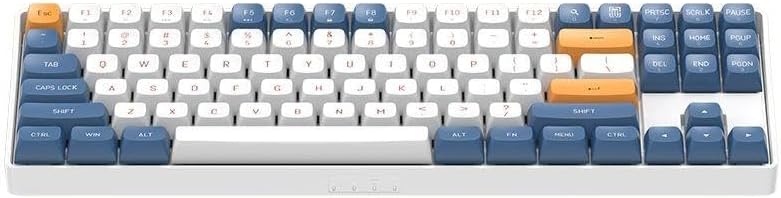
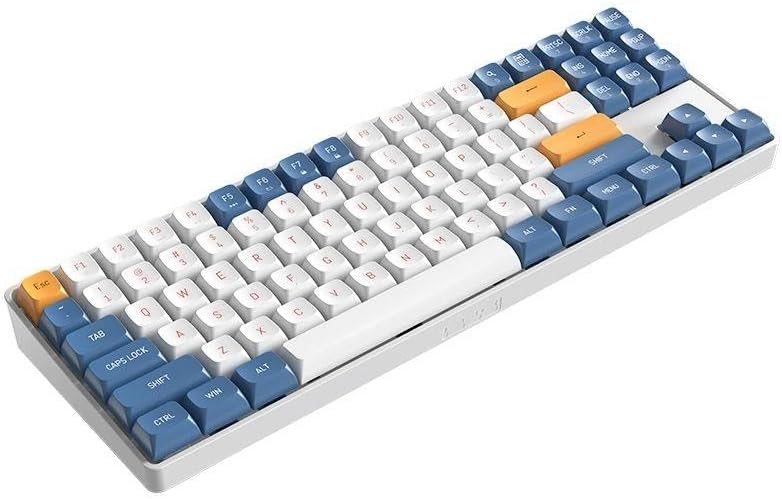
- Compact 87-Key Layout (TKL): Space-saving design with 100% anti-ghosting for simultaneous key detection.
- Узак мөөнөттүү батарея: Integrated 1200mAh lithium battery with fast USB-C charging.
- Hot-Swap колдоо: Easily customize your keyboard by changing switches.
- Эки жолу басылуучу PBT баскычтоптору: Durable, wear-resistant, and non-slip keycaps for a premium feel.
2. Пакеттин мазмуну
Upon unboxing your Aigo A87 keyboard, please ensure all the following items are present:
- Aigo A87 Starry Blue Mechanical Keyboard
- USB-C Cable
- Ачкыч тартуучу
- Кошумча Keycaps
- Запастык өчүргүчтөр
- Сактоочу куту
3. Орнотуу
3.1. Баскычтопту заряддоо
Before first use, it is recommended to fully charge the keyboard. Connect the provided USB-C cable to the keyboard's USB-C port and the other end to a powered USB port (e.g., computer, wall adapter). The charging indicator (if available, refer to keyboard LEDs) will show charging status and turn off when fully charged.
3.2. Баскычтопту туташтыруу
The Aigo A87 supports two connection modes: 2.4G Wireless and USB-C Wired.
3.2.1. 2.4G зымсыз туташуу
- Locate the 2.4G USB receiver, usually found in a dedicated slot on the keyboard or in the packaging.
- 2.4G USB ресиверди компьютериңиздеги жеткиликтүү USB портуна сайыңыз.
- Turn on the keyboard using the power switch (location may vary, typically on the back or side).
- The keyboard should automatically connect to the receiver. If not, press the designated pairing key combination (refer to keyboard markings or a quick start guide if provided) to initiate pairing.
3.2.2. USB-C зымдуу туташуусу
- Берилген USB-C кабелинин бир учун клавиатуранын USB-C портуна туташтырыңыз.
- USB-C кабелинин экинчи учун компьютериңиздеги жеткиликтүү USB портуна туташтырыңыз.
- The keyboard will automatically switch to wired mode and function without needing battery power.
4. Баскычтопту иштетүү
4.1. Негизги негизги функциялар
The Aigo A87 features a standard 87-key (TKL) layout. All standard alphanumeric, symbol, and function keys operate as expected.
4.2. Function (FN) Key Combinations
Many keyboards utilize an FN key for secondary functions. While specific combinations are not detailed here, common FN key uses include:
- FN + F1-F12: Multimedia controls (volume, play/pause), brightness adjustment, application shortcuts.
- FN + Win: Lock/unlock Windows key.
- FN + Жебе баскычтары: Backlight brightness or effect control.
Refer to the keycap legends for specific FN key combinations on your Aigo A87 keyboard.
4.3. Режимдердин ортосунда которулуу
The keyboard typically automatically switches to wired mode when the USB-C cable is connected. To switch back to 2.4G wireless mode, simply disconnect the USB-C cable and ensure the keyboard's power switch is on.
5. Техникалык тейлөө
5.1. Баскычтопту тазалоо
Үзгүлтүксүз тазалоо клавиатуранын иштешин жана көрүнүшүн сактоого жардам берет.
- Баскыч капкактары: Use the provided key puller to carefully remove keycaps. Clean them with a mild soap solution and a soft cloth, then dry thoroughly before reattaching.
- Клавиатуранын корпусу: бети жумшак менен сүртүп, гamp кездеме. Ашыкча нымдуулуктан сактаныңыз.
- Ачкычтардын ортосунда: Кысылган абаны өчүргүчтөрдүн ортосундагы чаңды жана калдыктарды тазалоо үчүн колдонуңуз.
5.2. Жалпы кам көрүү
- Avoid exposing the keyboard to extreme temperatures, direct sunlight, or high humidity.
- Do not spill liquids on the keyboard. In case of accidental spills, immediately disconnect the keyboard and allow it to dry completely before use.
- Store the keyboard in the provided storage box when not in use for extended periods.
6. Кыйынчылыктарды
If you encounter issues with your Aigo A87 keyboard, please refer to the following common problems and solutions:
- Баскычтоп жооп бербейт:
- Баскычтоп кубатталганын же USB-C аркылуу туташтырылганын текшериңиз.
- For wireless mode, check if the 2.4G receiver is properly plugged in and the keyboard is powered on. Try re-pairing if necessary.
- Компьютериңиздеги башка USB портуна туташып көрүңүз.
- Keys Not Registering or Repeating Presses:
- This can sometimes occur due to software conflicts or debris under the keycap/switch.
- Ensure your operating system and keyboard drivers are up to date.
- Carefully remove the affected keycap using the key puller and inspect the switch for any visible obstructions. Use compressed air to clean around the switch.
- If the issue persists, consider replacing the switch with a spare one, utilizing the hot-swap feature.
- Зымсыз туташуу маселелери:
- Ensure the keyboard is within range of the 2.4G receiver (typically up to 10 meters).
- Башка зымсыз түзмөктөрдүн (мисалы, Wi-Fi роутерлери, башка 2.4G түзмөктөрү) тоскоолдуктарынан алыс болуңуз.
- Try plugging the receiver into a different USB port, preferably a USB 2.0 port if available, as some USB 3.0 ports can cause interference.
- Заряддоо көйгөйлөрү:
- Ensure the USB-C cable is securely connected to both the keyboard and the power source.
- Башка USB портун же кубат адаптерин колдонуп көрүңүз.
- Verify the USB-C cable is not damaged.
7. Техникалык шарттар
| Өзгөчөлүк | Деталь |
|---|---|
| Бренд | Айго |
| Модель аты | Aigo A87 Starry Blue Wireless Mechanical Gaming Keyboard |
| Шайкеш түзмөктөр | Laptop, Desktop Computer, Gaming Console |
| Негизги өзгөчөлүктөрү | Silent, Rechargeable, Hot-Swappable |
| Камтылган Аппараттык | Key Puller, USB Cable, Extra Keycaps, Spare Switches |
| Power Source | Battery Powered (1200mAh Lithium) |
| Баскычтоптун жайгашуусу | 87-Key TKL, English Q Layout |
| Байланыш технологиясы | USB-C, 2.4G Wireless |
| Материалдын түрү | Polybutylene Terephthalate (PBT) Keycaps |
| Продукциянын өлчөмдөрү | 33 x 10 x 2 см |
| Продукт Салмагы | 900 грамм |
| Келип чыккан өлкө | Кытай |
| Сунушталган Колдонуулар | Personal, Student, Education, Gaming, Business, Daily Use, Programming |
8. Продукциянын сүрөттөрү


9. Кепилдик жана колдоо
The Aigo A87 Starry Blue Mechanical Gaming Keyboard comes with a standard manufacturer's warranty. For specific warranty terms, duration, and claim procedures, please refer to the warranty card included in your product packaging or visit the official Aigo webсайт.
For technical support, troubleshooting assistance beyond this manual, or inquiries regarding replacement parts, please contact Aigo customer service through their official support channels.


