Introduction
This manual provides comprehensive instructions for the setup, operation, maintenance, and troubleshooting of your Logitech G915 X Lightspeed Wireless Mechanical Gaming Keyboard. Designed for high-performance gaming and versatile connectivity, this keyboard features LIGHTSPEED wireless technology, GL mechanical switches, customizable G-keys, and LIGHTSYNC RGB lighting. Please read this manual thoroughly to ensure optimal use and longevity of your device.

Сүрөт: жогорудан төмөнгө view of the Logitech G915 X Lightspeed Wireless Mechanical Gaming Keyboard, showcasing анын толук жайгашуусу жана RGB жарыктандыруусу.
Кутуда эмне бар
Upon unboxing your Logitech G915 X Lightspeed keyboard, verify that all the following components are present:
- Logitech G915 X Lightspeed Wireless Mechanical Gaming Keyboard
- LIGHTSPEED USB Receiver
- USB Extender
- USB-C Data/Charging Cable
- Колдонуучунун документтери (бул колдонмо)

Image: All components included in the Logitech G915 X keyboard packaging, including the keyboard, USB-A to USB-C cable, USB extender, and USB wireless receiver.
Жайгашуу
Баштапкы заряддоо
Before first use, it is recommended to fully charge the keyboard.
- Connect the supplied USB-C data/charging cable to the USB-C port on the keyboard (located on the top edge).
- Connect the other end of the cable (USB-A) to a powered USB port on your computer or a USB wall adapter.
- The battery indicator light on the keyboard will show charging status. A full charge typically takes approximately 4 hours.
Баскычтопту туташтыруу
The G915 X offers three connectivity options: LIGHTSPEED Wireless, Bluetooth, and Wired USB.

Image: Close-up of the Logitech G915 X keyboard's connectivity buttons (LIGHTSPEED, Bluetooth, Wired) located above the F5-F8 keys.
LIGHTSPEED Wireless (Recommended for Gaming)
- Locate the LIGHTSPEED USB receiver. For optimal signal, use the USB extender to position the receiver closer to the keyboard.
- Plug the LIGHTSPEED USB receiver into an available USB-A port on your computer.
- On the keyboard, slide the power switch to the ON position (located on the top right).
- Press the LIGHTSPEED button (indicated by a wireless signal icon) on the keyboard. The indicator light above the button will turn solid cyan when connected.
Bluetooth байланышы
- Баскычтоп күйгүзүлгөнүн текшериңиз.
- Press and hold the Bluetooth button (indicated by a Bluetooth icon) on the keyboard until the indicator light above it starts blinking blue rapidly. This indicates pairing mode.
- On your computer or device, navigate to Bluetooth settings and select "G915 X" from the list of available devices.
- The indicator light will turn solid blue when successfully paired.
Зымдуу USB режими
- Connect the USB-C data/charging cable to the keyboard and the USB-A end to your computer.
- Баскычтоп автоматтык түрдө зымдуу режимге өтүп, кубаттай баштайт.
Иштөө нускамалары
Негизги өзгөчөлүктөрү бүттүview
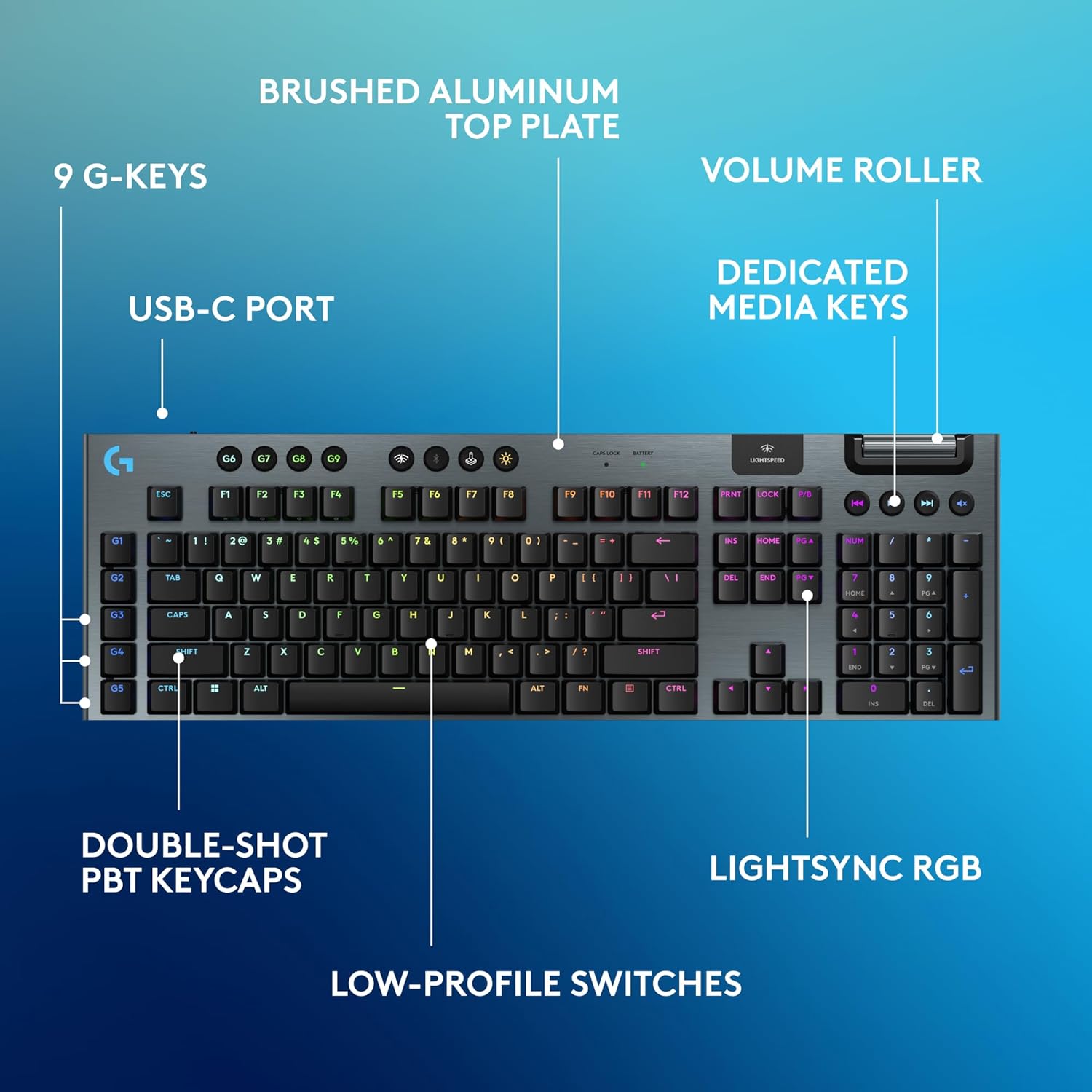
Image: Diagram highlighting key features of the Logitech G915 X keyboard, including G-keys, USB-C port, double-shot PBT keycaps, low-profile switches, brushed aluminum top plate, volume roller, dedicated media keys, and LIGHTSYNC RGB.
- GL Mechanical Switches: Төмөн профессионалfile switches designed for speed, precision, and comfort with a 1.3mm actuation point.
- LIGHTSPEED Wireless: Pro-grade wireless technology for ultra-fast and reliable connection.
- Bluetooth: For connecting to other devices that support Bluetooth.
- Арналган медиа ачкычтары: Control audio and video playback with ease.
- Көлөмдү өлчөөчү ролик: Smoothly adjust audio volume.
- LIGHTSYNC RGB: Customizable per-key RGB lighting with approximately 16.8 million colors.
- G-Keys (G1-G5): Five dedicated programmable macro keys on the left side of the keyboard.
- Double-Shot PBT Keycaps: Durable keycaps resistant to wear and shine.
Customizing with G HUB Software
To unlock the full potential of your G915 X keyboard, download and install the Logitech G HUB software from the official Logitech website. G HUB allows for extensive customization.
- G-Key Programming: Assign custom macros, commands, or system functions to the G1-G5 keys. You can create multiple profileар кандай оюндар же тиркемелер үчүн.
- LIGHTSYNC RGB Customization: Personalize lighting effects, colors, and animations. Sync lighting with other Logitech G devices.
- Оюн режими: Disable specific keys (e.g., Windows key) during gaming to prevent accidental interruptions.
- KEYCONTROL: Set up to 15 functions per key for advanced control.

Image: Screenshot of the Logitech G HUB software interface showing options for customizing commands and assigning functions to G-keys on the G915 X keyboard.
Media Controls and Volume
Dedicated media controls and a volume roller are located on the top right of the keyboard for quick access.
- Көлөмдү өлчөөчү ролик: Roll up to increase volume, roll down to decrease.
- Медиа баскычтары:
- Мурунку трек
- Ойнотуу/Тыныгуу
- Кийинки трек
- Үнсүз
Батарея башкаруу
The Logitech G915 X keyboard provides up to 36 hours of continuous battery life with lighting enabled. Battery life may vary based on usage and lighting intensity.
- Батарея көрсөткүчү: A dedicated battery indicator light is located near the LIGHTSPEED logo on the top right. It changes color to indicate battery level.
- Заряддоо: Connect the USB-C cable to the keyboard and a powered USB port. You can continue to use the keyboard in wired mode while it charges.
- Энергияны үнөмдөө: The keyboard will enter a low-power state after a period of inactivity to conserve battery.
Техникалык тейлөө
Туура тейлөө клавиатураңыздын узак иштөөсүн жана иштешин камсыз кылат.
- Клавиатураны тазалоо: Бир аз жумшак, түксүз кездемени колдонуңуз dampсуу же жумшак тазалоочу эритме менен эритиңиз. Күчтүү химиялык заттардан алыс болуңуз.
- Removing Dust/Debris: Use compressed air to clear dust and debris from between the keycaps and switches.
- Бетти тазалоо: Wipe the aluminum top plate with a soft, dry cloth.
- Сактагыч: Узак мөөнөткө колдонулбаганда, клавиатураны кургак, салкын жерде күн тийбеген жерде сактаңыз.
Проблемаларды чечүү
If you encounter issues with your Logitech G915 X keyboard, refer to the following common troubleshooting steps.
| Көйгөй | Мүмкүн чечим |
|---|---|
| Клавиатура жооп бербей жатат (зымсыз) |
|
| Bluetooth байланышы көйгөйлөрү |
|
| Ачкычтар катталбайт же эки жолу терилбейт |
|
| RGB жарыгы иштебейт же туура эмес |
|
| G-keys or macros not working |
|
Техникалык шарттар
| Өзгөчөлүк | Деталь |
|---|---|
| Модель номери | 920-012670 |
| Байланыш | LIGHTSPEED Wireless (2.4 GHz RF), Bluetooth, Wired USB-C |
| Которуу түрү | GL Tactile Mechanical Switches (Low-Profile) |
| Иш-аракет пункту | 1.3 мм |
| Жалпы саякат аралыгы | 3.2 мм |
| Баскыч капкактары | Double-Shot PBT |
| Жарыктандыруу | LIGHTSYNC RGB (Per-key customizable) |
| Программалануучу ачкычтар | 5 dedicated G-keys, up to 15 functions per key via KEYCONTROL |
| Батареянын иштөө мөөнөтү | Up to 36 hours (with lighting) |
| Заряддоо убактысы | Болжол менен 4 саат |
| Өлчөмдөрү (LxWxH) | 18.7 x 5.91 x 0.87 дюйм (47.5 x 15 x 2.2 см) |
| Салмагы | 2.38 фунт (1.08 кг) |
| Материал | Aluminum top plate |
| Операциялык системанын шайкештиги | PC, Mac OS |
Кепилдик жана колдоо
Logitech products are designed for durability and performance. For information regarding warranty coverage, technical support, and frequently asked questions, please visit the official Logitech support webсайт.
Logitech колдоо Webсайт: https://support.logi.com/
Кошумча коргоо үчүн, сатып алууну карап көрүңүзasing an extended protection plan available at the time of purchase.


