1. Продукт бүтүп калдыview
The SwitchBot Smart Lock Pro is a keyless entry door lock designed to convert your existing deadbolt into a smart lock without requiring complex DIY modifications. It features an aluminum alloy casing for durability and offers wide compatibility with mainstream North American deadbolts.
When paired with the SwitchBot Hub 2 (sold separately), the Lock Pro supports Matter, enabling integration with Apple Home and Siri. It is also compatible with third-party platforms such as Alexa and Google for voice command unlocking.

Image 1: SwitchBot Smart Lock Pro and its accompanying mobile application interface.
2. Орнотуу жана орнотуу
The Lock Pro is designed for simple and quick installation onto your existing door lock without damaging old parts, making it suitable for tenants and apartment residents. It is a retrofit solution.
2.1 Шайкештикти текшерүү
Ensure your existing deadbolt is compatible with the Lock Pro. It is compatible with mainstream North American door lock deadbolts. For Jimmy Proof and Mortise locks, additional adhesive accessories may be required. Please consult the customer support team before purchasing if you have these lock types.

Image 2: Lock compatibility diagram, illustrating supported deadbolt types.
2.2 Физикалык орнотуу
The internal side of your existing deadbolt is removed and replaced with the Lock Pro. The package includes necessary screws and a small screwdriver for installation. The main lock unit slides onto a backplate which is secured to the door.
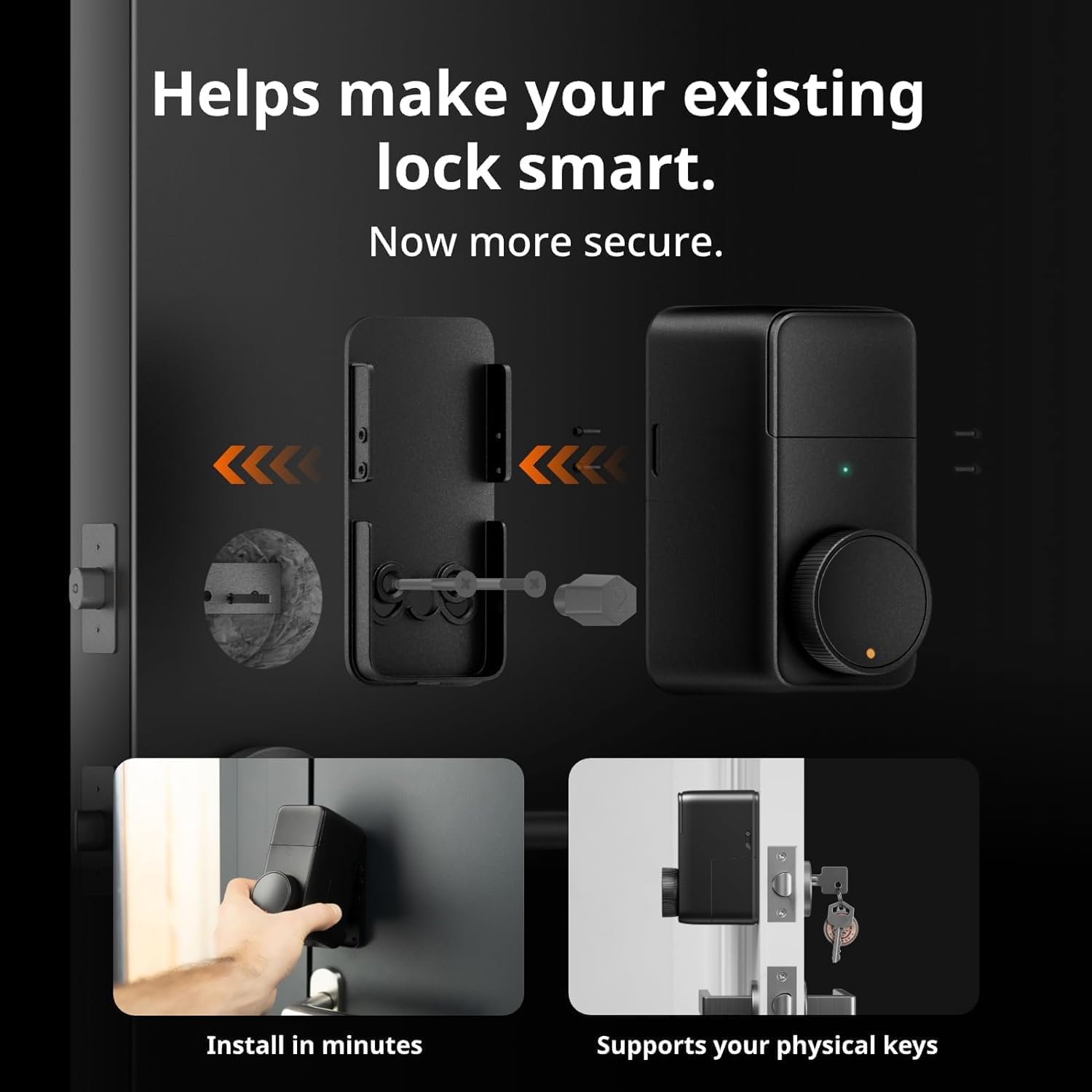
Image 3: Visual guide for installing the Lock Pro onto an existing deadbolt.
2.3 Initial Pairing and App Setup
Download the SwitchBot app to pair your Lock Pro. For Matter support and advanced features like remote unlocking and voice commands, the SwitchBot Hub 2 (sold separately) is required. Follow the in-app instructions for pairing and initial setup.

Image 4: Remote unlocking via the SwitchBot app on a smartphone.
3. Operating the Lock Pro
3.1 Кулпуну ачуу ыкмалары
The Lock Pro offers multiple ways to unlock your door:
- Bluetooth: Unlock directly via the SwitchBot app when within Bluetooth range.
- Алыстан кулпуну ачуу: Requires SwitchBot Hub. Unlock from anywhere using the app.
- Үйдү бөлүшүү: Share access with family and friends through the app.
- Үн менен башкаруу: Compatible with Alexa, Google Assistant, and Siri (with Hub 2).
- Widget Unlock: Quick access from your smartphone's home screen.
- Apple Watch: Unlock directly from your Apple Watch (with Hub 2).
- SwitchBot пульту: (Sold separately) A dedicated remote for quick unlocking.
- Физикалык ачкыч: Your existing physical key remains functional.
- NFC Tag: (Sold separately) Tap an NFC tag кулпусун ачуу.

Сүрөт 5: Бүттүview of the nine different unlocking methods available with the Lock Pro.
3.2 Авто кулпу өзгөчөлүгү
The Auto-Lock feature automatically locks your door immediately after closing, ensuring security when you leave or enter your home. This function uses geomagnetism for detection.

Image 6: Illustration of the automatic locking mechanism upon door closure.
3.3 Реалдуу убакыттагы эскертмелер
When connected to a SwitchBot Hub, the Lock Pro can send real-time notifications to your smartphone regarding the door lock status (locked/unlocked) and overall door status (open/closed).

Сүрөт 7: Мисample of real-time notifications received on a smartphone about door status.
4. Техникалык тейлөө
4.1 Батареянын иштөө мөөнөтү жана алмаштыруу
The Lock Pro is powered by 4 x AA 1.5V batteries (included), providing a battery life of up to 6-9 months depending on usage. Low battery notifications will be sent to your app when replacement is needed.
For extended battery life (9-12 months), the SwitchBot Dual Power Pack (sold separately) can be used. This accessory ensures continuous power by automatically switching between battery sources.

Image 8: Comparison of battery life using standard AA batteries versus the optional Dual Power Pack.
5. Кыйынчылыктарды
5.1 Low Battery Situations
If the battery runs low, the Lock Pro can still be unlocked using passive power supply. However, it is recommended to replace batteries promptly upon receiving low battery notifications to ensure optimal performance.

Image 9: Comparison of Lock Pro's ability to unlock during low battery versus other smart locks.
5.2 Байланыш маселелери
If you experience issues with connectivity or remote access, ensure your SwitchBot Hub (if used) is properly connected to your Wi-Fi network and within range of the Lock Pro. Check the SwitchBot app for device status and network diagnostics.
5.3 Physical Key Not Working
The Lock Pro is designed to allow continued use of your physical key. If your physical key is not working, ensure the lock mechanism is not obstructed and that the Lock Pro is correctly installed and aligned with your deadbolt.
6. Техникалык шарттар
| Өзгөчөлүк | Деталь |
|---|---|
| Бренд | SwitchBot |
| Модель аты | SwitchBot Smart Lock Pro |
| Кулпу түрү | joldar, |
| Материал | Алюминий |
| Түс | Lock Pro Silver |
| Элементтин өлчөмдөрү (L x W x Y) | 2.32 x 3.3 x 4.72 дюйм |
| Элемент Салмагы | 15.9 унция (450 грамм) |
| Power Source | 4 x AA батареялары (киргизилген) |
| Connectivity Protocol | Wi-Fi (with Hub), Bluetooth |
| Controller Type | IFTTT, Siri, Amazon Alexa (with Hub) |
| UPC | 810150541564 |
7. Кепилдик жана колдоо
For warranty information and technical support, please refer to the official SwitchBot website or contact their customer service directly. You can also find additional resources and FAQs on the SwitchBot support page.
Расмий колдонуучу колдонмо (PDF): PDF жүктөп алуу
8. Расмий продукт Videos
Below are official product videos from the seller, providing visual guides and demonstrations of the SwitchBot Smart Lock Pro.
No official seller videos found in the provided data that meet the embedding criteria.


