1. Киришүү
This manual provides essential instructions for setting up, operating, and maintaining your HONOR 200 5G ELI-NX9 smartphone. Please read this guide thoroughly to ensure proper use and to maximize the device's capabilities. Keep this manual for future reference.
2. Коопсуздук маалыматы
To prevent injury to yourself or others, and to avoid damage to your device, read all safety information before using the product. This includes:
- Аппаратты экстремалдык температурага же тике күн нуруна калтырбаңыз.
- Avoid using the device in wet or dusty environments.
- Use only HONOR-approved chargers and accessories.
- Аппаратты өз алдынча бөлүүгө же оңдоого аракет кылбаңыз.
- Observe all local laws and regulations regarding mobile phone use, especially while driving.
3. Түзмөк бүттүview
Familiarize yourself with the physical components of your HONOR 200 5G ELI-NX9.

3.1-сүрөт: Алдыңкы жана арткы view of the HONOR 200 5G ELI-NX9 smartphone. The front displays the large screen with a punch-hole camera, while the back features a distinctive camera module and the HONOR branding.

3.2-сүрөт: Арткы view of the HONOR 200 5G ELI-NX9, highlighting the oval-shaped triple camera system and the textured Moonlight White finish.
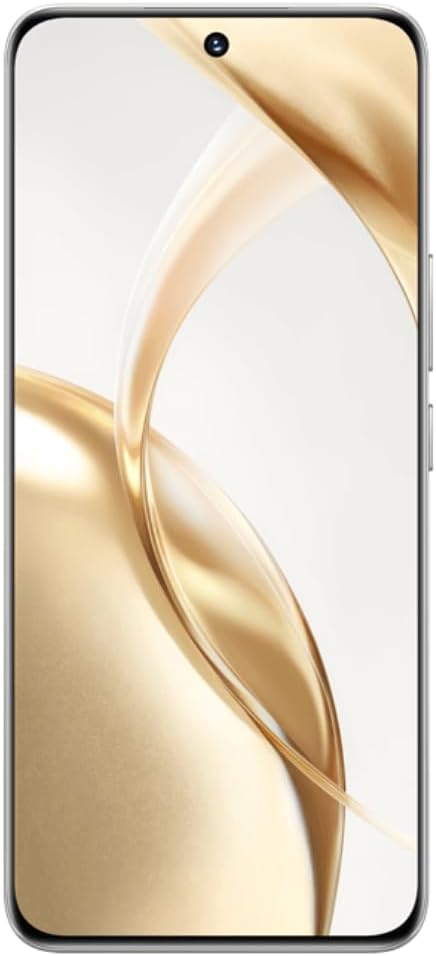
3.3-сүрөт: Фронт view of the HONOR 200 5G ELI-NX9, showcasing its large, curved display and the centered punch-hole front camera.

3.4-сүрөт: Side profile of the HONOR 200 5G ELI-NX9, illustrating the slim design and the placement of the power and volume buttons on the right edge.
3.1 Пакеттин мазмуну
Пакетиңизде төмөнкү заттар камтылганын текшериңиз:
- HONOR 200 5G ELI-NX9 Smartphone
- USB кабели
- Ыкчам баштоо колдонмосу (бул колдонмо)
- SIM чыгаруу куралы
- Кепилдик картасы
- Кубат адаптери (аймакка жараша өзгөрүшү мүмкүн)
4. Орнотуу
4.1 SIM карталарды салуу
The HONOR 200 5G ELI-NX9 supports Dual SIM functionality.
- Түзмөгүңүздүн капталындагы SIM карта салгычын табыңыз.
- SIM чыгаруу куралын лотоктун жанындагы кичинекей тешикке киргизип, лоток чыкканча акырын түртүңүз.
- Place your Nano-SIM cards into the designated slots on the tray, ensuring the gold contacts face down.
- SIM салгычты кылдаттык менен аппаратка кайра салыңыз.
4.2 Күйгүзүү/өчүрүү
- Күйгүзүү үчүн: Press and hold the Power button (located on the right side) until the HONOR logo appears.
- Өчүрүү үчүн: Кубат баскычын басып, кармап туруңуз, андан кийин экрандагы параметрлерден "Өчүрүү" дегенди тандаңыз.
- Кайра баштоо үчүн: Кубат баскычын басып, кармап туруңуз, андан кийин параметрлерден "Кайра баштоо" тандаңыз.
4.3 Түзмөктүн баштапкы конфигурациясы
Upon first power-on, follow the on-screen prompts to set up your device:
- Тилди жана аймакты тандаңыз.
- Wi-Fi тармагына туташыңыз.
- Акыркы колдонуучунун лицензиялык келишимин кабыл алыңыз.
- Google аккаунтуңуз менен кириңиз же жаңысын түзүңүз.
- Экранды кулпулоону (PIN код, графикалык ачкыч, сырсөз, манжа изи, жүздөн ачуу) орнотуу.
- Мурунку түзмөктөн дайындарды калыбына келтирүү (милдеттүү эмес).
5. Аппаратыңызды иштетүү
5.1 Негизги навигация
Your HONOR 200 5G ELI-NX9 uses a touch-sensitive display for interaction:
- таптаңыз: Бир нерсени тандаңыз же колдонмону ачыңыз.
- Серпүү: Экрандар же тизмелер аркылуу өтүңүз.
- Чымчуу: Сүрөттөрдү чоңойтуу же кичирейтүү жана web барактар.
- Узак басуу: Контексттик менюларга кириңиз же сүрөтчөлөрдү жылдырыңыз.
5.2 Камеранын функциялары
The device features a powerful camera system:
- Арткы камералар: 50 MP Main, 50 MP Telephoto, 12 MP Ultra-Wide/Macro.
- Алдыңкы камера: 50 MP for high-resolution selfies.
- AI Portrait Engine: Enhances facial features and applies various portrait effects.
- Түнкү режим: Optimizes photos in low-light conditions for clearer images.
- Видео жаздыруу: Supports 1080p video capture.
5.3 Display and Multimedia
Experience vibrant visuals on the 6.7-inch OLED display:
- Чечим: 1200 x 2664 pixels for sharp images and text.
- Түс тереңдиги: 1 Billion colors for rich and accurate reproduction.
- HDR колдоо: Enhanced contrast and color for compatible content (Netflix, Amazon HDR certified).
5.4 Иштөө жөндөмдүүлүгү жана батарея
- Процессор: Qualcomm Snapdragon 7 Gen 3 (4 nm) Octa-core for efficient multitasking and gaming.
- Эстутум: 12 GB RAM ensures smooth operation.
- Сактагыч: 512 GB internal storage for apps, photos, and videos.
- Батарея: 5200 mAh Silicon-Carbon battery provides extended usage.
- Тез кубаттоо: 100W тез кубаттоону колдойт.
6. Техникалык тейлөө
6.1 Аппаратыңызды тазалоо
Түзмөгүңүздү оптималдуу абалда кармоо үчүн:
- Экранды жана денени жумшак, түксүз чүпүрөк менен сүртүңүз.
- Катуу химиялык заттарды, абразивдүү тазалагычтарды же аэрозолдук спрейлерди колдонуудан алыс болуңуз.
- Аппаратты ашыкча нымдуулукка дуушар кылбаңыз.
6.2 Программалык камсыздоо жаңыртуулары
Regularly check for and install software updates to enhance performance, security, and introduce new features. Navigate to Орнотуулар > Тутум жана жаңыртуулар > Программаны жаңыртуу.
6.3 Батареяга кам көрүү
Батареянын иштөө мөөнөтүн узартуу үчүн:
- Батареяны бат-баттан толук кубаттап калуудан алыс болуңуз.
- Түзмөк 100% га жеткенден кийин, аны көпкө чейин заряддап турган абалда калтырбаңыз.
- Keep the device within recommended operating temperatures.
7. Кыйынчылыктарды
Эгерде сиз түзмөгүңүздө көйгөйлөргө туш болсоңуз, төмөнкү чечимдерди колдонуп көрүңүз:
7.1 Жалпы маселелер
- Түзмөк күйбөй жатат: Батарея заряддалганын текшериңиз. Кеминде 10 мүнөт кубаттагычка туташып, анан күйгүзүп көрүңүз.
- Колдонмолор бузулуп же катып жатат: Колдонмону жаап, кайра ачыңыз. Колдонмонун кэшин тазалоо (Орнотуулар > Колдонмолор > [Колдонмонун аты] > Сактагыч > Кэшти тазалоо). Аппаратты кайра иштетиңиз.
- Тармакка туташуу көйгөйлөрү: Check if Airplane Mode is off. Restart the device. Reset network settings (Settings > System & updates > Reset > Reset network settings).
- Жай аткаруу: Close unnecessary background apps. Clear storage space. Restart the device.
7.2 Заводдук абалга кайтаруу
Көйгөйлөр кайталана берсе, сиз заводдон баштапкы абалга келтиришиңиз керек болушу мүмкүн. Эскертүү: Бул түзмөгүңүздөгү бардык дайындарды жок кылат. Улантуудан мурун маанилүү маалыматтардын камдык көчүрмөсүн сактаңыз.
- барыңыз Settings > System & updates > Reset > Reset phone.
- Confirm your decision and enter your screen lock password if prompted.
- The device will restart and restore to its factory settings.
8. Техникалык шарттар
Key technical specifications for the HONOR 200 5G ELI-NX9:
| Бренд | УРМАТ |
| Модел | Honor 200 5G (ELI-NX9) |
| Операция системасы | Android 14 |
| Процессор | Qualcomm Snapdragon 7 Gen 3 (4 nm), Octa-core (1x2.63 GHz, 4x2.4 GHz, 3x1.8 GHz) |
| RAM | 12 ГБ |
| Ички сактагыч | 512 ГБ |
| Дисплей | 6.7 inches OLED, 1B colors, 1200 x 2664 pixels, 120Hz |
| Арткы камера | 50 MP (main), 50 MP (telephoto), 12 MP (ultrawide/macro) |
| Алдыңкы камера | 50 депутат |
| Батарея сыйымдуулугу | 5200 мАч |
| Заряддоо | 100W тез заряддоо |
| SIM колдоо | Кош SIM |
| Уюлдук технология | 5G |
| Элемент моделинин номери | Honor 200 5G |
| UPC | 6936520843787 |
| IMEI (Exampле) | 868420070415840 (Note: Actual IMEI is unique to each device) |

8.1-сүрөт: Example product label showing model (ELI-NX9), ROM/RAM, color, IMEI, and UPC. This information is unique to each device.
9. Кепилдик жана колдоо
Your HONOR 200 5G ELI-NX9 comes with a limited warranty. Please refer to the separate warranty card included in your package for detailed terms and conditions.
For further assistance, technical support, or to find service centers, please visit the official HONOR website or contact their customer service in your region. Keep your proof of purchase for warranty claims.
Official HONOR Webсайт: www.hihonor.com


