1. Коопсуздук боюнча маанилүү маалымат
Please read all instructions carefully before using the SANSUI ES-24C1 monitor. Keep this manual for future reference.
- Өрт же электр тогуна урунуу коркунучун алдын алуу үчүн мониторду жамгырдын же нымдуулуктун таасирине дуушар кылбаңыз.
- Мониторду ачпаңыз casinг. Ичинде колдонуучу тейлей турган бөлүктөр жок. Бардык тейлөөлөрдү квалификациялуу кызматкерлерге тапшырыңыз.
- Монитор кулап калбаш үчүн аны туруктуу, тегиз бетке коюңуз.
- Монитордун айланасында туура желдетүүнү камсыз кылыңыз. Вентиляция тешиктерин жаап албаңыз.
- Монитор менен кошо берилген кубат адаптерин гана колдонуңуз.
- Чагылганда же узак убакыт бою колдонбогондо мониторду розеткадан сууруп алыңыз.
2. Пакеттин мазмуну
Пакетте бардык буюмдар бар экенин текшериңиз:
- SANSUI ES-24C1 24-inch Curved Monitor
- Монитор стенд (негизги жана моюн)
- Кубаттуу адаптер
- HDMI кабели
- User Manual
3. Продукт бүтүп калдыview
The SANSUI ES-24C1 is a 24-inch Full HD (1920x1080) curved monitor featuring a 100Hz refresh rate, 1ms MPRT response time, and built-in speakers. It is designed for both home and office use, offering a 1500R curvature for an immersive viewтажрыйбасы.

Сүрөт: бүттүview of the SANSUI ES-24C1 monitor highlighting its key features and curved design.

Image: Summary of the monitor's main features including 100Hz, 1ms MPRT, USB Type-C, HDR, 100% sRGB, 3000:1 contrast, 250 Nits, built-in speakers, and VESA mount.
Порттор жана башкаруу элементтери

Сүрөт: Жакын план view of the monitor's rear ports, including HDMI, USB Type-C, and Audio Out.
- USB Type-C: 1 port for video input (does not support charging).
- HDMI1.4: 1 port for video input.
- 3.5 мм аудио уячасы: Тышкы кулакчындарды же динамиктерди туташтыруу үчүн.
- DC IN: Кубат киргизүү порту.
- Five-Way Joystick: Located on the back for OSD menu navigation.
4. Орнотуу
4.1 Мониторду чогултуу
Монитордун стендин чогултуу үчүн бул кадамдарды аткарыңыз:
- Монитор панелине стенд мойнуна бекитиңиз.
- Secure the stand base to the neck.
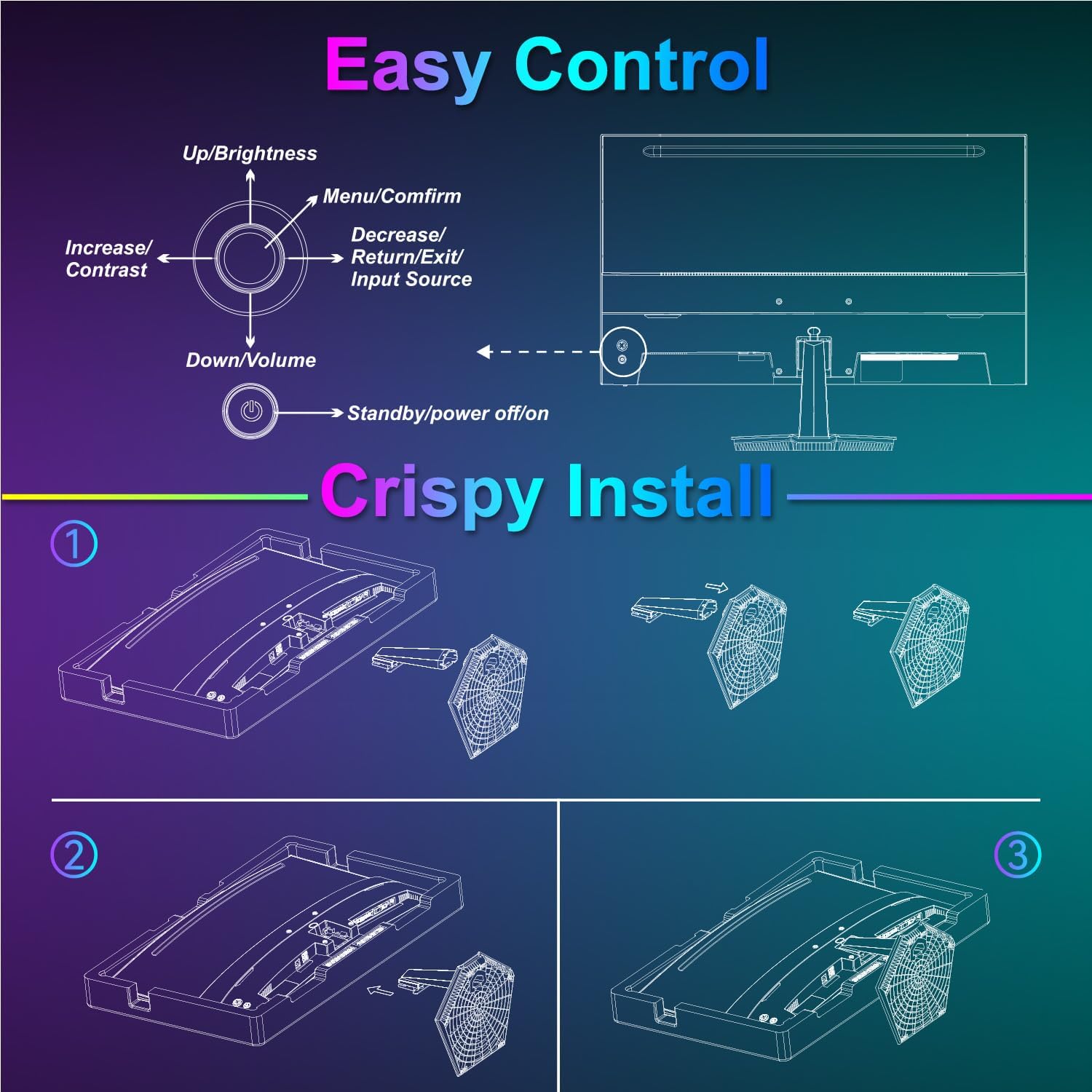
Image: Diagram illustrating the step-by-step assembly of the monitor stand.
4.2 Түзмөктөргө туташуу
Connect your monitor to a computer or other video source using the appropriate cable.
- HDMI: Connect one end of the HDMI cable to the monitor's HDMI port and the other end to your device's HDMI output.
- USB Type-C: Connect one end of the USB Type-C cable to the monitor's USB Type-C port and the other end to your device's compatible USB Type-C output.
- Аудио: If using external audio devices, connect them to the 3.5mm audio jack.

Image: Visual representation of various devices connecting to the monitor via HDMI and USB Type-C.
4.3 Күйгүзүү/өчүрүү
Connect the power adapter to the monitor's DC IN port and then plug it into a power outlet. Press the power button located on the back of the monitor to turn it on or off.
5. Иштөө нускамалары
5.1 Экрандык менюнун навигациясы
The On-Screen Display (OSD) menu is controlled using the five-way joystick on the back of the monitor. Press the joystick to open the menu, then move it up/down/left/right to navigate and select options.

Image: Diagram showing the five-way joystick and its functions for OSD menu navigation.
5.2 Дисплей орнотуулары
Adjust various display parameters to optimize your viewтажрыйбасы.
- Жарыктык/Контраст: Жалпы жарыктыктын жана контрасттын деңгээлин тууралаңыз.
- Түс жөндөөлөрү: Түс температурасын, өңүн жана каныккандыгын так жөндөө.
- HDR: Enable or disable High Dynamic Range for enhanced contrast and color.
- Low Blue Light/Anti-Flicker: Reduce eye strain during prolonged use.
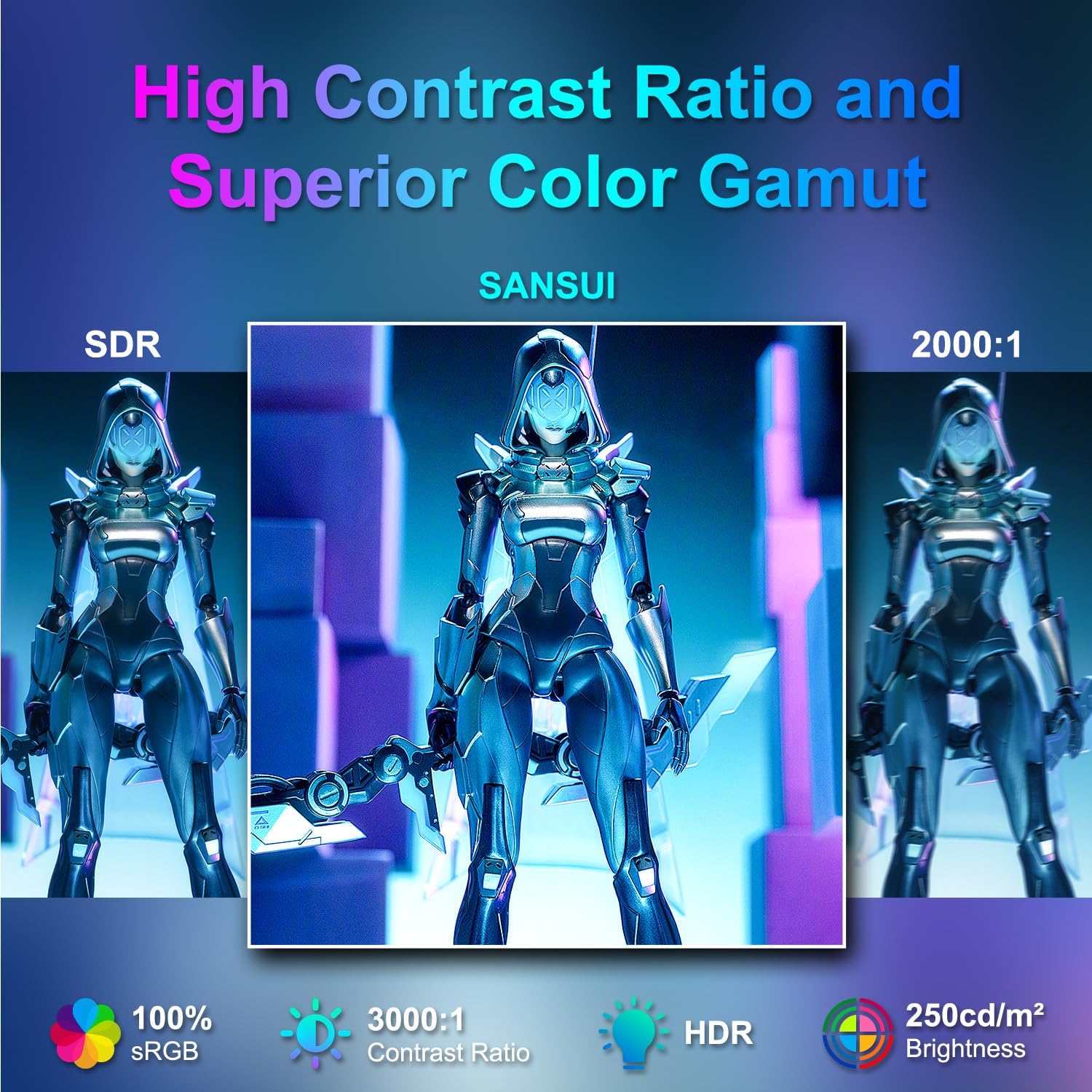
Image: Visual comparison demonstrating high contrast ratio and superior color gamut of the SANSUI monitor.

Image: Highlights of display features like 3000:1 contrast ratio, 100% sRGB, and 250 Nits brightness.

Image: Comparison of display quality with and without HDR enabled.

Image: Illustration of Low Blue Light and Flicker-Free technologies for reduced visual fatigue.
5.3 Оюн функциялары
The ES-24C1 monitor includes features optimized for gaming performance.
- 100Hz жаңыртуу ылдамдыгы: Жылмакай кыймылды жана кирүү кечиктирүүсүн азайтат.
- 1ms MPRT жооп берүү убактысы: Кыймылдын бүдөмүктүгүн жана арбактарды азайтат.
- Адаптивдүү синхрондоштуруу: Экрандын айрылышын жана кекечтенүүсүн жок кылуу үчүн монитордун жаңыртуу жыштыгын GPUнун кадр жыштыгы менен синхрондоштурат.
- Оюн режимдери: Pre-set display modes optimized for different game genres (e.g., FPS, RTS, RPG).
- Жасалма интеллект: An on-screen crosshair overlay for improved aiming accuracy.
- Оюн таймери: Оюндагы окуяларды көзөмөлдөө үчүн экрандагы таймер.

Image: Demonstrates the difference in smoothness between 60Hz, 75Hz, and 100Hz refresh rates, highlighting low blue light and Adaptive FreeSync.

Image: Illustrates the benefits of 100Hz refresh rate and 1ms MPRT response time in reducing screen tearing and improving fluidity.
5.4 Multi-Window Modes (PIP/PBP)
The monitor supports Picture-in-Picture (PIP) and Picture-by-Picture (PBP) modes, allowing you to view content from multiple input sources simultaneously.
- PBP (Picture-by-Picture): Divides the screen into two halves, displaying content from two different sources side-by-side.
- PIP (Сүрөт ичиндеги сүрөт): Displays content from a secondary source in a smaller window overlaid on the main display.

Сүрөт: Мисamples of Duplicated Mode, Second Screen Mode, and Single Display Screen Mode for enhanced productivity.
6. Техникалык тейлөө
6.1 Тазалоо
- Тазалоодон мурун ар дайым мониторду сууруп коюңуз.
- Жумшак, түксүз кездемени жеңил колдонуңуз dampened with water or a mild, non-abrasive cleaner specifically designed for electronics.
- Тазалоочу каражатты түз экранга чачпаңыз.
6.2 Кам көрүү
- Монитор же анын кабелдерине оор нерселерди коюудан алыс болуңуз.
- Мониторду күн нурунан, жылуулук булактарынан жана экстремалдык температурадан алыс кармаңыз.
- Do not expose the monitor to strong magnetic fields.
7. Кыйынчылыктарды
If you encounter issues with your SANSUI ES-24C1 monitor, refer to the following common problems and solutions:
- Кубат жок: Ensure the power adapter is securely connected to both the monitor and a working power outlet. Check if the power indicator light is on.
- Сигнал жок: Verify that the video cable (HDMI or USB Type-C) is correctly connected to both the monitor and your device. Ensure the correct input source is selected in the OSD menu.
- Жаркылдаган экран: Check the video cable for damage or loose connections. Try a different video cable or port. Ensure your graphics card drivers are up to date.
- Сүрөттүн сапаты начар: Adjust brightness, contrast, and color settings in the OSD menu. Ensure the display resolution and refresh rate are set correctly in your device's display settings.
- Динамиктерден үн жок: Check the volume settings on both the monitor and your connected device. Ensure the audio cable (if used) is properly connected.
8. Техникалык шарттар
Detailed technical specifications for the SANSUI ES-24C1 24-inch Curved Monitor:
| Өзгөчөлүк | Спецификация |
|---|---|
| Модель номери | ES-24C1 |
| Screen Size | 24 дюйм |
| Панел түрү | Curved (1500R) |
| Резолюция | 1920 x 1080 (FHD) |
| Жаңыртуу ылдамдыгы | 100Hz |
| Жооп убактысы | 1 мс (MPRT) |
| Контраст катышы | 3000:1 |
| Жарыктык | 250 Nits |
| Display Colors | 16.7 млн |
| Түс гаммасы | 100% sRGB |
| Viewбурч | 178° (H/V) |
| Video Inputs | 1x HDMI 1.4, 1x USB Type-C |
| Аудио чыгаруу | 1x 3.5 мм аудио уячасы |
| Баяндамачылар | 2x 2W Built-in Speakers |
| VESA тоосу | 75 x 75 мм |
| Тилтти тууралоо | -5°тан 15°ка чейин |
| Продукциянын өлчөмдөрү | 21 x 38 x 49 дюйм |
| Элемент Салмагы | 7.78 фунт |

Image: Detailed dimensions and ergonomic features like 178° wide viewing angle and -5°~15° tilt.

Image: Visual representation of the 178° wide viewбурч.

Image: Tips for VESA mounting (75x75mm, M4*8mm screw size) and tilt adjustment.

Сүрөт: Арткы view of the monitor detailing port locations and key specifications.
9. Кепилдик жана колдоо
SANSUI provides a limited warranty for this product. For detailed warranty information, please refer to the warranty card included in your package or visit the official SANSUI website. For technical support or service inquiries, please contact SANSUI customer service.
Онлайн колдоо: Visit the SANSUI Store on Amazon
10. Расмий продукт Video
Watch the official product video for a visual guide to the SANSUI ES-24C1 monitor's features and benefits.
Video: SANSUI 24" 100Hz Curved Monitor USB C with Speakers. This video provides an overview of the monitor's design, key features, and connectivity options.


