1. Киришүү
This manual provides essential information for setting up, operating, maintaining, and troubleshooting your Acer Swift Go 16-2024 laptop. Designed for performance and portability, this laptop features a 16-inch WUXGA IPS touchscreen, Intel Ultra 9 185H processor, 32GB LPDDR5 RAM, 1TB SSD, Intel ARC Graphics, Thunderbolt 4, a backlit keyboard, and a fingerprint reader, running on Windows 11 Home.
2. Кутуда эмне бар
- Acer Swift Go 16-2024 Laptop
- AC кубат адаптери (заряддагыч)
- Ыкчам баштоо колдонмосу (эгер камтылган болсо)
3. Орнотуу
3.1 Алгачкы кубаттуулук
- Ноутбукту жана кубат адаптерин кутудан чыгарыңыз.
- Кубат адаптерин ноутбуктун заряддоо портуна, андан кийин розеткага туташтырыңыз.
- Ноутбуктун капкагын ачыңыз. Система автоматтык түрдө күйүп кетиши мүмкүн же сиз күйгүзүү баскычын басышыңыз керек болушу мүмкүн.
3.2 Перифериялык түзүлүштөрдү туташтыруу
Connect external devices such as a mouse, external display, or USB drives to the available ports. Refer to the 'Ports and Connectors' section for port identification.
3.3 Windows 11 үй орнотуусу
Follow the on-screen instructions to complete the Windows 11 Home initial setup. This includes selecting your region, connecting to a Wi-Fi network, and creating a user account.
3.4 Microsoft Office Redemption
To redeem your Microsoft Office license key, contact Acer support with your Amazon Order ID. Full instructions are typically included in the product package.
4. Ноутбугуңузду иштетүү
4.1 Электр энергиясын башкаруу
- Күйгүзүү: Баскычтопто жайгашкан кубат баскычын басыңыз.
- Уйку режими: Капкакты жабыңыз же Windows Start менюсунан "Уйку" дегенди тандаңыз.
- Өчүрүү: Windows Start менюсунан "Өчүрүү" дегенди тандаңыз.
4.2 Сенсордук экрандын иштеши
The 16-inch WUXGA IPS display supports touch input. Use gestures similar to a smartphone or tablet for navigation, zooming, and interaction with applications.
4.3 Keyboard and Fingerprint Reader
- Арткы жарык клавиатура: Adjust keyboard backlight intensity using the dedicated function keys (Fn + F9 or similar, refer to keyboard icons).
- Манжа изин окугуч: Set up Windows Hello in Windows Settings to use the integrated fingerprint reader for secure login.
4.4 Байланыш
- Wi-Fi: Connect to wireless networks via Windows network settings.
- Bluetooth: Pair Bluetooth devices such as headphones or mice through Windows Bluetooth settings.
- Thunderbolt 4: Utilize the Thunderbolt 4 port for high-speed data transfer, external displays, and power delivery.
4.5 AcerSense Software
The AcerSense software assists in managing battery health, storage optimization, and overall system performance. Access it through the Windows Start menu or taskbar icon.
5. Features Overview
The Acer Swift Go 16-2024 laptop is designed for efficient daily use and productivity, incorporating several key features:
- Аткаруу: Powered by a 16-Core Intel Ultra 9 185H processor with Intel ARC Graphics, 32GB LPDDR5 RAM, and a 1TB SSD for smooth multitasking and fast data access.
- Дисплей: Features a 16-inch WUXGA (1920 x 1200) IPS touchscreen display for clear visuals and interactive use.
- Байланыш: Equipped with Thunderbolt 4, multiple USB ports, HDMI, Wi-Fi 6, and Bluetooth 5.1 for versatile connections.
- Коопсуздук: Includes a fingerprint reader for secure and convenient login.
- Аудио: Stereo speakers with Acer TrueHarmony audio technology provide enhanced sound.
- Webкамера: 720p HD webcam with temporal noise reduction for clear video calls.
- Туруктуу дизайн: Features 100% recyclable packaging and a back cover made from 30% recycled plastic, holding Energy Star and EPEAT Silver certifications.
6. Продукциянын сүрөттөрү

Фронт view of the Acer Swift Go 16-2024 laptop, showcasing дисплей жана клавиатура.

Жогорудан төмөн view of the Acer Swift Go 16-2024 laptop's backlit keyboard and precision touchpad.
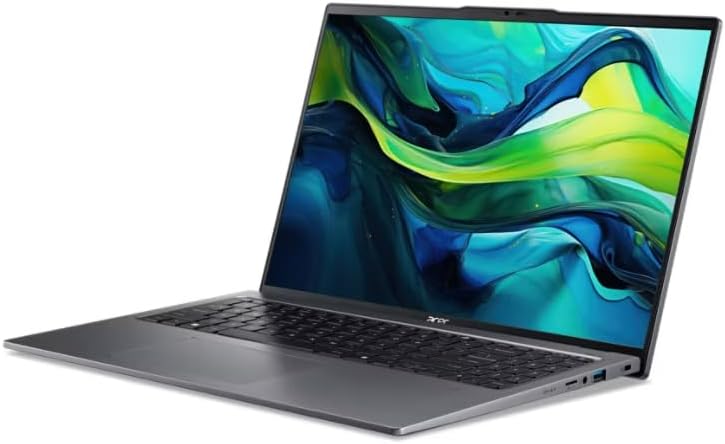
Сол жагы view of the Acer Swift Go 16-2024 laptop, highlighting available ports such as USB and audio jack.

Оң тарап view of the Acer Swift Go 16-2024 laptop, showing ports including HDMI and USB.

Жогорку view of the Acer Swift Go 16-2024 laptop in a closed position, displaying its sleek profile.
7. Техникалык шарттар
| Өзгөчөлүк | Спецификация |
|---|---|
| Модель аты | Swift Go 16-2024 |
| Дисплей | 16-inch WUXGA (1920 x 1200) IPS Touchscreen |
| Процессор | Intel Ultra 9 185H (16-Core, up to 3.9 GHz) |
| Графика | Intel ARC Graphics |
| RAM | 32 ГБ LPDDR5 |
| Сактагыч | 1TB SSD |
| Операция системасы | Windows 11 Home |
| Зымсыз байланыш | Wi-Fi 6 (802.11ax), Bluetooth 5.1 |
| Порттар | Thunderbolt 4, USB-A, HDMI |
| Баскычтоп | Арткы жарык клавиатура |
| Коопсуздук | Манжа изин окугуч |
| Webcam | Убактылуу ызы-чууну азайтуу менен 720p HD |
| Батареянын иштөө мөөнөтү | Up to 10 hours (usage may vary) |
| Өлчөмдөрү (W x D x H) | 14.3 x 9.4 x 0.78 дюйм |
| Салмагы | Болжол менен 3.81 фунт (1.73 кг) |
8. Техникалык тейлөө
- Тазалоо: Экранды жана корпусту тазалоо үчүн жумшак, мамыксыз чүпүрөктү колдонуңуз. Күчтүү химиялык заттардан алыс болуңуз.
- Программалык камсыздоо жаңыртуулары: Regularly update Windows and Acer drivers to ensure optimal performance and security.
- Батареяга кам көрүү: Батареянын иштөө мөөнөтүн узартуу үчүн, экстремалдык температурадан жана батареяны бат-баттан толук кубаттап турбаңыз.
- Сактагычты башкаруу: Мезгил-мезгили менен ачык-айкын керексиз fileжана SSD иштешин сактоо үчүн тиркемелер.
9. Кыйынчылыктарды
| Көйгөй | Мүмкүн чечим |
|---|---|
| Ноутбук күйбөйт | Кубат адаптери бекем туташтырылганын жана розетка иштеп турганын текшериңиз. Башка розетканы колдонуп көрүңүз. |
| System freezes or becomes unresponsive | Press and hold the power button for 10-15 seconds to force a shutdown. Restart the laptop. Check for system updates. |
| Wi-Fi туташуу маселелери | Restart your router and modem. Check Wi-Fi settings in Windows. Ensure Wi-Fi drivers are up to date. |
| Backlit keyboard not working | Ensure the backlight is enabled and adjusted using the dedicated function keys (e.g., Fn + F9). |
| Fingerprint reader not recognized | Ensure your finger is clean and dry. Re-register your fingerprint in Windows Hello settings. |
10. Кепилдик жана колдоо
Your Acer Swift Go 16-2024 laptop comes with a standard manufacturer's warranty. For detailed warranty information, please refer to the documentation included with your product or visit the official Acer support webсайт. Техникалык жардам, драйверди жүктөп алуу же тейлөө суроосу үчүн Acer кардарларды колдоо бөлүмүнө кайрылыңыз.
Acer колдоо Webсайт: www.acer.com/support


