1. Киришүү
This manual provides essential instructions for the safe and efficient use of your Meizu Note 21 Pro smartphone. Please read this manual thoroughly before operating the device and retain it for future reference.
2. Кутуда эмне бар
- Meizu Note 21 Pro Smartphone
- Кубаттуу адаптер
- (Other accessories such as USB cable, SIM ejector tool, and documentation may vary by region.)
3. Түзмөктүн жайгашуусу
Familiarize yourself with the physical components of your Meizu Note 21 Pro.
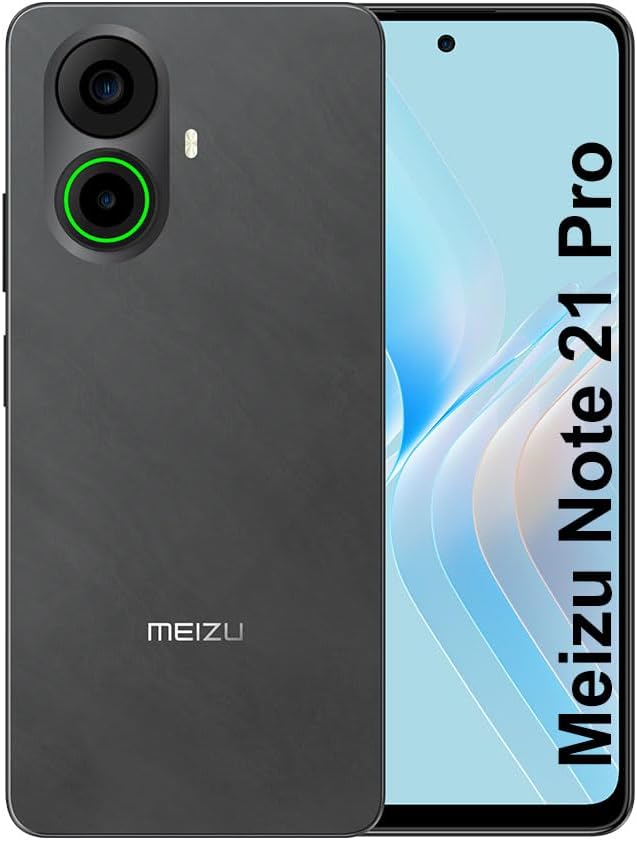
Сүрөт 3.1: Алдыңкы жана арткы view of the Meizu Note 21 Pro. The front displays the screen with a punch-hole camera. The rear shows the dual camera module with a green accent ring on one lens, a flash, and the "MEIZU" logo at the bottom.
- Алдыңкы дисплей: 6.78-inch FHD+ screen with a 120Hz refresh rate.
- Алдыңкы камера: Дисплейдин жогорку борборунда жайгашкан.
- Арткы камералар: Dual camera system, including a 64MP main camera.
- Каптал манжа изинин сенсору: Integrated for secure access.
- USB порт: Заряддоо жана маалыматтарды өткөрүү үчүн.
- 3.5 мм аудио уячасы: Наушник үчүн.
- SIM/MicroSD карта үчүн лоток: Supports Dual Nano SIM and MicroSD cards.
4. Орнотуу
4.1. SIM жана MicroSD карталарын салуу
- Түзмөгүңүздүн капталындагы SIM карта салгычын табыңыз.
- SIM чыгаруучу куралды лотоктун жанындагы кичинекей тешикке салып, лоток чыгып кеткиче акырын түртүңүз.
- Place your Nano SIM card(s) and/or MicroSD card into the designated slots on the tray. Ensure the gold contacts face downwards.
- Аспапка лотокту ордунан чыккыча кылдаттык менен кайра киргизиңиз.
4.2. Баштапкы күйгүзүү жана орнотуу
- Press and hold the Power button until the Meizu logo appears.
- Тилиңизди тандоо, Wi-Fi тармагына туташуу жана Google аккаунтуңузду орнотуу үчүн экрандагы көрсөтмөлөрдү аткарыңыз.
- During setup, you will be guided to configure security features such as a PIN, pattern, or password.
4.3. Манжа изин таанууну орнотуу
- багыттоо Орнотуулар > Коопсуздук жана купуялык > Манжа изинин кулпусун ачуу.
- Follow the on-screen instructions to register your fingerprint by repeatedly touching the side-mounted sensor.
- Ensure your finger covers the entire sensor area during registration for optimal performance.
5. Аппаратыңызды иштетүү
5.1. Дисплей жана навигация
- The 6.78-inch FHD+ display operates at a 120Hz refresh rate for smooth visuals.
- Navigate the Android 14 operating system using touch gestures: tap, swipe, pinch-to-zoom.
- Экрандын жогору жагынан ылдый серпип, тез жөндөөлөргө өтүңүз.
5.2. Камеранын функциялары
- Үй экранынан же колдонмо суурмасынан Камера тиркемесин ачыңыз.
- The rear camera system features a 64MP main sensor for high-resolution photos and a 2MP depth-of-field camera for portrait effects.
- The 13MP front-facing camera is suitable for selfies and video calls.
- Tap on the screen to focus, and use the on-screen shutter button to capture images. Explore various modes like Portrait, Night, and Pro within the camera app.
5.3. Аткаруу жана сактоо
- The MediaTek G99 Octa Core processor ensures efficient performance for applications and multitasking.
- The device comes with 256GB of internal storage and 8GB of RAM.
- Storage can be expanded using a MicroSD card (sold separately).
5.4. Батарея жана заряддоо
- The Meizu Note 21 Pro is equipped with a 5000mAh battery.
- Use the provided Power Adapter for 30W fast charging.
- To charge, connect the USB cable to the phone's USB port and the power adapter, then plug the adapter into a wall outlet.
5.5. Байланыш
- 4G LTE: Supports various LTE FDD and TDD bands for cellular data. Note: This international version works on T-Mobile in the USA and globally with other carriers.
- Wi-Fi 5: Интернетке кирүү үчүн зымсыз тармактарга туташыңыз.
- Bluetooth: Кулакчындар жана динамиктер сыяктуу зымсыз аксессуарлар менен жупташтырыңыз.
- NFC: Тийбей туруп төлөмдөр жана туура келген түзмөктөр менен тез жупташтыруу үчүн.
- GPS: Жайгашкан жерди аныктоо кызматтары жана навигация үчүн.
6. Техникалык тейлөө
- Тазалоо: Аппараттын экранын жана корпусун тазалоо үчүн жумшак, түксүз чүпүрөктү колдонуңуз. Катуу химиялык заттардан же абразивдүү материалдардан алыс болуңуз.
- Батареяга кам көрүү: Avoid extreme temperatures. Do not fully discharge the battery frequently. For optimal battery longevity, keep the charge between 20% and 80%.
- Программалык камсыздоо жаңыртуулары: Оптималдуу аткарууну жана коопсуздукту камсыз кылуу үчүн системанын жаңыртууларын дайыма текшерип, орнотуңуз. барыңыз Орнотуулар > Система > Системаны жаңыртуу.
7. Кыйынчылыктарды
| Маселе | Мүмкүн чечим |
|---|---|
| Түзмөк күйбөйт | Ensure the battery is charged. Connect the device to the power adapter and try again. If unresponsive, press and hold the Power button for 10-15 seconds to force a restart. |
| Начар тармак сигналы | Check if the SIM card is correctly inserted. Move to an area with better network coverage. Restart the device. Verify with your carrier that your plan is active. |
| Колдонмолор жай же бузулуп жатат | Фондук колдонмолорду жабыңыз. Колдонмонун кэшин тазалоо (Орнотуулар > Колдонмолор > колдонмону тандаңыз > Сактоо жана кэш > Кэшти тазалоо). Түзмөктү өчүрүп-күйгүзүңүз. Жетиштүү сактагыч орун бар экенин текшериңиз. |
| Манжа изинин сенсору иштебей жатат | Ensure your finger and the sensor are clean and dry. Re-register your fingerprint in settings. |
8. Техникалык шарттар
- Модел: Meizu Note 21 Pro
- Операция системасы: Android 14
- Процессор: MediaTek G99 Octa Core (2.2GHz)
- Дисплей: 6.78 inches FHD+ (1080 x 2160 resolution), 120Hz Refresh Rate
- RAM: 8 ГБ
- Ички сактагыч: 256 ГБ
- Арткы камера: 64 МП Негизги + 2 МП тереңдик
- Алдыңкы камера: 13MP
- Батарея: 5000 мАч, 30 Вт тез кубаттоо
- Байланыш: 4G LTE (FDD:1,2,3,4,5,7,8,12,17,18,19,20,26,28,66; TDD:38,40,41), 3G WCDMA, 2G Quad Band, Wi-Fi 5, Bluetooth, NFC, GPS
- Аудио Jack: 3.5 мм
- Өлчөмдөрү: 6.64 x 2.96 x 0.33 дюйм
- Салмагы: 1.1 фунт
9. Кепилдик жана колдоо
For warranty information and technical support, please refer to the warranty card included with your product or visit the official Meizu webсайт. Кепилдик дооматтар үчүн сатып алганыңыздын далилин сактаңыз.
For further assistance, you may contact Meizu customer service through their official channels.


