1. Киришүү
Thank you for choosing the Dripex Mobile Standing Desk. This manual provides essential information for the assembly, operation, and maintenance of your new desk. This desk is designed to offer a versatile and ergonomic workspace, featuring adjustable height, integrated power outlets, LED strip lights, and convenient accessories for an organized setup.
Please read this manual thoroughly before assembly and use to ensure proper function and safety.
2. Коопсуздук боюнча маанилүү маалымат
- Always use the desk with caution, especially when adjusting the height or moving it.
- Ensure all components are securely attached during assembly.
- Keep the area around the desk clear to prevent tripping hazards.
- Do not place heavy objects on the hook or exceed the maximum weight recommendation of 25 кг (55 фунт).
- Always supervise children when they are near the desk.
- Do not attempt to modify the desk or its electrical components.
- Ensure the power cord is not pinched or damaged during use or movement.
3. Пакеттин мазмуну
Please verify that all parts are present before beginning assembly. Refer to the detailed parts list included in your product packaging for specific component identification.
- Desk Frame Components (Iron)
- Үстөл үстүндөгү панелдер (инженердик жыгачтан жасалган)
- Power Outlet Strip with USB Ports
- USB LED Strip Lights
- Наушник илгич
- Cup Holder
- Сактоочу баштык
- Баскычтоп лоток
- Кулпуланган дөңгөлөктөр
- Монтаждоо жабдыктары (буроолор, болттар, шаймандар)
4. Монтаждоо боюнча нускамалар
The Dripex Mobile Standing Desk is designed for straightforward assembly. Detailed, step-by-step instructions with labeled parts are included in the product packaging. Please follow these instructions carefully.
- Компоненттерди таңгактан чыгаруу: Чийилип калбашы үчүн, бардык тетиктерди таңгактан этияттык менен алып чыгып, таза, жумшак бетке коюңуз. Бардык тетиктерди камтылган тетиктердин тизмеси менен салыштырып текшериңиз.
- Рамканы чогултуу: Begin by assembling the main iron frame components according to the diagrams in your instruction manual. Ensure all screws are tightened securely.
- Дөңгөлөктөрдү тиркөө: Install the lockable wheels to the base of the frame. Ensure they are firmly attached.
- Үстөлгө панелдерди орнотуу: Secure the engineered wood tabletop panels to the frame. Pay attention to the orientation of the main and upper shelves.
- Аксессуарларды орнотуу: Attach the headphone hook, cup holder, and storage bag in their designated positions.
- Электр компоненттерин туташтыруу: Install the power outlet strip and USB LED strip lights. Route cables neatly to avoid entanglement.
- Акыркы текшерүүлөр: Once assembled, gently shake the desk to ensure stability. Tighten any loose connections.
Note: Assembly typically takes 1-2 hours for one person. Having a second person may assist with certain steps.

5. Иштөө нускамалары
5.1. Бийиктигин тууралоо
The desk features a manual height adjustment mechanism, allowing you to switch between sitting and standing positions to promote better posture and reduce discomfort.
- To Adjust Height: Loosen the four adjustment knobs located on the vertical support beams of the desk frame. Carefully raise or lower the desk to your desired height (range: 26.4" to 45"). Once the desired height is achieved, securely tighten all four knobs to lock the desk in place. Ensure all knobs are equally tightened for stability.

5.2. Электр розеткалары жана USB порттору
Интеграцияланган кубат тилкеси түзмөктөрүңүз үчүн кубатка ыңгайлуу жетүүнү камсыз кылат.
- AC розеткалары: үстөл камтыйт 2 standard 120V/12A AC outlets. Plug in your laptop, monitor, or other AC-powered devices.
- USB порттору: үстөл камтыйт 2 USB ports (5V/2A) for charging smartphones, tablets, and other USB-powered accessories.
- Электр кабели: The desk is equipped with a 5 фут электр шнуру. Plug it into a standard wall outlet.

5.3. LED Strip Lights
The USB LED strip lights add ambient lighting to your workspace.
- Операция: The LED strip lights are controlled via buttons directly on the strip. Use these buttons to cycle through various lighting effects and RGB colors.
- Кубат булагы: The LED lights are USB-powered. Ensure they are connected to a USB port (either on the desk or another power source).
5.4. Tilting Board
The front board of the desk can be tilted to provide an angled surface, suitable for drawing, writing, or comfortable typing.
- Эңкейтүү үчүн: Locate the adjustment mechanism beneath the tilting board. Loosen the knob, adjust the board to your desired angle, and then tighten the knob to secure it.
- Drop Protection: An edge baffle is present to prevent items from sliding off the tilted surface.
- Note: The tilt mechanism is designed for right-handed use, which may affect mouse placement for left-handed users when the board is tilted.
5.5. Mobile Functionality
The desk is equipped with 360° lockable wheels for easy movement and stability.
- Жылдыруу үчүн: Unlock the wheels by flipping the locking levers upwards. Carefully push the desk to its new location.
- Коопсуздукту камсыз кылуу үчүн: Once the desk is in position, press the locking levers downwards on all wheels to prevent unintended movement.
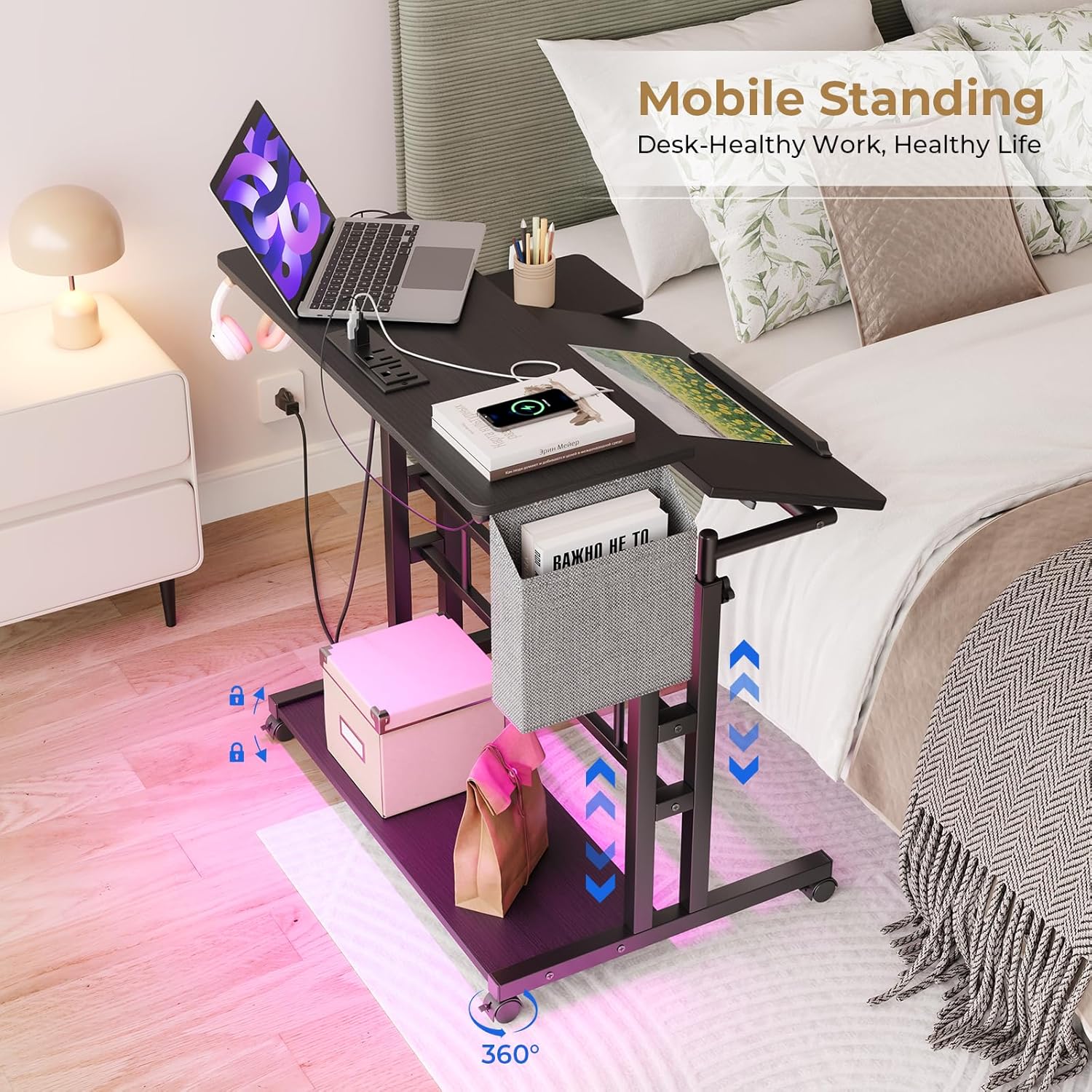
5.6. Integrated Accessories
The desk includes several accessories to enhance organization and convenience.
- Наушник илгич: A sturdy iron hook is provided to hang your headphones, keeping them within reach and off the desk surface.
- Кубок ээси: A dedicated cup holder helps prevent spills and keeps your beverage secure.
- Сактоочу баштык: A fabric storage bag is included for storing files, notebooks, or other small items.
- Текче: An additional shelf under the table provides space for a computer chassis or other storage.

6. Техникалык тейлөө
6.1. Тазалоо
- Desk Surfaces: Үстөлдүн үстүн жана алкагын жумшак, d менен сүртүңүзamp кездеме. Абразивдүү тазалагычтардан же финишке зыян келтирүүчү катаал химиялык заттардан алыс болуңуз.
- Электр компоненттери: Ensure the desk is unplugged before cleaning near power outlets or LED lights. Use a dry cloth to wipe these areas.
6.2. Жалпы кам көрүү
- Regularly check all screws and bolts to ensure they remain tight. Retighten as necessary to maintain stability.
- Үстөлдү узак убакыт бою ашыкча нымдуулукка же түз күн нуруна дуушар кылбаңыз.
- Do not place hot items directly on the tabletop without a protective coaster.
7. Кыйынчылыктарды
| Көйгөй | Мүмкүн себеп | Чечим |
|---|---|---|
| Үстел туруксуз же солкулдап турат. | Бош монтаждоо бурамалар же тегиз эмес пол. | Check and tighten all assembly screws. Ensure the desk is on a level surface. Adjust leg levelers if present. |
| Бийиктикти тууралоо кыйынчылыгы. | Adjustment knobs not fully loosened or mechanism is stiff. | Ensure all four adjustment knobs are completely loosened before attempting to change height. Apply gentle, even pressure when raising or lowering. If stiff, a small amount of silicone lubricant on the sliding parts may help. |
| Дөңгөлөктөр жылмакай тоголонбойт же бекитилбейт. | Debris in wheels or locking mechanism malfunction. | Clean any hair or debris from the wheel casters. Ensure the locking levers are fully disengaged for rolling and fully engaged for locking. If a wheel is damaged, it may need replacement. |
| LED strip lights not working. | USB connection loose or power issue. | Check if the USB cable for the LED lights is securely plugged into a working USB port. Ensure the power strip is plugged into a live wall outlet. |
| Power outlets/USB ports not providing power. | Desk power cord unplugged or wall outlet issue. | Verify the desk's main power cord is securely plugged into a functional wall outlet. Test the wall outlet with another device. Check for any tripped circuit breakers. |
8. Техникалык шарттар
- Бренд: Dripex
- Модель номери: XBD-WP324-PUS
- Продукциянын өлчөмдөрү (D x W x Y): 23.6" x 31.5" x 26.7" (60см x 80см x 68см)
- Жөнгө салынуучу бийиктик диапазону: 26.4" - 45" (67см - 115см)
- Maximum Салмагы сунуш: 25 кг (55 фунт)
- Түсү: Кара
- Стиль: Заманбап
- Негизги материал: Темир
- Top Материал түрү: Инженердик жыгач
- Бүткөн түрү: Powder капталган
- Электр розеткалары: 2 x 120V/12A AC розеткалары
- USB порттору: 2 x 5V/2A USB порттору
- Электр шнурунун узундугу: 5 фут
- Өзгөчөлүктөр: Adjustable Height, Built-In Power Outlet, Compact, Ergonomic, Wheels, LED Strip Lights, Headphone Hook, Cup Holder, Storage Bag, Keyboard Tray
- Ассамблея талап кылынат: Yes (Recommended 2 people for assembly)
9. Кепилдик жана колдоо
The Dripex Mobile Standing Desk comes with a Чектелген Кепилдик. Specific details regarding the warranty period and coverage are typically provided with your product packaging or can be obtained by contacting Dripex customer support.
For technical assistance, missing parts, or warranty claims, please refer to the contact information provided in your product documentation or visit the official Dripex webколдоо параметрлери үчүн сайт.
Сураныч, кепилдик максаттары үчүн сатып алганыңыздын далилин сактап коюңуз.


