1. Киришүү
The Phomemo LT12 Label Maker Machine is a portable, rechargeable label printer designed for various organizational needs in home, office, and school environments. It features a QWERTY keyboard for direct input and Bluetooth connectivity for enhanced customization via the Printmaster application. This manual provides comprehensive instructions for setting up, operating, and maintaining your LT12 label maker.
2. Пакеттин мазмуну
Төмөндө тизмеленген нерселердин баары пакетиңизге камтылганын текшериңиз:
- 1 x LT12 Label Maker
- 1 x Type-C заряддоо кабели
- 1 x 12mm x 4m Black on White Label Tape
- 1 x User Manual

Image: The Phomemo LT12 label maker, a Type-C charging cable, a roll of 12mm x 4m black on white label tape, and the user manual, laid out as included in the package.
3. Продукт бүтүп калдыview жана өзгөчөлүктөрү
The Phomemo LT12 is designed for ease of use and versatility. Key features include:
- Кайра заряддалуучу батарея: Equipped with a 1200mAh lithium battery, providing 2-3 hours of continuous printing on a full charge. Charges via a Type-C cable. Features an automatic shut-off after 5 minutes of inactivity to conserve battery life.
- Кош киргизүү ыкмалары: Features a familiar QWERTY keyboard for direct, one-touch printing and Bluetooth connectivity for advanced editing via the Printmaster APP.
- Printmaster APP: Offers extensive customization with over 1600 icon symbols, 163 fonts, 30+ languages, and 287+ border styles. Supports saving templates and viewing print history.
- Efficient Labeling: Supports label widths from 9mm to 12mm, allowing for multiple lines of text. Includes a built-in cutter and supports horizontal or vertical printing.
- Туруктуу энбелгилер: Labels are waterproof, BPA-free, heat resistant, and designed to tear off without residue. They are fade-resistant, maintaining clarity even in humid or harsh conditions.
- LCD Backlit Screen: A backlit LCD display ensures optimal visibility and readability of labels, even in low-light environments.
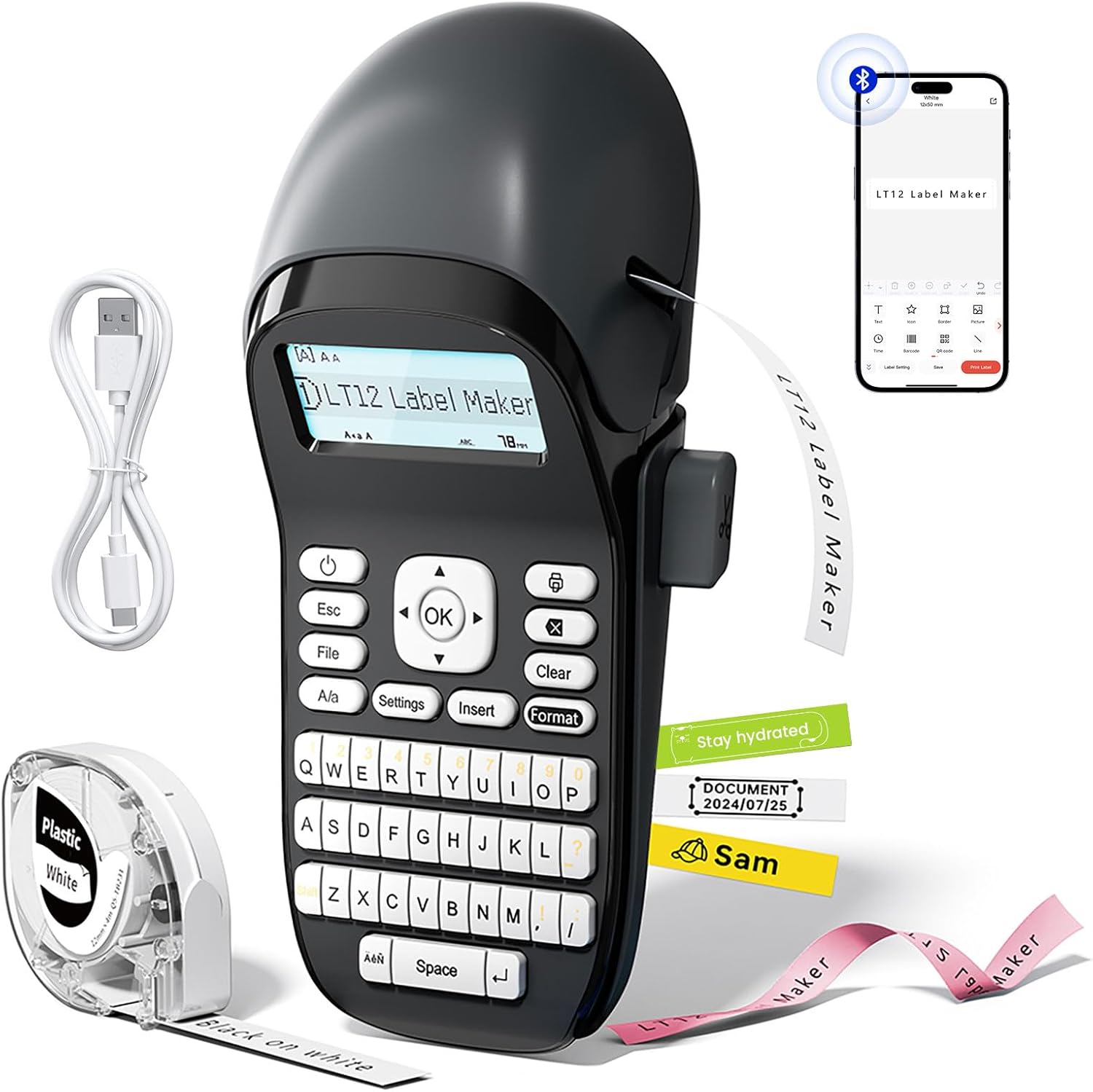
Image: The Phomemo LT12 Label Maker, showcasing its QWERTY keyboard, LCD screen, and a smartphone connected via Bluetooth, alongside label tape and a charging cable.

Image: A visual comparison highlighting the LT12's integrated 1200mAh rechargeable battery against other label makers that require 6 AA batteries.

Image: The Phomemo LT12 label maker with its LCD backlit screen illuminated, demonstrating clear visibility in a dimly lit setting.
4. Орнотуу
4.1 Аппаратты заряддоо
Before first use, fully charge the LT12 label maker. Connect the provided Type-C charging cable to the device and a compatible USB power source. The charging indicator will show the charging status.
4.2 Этикетка лентасын жүктөө
- Open the tape compartment cover on the side of the label maker.
- Insert the label tape cassette with the tape end facing the print head. Ensure the tape is properly aligned.
- Тасма бөлүмүнүн капкагын бекем жабыңыз.
4.3 Колдонмону орнотуу жана Bluetooth туташуу
To utilize advanced features and customization, connect your LT12 label maker to the Printmaster app:
- жүктөп алыңыз Printmaster смартфонуңуздун колдонмолор дүкөнүнөн колдонмо (Android жана iOS үчүн жеткиликтүү).
- Turn on Bluetooth on your smartphone and power on the LT12 label maker.
- Open the Printmaster app and search for available Bluetooth devices.
- Select "LT12 Label Maker" from the list to establish a connection.

Image: A visual guide showing four steps to connect the Phomemo LT12 label maker to a smartphone via the Printmaster app: download app, enable Bluetooth, search for device, and select LT12.
5. Иштөө нускамалары
5.1 Basic Label Creation (Using Keyboard)
- Power on the label maker.
- Каалаган текстиңизди терүү үчүн QWERTY баскычтобун колдонуңуз. Текст LCD экранында пайда болот.
- Utilize the function keys for basic editing:
- Esc: Exit current menu or cancel action.
- File: Access saved labels or save current label (supports up to 9 fileс).
- А/а: Toggle between uppercase and lowercase letters.
- Орнотуулар: Adjust device settings (e.g., language, print density).
- Кыстаруу: Add symbols, dates, or other special characters.
- Формат: Change font styles, sizes, or add borders.
- Тазалоо: Delete characters or clear the entire text.
- OK: Confirm selections or initiate printing.
- басыңыз OK button to print the label.

Сүрөт: деталдуу view of the Phomemo LT12 label maker's QWERTY keyboard and its LCD screen, showing text input.
5.2 Advanced Label Creation (Using Printmaster App)
- Ensure your LT12 label maker is connected to the Printmaster app via Bluetooth.
- Колдонмонун ичинде сиз:
- Type text and adjust font, size, and style.
- Access a library of over 1600 icons and symbols.
- Choose from 163 fonts and 287 border styles.
- Create and save custom templates for frequent use.
- Review your print history.
- Once your label design is complete in the app, tap the print icon to send it to the label maker.

Image: A series of smartphone screenshots illustrating the Printmaster app's interface for text editing, symbol insertion, and label customization.
6. Техникалык тейлөө
6.1 Тазалоо
Regular cleaning ensures optimal performance:
- Тазалоодон мурун аппаратты өчүрүңүз.
- Use a soft, dry cloth to wipe the exterior of the label maker.
- Gently clean the print head with a cotton swab moistened with rubbing alcohol if print quality degrades. Allow to dry completely before use.
6.2 Батареяга кам көрүү
- Батареянын иштөө мөөнөтүн узартуу үчүн, аны тез-тез толугу менен зарядсыздандырбаңыз.
- Түзмөктү тез-тез колдонбосоңуз да, аны үзгүлтүксүз кубаттап туруңуз.
- If storing for an extended period, charge the battery to approximately 50% and recharge every 3-6 months.
6.3 Сактоо
Store the label maker in a cool, dry place away from direct sunlight and extreme temperatures. Remove the label tape cassette if storing for a very long period.
7. Кыйынчылыктарды
| Көйгөй | Мүмкүн себеп | Чечим |
|---|---|---|
| Түзмөк күйбөйт же заряддалбайт. | Low battery; faulty charging cable or adapter; device malfunction. | Ensure the device is charged using the provided Type-C cable and a working power adapter. Try a different cable or adapter. If the issue persists, contact support. |
| Басма же бүдөмүк басып чыгаруу жок. | Label tape incorrectly installed; print head dirty; low battery. | Reinstall the label tape correctly. Clean the print head as described in Section 6.1. Charge the device fully. |
| Bluetooth байланышы ишке ашпай калды. | Bluetooth not enabled; app issue; device not discoverable. | Ensure Bluetooth is enabled on both the label maker and your smartphone. Restart the app and the label maker. Try pairing again. |
| Labels are not cutting properly. | Кесүүчү миз мокок же бүтөлүп калган. | Ensure no tape residue is obstructing the cutter. If the issue persists, contact support. |
| Labels peel off easily. | Surface not clean; label type unsuitable for surface. | Ensure the surface is clean, dry, and smooth before applying the label. Use appropriate label types for specific environments (e.g., waterproof for humid areas). |
8. Техникалык шарттар
| Өзгөчөлүк | Деталь |
|---|---|
| Модель аты | LT12 |
| Бренд | Phomemo |
| Байланыш технологиясы | Bluetooth |
| Басма технологиясы | Термикалык |
| Максималдуу медиа өлчөмү | 12мм х 4м |
| Максималдуу кара жана ак басып чыгаруу чечими | 203 dpi |
| Макс басып чыгаруу ылдамдыгы (монохромдуу) | 30 промилле |
| Батарея | 1200mAh литий-ион (кошулган) |
| Заряддоо интерфейси | USB Type-C |
| Продукциянын өлчөмдөрү | 8.85"D x 4.29"W x 3.07"H |
| Элемент Салмагы | 10.3 унция (291 грамм) |
| Шайкеш түзмөктөр | Смартфондор, Планшеттер (Android, iOS) |
| Принтердин сыя түрү | No Ink (Thermal Printing) |
9. Кепилдик маалыматы
The Phomemo LT12 Label Maker Machine comes with a Limited Warranty. For specific details regarding warranty coverage, duration, and terms, please refer to the warranty card included in your product packaging or visit the official Phomemo webакыркы маалымат алуу үчүн сайт.
10. Колдоо
For further assistance, technical support, or inquiries about your Phomemo LT12 Label Maker Machine, please contact Phomemo customer service through their official webсайт же продукт документациясында көрсөтүлгөн байланыш маалыматы.
You can also find additional resources, FAQs, and product updates on the official Phomemo webсайт: Phomemo Store


