Introduction
Thank you for choosing the iTOMA 515 Alarm Clock. This device combines an alarm clock with an FM radio, a dimmable LED display, and dual alarm functionality, designed for convenience and reliability. This manual provides detailed instructions for setup, operation, and maintenance to ensure optimal performance.
Пакеттин мазмуну
- 1 x iTOMA 515 Alarm Clock
- 1 x User Manual
Эскертүү: Кубат адаптери камтылган эмес жана өзүнчө сатып алынышы керек.
Продукт бүттүview
Familiarize yourself with the main components and controls of your iTOMA 515 Alarm Clock.
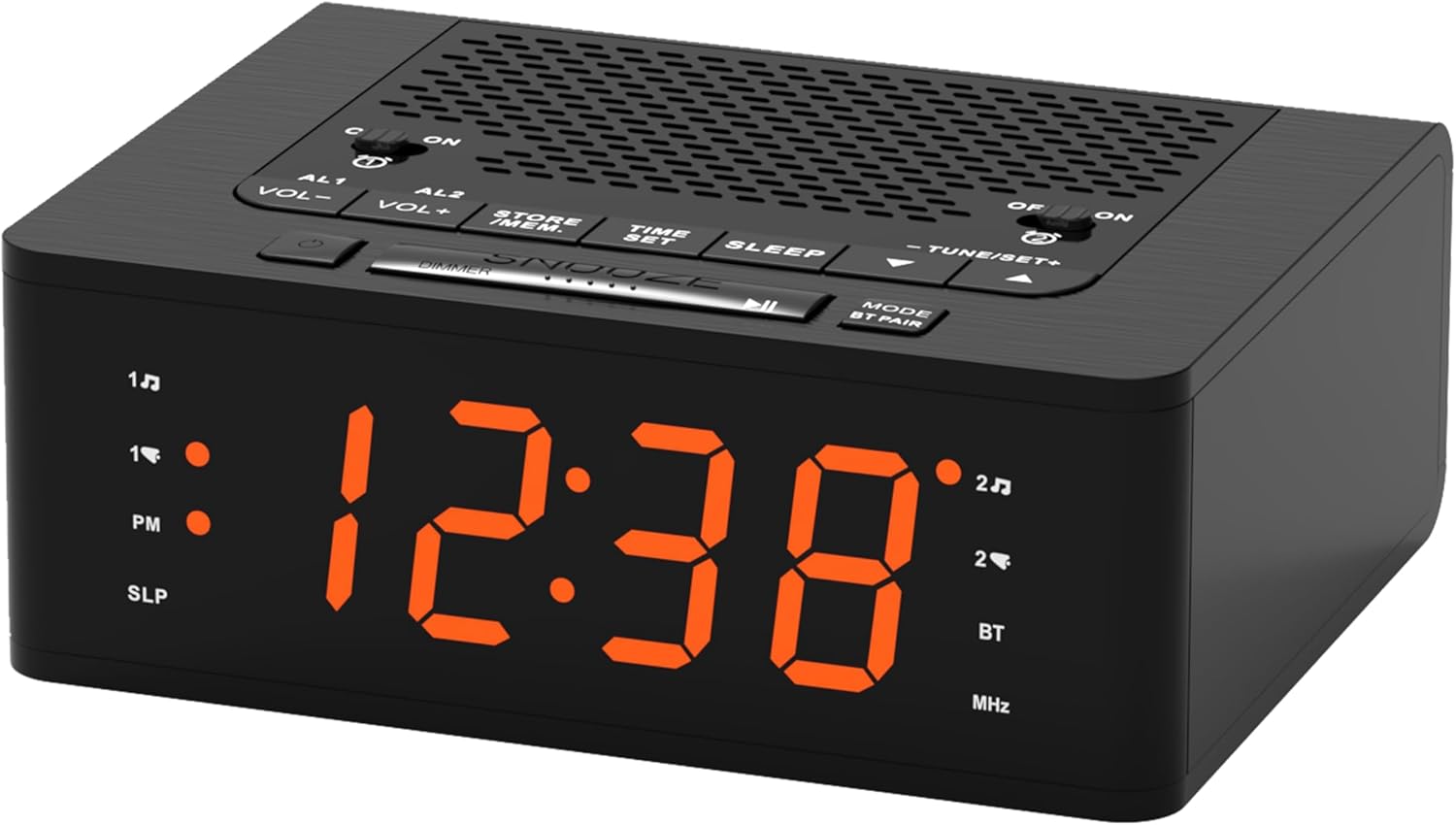
Сүрөт: Фронт view of the iTOMA 515 Alarm Clock, showcasing the orange LED display and top-mounted control buttons.

Сүрөт: Жогорку view of the alarm clock, highlighting the various control buttons for volume, alarm settings, time, sleep, and tuning.
Башкаруу баскычтары:
- AL1 / AL2: Alarm 1 / Alarm 2 setting buttons.
- VOL+ / VOL-: Үн көлөмүн тууралайт.
- STORE / MEM: Saves and recalls FM radio presets.
- УБАКЫТТЫ ОРНОТУУ: Убакытты орнотуу режимине кирет.
- УЙКУ: Activates sleep timer for FM radio.
- TUNE+ / TUNE-: Adjusts FM radio frequency.
- SNOOZE / DIMMER: Snoozes alarm; adjusts display brightness.
- MODE / BT PAIR: Switches between modes (FM, Bluetooth); initiates Bluetooth pairing.
- ON / OFF (for AL1/AL2): Toggles alarms on or off.
Жайгашуу
1. Power Connection
- Connect a compatible DC 5V power adapter (not included) to the DC IN port on the back of the alarm clock.
- Plug the adapter into a standard wall outlet. The display will light up.
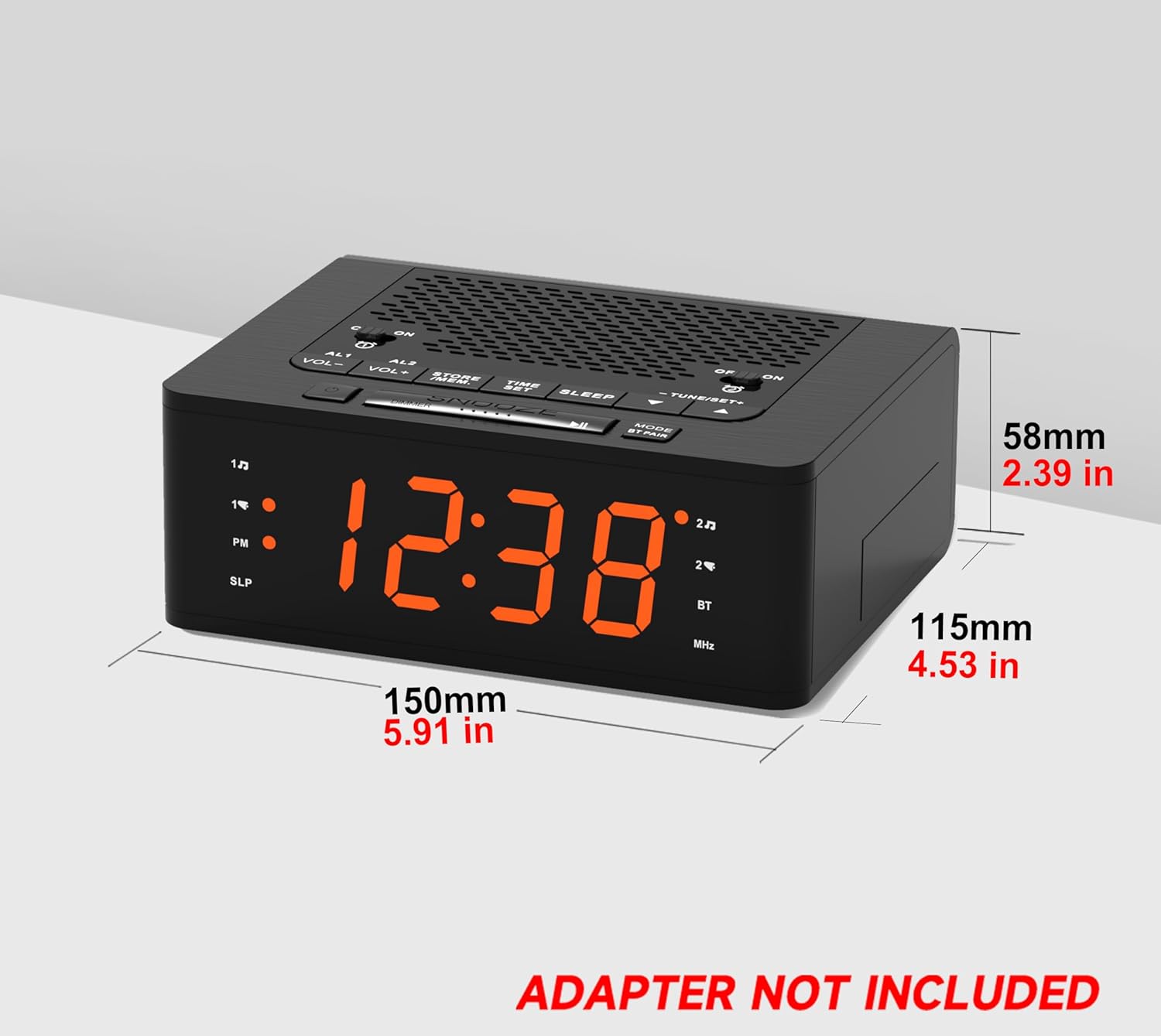
Сүрөт: Side view of the iTOMA 515 Alarm Clock with dimensions indicated, and a clear note stating "ADAPTER NOT INCLUDED".
2. Баштапкы убакытты орнотуу
- басып, кармап туруңуз УБАКЫТТЫ ОРНОТУУ баскычын сааттын цифралары жаркылдай баштаганга чейин басыңыз.
- колдонуу TUNE+ or КОНУН - саатты тууралоо үчүн баскычтар. 12 сааттык форматты колдонсоңуз, PM индикаторуна көңүл буруңуз.
- Басыңыз УБАКЫТТЫ ОРНОТУУ again to confirm the hour and move to minute adjustment.
- колдонуу TUNE+ or КОНУН - мүнөттөрдү тууралоо үчүн баскычтар.
- Басыңыз УБАКЫТТЫ ОРНОТУУ once more to confirm the minutes and exit time setting mode.
3. 12/24 сааттык форматты тандоо
While the time is flashing during setup, press the РЕЖИМ button to toggle between 12-hour and 24-hour display formats.
Иштөө нускамалары
1. Display Brightness Control (Dimmer)
The iTOMA 515 features a 4-level dimmable LED display.
- басыңыз КАЙРЫЛУУ / КӨҢҮЛГӨТ button repeatedly to cycle through the brightness levels: Level 3 (brightest), Level 2, Level 1, and OFF.
- Select the brightness level that suits your preference for optimal visibility without disturbance.

Сүрөт: The alarm clock display transitioning through four brightness levels (L3, L2, L1, OFF) to illustrate the dimmer function.
2. Setting Alarms (AL1 & AL2)
The clock supports two independent alarms. You can set the alarm time, sound source (buzzer or FM radio), and alarm week mode.
- Же баскычын басып туруңуз AL1 or AL2 ойготкуч сааттын цифралары жарк этмейинче басыңыз.
- колдонуу TUNE+ or КОНУН - ойготкуч саатын тууралоо үчүн баскычтар.
- Тийиштүү баскычты басыңыз AL1 or AL2 саатты ырастоо жана мүнөттүк жөндөөлөргө өтүү үчүн кайра баскычын басыңыз.
- колдонуу TUNE+ or КОНУН - ойготкуч мүнөттөрдү тууралоо үчүн баскычтар.
- басыңыз AL1 or AL2 button again to select the alarm sound source: Buzzer or FM радиосу.
- басыңыз AL1 or AL2 button again to select the alarm week mode: d1-7 (every day), d1-5 (weekdays only), or d6-7 (weekends only).
- басыңыз AL1 or AL2 button one last time to save the settings and exit.

Сүрөт: The alarm clock display with indicators for two separate alarms, showing AM 7:00 (Wake Up Time) and PM 7:00 (Coffee Time) as examples.
3. Turning Alarms ON/OFF
To activate or deactivate an alarm, use the dedicated КҮЙГҮЗҮҮ/ӨЧҮРҮҮ buttons located on the top panel for AL1 and AL2.
4. Тындырма функциясы
Ойготкуч чыкканда чоң баскычты басыңыз СОЮЗ button on the top of the clock to temporarily silence the alarm for an additional 9 minutes of sleep. The alarm will sound again after this period.

Сүрөт: A hand reaching to press the large SNOOZE button on the top of the alarm clock, indicating its function for an extra 9 minutes of sleep.
5. FM радиосунун иштеши
The iTOMA 515 features an FM radio with 20 preset stations and adjustable volume.
- басыңыз РЕЖИМ button to switch to FM radio mode. The frequency will appear on the display.
- Автоматтык сканерлөө: басып, кармап туруңуз TUNE+ or КОНУН - button to automatically scan for the next available station.
- Кол менен күү: баскычын кыскача басыңыз TUNE+ or КОНУН - button to manually adjust the frequency in small increments.
- Үндү тууралоо: колдонуу VOL+ or VOL- buttons to adjust the radio volume (16 levels).
- Алдын ала орнотууларды сактоо: To save a station, tune to your desired frequency, then press and hold the STORE / MEM button until a preset number flashes. Use TUNE+ or КОНУН - to select the preset number (P01-P20), then press STORE / MEM сактап калуу үчүн дагы.
- Алдын ала орнотууларды кайра чакырыңыз: FM режиминде, баскычын кыскача басыңыз STORE / MEM button to cycle through your saved preset stations.

Сүрөт: The alarm clock displaying an FM radio frequency (87.5 MHz), with icons indicating sleep timer, presets, and volume levels.
6. FM Radio Sleep Timer
Уйку таймери белгиленген убакыттан кийин автоматтык түрдө өчүп турган радиону уктап калууга мүмкүндүк берет.
- FM радиосу ойнотулуп жатканда, баскычын басыңыз УЙКУ button repeatedly to cycle through the sleep timer options (e.g., 90, 80, 70... 10 minutes, OFF).
- Радио тандалган убакыт бою ойнотулуп, андан кийин автоматтык түрдө өчөт.
7. Bluetooth Жупташтыруу
The iTOMA 515 supports Bluetooth connectivity for audio streaming.
- басыңыз MODE / BT PAIR button to switch to Bluetooth mode. The display will show "BT" and flash, indicating it's in pairing mode.
- Мобилдик түзмөгүңүздө Bluetooth иштетип, жеткиликтүү түзмөктөрдү издеңиз.
- Select "iTOMA 515" from the list of devices to pair.
- Once paired, the "BT" indicator on the clock will stop flashing and remain solid. You can now stream audio from your device to the alarm clock.
Сүрөт: The iTOMA 515 Alarm Clock positioned next to a smartphone, illustrating its capability to play music via Bluetooth connection.
Техникалык тейлөө
To ensure the longevity and proper functioning of your iTOMA 515 Alarm Clock, follow these simple maintenance guidelines:
- Тазалоо: Use a soft, dry cloth to wipe the exterior of the clock. Avoid using abrasive cleaners, waxes, or solvents as they may damage the finish.
- Жайгашкан жери: Саатты күн нурунан, жылуулук булактарынан жана ашыкча нымдуулуктан алыс, туруктуу, жалпак бетке кой.
- Вентиляция: Ашыкча ысып кетүүнүн алдын алуу үчүн аппараттын үстүнкү жана капталындагы желдетүү тешиктери жабылбагандыгын текшериңиз.
- Электр энергиясын өчүрүү: If the clock will not be used for an extended period, unplug it from the power outlet.
Проблемаларды чечүү
If you encounter issues with your iTOMA 515 Alarm Clock, refer to the following common problems and solutions:
| Көйгөй | Мүмкүн себеп | Чечим |
|---|---|---|
| Сааттын дисплейи өчүк же иштебей жатат. | Эч кандай кубат туташуу же туура эмес адаптер. | Ensure the power adapter is securely plugged into the clock and a working wall outlet. Verify the adapter is functional. |
| Убакытты же ойготкучту коюу мүмкүн эмес. | Incorrect button sequence or not in setting mode. | басып, кармап туруңуз УБАКЫТТЫ ОРНОТУУ or respective АЛАРМ button until digits flash. Follow the instructions carefully. |
| FM радиосун кабыл алуу начар. | Алсыз сигнал же тоскоолдук. | Adjust the position of the clock. Extend the FM antenna fully if available (not explicitly mentioned but common for radios). Try scanning for stations again. |
| Ойготкуч угулбайт. | Alarm is off or volume is too low. | Ensure the alarm's КҮЙГҮЗҮҮ/ӨЧҮРҮҮ button is set to ON. Check the alarm volume setting. |
| Cannot switch off military time (24-hour format). | Incorrect setting during time adjustment. | During time setting (when hour digits flash), press the РЕЖИМ 12 сааттык жана 24 сааттык форматтардын ортосунда которулуу үчүн баскыч. |
| Bluetooth түзмөгү жупташа албайт. | Clock not in pairing mode or device too far. | Ensure the clock is in Bluetooth pairing mode (BT flashing). Move your device closer to the clock. Try restarting both devices. |
Техникалык шарттар
- Бренд: iTOMA
- Модел: 515
- Дисплей түрү: LED (кызгылт сары)
- Дисплей жарыктыгы: 4 levels (L3, L2, L1, OFF)
- Кубат булагы: Mains powered (DC 5V adapter, not included)
- Продукциянын өлчөмдөрү: 15 см (L) x 11.5 см (W) x 5.8 см (H) / 5.91 дюйм (L) x 4.53 дюйм (W) x 2.39 дюйм (Ж)
- Элемент Салмагы: 420 г
- FM радио жыштыгы: 87.5 - 108 МГц
- FM алдын ала орнотуулар: 20 станцияга чейин
- Радионун үнү: 16 жөнгө салынуучу деңгээл
- Уйку таймери: 10-90 мүнөт
- Ойготкуч түрлөрү: Buzzer, FM Radio
- Alarm Week Modes: Every day (d1-7), Weekdays (d1-5), Weekends (d6-7)
- Байланыш: Bluetooth
Кепилдик маалымат
iTOMA products are manufactured to high-quality standards. For specific warranty details, please refer to the warranty card included with your purchase or contact iTOMA customer support. Keep your purchase receipt as proof of purchase for any warranty claims.
Колдоо
For further assistance, technical support, or inquiries regarding your iTOMA 515 Alarm Clock, please visit the official iTOMA webсайтка же кардарларды тейлөө бөлүмүнө кайрылыңыз. Байланыш маалыматын адатта продукт таңгагынан же бренддин расмий онлайн катышуусунан тапса болот.


