1. Киришүү
The ASUSTOR Lockerstor 6 Gen3 AS6806T is a high-performance 6-bay Network Attached Storage (NAS) device designed for video and content creators. Powered by an AMD Ryzen Quad-Core 2.3GHz CPU and 16GB ECC DDR5 RAM, it offers robust data storage and management capabilities. Key features include four M.2 NVMe slots for doubled performance with PCIe 4.0, dual 5GbE and 10GbE ports for high-speed networking, and versatile USB4 ports for external storage. This manual provides essential information for setting up, operating, and maintaining your AS6806T NAS.
Негизги өзгөчөлүктөрү:
- Quad-Core AMD Ryzen Embedded V3C14 CPU @ 2.3 GHz - 3.8 GHz Turbo
- DDR5 ECC RAM support
- Quad M.2 slots for NVMe SSDs – Doubled Performance with PCIe 4.0
- Two USB4 ports at 40 Gbps. 3x USB 3.2 Gen 2 Type-A at 10 Gbps. 2x 10-Gigabit Ethernet. 2x 5-Gigabit Ethernet.
- Supports Wake on LAN and Wake on WAN
2. Пакеттин мазмуну
Төмөндө тизмеленген нерселердин баары пакетиңизге камтылганын текшериңиз:
- AS6806T Unit x1
- AC кубат кабели x1
- 10GbE LAN Cable (Cat 6a) x4
- Flat Head Screws for 3.5" HDD x24
- Flat Head Screws for 2.5" HDD x24
- Ыкчам орнотуу колдонмосу x1
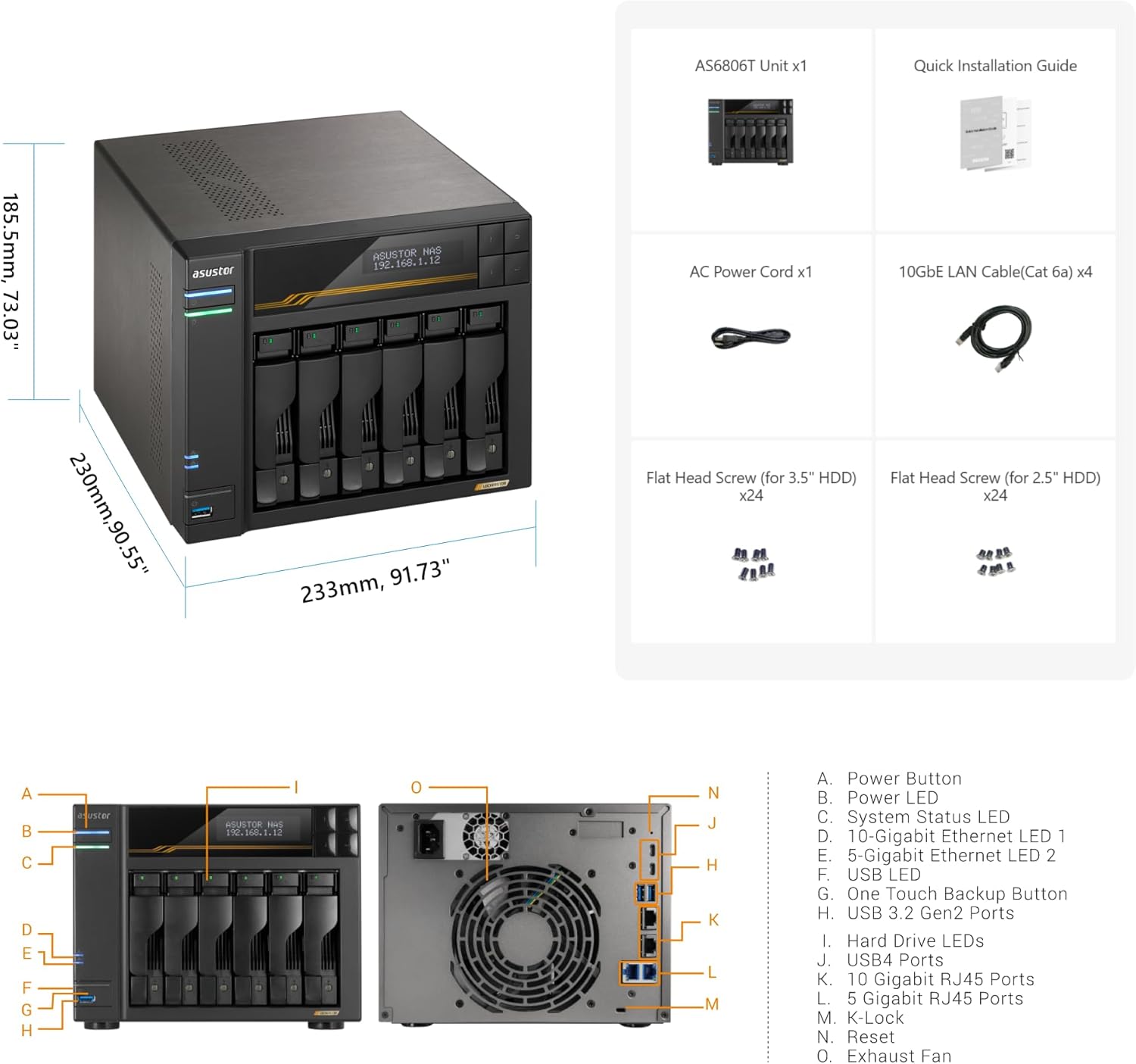
Сүрөт: ASUSTOR Lockerstor 6 Gen3 AS6806T package contents and dimensions. This image displays the NAS unit, power cord, LAN cables, various screws, and the quick installation guide. It also shows the device dimensions: 185.5mm (7.303 inches) height, 230mm (9.055 inches) depth, and 233mm (9.173 inches) width.
3. Техникалык жабдыктар бүттүview
Арткы Panel:

Сүрөт: Rear panel of the ASUSTOR Lockerstor 6 Gen3 AS6806T NAS. This view highlights the various ports and cooling fan on the back of the device.
Компоненттин идентификациясы:
Сүрөт: Diagram illustrating the port identification on the ASUSTOR Lockerstor 6 Gen3 AS6806T. The image shows the DC power input, Reset button, USB4 ports, USB 3.2 Gen 2 Type-A ports, 5-Gigabit Ethernet ports, and 10-Gigabit Ethernet ports.
- DC киргизүү: Кубат туташтыруу порту.
- Калыбына келтирүү баскычы: Used to reset the device settings.
- USB4 Ports: Two 40 Gbps USB4 ports for high-speed data transfer.
- USB 3.2 Gen 2 Type-A порттору: Three 10 Gbps USB 3.2 Gen 2 Type-A ports.
- 5-Gigabit Ethernet Ports: Two 5GbE ports for network connectivity.
- 10-Gigabit Ethernet Ports: Two 10GbE ports for high-speed network connectivity.
4. Орнотуу
4.1. Installing M.2 NVMe SSDs
The Lockerstor 6 Gen3 AS6806T features four M.2 NVMe slots for high-speed storage. Follow these steps to install M.2 SSDs:
- Power off the NAS and disconnect all cables.
- сырткысын алып салуу casing of the NAS to access the M.2 slots.
- Carefully insert the M.2 NVMe SSD into an available slot at an angle.
- Gently push down the SSD until it clicks into place or can be secured with a screw.
- Сырткысын алмаштыруу casing and reconnect all cables.

Сүрөт: Diagram showing the location of the M.2 NVMe SSD slots inside the ASUSTOR Lockerstor 6 Gen3 AS6806T. The image indicates four M.2 slots, supporting PCIe Gen4x1 and Gen4x2.
Видео: This video demonstrates the process of adding M.2 SSDs to your Lockerstor Gen3 NAS. It shows how to open the device, locate the M.2 slots, insert the SSDs, and secure them.
4.2. Replacing RAM
The Lockerstor 6 Gen3 AS6806T supports DDR5 ECC RAM. Follow these steps to replace or upgrade the RAM modules:
- Power off the NAS and disconnect all cables.
- сырткысын алып салуу casing of the NAS to access the RAM slots.
- Gently push the clips on both sides of the RAM module outwards to release it.
- Carefully remove the old RAM module.
- Align the notch on the new RAM module with the slot and insert it at an angle.
- Push down firmly until the clips snap into place, securing the module.
- Сырткысын алмаштыруу casing and reconnect all cables.

Сүрөт: Diagram showing the location of the RAM slots inside the ASUSTOR Lockerstor 6 Gen3 AS6806T. The image highlights the DDR5 ECC RAM modules.
Видео: This video demonstrates the process of replacing RAM on your Lockerstor Gen3 NAS. It guides you through opening the device, removing existing RAM, and installing new modules.
4.3. Installing Hard Disk Drives (HDDs)
The Lockerstor 6 Gen3 AS6806T supports 3.5-inch and 2.5-inch SATA HDDs/SSDs. Follow these steps to install your drives:
- Gently pull the drive tray handle to release and slide out a drive tray.
- For 3.5-inch HDDs, align the drive with the tray and secure it using the provided screws. For 2.5-inch HDDs/SSDs, use the appropriate screw holes on the tray.
- Slide the populated drive tray back into the empty bay until it clicks into place.
- Repeat for all desired drives.
5. Operating System (ADM)
The ASUSTOR Lockerstor 6 Gen3 AS6806T runs on ASUSTOR Data Master (ADM), ASUSTOR's intuitive and feature-rich operating system. ADM provides a user-friendly interface for managing your NAS, files, and applications. Key functionalities include:
- File Башкаруу: Easily organize, access, and share your data across various platforms.
- Backup & Restore: Comprehensive backup solutions to protect your valuable data.
- Мультимедиа колдонмолору: Stream media, manage photos, and enjoy your digital content.
- Борбордук колдонмо: Expand NAS functionality with a wide range of apps for various needs.
- Коопсуздук: Robust security features, including real-time virus protection and powerful firewalls.
Post-Quantum Cryptography (PQC) Ready
The ASUSTOR Lockerstor Gen3 NAS is PQC Ready, offering enhanced security against future quantum computing threats. This ensures your data remains protected with advanced cryptographic algorithms.
Видео: This video explains the Post-Quantum Cryptography (PQC) readiness of ASUSTOR NAS devices, highlighting their defense against future quantum attacks.
6. Техникалык тейлөө
Regular maintenance ensures the optimal performance and longevity of your ASUSTOR NAS.
6.1. Программалык камсыздоону жаңыртуу
- Regularly check for and install ADM updates via the Control Panel to ensure you have the latest features, security patches, and bug fixes.
6.2. Айдоочулардын ден соолугун көзөмөлдөө
- Utilize ADM's built-in tools to monitor the health of your HDDs and SSDs (e.g., S.M.A.R.T. status).
- Replace drives promptly if any warnings or errors are detected to prevent data loss.
6.3. System Reboot
- Consider scheduling weekly reboots to maintain system stability and clear temporary data.
7. Техникалык шарттар
| Өзгөчөлүк | Деталь |
|---|---|
| Бренд | Asustor |
| Элемент моделинин номери | AS6806T |
| CPU | Quad-Core AMD Ryzen Embedded V3C14 @ 2.3 GHz - 3.8 GHz Turbo |
| RAM | 16GB ECC DDR5 |
| M.2 NVMe Slots | 4 (PCIe 4.0) |
| USB4 порттору | 2 (40 Gbps) |
| USB 3.2 Gen 2 Type-A порттору | 3 (10 Gbps) |
| 10-Гигабит Ethernet | 2 |
| 5-Гигабит Ethernet | 2 |
| Элемент Салмагы | 10.14 фунт (4.6 кг) |
| Продукциянын өлчөмдөрү | 12.6 x 12.6 x 12.2 дюйм |
| Шайкеш түзмөктөр | Server |
| Монтаж түрү | Rack Mount |
8. Кепилдик жана колдоо
For detailed warranty information, please refer to the documentation included with your product or visit the official ASUSTOR website. ASUSTOR may offer extended protection plans separately.
Колдоо булактары:
- ASUSTOR Webсайт: Visit the official ASUSTOR website for the latest drivers, firmware updates, FAQs, and support articles.
- Техникалык колдоо: Contact ASUSTOR technical support for assistance with any issues or questions regarding your NAS.