1. Киришүү
Thank you for choosing the WOOX Indoor Smart Camera 3MP R4208. This camera is designed to provide reliable indoor surveillance with advanced features such as 3-megapixel resolution, night vision, two-way audio communication, and compatibility with smart home ecosystems like Amazon Alexa and Google Home. This manual provides essential information for setting up, operating, and maintaining your device to ensure optimal performance and security.
2. Пакеттин мазмуну
Сураныч, төмөнкү нерселер үчүн кутучаны белгилеңиз:
- WOOX Indoor Smart Camera 3MP R4208
- USB кубат кабели
- Кубаттуу адаптер
- Орнотуу комплекти (бурамалар, дубал анкерлери)
- User Manual
3. Продукт бүтүп калдыview
Familiarize yourself with the components of your WOOX Indoor Smart Camera.
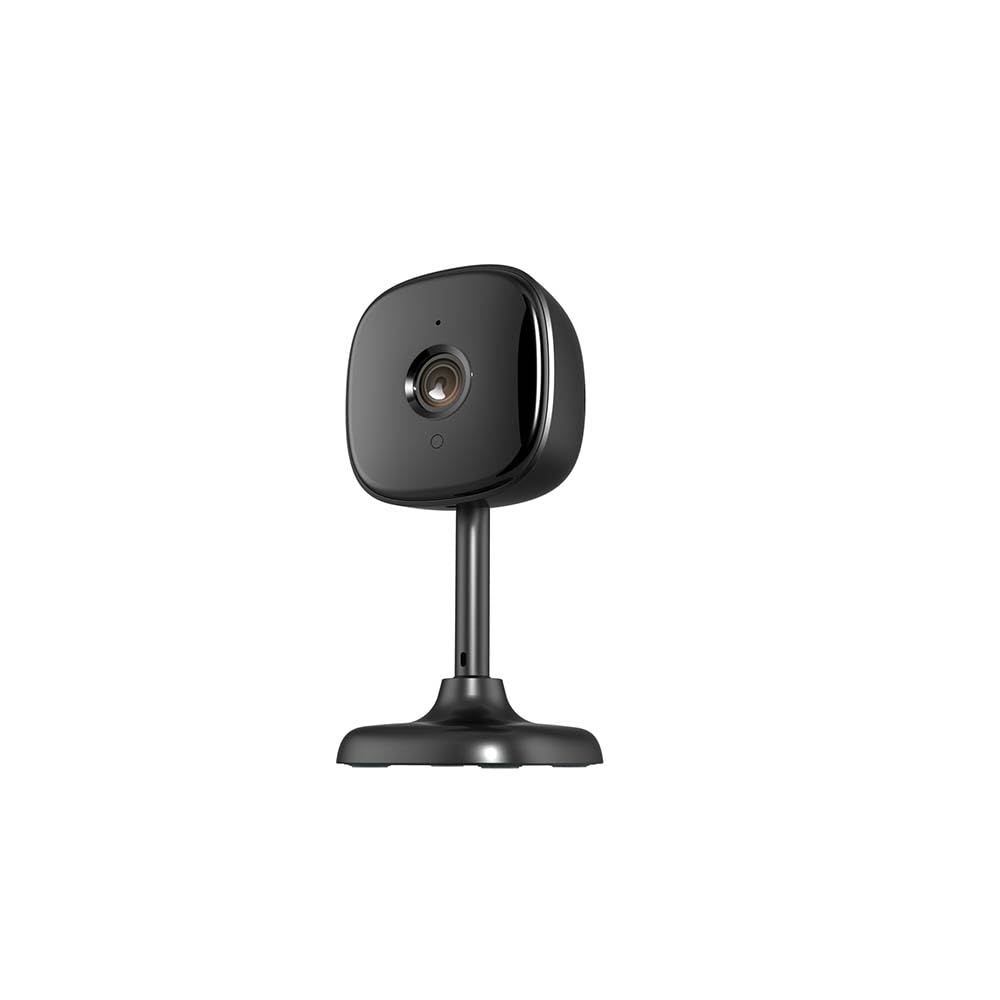
Сүрөт: алдыңкы view of the WOOX Indoor Smart Camera R4208, showing the lens and base.
- Камера линзасы: Video foo тартатtage.
- Инфракызыл диоддор: For automatic night vision.
- Микрофон: Аудио киргизүү жана эки тараптуу байланыш үчүн.
- Баяндамачы: Аудио чыгаруу жана эки тараптуу байланыш үчүн.
- Статус индикаторунун жарыгы: Indicates camera status (e.g., pairing mode, connected).
- Микро USB порту: Кубат туташтыруу үчүн.
- Калыбына келтирүү баскычы: Камераны заводдук жөндөөлөргө кайтаруу үчүн колдонулат.
- MicroSD картасынын уячасы: For local video storage (MicroSD card not included).
4. Орнотуу
4.1 Күйгүзүү
- Connect the USB power cable to the camera's Micro USB port.
- USB кабелинин экинчи учун берилген кубат адаптерине сайыңыз.
- Plug the power adapter into a wall outlet. The camera will power on, and the status indicator light will begin to flash.
4.2 Колдонмону орнотуу
- жүктөп алыңыз WOOX Home колдонмону Apple App Store дүкөнүнөн (iOS түзмөктөрү үчүн) же Google Play Store дүкөнүнөн (Android түзмөктөрү үчүн) жүктөп алыңыз.
- Alternatively, scan the QR code provided in the quick start guide or on the product packaging to download the app.
4.3 Аккаунт түзүү жана түзмөктү жупташтыруу
- Open the WOOX Home app and register for a new account or log in if you already have one.
- Мобилдик түзмөгүңүз 2.4 ГГц Wi-Fi тармагына туташкандыгын текшериңиз. Камера 5 ГГц Wi-Fi колдобойт.
- In the app, tap the "+" icon or "Add Device" to add a new device.
- Select "Security & Video Surveillance" and then choose "Smart Camera (Wi-Fi)".
- Follow the on-screen instructions to connect the camera. This typically involves resetting the camera (if the indicator light is not flashing rapidly), entering your Wi-Fi password, and scanning a QR code generated by the app with the camera's lens.
- Once connected, the camera's status indicator light will turn solid blue.
4.4 Камераны жайгаштыруу
Place the camera on a flat surface or mount it to a wall or ceiling using the provided mounting kit. Ensure the camera has a clear line of sight to the area you wish to monitor. Avoid placing it near heat sources or in direct sunlight.

Image: The WOOX Indoor Smart Camera R4208 positioned on a flat surface, demonstrating typical placement.
5. Иштөө нускамалары
5.1 Live View
Open the WOOX Home app and tap on your camera's name to access the live video feed. You can view the stream in real-time, switch to full-screen mode, and take snapshots or record video manually.
5.2 Эки тараптуу аудио
Түз эфирде view, tap the microphone icon to speak through the camera's speaker. Tap it again to end communication. The speaker icon allows you to listen to audio from the camera's location.
5.3 Кыймылды жана үндү аныктоо
Navigate to the camera settings in the WOOX Home app. Here you can enable motion detection and sound detection. Adjust sensitivity levels and set up notification schedules to receive alerts on your mobile device when activity is detected.
5.4 Түнкү көрүнүш
The camera is equipped with infrared LEDs that automatically activate in low-light conditions, providing clear black-and-white video footagтүндө э.
5.5 Видеону жазуу жана ойнотуу
If a MicroSD card (not included) is inserted, the camera can record video continuously or upon motion/sound detection. Access recorded footage through the "Playback" option in the camera's interface within the WOOX Home app. Cloud storage options may also be available through the app.
5.6 Smart Assistant интеграциясы
The WOOX R4208 camera is compatible with Amazon Alexa and Google Home. To integrate:
- Alexa үчүн: Enable the "WOOX Home" skill in the Alexa app, then link your WOOX Home account. Discover devices. You can then use voice commands like "Alexa, show me the living room camera."
- Google Home үчүн: Link the "WOOX Home" service in the Google Home app. You can then use voice commands like "Hey Google, show me the baby room camera on my Nest Hub."
6. Техникалык тейлөө
6.1 Тазалоо
Камераны тазалоо үчүн, линзаны жана корпусту жумшак, кургак чүпүрөк менен акырын сүртүңүз. Суюк тазалоочу каражаттарды же абразивдүү материалдарды колдонбоңуз, анткени алар түзмөккө зыян келтириши мүмкүн.
6.2 Микропрограмма жаңыртуулары
Periodically check the WOOX Home app for available firmware updates. Keeping your camera's firmware up-to-date ensures optimal performance, security, and access to new features. Follow the in-app instructions to perform updates.
6.3 Сактагычты башкаруу
If using a MicroSD card, regularly check its storage capacity through the app. You may need to format the card periodically or replace it if it becomes full or corrupted. Back up important recordings before formatting.
7. Кыйынчылыктарды
- Camera is offline:
Ensure the camera is powered on and the power adapter is securely plugged in. Check your Wi-Fi router and internet connection. Try restarting the camera by unplugging and replugging it. If the issue persists, try resetting the camera and re-pairing it with the app. - Wi-Fi'га туташпай жатат:
Verify that your Wi-Fi network is 2.4GHz. Ensure your Wi-Fi password is correct. Move the camera closer to your Wi-Fi router. Reset the camera and try the pairing process again. - Видеонун сапаты начар:
Check your internet connection speed. Ensure the camera lens is clean and free from obstructions. Adjust the camera's position to improve lighting conditions. - No audio or two-way audio not working:
Check the volume settings on your mobile device and within the WOOX Home app. Ensure the microphone and speaker on the camera are not obstructed. - Motion/Sound detection not working:
Verify that motion/sound detection is enabled in the app settings and that sensitivity levels are appropriately set. Check notification settings on your phone to ensure the WOOX Home app is allowed to send notifications.
8. Техникалык шарттар
| Модель номери | R4208 |
| Резолюция | 3 мегапиксел |
| Продукттун таза салмагы | 57г |
| Продукт өлчөмү | 55 x 55 x 112 мм |
| Байланыш | Wi-Fi (2.4 ГГц гана) |
| Шайкештик | Amazon Alexa, Google Home |
| Сактагыч | MicroSD картасы (128 ГБ чейин, кошулган эмес) |
| Түнкү көрүнүш | Инфракызыл светодиоддор |
| Эки тараптуу аудио | Колдоого алынган |
| Өндүрүүчү | Woox |
| Келип чыккан өлкө | Германия |
9. Кепилдик жана колдоо
Your WOOX Indoor Smart Camera 3MP R4208 comes with a standard manufacturer's warranty. For detailed warranty information, please refer to the warranty card included in your package or visit the official WOOX website. For technical support, troubleshooting assistance, or any product-related inquiries, please contact WOOX customer service through their official website or the contact information provided in the WOOX Home app.


