1. Киришүү
The MOOKA PR1 Air Purifier is designed to improve indoor air quality by effectively removing various airborne pollutants. Featuring a multi-stage filtration system, including a washable pre-filter, PM2.5 sensor, and specialized modes for pets, this device is suitable for large rooms up to 2200 sq.ft. This manual provides essential information for the safe and efficient operation and maintenance of your air purifier.

Image 1.1: The MOOKA PR1 Air Purifier, designed for home use, shown next to a dog, illustrating its effectiveness in pet-friendly environments.
2. Коопсуздук нускамалары
Сураныч, жаракаттарды же зыяндарды болтурбоо үчүн шайманды колдонуудан мурун бардык коопсуздук нускамаларын кылдат окуп чыгыңыз.
- Көчүрүү, тазалоо же тейлөө иштерин жүргүзүү алдында аба тазалагычты дайыма электр розеткасынан ажыратыңыз.
- Do not operate the appliance with a damaged cord or plug. If the cord or plug is damaged, contact customer support.
- Keep the air purifier away from water or other liquids. Do not use in wet environments such as bathrooms.
- Ensure the air inlet and outlet are not blocked. Maintain at least 15 cm (6 inches) clearance from walls and furniture.
- Манжаларды же бөтөн нерселерди аба кирүүчү же чыгуучу тешиктерине киргизбеңиз.
- Бул шайман физикалык, сенсордук же акыл-эс жөндөмү начар же тажрыйбасы жана билими жок адамдар (анын ичинде балдар) тарабынан колдонууга арналбайт, эгерде алардын коопсуздугуна жооптуу адам тарабынан шайманды колдонуу боюнча көрсөтмө болбосо .
- Use only MOOKA official replacement filters.
3. Продукциянын компоненттери
The MOOKA PR1 Air Purifier consists of the main unit, a multi-layer filter, and a control panel.
- Негизги блок: Houses the fan, motor, and air quality sensor.
- Башкаруу панели: Located on the top of the unit, with touch-sensitive buttons and a digital display.
- Фильтр бөлүмү: Located at the back/bottom for filter installation and replacement.

Image 3.1: An internal diagram of the air purifier, highlighting the high CADR, quiet operation, and extra-large fan for efficient air circulation.
4. Орнотуу
4.1 Пакеттен чыгаруу
- Аба тазалагычты таңгагынан кылдаттык менен чыгарып алыңыз.
- Remove all plastic wrapping from the unit and the filter.
4.2 Чыпканы орнотуу
The filter comes pre-installed but is wrapped in plastic for protection during shipping. This plastic must be removed before first use.
- Turn the air purifier upside down or open the back cover (depending on model design).
- Чыпканын капкагын ачып, алып салуу үчүн аны саат жебесине каршы бураңыз.
- Take out the filter and remove the plastic bag.
- Place the filter back into the unit, ensuring it is seated correctly.
- Фильтрдин капкагын кайра ордуна коюп, бекем бекитүү үчүн саат жебеси боюнча бураңыз.
4.3 Орнотуу
For optimal performance, place the air purifier on a flat, stable surface in the room where purification is desired. Ensure there is adequate space around the unit for proper airflow.
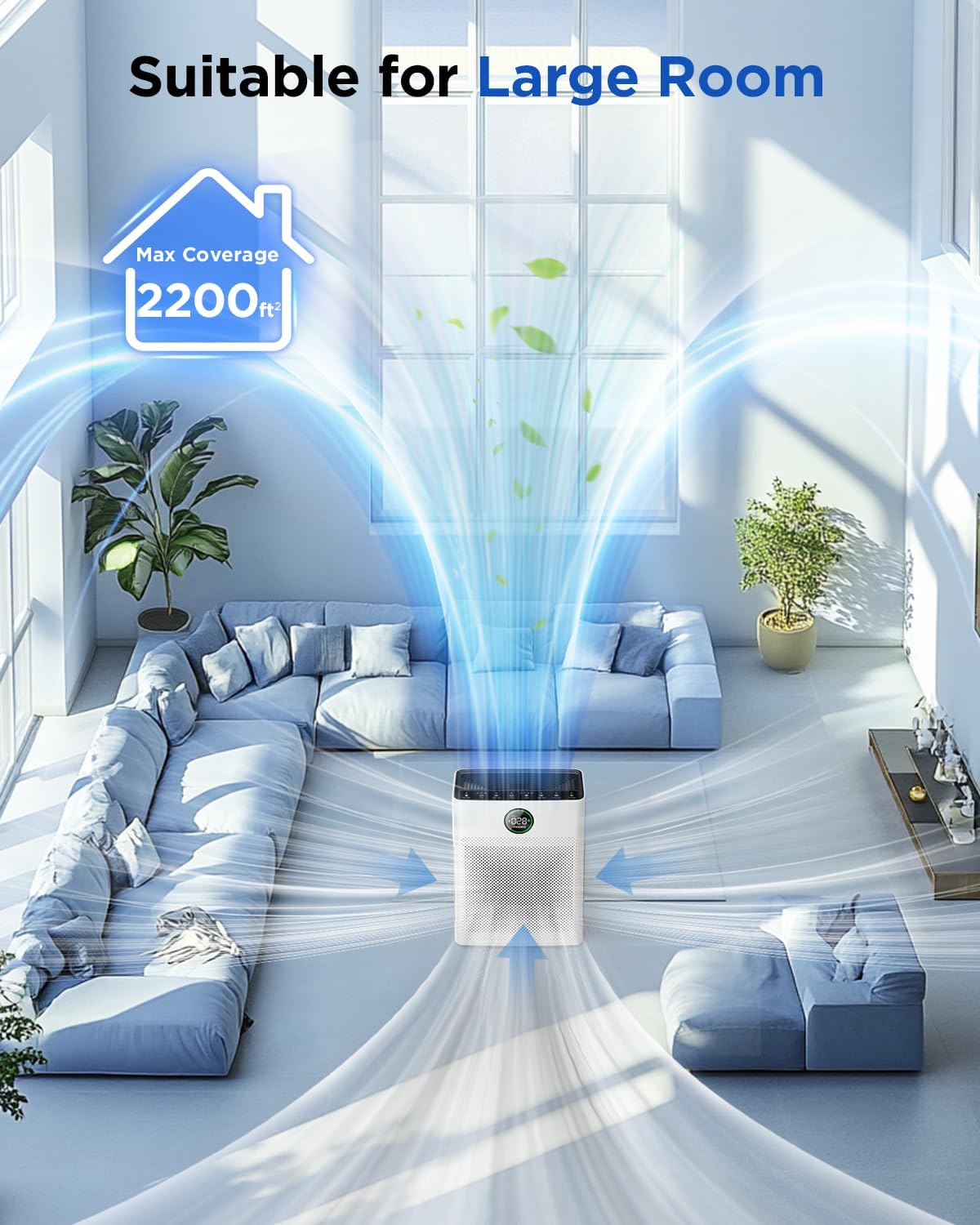
Image 4.1: The MOOKA PR1 Air Purifier positioned in a spacious living area, demonstrating its capability to purify air in large rooms up to 2200 sq.ft.
5. Иштөө нускамалары
Башкаруу панели жана анын функциялары менен таанышыңыз.
5.1 Күйгүзүү/өчүрүү
- Электр шнурын ылайыктуу электр розеткасына сайыңыз.
- басыңыз Күч аппаратты күйгүзүү же өчүрүү үчүн баскыч.
5.2 Fan Speed Modes
The air purifier offers 6 adjustable fan speed modes:
- Уйку режими: Operates at the lowest fan speed (26dB) for quiet operation during rest.
- I, II, III: Manual fan speed settings from low to high.
- Авто режим: The fan speed automatically adjusts based on the detected air quality.
- Үй жаныбарлары режими: Increases purification effect to capture pet hair and odors faster.
басыңыз Ылдамдык жеткиликтүү режимдер аркылуу айлануу үчүн баскычты басыңыз.

Image 5.1: The MOOKA PR1 Air Purifier with a dog, emphasizing the 'Pet Mode' feature on the control panel, designed for pet owners.
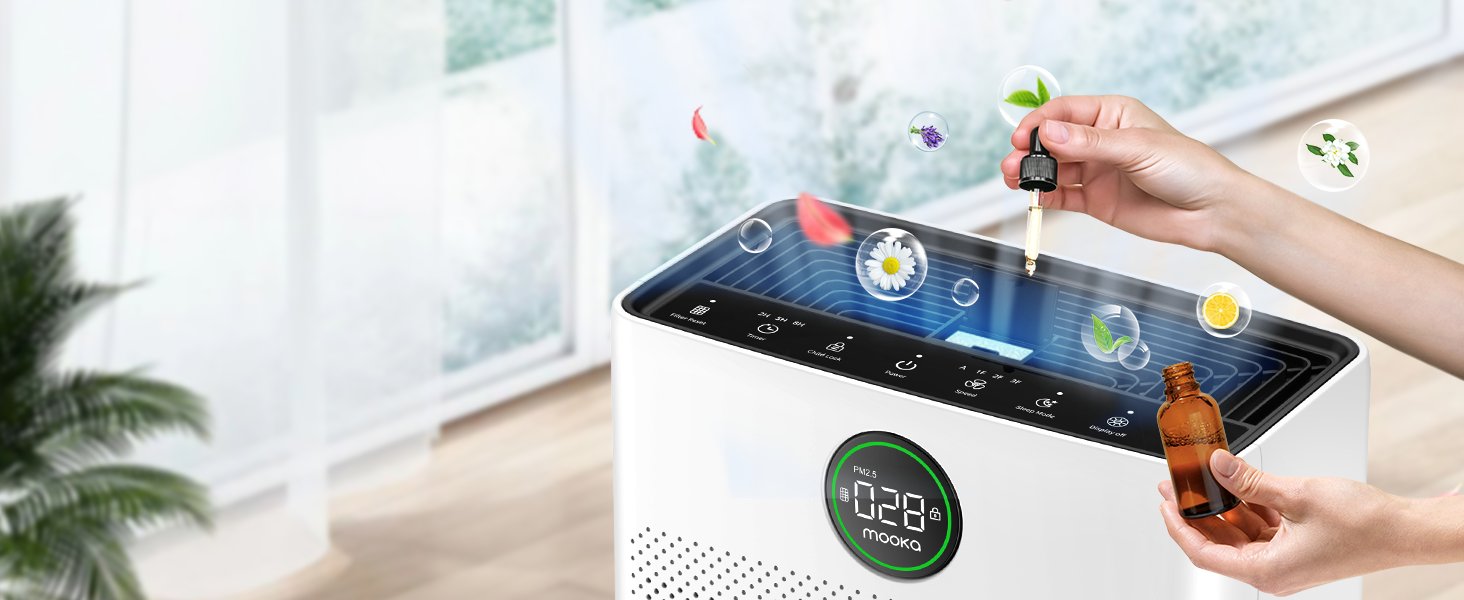
Image 5.2: The air purifier operating quietly in a bedroom at 26dB, indicating its suitability for undisturbed sleep.
5.3 Абанын сапатын көрсөтүү
The PR1 is equipped with a PM2.5 sensor that displays real-time air quality levels on the screen. The indicator light changes color to reflect air quality:
- Жашыл: Good air quality (0-75 PM2.5)
- Ачык күрөң: Абанын сапаты орточо (76-150 PM2.5)
- Кызыл: Poor air quality (>150 PM2.5)
Upon powering on, the air purifier enters a preheating state, and the indicator light will flash for approximately one minute before displaying the current air quality.

Image 5.3: The air quality sensor display on the MOOKA PR1, showing PM2.5 levels and their corresponding color-coded air quality ratings.
5.4 Таймер функциясы
The timer allows you to set the air purifier to operate for a specific duration before automatically turning off.
- басыңыз Таймер button to select desired operating hours (e.g., 2H, 5H, 8H).
5.5 Балдардан кулпу
The Child Lock feature prevents accidental changes to settings.
- басып, кармап туруңуз Child Lock button for 3 seconds to activate or deactivate.
5.6 Аромат функциясы
The air purifier includes an aroma function to diffuse essential oils.
- Locate the aroma pad compartment.
- Add a few drops of essential oil to the aroma pad. For first-time use, moisten the pad with more essential oil.
- Купени жабыңыз.

Image 5.4: A user adding essential oils to the aroma diffuser compartment of the air purifier, demonstrating the aromatherapy feature.
6. Техникалык тейлөө
Үзгүлтүксүз тейлөө оптималдуу иштешин камсыз кылат жана аба тазалагычыңыздын иштөө мөөнөтүн узартат.
6.1 Washable Pre-Filter Cleaning
The pre-filter can be cleaned to maintain efficiency.
- Аба тазалагычты розеткадан ажыратыңыз.
- Remove the pre-filter (refer to Filter Installation section).
- Rinse the pre-filter under running water to remove accumulated pet hair and dust.
- Allow the pre-filter to air dry completely in the shade before re-installing.

Image 6.1: The washable pre-filter, illustrating its ability to capture pet hair and the ease of cleaning under water.
6.2 Фильтрди алмаштыруу
The air purifier has a filter replacement reminder function. The filter indicator light will illuminate when it's time to replace the filter.
- Recommended replacement frequency: Every 3-6 months for optimal purification.
- To reset the filter reminder: After replacing the filter, press and hold the Чыпканы баштапкы абалга келтирүү баскычын 3 секунда басыңыз.
- Алмаштыруучу чыпка модели: Издөө B0DD3ZZ7ZV.

Image 6.2: The 'Pet Owners Choice' filter, designed to effectively filter pet dander, fluff, pollen, and absorb unwanted odors.
6.3 Сенсорду тазалоо
Regularly clean the PM2.5 sensor to maintain accurate air quality readings.
- The air quality sensor is located on the left back position of the unit.
- Gently wipe the sensor opening with a dry cotton swab or soft cloth to remove any dust accumulation.
7. Кыйынчылыктарды
Бул бөлүм сиз кабылышы мүмкүн болгон жалпы көйгөйлөрдү карайт.
7.1 Why does the screen show 005 air quality?
If the screen consistently displays '005' or an unexpectedly low reading, consider the following:
- Сенсордун жайгашкан жери: The air quality sensor is located on the left back position of the unit. Ensure this area is not obstructed.
- Сенсордун тазалыгы: Dust accumulation on the sensor can affect its accuracy. Refer to Section 6.3 for sensor cleaning instructions.
- Алдын ала ысытуу: After powering on, the air purifier is in a preheating state for about one minute, during which the indicator light flashes. Wait for this process to complete for accurate readings.
- Экологиялык факторлор: In very clean environments, a low reading is normal.
7.2 Түзмөк күйбөй жатат
- Кубат шнуру түзмөккө да, розеткага да бекем сайылганын текшериңиз.
- Ensure the electrical outlet is functioning by testing it with another appliance.
7.3 Poor Air Purification
- Check if the filter's plastic packaging has been removed.
- Ensure the filter is correctly installed and not clogged. Replace if necessary (refer to Section 6.2).
- Verify that the air inlet and outlet are not obstructed.
- Select an appropriate fan speed or Auto/Pet mode for the room size and air quality.
8. Техникалык шарттар
| Өзгөчөлүк | Спецификация |
|---|---|
| Модель номери | PR1 |
| Продукциянын өлчөмдөрү | 12.3"D x 6.4"W x 16.3"H |
| Салмагы | 8.93 фунт |
| Полдун аянты | 2200 чарчы футка чейин |
| Ызы-чуу деңгээли (Уйку режими) | 26 дБ |
| Түс | Ак |
| Сертификаттар | CARB, ETL, DOE, FCC |
| Ozone Release | Жок |
| UV жарык | Жок |
9. Кепилдик жана колдоо
MOOKA products are designed for long-term use and safety. This product is backed by authoritative certifications.
- For any questions or concerns regarding your MOOKA PR1 Air Purifier, please contact MOOKA customer support.
- Кепилдиктин конкреттүү чоо-жайын билүү үчүн сатып алуу документтерин караңыз.


