Introduction
Thank you for choosing the Mediashop Kendox Life Tracker Smartwatch. This manual provides essential information for setting up, operating, and maintaining your device. Please read it carefully to ensure optimal performance and longevity of your smartwatch.

Image: The Kendox Life Tracker Smartwatch, featuring a sleek black design with a digital display showing time, date, battery, steps, and vital signs like temperature.
Пакеттин мазмуну
Пакетиңизде бардык буюмдар бар экенин текшериңиз:
- 1x Kendox Life Tracker Health Watch
- 1x заряддоо кабели
Орнотуу колдонмосу
1. Аппаратты заряддоо
Before first use, fully charge your Kendox Life Tracker. Connect the provided charging cable to the charging port on the back of the smartwatch and plug the other end into a USB power source (e.g., computer, wall adapter).

Сүрөт: жакын план view of the charging cable connected to the charging port of the Kendox Life Tracker Smartwatch.
2. Колдонмону орнотуу жана жупташтыруу
To unlock the full potential of your smartwatch, download the companion app on your smartphone. The Kendox Life Tracker is compatible with both iOS and Android devices.
- Издөө the official "Kendox Life Tracker" app in the Apple App Store (for iOS) or Google Play Store (for Android).
- Колдонмону орнотуп, аны ачыңыз.
- Follow the on-screen instructions within the app to pair your smartwatch via Bluetooth. Ensure Bluetooth is enabled on your smartphone.

Image: Logos for Android and iPhone, indicating compatibility with both operating systems.
Иштөө нускамалары
Интерфейсте навигация
The Kendox Life Tracker features a 4.3 cm High-Definition display. Swipe left/right or up/down to navigate through different screens and menus. Tap to select an option.
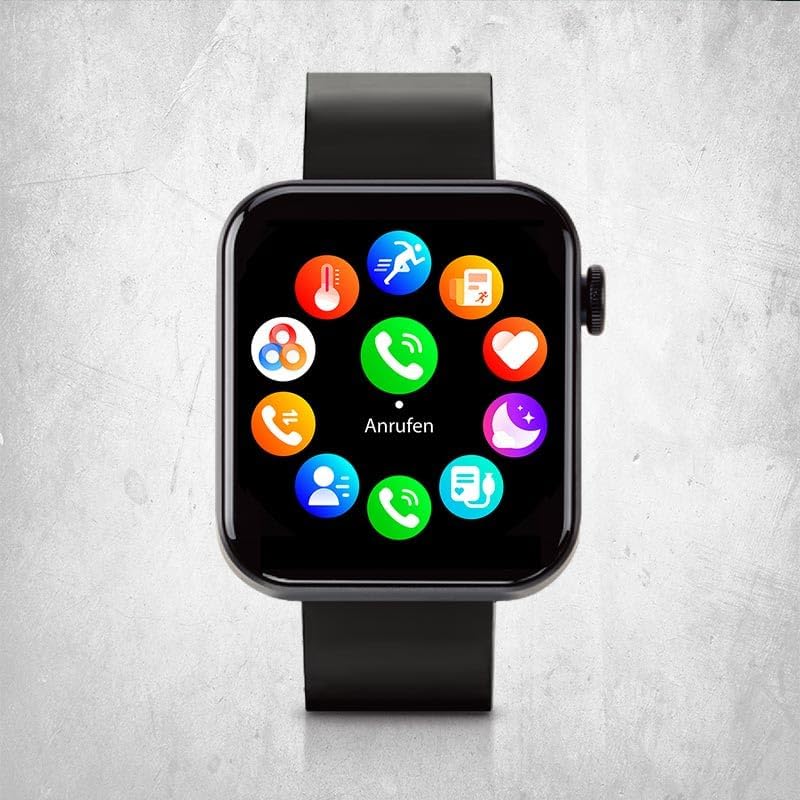
Image: The smartwatch display showing a circular menu of various app icons, including calls, messages, and health tracking.
Негизги өзгөчөлүктөрү жана функциялары
24/7 Vital Value Display
Continuously monitor your body temperature, heart rate, blood pressure, and blood oxygen levels. Access these readings directly on your watch or through the app for detailed historical data.

Image: A close-up of the smartwatch on a wrist, showing a heart icon and a heart rate reading of 91 BPM.
Intelligent Sport Modes
Choose from 18 different sport modes to track your fitness activities. The watch records steps, distance, calorie consumption, mileage, and training duration for comprehensive fitness tracking.

Image: The smartwatch on a person's wrist, displaying a timer during a workout, indicating active sport mode tracking.
Smart Functions (Calls & Messages)
Make and receive calls and messages directly from your watch when connected to your smartphone. Enjoy other versatile functions like weather information, flashlight, alarm clock, and reminders.

Image: A close-up of the smartwatch on a wrist, showing a numeric keypad for dialing a phone number.
Real-time Sleep Analysis
Optimize your sleep habits with real-time monitoring of sleep phases and patterns. The Kendox Life Tracker helps ensure restful sleep and improved well-being by providing insights into your sleep quality.
Техникалык тейлөө
Акылдуу саатыңызды тазалоо
Үзгүлтүксүз тазалоо аппаратыңыздын сырткы көрүнүшүн жана иштөөсүн сактоого жардам берет.
- Экранды жана денени жумшак, түксүз чүпүрөк менен сүртүңүз.
- Кежир тактар үчүн, бир аз гampчүпүрөктү суу менен. Катуу химиялык заттарды же абразивдүү материалдарды колдонуудан алыс болуңуз.
- Заряддоодон мурун заряддоо контакттары таза жана кургак экенин текшериңиз.
Суу каршылык
The Kendox Life Tracker is sweat-resistant and waterproof. However, it is not recommended for diving or high-pressure water activities. Always dry the watch thoroughly after exposure to water.
Проблемаларды чечүү
| Көйгөй | Мүмкүн себеп | Чечим |
|---|---|---|
| Саат күйбөйт | Батареянын аздыгы; аппарат катып калган. | Charge the watch for at least 30 minutes. If still unresponsive, perform a soft reset by pressing and holding the side button for 10-15 seconds. |
| Смартфон менен жупташтыруу мүмкүн эмес | Bluetooth өчүк; саат жупташтыруу режиминде эмес; колдонмодо көйгөйлөр бар. | Ensure Bluetooth is enabled on your phone. Restart both the watch and phone. Reinstall the app if necessary. Check app permissions. |
| Inaccurate vital sign readings | Туура эмес орнотуу; сенсордун тыгылып калышы; өлчөө учурунда кыймыл. | Ensure the watch is worn snugly on your wrist. Clean the sensor on the back of the watch. Remain still during measurements. Note that this device is not a medical instrument. |
| Билдирмелер алынган жок | App permissions; Bluetooth connection lost; notification settings. | Check notification permissions in the app and on your phone. Verify Bluetooth connection. Ensure notifications are enabled in the watch app settings. |
Техникалык шарттар
| Өзгөчөлүк | Деталь |
|---|---|
| Модель номери | 9010041056028 |
| Бренд | Mediashop |
| Дисплей | 4.3 cm High-Definition Digital Display |
| Байланыш | Bluetooth |
| Операция системасы | Wear OS |
| Шайкеш түзмөктөр | Smartphones (iOS & Android), Tablets, PCs, Laptops |
| Өлчөмдөр | 21 x 4.3 x 8 см |
| Салмагы | 120 грамм |
| Суу каршылык | Sweat-resistant and waterproof (not for diving) |
| Батареянын иштөө мөөнөтү | 7 күнгө чейин (колдонууга жараша) |

Image: An infographic highlighting key specifications such as the 4.3 cm High-Definition Display, up to 7 days battery life, sweat resistance, waterproofing, flexible silicone band, and integrated flashlight.
Кепилдик жана колдоо
For warranty information and customer support, please refer to the official Mediashop webсайтка же түздөн-түз кардарларды тейлөөгө кайрылыңыз. Ар кандай кепилдик дооматтары үчүн сатып алганыңыздын далилин сактаңыз.
Өндүрүүчү: Mediashop
ASIN: B0DCBF6JTG
Модел: 9010041056028
Кошумча жардам алуу үчүн, баш багыңыз Mediashop Store on Amazon.


