1. Киришүү
This manual provides essential instructions for the safe and efficient operation, setup, and maintenance of your OMTech 30W MOPA Fiber Laser Engraver with Rotary Axis, Model LYF-30JW(S). Please read this manual thoroughly before operating the machine to ensure proper usage and to prevent damage or injury.
The OMTech 30W MOPA Fiber Laser Engraver is designed for precise and high-speed marking and engraving on various materials, including metals and certain plastics. It features a robust 30W JPT fiber laser source, a 5.9"x5.9" (150x150mm) work area, and comes with a rotary axis for cylindrical object engraving.
2. Коопсуздук нускамалары
WARNING: This is a Class 2 laser product. Always wear appropriate laser safety glasses when operating the machine. Never look directly into the laser beam.
- Ensure the machine is properly grounded before use.
- Operate the laser engraver in a well-ventilated area to dissipate fumes and debris.
- Иш аянтын күйүүчү материалдардан алыс кармаңыз.
- Иш учурунда машинаны кароосуз калтырбаңыз.
- Авариялык токтотуу баскычынын жайгашкан жери жана функциясы менен таанышып алыңыз.
- Only trained personnel should operate or maintain the machine.
- Avoid placing reflective materials in the laser path without proper precautions.
3. Продукциянын компоненттери
The OMTech 30W MOPA Fiber Laser Engraver system includes the main laser unit, a rotary axis attachment, and necessary cables and software.

Image 3.1: The OMTech 30W MOPA Fiber Laser Engraver with the rotary axis accessory.
3.1 Main Laser Unit
- Laser Head (Galvo Scanner): Directs the laser beam.
- Жумуш платформасы: The base where materials are placed for engraving.
- Башкаруу панели: Includes power switch, emergency stop, and key switch.
- Focusing Column: Adjustable column for setting the correct focal distance.
- Dual Red Dot Locators: Aids in precise material positioning and focusing.
3.2 Rotary Axis
The included rotary axis allows for engraving on cylindrical or irregularly shaped objects.

Image 3.2: The laser engraver shown with the rotary axis connected, ready for cylindrical object engraving.
4. Орнотуу колдонмосу
4.1 Кутудан чыгаруу жана жайгаштыруу
- Бардык компоненттерди таңгактан кылдаттык менен алып салыңыз.
- Place the laser engraver on a stable, level surface in a well-ventilated area.
- Ensure adequate space around the machine for operation and maintenance.
4.2 Электрдик туташуу
- Connect the power cable to the machine and a grounded electrical outlet.
- Voltage машинанын талаптарына дал келет.
4.3 Программалык камсыздоону орнотуу
The engraver is compatible with LightBurn and EZCad software. Install the software on your computer using the provided media or by downloading the latest version from the official OMTech webсайт.
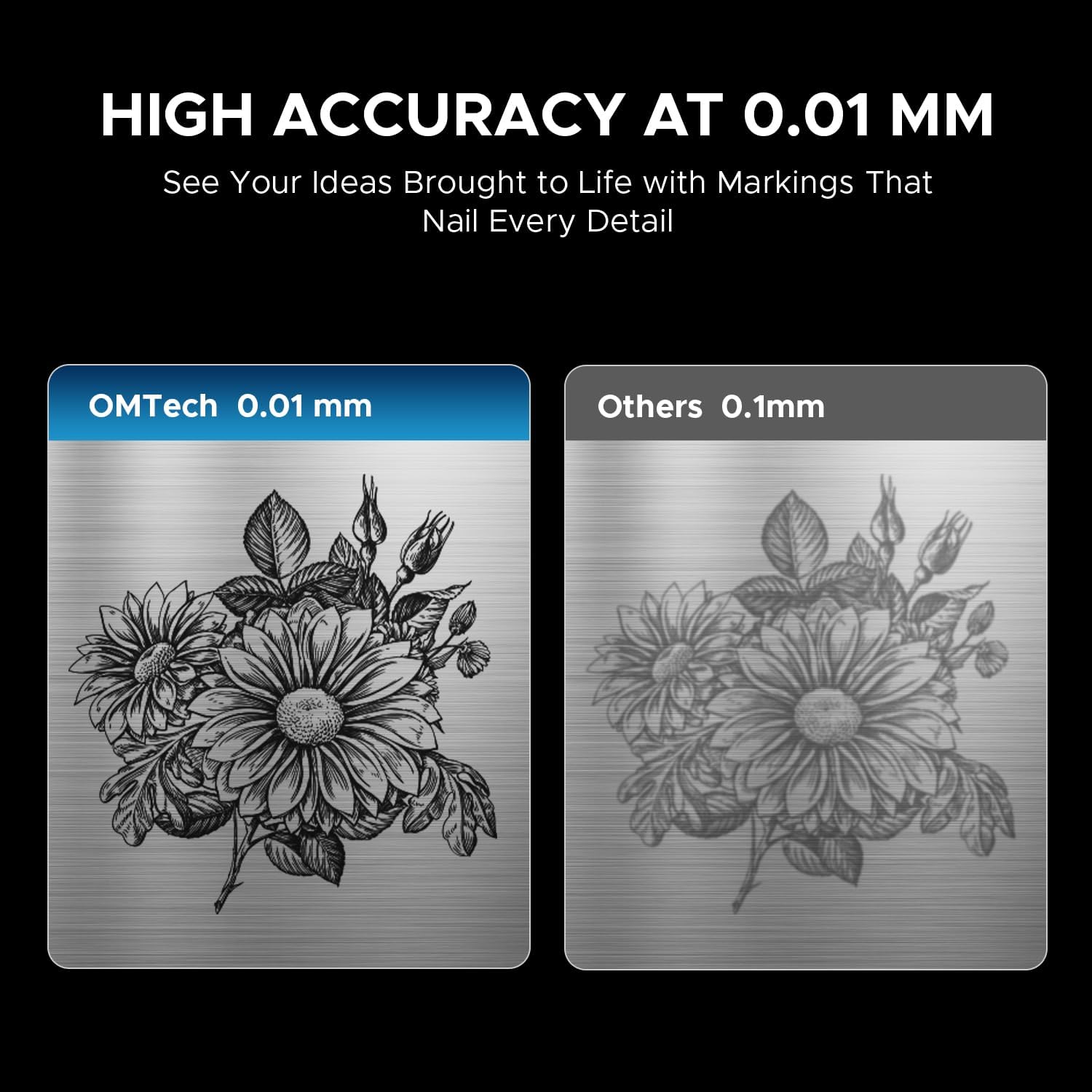
Image 4.1: The laser engraver connected to a computer, illustrating software compatibility and setup.
4.4 Rotary Axis Connection (Optional)
- If using the rotary axis, connect its cable to the designated port on the main laser unit.
- Securely mount the rotary axis to the work platform if required for your application.
5. Иштөө нускамалары
5.1 Күйгүзүү
- Insert the key into the key switch and turn it to the 'ON' position.
- Негизги кубат баскычын басыңыз.
- The machine will initialize.
5.2 Material Preparation and Placement
Ensure your material is clean and free of obstructions. Place the material securely on the work platform or within the rotary axis chuck.
5.3 Лазерди фокустоо
Use the dual red dot locators to achieve the correct focal distance. Adjust the height of the laser head until the two red dots converge into a single, sharp point on the material surface. This ensures optimal engraving quality and depth.
5.4 Software Operation (LightBurn/EZCad)
- Launch the engraving software (LightBurn or EZCad) on your computer.
- Дизайныңызды импорттоңуз же түзүңүз.
- Set engraving parameters such as power, speed, frequency, and pulse width according to your material and desired effect. Refer to the software's user manual for detailed parameter guidance.
- Preview the engraving path to confirm positioning.
5.5 Engraving Process
- Ensure all safety precautions are in place, including wearing laser safety glasses.
- Initiate the engraving job from the software.
- Monitor the engraving process. In case of any issue, press the emergency stop button immediately.
- Once complete, wait for the laser to stop before removing the engraved material.
5.6 Шайкеш материалдар
The OMTech 30W MOPA Fiber Laser Engraver is suitable for marking and engraving a wide range of materials:

Сүрөт 5.1: Мисamples of materials that can be engraved with the OMTech MOPA Fiber Laser.
- Metals: Brass, Gold, Silver, Aluminum, Titanium, Tungsten, Stainless Steel.
- Other Materials: Brick, Tile, Marble, Granite.
5.7 Engraving Performance
The machine offers high speed and precision for various applications.

Image 5.2: Illustration of the high engraving speed capability of fiber lasers compared to other laser types.

Сүрөт 5.3: Мисample of engraving depth, demonstrating the machine's capability for multi-pass cutting up to 0.8 mm.

Image 5.4: Visual comparison highlighting the 0.01 mm engraving accuracy of the OMTech laser.
6. Техникалык тейлөө
Үзгүлтүксүз тейлөө сиздин лазердик оюгучуңуздун узак иштөөсүн жана оптималдуу иштешин камсыздайт.
- Линзаны тазалоо: Periodically inspect and clean the laser lens using specialized lens cleaning solutions and wipes to prevent dust and debris from affecting beam quality.
- Work Area Cleanup: Keep the work platform and surrounding area clean from engraved material residue.
- Кабелдик текшерүү: Regularly check all cables for signs of wear or damage. Replace any damaged cables immediately.
- Аба желдеткичтери: Ensure the machine's air vents are clear and unobstructed to maintain proper cooling.
The fiber laser source has an estimated service life of over 100,000 hours, requiring minimal maintenance for the laser source itself.
7. Кыйынчылыктарды
This section addresses common issues you might encounter. For more complex problems, please contact OMTech support.
- Лазердик чыгаруу жок:
- Check if the machine is powered on and the key switch is in the 'ON' position.
- Ensure the emergency stop button is not engaged.
- Verify all cables are securely connected. - Poor Engraving Quality:
- Re-check the laser focus. The red dots should converge perfectly.
- Clean the laser lens if it appears dirty.
- Adjust engraving parameters (power, speed, frequency, pulse width) for the specific material.
- Ensure the material is flat and securely placed. - Программалык камсыздоого туташуу маселелери:
- Restart both the machine and the computer.
- Check USB cable connection.
- Reinstall software drivers if necessary. - Rotary Axis Not Functioning:
- Ensure the rotary axis is correctly connected to the main unit.
- Verify that the rotary axis settings are enabled and configured in the software.
8. Техникалык шарттар
| Өзгөчөлүк | Спецификация |
|---|---|
| Модель номери | LYF-30JW(S) |
| Лазердик күч | 30 Вт |
| Лазердик булак | JPT Fiber Laser |
| Лазердик толкун узундугу | 1064 нм |
| Макс. Белгилөө ылдамдыгы | 10,000 мм/с |
| Белгилердин тактыгы | 0.01 мм |
| Max. Single Pass Marking Depth | 0.08 мм |
| Жыштык диапазону | 1-4000 кГц |
| Adjustable Pulse Width | 2-500 ns |
| Жумуш аймагы | 5.9" x 5.9" (150 мм x 150 мм) |
| Estimated Laser Service Life | 100,000 XNUMX+ саат |
| Муздатуу системасы | Аба муздатуу |
| Шайкеш программалык камсыздоо | LightBurn (Windows 7, 8, 10, 11, macOS), EZCad2 |
| Колдоого алынган сүрөт форматтары | .bmp, .gif, .jpg, .jpeg, .dxf, .dst, .ai |
| Өлчөмдөрү (L x W x Y) | 15.8 x 13.4 x 21.3 дюйм |
| Таза Салмак | 40 XNUMX фунт |
| Сертификаттар | FDA, CE |
Эскертүү: Техникалык мүнөздөмөлөр алдын ала эскертүүсүз өзгөртүлүшү мүмкүн.
9. Колдоо жана кепилдик
9.1 Кардарларды колдоо
For technical assistance, troubleshooting, or any inquiries regarding your OMTech laser engraver, please contact our support team:

Image 9.1: OMTech customer support contact details.
- Телефон: +1 (949) 438-4949
- Жалпы электрондук почта: SUPPORT@OMTECHLASER.COM
- Техникалык колдоо электрондук почтасы: TECHSUPPORT@OMTLASER.COM
Support is available 24/7.
9.2 Кепилдик маалыматы
Please refer to the official OMTech website or your purchase documentation for detailed warranty information regarding your OMTech 30W MOPA Fiber Laser Engraver. Warranty terms and conditions may vary.


