1. Коопсуздук нускамалары
Please read and understand all safety instructions before operating the Moukey MTs10-2 Karaoke Machine. Retain this manual for future reference.
- Аппаратты жамгырдын, нымдуулуктун же экстремалдык температуранын таасиринде калтырбаңыз.
- Аппаратты жылуулук булактарынын жанына же тике күн нуруна коюудан алыс болуңуз.
- в ачпагылаasing; бардык тейлөөлөрдү квалификациялуу кызматкерлерге тапшырыңыз.
- Ашыкча ысып кетүүнүн алдын алуу үчүн туура желдетүүнү камсыз кылыңыз.
- Берилген кубат адаптерин гана колдонуңуз.
- Балдар жетпеген жерде сактаңыз.
- Батареяларды жергиликтүү эрежелерге ылайык таштаңыз.
2. Пакеттин мазмуну
Төмөндө тизмеленген нерселердин баары пакетиңизге камтылганын текшериңиз:
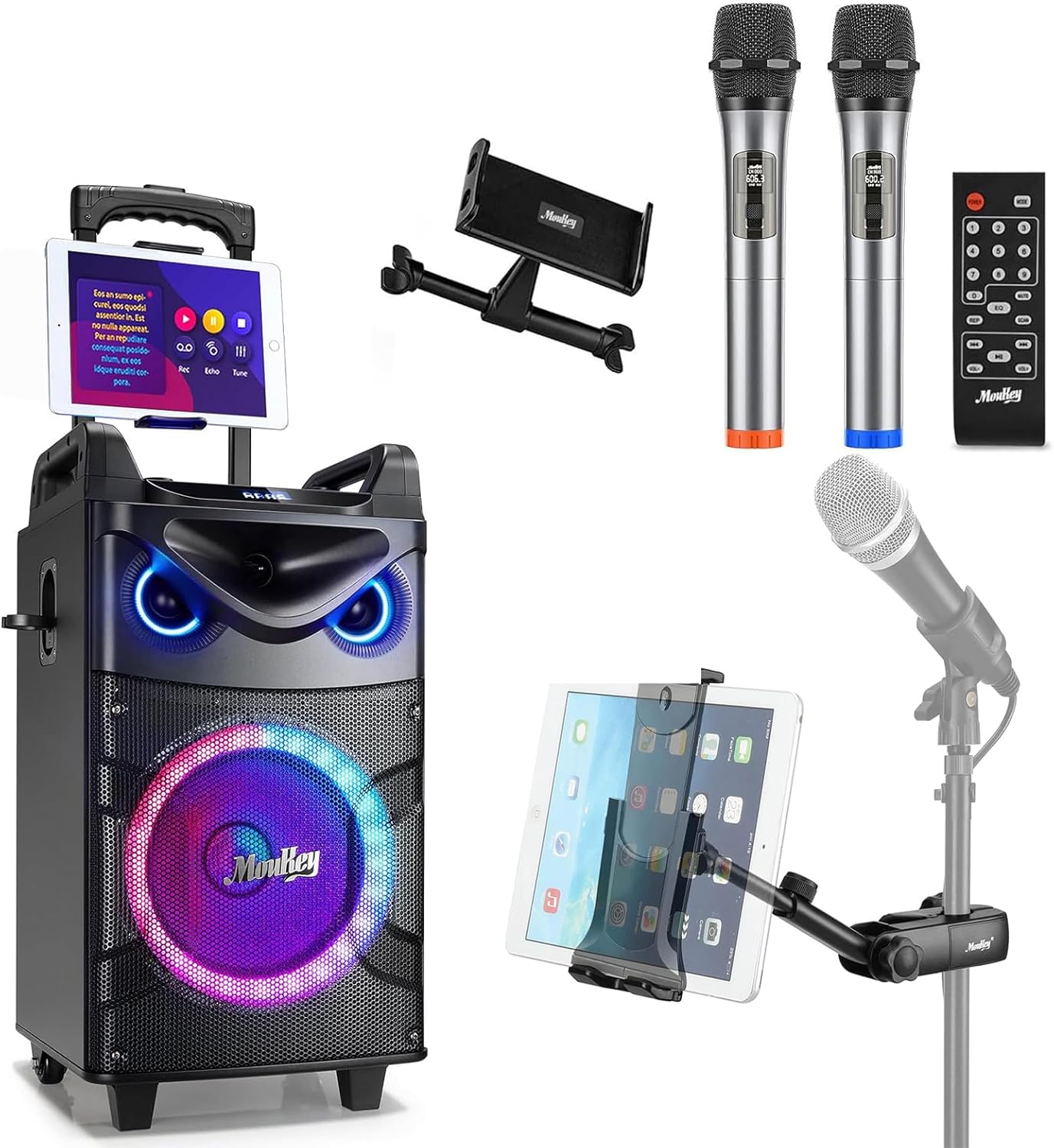
- Moukey MTs10-2 Karaoke Machine
- Wireless Microphone (x2)
- Adjustable Tablet Holder
- Алыстан башкаруу
- Кубаттуу адаптер
- 3.5mm AUX кабели
- TV Cable (RCA to 3.5mm)
- Колдонуучунун Колдонмосу (бул документ)

3. Продукт бүтүп калдыview
3.1 Негизги компоненттер
The Moukey MTs10-2 Karaoke Machine features a robust design with integrated audio components and versatile connectivity options.
- 10 дюймдук Вуфер: Provides powerful bass and full-range sound reproduction.
- 3 дюймдук твитер: Delivers clear high-frequency audio.
- UHF Wireless Microphones: Two high-fidelity microphones for vocal performance.
- Adjustable Tablet Holder: Securely holds smartphones and tablets for lyric display or video playback.
- Интегралдык LED жарыктары: Dynamic colorful lights that synchronize with music.

3.2 Башкаруу панели
The control panel located on the top of the unit provides access to all functions and adjustments.
- Үн баскычы: Негизги үндү тууралайт.
- Басс тууралоо: Controls the low-frequency output.
- Үч ырды жөндөө: Controls the high-frequency output.
- Режим баскычы: Switches between input sources (Bluetooth, AUX, USB, TF Card, FM Radio).
- Light FX Button: Cycles through LED light modes.
- USB порт: USB дискти ойнотуу үчүн.
- TF карта уячасы: TF картасын ойнотуу үчүн.
- AUX кирүүсү: тышкы аудио түзмөктөр үчүн 3.5 мм киргизүү.
- 6.35mm Mic Jacks: Two additional inputs for wired microphones.
- INST/TWS Button: Initiates True Wireless System pairing or instrument input.

4. Орнотуу
4.1 Караоке аппаратын кубаттоо
- Connect the provided power adapter to the DC IN port on the back of the karaoke machine.
- Адаптерди кадимки эле розеткага сайыңыз.
- Заряддоо индикаторунун жарыгы күйөт. Толук кубаттоо, адатта, болжол менен 6 саатты талап кылат.
- The machine offers up to 14 hours of playing time on a full charge, depending on usage.

4.2 Installing Microphone Batteries
Each wireless microphone requires two AA batteries (not included).
- Unscrew the bottom cap of each microphone.
- Туура полярдуулукту (+/-) камсыз кылуу менен эки AA батарейкасын салыңыз.
- Астыңкы капкакты кайра бекем бурап бекитиңиз.

4.3 Attaching the Tablet Holder
The adjustable tablet holder can be attached to the karaoke machine or a separate microphone stand.
- To the Karaoke Machine: Slide the tablet holder's base into the designated slot on top of the MTs10-2 unit until it clicks into place.
- To a Mic Stand: cl колдонуңузamp mechanism on the tablet holder to secure it to a standard microphone stand pole.
- Adjust the flexible ball joint and the 360° rotatable clamp каалаган жетүү үчүн viewing angle for your device.


5. Иштөө нускамалары
5.1 Күйгүзүү/өчүрүү
Press and hold the Power button on the control panel to turn the karaoke machine on or off.
5.2 Bluetooth байланышы
- Turn on the karaoke machine. It will automatically enter Bluetooth pairing mode, indicated by a flashing 'BLUE' on the display.
- Смартфонуңузда же планшетиңизде Bluetooth'ду иштетиңиз жана жеткиликтүү түзмөктөрдү издеңиз.
- Select 'Moukey MTs10-2' from the list to pair. A confirmation tone will sound upon successful connection.
5.3 Микрофонду колдонуу
- Turn on the wireless microphones using their respective power switches. They will automatically connect to the karaoke machine.
- Adjust the microphone volume using the dedicated controls on the machine.
- For wired microphones, plug them into the 6.35mm Mic Jacks on the control panel.
5.4 Чыныгы зымсыз система (TWS) жупташтыруу
The TWS function allows you to connect two MTs10-2 units for a stereo sound experience (second unit sold separately).
- Ensure both MTs10-2 units are powered on and not connected to any Bluetooth device.
- On one unit (the master), press and hold the 'INST/TWS' button until you hear a pairing tone.
- The two units will automatically connect. Once paired, connect your Bluetooth device to the master unit as described in Section 5.2.

5.5 LED жарык режимдери
Press the 'Light FX' button on the control panel or remote control to cycle through various colorful LED light modes. The lights can change color with the beat of the music, creating a dynamic atmosphere.

5.6 Audio Input Options
The MTs10-2 supports multiple audio input methods:
- Bluetooth: Wireless connection to smartphones, tablets, and other Bluetooth-enabled devices.
- AUX кирүүсү: Connect external audio players using the provided 3.5mm AUX cable.
- USB/TF картасы: Insert a USB drive or TF card into the respective slots for direct audio playback.
- FM радиосу: Жергиликтүү станцияларды угуу үчүн FM радио режимине которулуңуз.

5.7 Үндү тууралоо
Use the dedicated knobs on the control panel to fine-tune your audio output:
- Үн баскычы: Үнүн жогорулатуу үчүн сааттын жебеси боюнча, азайтуу үчүн сааттын жебесине каршы буруңуз.
- Басс тууралоо: Adjust to enhance or reduce low frequencies.
- Үч ырды жөндөө: Adjust to enhance or reduce high frequencies.
6. Техникалык тейлөө
Proper maintenance ensures the longevity and optimal performance of your karaoke machine.
- Тазалоо: Агрегаттын сыртын тазалоо үчүн жумшак, кургак чүпүрөктү колдонуңуз. Суюк тазалагычтарды же абразивдүү материалдарды колдонбоңуз.
- Сактагыч: Store the machine in a cool, dry place away from direct sunlight and extreme temperatures when not in use.
- Батареяга кам көрүү: If storing for an extended period, fully charge the internal battery every 3-6 months to maintain its health. Remove AA batteries from microphones if not used for a long time.
- Вентиляция: Ensure the speaker grilles and vents are free from dust and obstructions.
7. Кыйынчылыктарды
Жалпы маселелер жана аларды чечүү үчүн төмөнкү таблицага кайрылыңыз.
| Көйгөй | Мүмкүн себеп | Чечим |
|---|---|---|
| Күч жок | Battery depleted; Power adapter not connected. | Charge the machine; Ensure power adapter is securely connected to both the unit and a working outlet. |
| Үн чыгышы жок | Үнү өтө төмөн; Киргизүү режими туура эмес; Түзмөк туташкан эмес. | Increase master volume; Press 'Mode' button to select correct input; Re-pair Bluetooth device or check AUX/USB connection. |
| Микрофон иштебей жатат | Microphone off; Batteries depleted; Out of range. | Turn on microphone; Replace AA batteries; Ensure microphone is within operating range of the machine. |
| Bluetooth байланышы туруксуз | Device too far; Interference; Other Bluetooth devices connected. | Move device closer to the machine; Avoid obstacles; Disconnect other Bluetooth devices. |
| TWS жупташтырылган жок | One or both units already connected to Bluetooth; Incorrect pairing procedure. | Ensure both units are disconnected from other Bluetooth devices; Follow TWS pairing steps in Section 5.4 carefully. |
8. Техникалык шарттар
| Өзгөчөлүк | Спецификация |
|---|---|
| Бренд | Moukey |
| Модел | MTs10-2 |
| Вуфердин өлчөмү | 10 дюйм |
| Tweeter өлчөмү | 3 дюйм |
| Максималдуу кубаттуулук | 160 Ватт |
| Power Source | Батарея менен иштейт |
| Байланыш технологиясы | Bluetooth |
| Каналдардын саны | 4 |
| Аудио киргизүү | Wired microphones, wireless microphones, musical instruments, audio players |
| Microphone Connector Type | 6.35mm Jack (for wired mics) |
| Планшет кармоочу шайкештиги | 4.7 to 12.9 inches phones & tablets (horizontal placement) |
| Монтаж түрү | Кабат туруктуу |
| Түс | Кара |
9. Кепилдик жана колдоо
Moukey products are designed and manufactured to the highest quality standards. For warranty information, technical support, or service inquiries, please refer to the warranty card included in your package or visit the official Moukey webсайт. Сиз да зыярат кылсаңыз болот Amazon'догу Moukey дүкөнү кошумча продукт маалымат жана колдоо ресурстар үчүн.


