1. Киришүү
Thank you for choosing the CHERRY XTRFY MX 3.1 Mechanical Wired Gaming Keyboard. This manual provides comprehensive instructions for setting up, operating, and maintaining your new keyboard to ensure optimal performance and longevity. Designed for gamers and professionals alike, the MX 3.1 features high-quality components and customizable options to enhance your computing experience.

Figure 1.1: CHERRY XTRFY MX 3.1 Keyboard - Top View
The MX 3.1 keyboard combines stunning visuals with a robust aluminum housing and vibrant RGB lighting. It features new CHERRY MX2A switches and a noise-damping structure, elevating your gaming and typing experience. The keyboard is built for durability and precision, offering a comfortable and responsive interface.
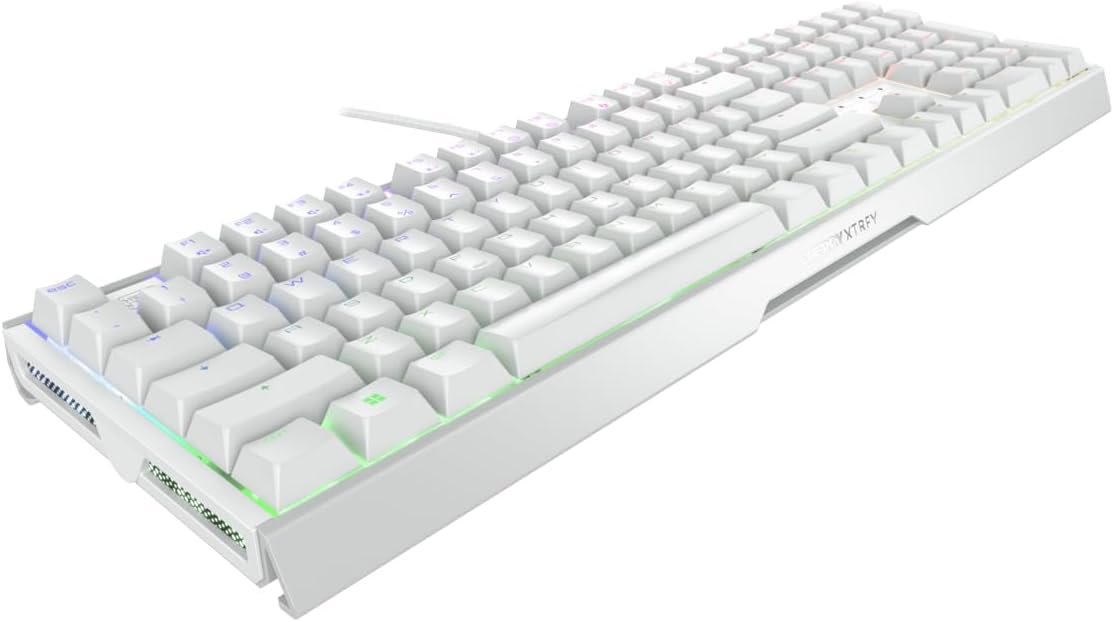
Figure 1.2: CHERRY XTRFY MX 3.1 Keyboard - Angled View
2. Орнотуу колдонмосу
2.1 Пакеттин мазмуну
- CHERRY XTRFY MX 3.1 Mechanical Wired Gaming Keyboard
- Detachable USB-A Cable
- Screwable Detachable Metal Feet (pre-installed or included separately)
- Ыкчам баштоо колдонмосу (бул колдонмо)
2.2 Баскычтопту туташтыруу
- Баскычтопту жана бардык аксессуарларды таңгактан чыгарыңыз.
- Locate the detachable USB-A cable. Connect one end of the cable to the USB-C port on the keyboard.
- USB-A кабелинин экинчи учун компьютериңиздеги жеткиликтүү USB портуна туташтырыңыз.
- Клавиатура сиздин операциялык системаңыз тарабынан автоматтык түрдө таанылат. Негизги функциялар үчүн кошумча драйверлер талап кылынбайт.
2.3 Adjusting Keyboard Height
The MX 3.1 keyboard includes screwable detachable metal feet for individual positioning and ergonomic comfort. These feet can be adjusted or removed based on your preferred typing angle.

Figure 2.1: Detachable Metal Feet for Height Adjustment
3. Иштөө нускамалары
3.1 CHERRY MX2A Switches
The CHERRY XTRFY MX 3.1 keyboard features new CHERRY MX2A switches, engineered in Germany for reliable and comfortable typing. These switches incorporate gold crosspoint precision, premium lubricant, and an innovative spring design for smoother actuation, improved acoustics, and a lifespan of 100 million keystrokes.

Figure 3.1: CHERRY MX2A Switch Options
The MX 3.1 is available with different MX2A switch types, allowing you to choose based on your preferred tactile feedback and sound:
- CHERRY MX2A Red Switch: Offers a linear, smooth, and direct keystroke without a noticeable click. Ideal for fast-paced gaming.
- CHERRY MX2A Brown Switch: Provides a targeted and noticeable tactile bump without an audible click, offering a balance between typing and gaming.
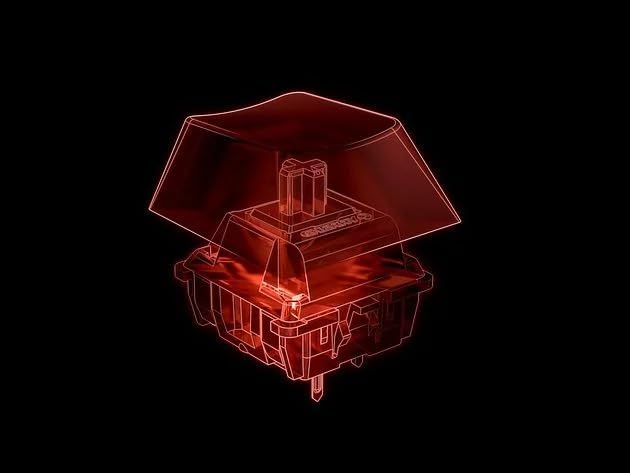
Figure 3.2: Detail of a CHERRY MX2A Switch
3.2 Customizable RGB Illumination
The MX 3.1 features 16.8 million color LED illumination, which can be customized to your preference. You can choose from integrated color schemes or create your own unique lighting effects.

3.3-сүрөт: Ыңгайлаштырылуучу RGB жарыктандыруу
To fully customize the RGB illumination, multimedia controls, shortcuts, text modules, and macros, download and install the official CHERRY software from the CHERRY XTRFY website. The software provides an intuitive interface for advanced personalization.

Figure 3.4: Side RGB Illumination
3.3 Noise Damping Structure
The keyboard incorporates a damping structure designed to reduce noise during fast typing and intense gaming sessions. This feature helps maintain focus and provides a more pleasant acoustic environment.

3.5-сүрөт: D ызы-чуусуamping Feature
Integrated mechanisms further improve acoustics and contribute to ergonomic comfort, reducing strain on fingers and wrists during long periods of use.
4. Техникалык тейлөө
4.1 Баскычтопту тазалоо
- Тазалоодон мурун клавиатураны компьютерден ажыратыңыз.
- Бир аз жумшак, түксүз кездемени колдонуңуз dampачкыч капкактарын жана шассиди сүртүү үчүн суу же жумшак тазалоо эритмеси менен камтылган.
- Ачкычтардын ортосундагы чаң жана таштанды үчүн кысылган абаны колдонуңуз.
- Avoid using harsh chemicals, abrasive cleaners, or excessive moisture, as these can damage the keyboard's finish or internal components.
- Компьютериңизге кайра туташтыруудан мурун клавиатура толугу менен кургак экенин текшериңиз.
5. Кыйынчылыктарды
5.1 Жалпы маселелер жана чечимдер
| Көйгөй | Мүмкүн себеп | Чечим |
|---|---|---|
| Баскычтоп жооп бербей жатат | Loose cable connection, incorrect USB port, driver issue | USB кабелинин бекем туташтырылганын текшериңиз. Башка USB портун колдонуп көрүңүз. Компьютериңизди өчүрүп-күйгүзүңүз. |
| RGB жарыгы иштебейт же туура эмес | Software settings, keyboard mode | Check CHERRY software settings. Ensure keyboard is not in a mode that disables lighting. Reinstall software if necessary. |
| Ачкычтар катталбайт же эки жолу терилбейт | Debris under keycap, switch malfunction | Use compressed air to clear debris. If issue persists, contact support. |
| Function (FN) keys not working | Function lock enabled | Press CTRL + FN to toggle function lock. The FN key will glow red when engaged. |
6. Техникалык шарттар
| Өзгөчөлүк | Деталь |
|---|---|
| Бренд | CHERRY XTRFY |
| Модель номери | G80-3890HJAUS-0 |
| Продукциянын өлчөмдөрү | 17.1"L x 5.4"W x 1.3"H (17.1 x 5.4 x 1.3 дюйм) |
| Элемент Салмагы | 3.21 фунт |
| Өндүрүүчү | CHERRY XTRFY |
| Шайкеш түзмөктөр | PC |
| Байланыш технологиясы | USB-A |
| Keyboard Description | Механикалык оюн |
| Сунушталган Колдонуулар | Оюндар |
| Өзгөчөлүктөр | Adjustable RGB, Aluminum Build, Cherry MX2A Switches |
| Түс | Ак |
| Ачкычтардын саны | 110 |
| Материал | Алюминий |
7. Кепилдик маалыматы
Specific warranty details for the CHERRY XTRFY MX 3.1 Mechanical Wired Gaming Keyboard are not provided in this manual. For comprehensive warranty terms and conditions, please refer to the official CHERRY XTRFY webсайтына кириңиз же алардын кардарларды тейлөө кызматына түз кайрылыңыз. Кепилдик боюнча дооматтар үчүн сатып алууну тастыктаган документти сактап коюңуз.
8. Кардарларды колдоо кызматы
If you encounter any issues or have questions regarding your CHERRY XTRFY MX 3.1 keyboard that are not covered in this manual, please visit the official CHERRY XTRFY support page or contact their customer service team. Support resources typically include FAQs, driver downloads, and contact information for technical assistance.
Official CHERRY XTRFY Webсайт: www.cherryxtrfy.com


