1. Продукт бүтүп калдыview
The ARPHA D180K-B is a keyless entry door lock designed for residential use, offering multiple unlocking methods and smart features for enhanced security and convenience. This manual provides detailed instructions for installation, operation, and maintenance.

Figure 1: ARPHA D180K-B Keyless Entry Door Lock (Matte Black)
2. Пакеттин мазмуну
Орнотуудан мурун, бардык компоненттердин бар экендигин текшериңиз:
- Front Lock Unit
- Rear Lock Unit
- Кулпу цилиндри
- Механикалык ачкычтар (2)
- Door Knobs (2)
- Орнотуу шаблону
- Бурама аксессуарлар пакети
- Операциялык колдонмо

Figure 2: Components included in the ARPHA D180K-B package.
3. Орнотуу
The ARPHA D180K-B is designed for easy installation on most US standard left and right-hand doors without additional drilling. A video guide is available to walk you through the process.
3.1 Эшиктин шайкештиги
Эшигиңиз төмөнкү мүнөздөмөлөргө жооп берерин текшериңиз:
- Door Thickness: 1-3/8" to 2-1/8" (35mm to 55mm)
- Door Backset: 2-3/8" or 2-3/4" (60mm or 70mm)
- Cross Bore Diameter: 2-1/8" (54mm)

Figure 3: Door dimensions and compatibility requirements.
3.2 Орнотуу кадамдары
Follow the instructions provided in the included manual and the video guide for a smooth installation.
Video 1: Detailed installation guide for the ARPHA D180K-B Keyless Entry Door Lock.
3.3 Батареяны орнотуу
The keypad door lock requires 4 AA batteries (not included). Ensure correct polarity when inserting the batteries.

Figure 4: Battery compartment and low battery alert indicator.
4. Иштөө нускамалары
The ARPHA D180K-B offers multiple ways to unlock and manage access.
4.1 Кулпуну ачуу ыкмалары
The lock can be unlocked using the following methods:
- Колдонмону башкаруу: Unlock remotely via the Tuya Smart App (requires optional gateway ASIN: B09YHFG933 for remote functionality).
- Купуя сөз: Enter a 6-8 digit passcode on the keypad.
- EKey: Digital key access through the app.
- Механикалык ачкыч: Физикалык ачкычты камдык көчүрмө катары колдонуңуз.
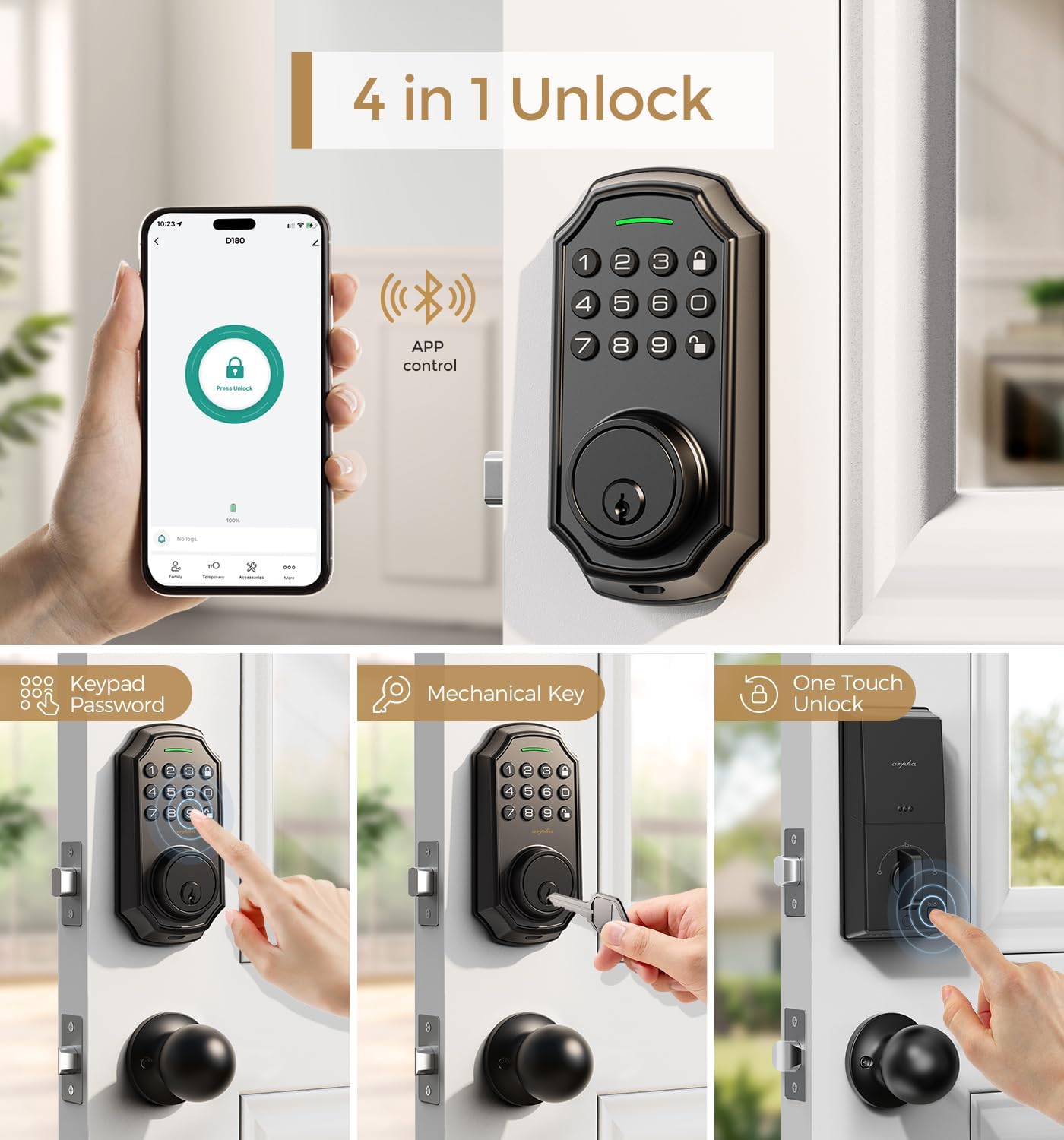
Figure 5: ашыкview of the four primary unlocking methods.
4.2 Карап чыгууга каршы сырсөз
To protect your passcode from prying eyes, you can enter up to 16 virtual digits before or after your actual 6-8 digit passcode. The lock will still recognize the correct sequence within the longer entry.

6-сүрөт: Мисample of using the anti-peeping password feature.
4.3 Автоматтык кулпулоо жана бир тийүү менен кулпулоо
The lock features an auto-lock function that can be set to activate between 10 seconds and 30 minutes after unlocking. Additionally, a one-touch lock feature allows for immediate locking by pressing a dedicated button.

Figure 7: Auto-lock timer setting and one-touch locking functionality.
4.4 App Connection and Management
Connect your lock to the Tuya Smart App for advanced features. Ensure Bluetooth is enabled and your network is set to 2.4G for gateway connection. The app allows you to:
- Generate and share one-time, permanent, scheduled, and recurring codes.
- Manage up to 100 user access codes (3 admin, 97 user).
- View кирүү жазуулары.
- Remotely unlock/lock (with optional gateway).
Video 2: Tutorial on connecting the smart door lock to a gateway for remote access.
Video 3: Guide on connecting the D180K-B to the mobile application.
Video 4: Demonstrates various app functions and operations for the D180K-B.

Figure 8: App control via Bluetooth, effective within a 10-meter range.

Figure 9: The lock supports up to 100 user codes, including 3 admin and 97 regular users.

Figure 10: Generating and sharing temporary access codes via the app.

Figure 11: Real-time unlocking records can be viewколдонмодо жазылган.

Figure 12: Setting timed passcodes with automatic expiration dates.
5. Техникалык тейлөө
5.1 Батареяны алмаштыруу
The lock is powered by 4 AA batteries, which typically last around 180 days. A low battery alert will notify you when replacement is needed. Replace all four batteries simultaneously with new ones to ensure optimal performance.

Figure 13: The app displays a low battery reminder when the lock's power is low.
5.2 Тазалоо
Баскычтопту жана кулпу корпусун жумшак, кургак чүпүрөк менен сүртүңүз. Каптамага же электрондук компоненттерге зыян келтириши мүмкүн болгон абразивдүү тазалоочу каражаттарды же эриткичтерди колдонуудан алыс болуңуз.
6. Кыйынчылыктарды
If you encounter issues with your ARPHA D180K-B lock, consider the following:
- Кулпу жооп бербей жатат: Батареянын деңгээлин текшерип, керек болсо алмаштырыңыз.
- Клавиатура күйбөйт: Батареялар туура орнотулганын жана заряддалганын текшериңиз.
- Unable to connect to app: Verify Bluetooth is on, the gateway is powered, and your Wi-Fi network is 2.4G. Refer to the app connection video for detailed steps.
- Incorrect passcode entry: Ensure you are entering the correct 6-8 digit passcode. Remember the anti-peeping feature allows extra digits before or after.
- Кулпу ишке кирбей/ажыратылбай жатат: Эшиктин рамкасындагы же кулпу механизминдеги тоскоолдуктардын бар-жогун текшериңиз.
Кошумча жардам алуу үчүн кардарларды колдоо бөлүмүнө кайрылыңыз.
7. Техникалык шарттар
| Өзгөчөлүк | Спецификация |
|---|---|
| Бренд | ARPHA |
| Модель аты | D180K-B |
| Кулпу түрү | Баскычтоп Deadbolt |
| Өзгөчө өзгөчөлүк | Passcode Unlock, App Control, Auto-Lock |
| Материал | Цинк |
| Түс | Matte Black |
| Элементтин өлчөмдөрү (L x W x Y) | 5.8 x 2.3 x 1.57 дюйм |
| Элемент Салмагы | 3.5 фунт |
| Power Source | 4 АА батарейкалар (киргизилген эмес) |
| Connectivity Protocol | Bluetooth |
| Колдонуучунун кубаттуулугу | 3 Administrator, 97 User Passcodes |
| Иштөө нымдуулугу | 0% - 95% |
| Иштөө температурасы | -4°F жана +140°F (-20°C менен +60°C) |
8. Кепилдик жана колдоо
ARPHA offers a 30-day money-back guarantee, an 18-month assurance, and lifetime technical support for the D180K-B Keyless Entry Door Lock.
Our dedicated support team is available 24/7 via email to assist you with any questions or issues.
- Электрондук почта колдоо: support@arpha.com
- Телефондук колдоо: (1) 844-820-5077
Figure 14: ARPHA provides 24/7 online service and a 2-hour fast response.


