1. Киришүү
This manual provides detailed instructions for the installation, operation, and maintenance of your JVC KW-M595BT Digital Car Stereo. Please read this manual thoroughly before using the product to ensure proper and safe operation. Keep this manual for future reference.
2. Кутуда эмне бар
Орнотууну баштоодон мурун бардык элементтердин бар экенин текшериңиз:
- JVC KW-M595BT Receiver
- GPS антеннасы
- Электр менен камсыздоо кабели
- Узарткыч токтоочу жай кабели
- Бурама топтому
- Колдонуучунун колдонмосу жана Кепилдик картасы
3. Орнотуу жана орнотуу
Туура орнотуу оптималдуу аткаруу жана коопсуздук үчүн өтө маанилүү болуп саналат. Орнотуу квалификациялуу адис тарабынан аткарылышы сунушталат.
3.1 Өлчөмдөрү
Ensure adequate space for installation. Refer to the diagram below for precise measurements.

Сүрөт: алдыңкы жана каптал view of the JVC KW-M595BT showing its dimensions in inches and millimeters.
3.2 Зымдарды туташтыруу
Carefully connect all necessary cables. Incorrect wiring can cause damage to the unit or vehicle. Consult your vehicle's wiring diagram and the included installation guide for specific connections.

Сүрөт: Арткы view of the JVC KW-M595BT showing various input/output ports including USB, GPS antenna, iDatalink Maestro connector, audio preouts, and power connections.
- Кубат менен камсыздоо кабели: Унаанын кубатына, жерге жана кошумча зымдарына туташтырыңыз.
- GPS антеннасы: Connect the GPS antenna for navigation features.
- USB Terminal (1.0 m): For smartphone connection and media playback.
- Audio Preouts: Алдыңкы, арткы жана сабвуфердин тышкы чыгаруулары ampаман калгандар.
- iDatalink Maestro Connector: For advanced vehicle integration (Maestro RR/RR2 sold separately).
- Арткы View Камера киргизүү: Шайкеш келген арткы бөлүктү туташтырыңызview камера.
- FM/AM антенна киргизүү: Унааңыздын радио антеннасын туташтырыңыз.
3.3 Баштапкы күйгүзүү
After installation, turn on your vehicle's ignition. The unit should power on. Follow any on-screen prompts for initial setup, such as language selection and time zone.
4. Иштөө нускамалары
Familiarize yourself with the unit's controls and features for an optimal user experience.
4.1 Алдыңкы панелдин башкаруу элементтери
The 6.8-inch capacitive touchscreen display provides intuitive control over all functions. Physical buttons are located on the left side of the unit.

Сүрөт: алдыңкы view of the JVC KW-M595BT display with labels pointing to various controls and screen elements, including power, volume, home, voice recognition, and source selection.
- Power/Home: Press to turn on/off or return to the home screen.
- Көлөмү: Аудио чыгаруу деңгээлин тууралаңыз.
- Үн таануу: Activate voice commands for connected smartphones.
- Булак тандоо: Switch between different audio/video sources.
- Камтылган микрофон: Үнсүз чалуу жана үн буйруктары үчүн.
4.2 Bluetooth байланышы
Pair your smartphone via Bluetooth for wireless audio streaming and hands-free calling.
- Смартфонуңузда Bluetooth'ду иштетиңиз.
- On the KW-M595BT, navigate to the Bluetooth settings.
- Select your device from the list of available devices and confirm pairing.

Image: A smartphone displaying a music player app connected via Bluetooth to the JVC KW-M595BT, which is showing music playback information.
4.3 Apple CarPlay
Connect your iPhone via USB to access Apple CarPlay features directly on the unit's display.
- Connect your iPhone to the USB port using a certified USB cable.
- Select the Apple CarPlay icon on the unit's home screen.
- Follow any on-screen prompts on both the unit and your iPhone.

Image: The JVC KW-M595BT display showing the Apple CarPlay interface with various app icons like Phone, Music, Maps, and Messages, with an iPhone connected via USB.
4.4 Android Auto
Connect your Android smartphone via USB to use Android Auto for navigation, communication, and entertainment.
- Connect your Android phone to the USB port using a certified USB cable.
- Select the Android Auto icon on the unit's home screen.
- Follow any on-screen prompts on both the unit and your Android phone.

Image: The JVC KW-M595BT display showing the Android Auto interface with app icons like Maps, Waze, Messages, and Phone, with an Android phone connected via USB.
4.5 USB Mirroring for Smartphone
Mirror your Android smartphone screen (OS 7.0+) to the KW-M595BT monitor via USB and Bluetooth using the Mirroring OA for JVC app.
- Download and install the Mirroring OA for JVC app on your Android smartphone.
- Connect your smartphone via USB and ensure Bluetooth is paired.
- Launch the Mirroring OA app and select the USB Mirroring function on the KW-M595BT.

Image: The JVC KW-M595BT display showing a navigation app mirrored from a smartphone, with icons for other popular apps below.
4.6 Audio Control (Equalizer & Time Alignment)
Customize your audio experience using the 13-band graphic equalizer and digital time alignment features.

Image: The JVC KW-M595BT display showing the graphic equalizer interface, allowing users to adjust frequency bands for sound customization.
- Графикалык эквалайзер: Adjust specific frequency bands to tailor the sound to your preference. Access this feature through the audio settings menu.
- Санариптик убакытты тегиздөө: s үнүн оптималдаштырууtagар бир динамиктин кечигүүсүн тууралоо менен, үндүн кулагыңызга бир убакта жетишин камсыз кылыңыз.
4.7 iDatalink Maestro интеграциясы
The KW-M595BT is compatible with iDatalink Maestro RR/RR2 (sold separately) for advanced vehicle integration, retaining factory features and displaying vehicle information.
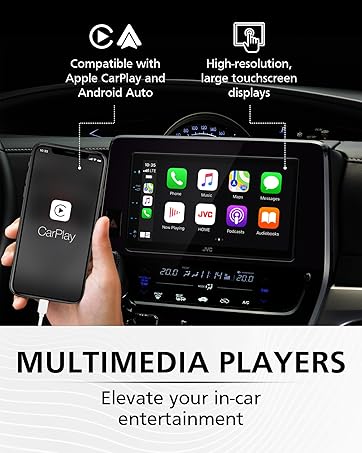
Image: The JVC KW-M595BT display showing various vehicle information screens (gauges, climate, parking assist, vehicle info) enabled by iDatalink Maestro, with the Maestro module shown next to the head unit.
5. Техникалык тейлөө
Regular maintenance helps ensure the longevity and performance of your car stereo.
- Дисплейди тазалоо: Сенсордук экранды акырын сүртүү үчүн жумшак, кургак чүпүрөктү колдонуңуз. өжөр тактар үчүн, бир аз гampчүпүрөккө суу же электроника үчүн арналган экран тазалагыч. Катуу химиялык заттардан же абразивдүү материалдардан алыс болуңуз.
- Программалык камсыздоо жаңыртуулары: JVCди мезгил-мезгили менен текшерип туруңуз webоптималдуу иштешин жана жаңы функцияларга жетүүнү камсыз кылуу үчүн микропрограммаларды жаңыртуу үчүн сайт.
6. Кыйынчылыктарды
If you encounter issues with your KW-M595BT, refer to the following common problems and solutions:
| Көйгөй | Мүмкүн себеп | Чечим |
|---|---|---|
| Күч жок | Туура эмес зымдар, күйгүзүлгөн сактагыч, унаанын аккумулятору маселеси. | Check power connections, inspect the fuse (15A), ensure vehicle battery is charged. |
| Үн жок | Үнү өтө төмөн, үнсүз режимде, динамиктин зымдары туура эмес туташтырылган ampкөтөргүч маселеси. | Increase volume, check mute status, verify speaker connections, test external ampэгерде колдонулса, көтөргүч. |
| Bluetooth туташпай жатат | Телефондо/түзмөктө Bluetooth өчүк, түзмөк жупташтыруу режиминде эмес, тоскоолдук бар. | Ensure Bluetooth is active on both devices, put unit in pairing mode, try re-pairing, move closer to the unit. |
| Apple CarPlay/Android Auto ишке кирбей жатат | Faulty USB cable, app not installed/updated, phone settings. | Use a certified USB cable, ensure the respective app is installed and updated on your phone, check phone's USB connection settings. |
| Сенсордук экран жооп бербейт | Temporary software glitch, screen dirty. | Perform a soft reset (refer to manual for reset button location), clean the screen. |
If the problem persists after trying these solutions, contact JVC customer support or a qualified service technician.
7. Техникалык шарттар
Key technical specifications for the JVC KW-M595BT Digital Car Stereo:

Image: A visual comparison demonstrating the higher resolution and finer detail of the WSVGA (1024x600 pixel) display compared to a conventional WVGA (800x480 pixel) display.
- Модель номери: KW-M595BT
- Дисплей: 6.8-inch WSVGA Capacitive LCD Touch Panel (1024x600 resolution)
- Өлчөмдөрү (W x Y x D): 7.06 x 3.38 x 3.94 дюйм (178 мм x 100 мм x 86 мм)
- Элемент Салмагы: 2.41 фунт
- Байланыш: Bluetooth, USB
- Смартфон интеграциясы: Apple CarPlay, Android Auto, USB чагылдыруу (Android OS 7.0+ үчүн)
- Аудио өзгөчөлүктөрү: 13-Band Graphic EQ, Digital Time Alignment, MP3/WMA/AAC/WAV/FLAC support
- Алдын ала маалыматтар: Front, Rear, Subwoofer (2.5V)
- Өзгөчөлүктөр: iDatalink Maestro Ready, SiriusXM Ready, USB 2.1A Charging
- Видеону коддоо: H.264, MPEG-4
- Көлөмдүү үн каналынын конфигурациясы: 5.1
8. Кепилдик маалыматы
Your JVC KW-M595BT comes with a manufacturer's warranty. Please refer to the warranty card included in the product packaging for detailed terms, conditions, and registration information. Keep your proof of purchase for warranty claims.
9. Кардарларды колдоо кызматы
Кошумча жардам, техникалык колдоо же кызмат суроо үчүн расмий JVCке баш багыңыз webсайтка же кардарларды тейлөө бөлүмүнө кайрылыңыз:
- JVC расмий Webсайт: www.jvc.com
- Refer to the included documentation for specific contact numbers or email addresses for your region.


