Introduction
This manual provides detailed instructions for the setup, operation, and maintenance of your Perixx PERIMICE-713R Wireless Rechargeable Vertical Mouse. Please read this manual thoroughly before using the product to ensure proper functionality and to maximize your user experience.
Пакеттин мазмуну
Пакетиңизде бардык буюмдар бар экенин текшериңиз:
- 1 x Perixx PERIMICE-713R Wireless Rechargeable Vertical Mouse
- 1 x USB Nano кабыл алгыч
- 1 x USB-C заряддоо кабелине
- 1 x User Manual

Image: Contents of the Perixx PERIMICE-713R retail package, showing the vertical mouse, USB receiver, USB-C charging cable, and the user manual.
Продукт бүттүview
The Perixx PERIMICE-713R is an ergonomic vertical mouse designed for right-handed users, featuring dual charging capabilities and adjustable sensitivity. Its design promotes a natural hand position to reduce wrist strain.

Image: The Perixx PERIMICE-713R vertical mouse shown with its USB-C charging port connected to a cable, highlighting its sleek black design.
Негизги өзгөчөлүктөрү:
- Эргономикалык вертикалдык дизайн: Promotes a natural handshake grip, reducing wrist pronation.
- Dual Rechargeable Options: Supports both wired USB-C charging and wireless charging (wireless charging pad not included).
- Жөнгө салынуучу DPI: Cycle through 1000, 1600, and 2400 DPI settings for precise control.
- Тынч чыкылдатуу: Designed for silent operation, suitable for quiet environments.
- 6 баскычтуу дизайн: Includes left/right click, scroll wheel, DPI button, and two thumb buttons for enhanced productivity.
- 2.4 ГГц зымсыз байланыш: Reliable connection up to 10 meters with a Nano USB receiver.
Орнотуу колдонмосу
1. Чычканды заряддоо
The mouse features a built-in rechargeable battery. It can be charged via two methods:
- Зымдуу кубаттоо: Connect the included USB-C to A cable to the USB-C port on the front of the mouse and to a USB-A port on your computer or a USB wall adapter.
- Зымсыз кубаттоо: Place the mouse on a compatible wireless charging pad (not included). Ensure the mouse is correctly positioned for charging to initiate.

Image: Demonstrates connecting the USB-C cable for wired charging of the mouse.

Image: The vertical mouse resting on a wireless charging pad, illustrating its wireless charging capability.
2. USB кабылдагычты туташтыруу
- Locate the Nano USB receiver, typically stored in a compartment on the underside of the mouse.
- Remove the receiver and plug it into an available USB-A port on your computer.
- Компьютериңиз керектүү драйверлерди автоматтык түрдө таап, орнотуп алышы керек.

Image: The underside of the mouse, illustrating the power switch and the compartment for storing the USB Nano receiver.
3. Күйгүзүү / Өчүрүү
On the underside of the mouse, locate the power switch. Slide the switch to the "ON" position to activate the mouse. Slide it to "OFF" when not in use to conserve battery life.
Иштөө нускамалары
Баскыч функциялары
The PERIMICE-713R features 6 buttons:
- Сол чыкылдатуу баскычы: Стандарттык негизги чыкылдатуу функциясы.
- Оң баскычты чыкылдатуу: Стандарттык кошумча чыкылдатуу функциясы.
- Жылдыруу дөңгөлөгү: For vertical scrolling. Can also be pressed for middle-click functionality.
- DPI баскычы: Located behind the scroll wheel, cycles through DPI settings.
- Алга баскычы: (Бас бармак баскычы) Алга карай жылдырат web браузерлер же file изилдөөчүлөр.
- Артка баскычы: (Бас бармак баскычы) Артка карай жылдырат web браузерлер же file изилдөөчүлөр.
DPI (сезгичтик) жөндөө
Press the DPI button to cycle through the available sensitivity settings: 1000 DPI, 1600 DPI, and 2400 DPI. Select the setting that best suits your preference and task requirements.

Image: The DPI button on the mouse, illustrating its function to adjust sensitivity between 1000, 1600, and 2400 DPI.
Эргономикалык кармагыч
Hold the mouse with your hand in a natural handshake position. This vertical orientation is designed to align your wrist and forearm in a more neutral posture, reducing strain compared to traditional horizontal mice.

Image: A user's hand holding the vertical mouse, showcasing the ergonomic 47-degree tilt that promotes a natural wrist posture.
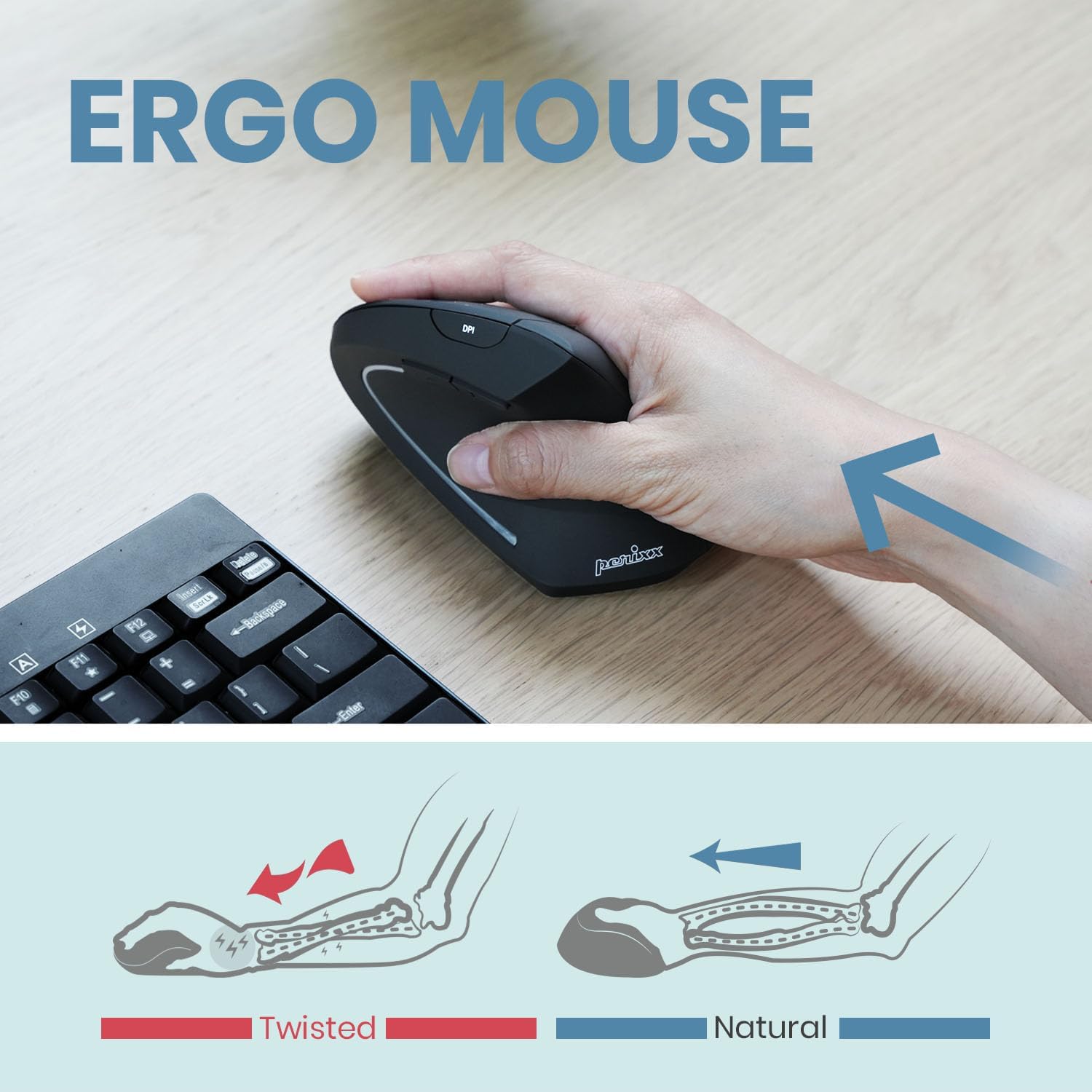
Image: An illustration comparing the "twisted" wrist position often associated with standard mice to the "natural" wrist position achieved with a vertical ergonomic mouse.
Техникалык тейлөө
Тазалоо
Чычканыңызды тазалоо үчүн, анын бетин жумшак, d менен акырын сүртүңүзamp cloth. Avoid using harsh chemicals, abrasive cleaners, or excessive moisture, as these can damage the device. Ensure the mouse is powered off before cleaning.
Батареяга кам көрүү
The mouse contains a Lithium Polymer battery. For optimal battery life:
- Батареяны бат-баттан толук кубаттап калуудан алыс болуңуз.
- Charge the mouse regularly, especially if it will be stored for an extended period.
- Чычканды өтө жогорку температурага дуушар кылбаңыз.
Проблемаларды чечүү
Чычкан жооп бербейт:
- Ensure the mouse is powered on using the switch on the underside.
- Батареянын деңгээлин текшерип, керек болсо чычканды заряддаңыз.
- Verify that the USB Nano receiver is securely plugged into a working USB port on your computer.
- Ресиверди башка USB портуна сайып көрүңүз.
- Компьютериңизди өчүрүп күйгүзүңүз.
Үзгүлтүксүз туташуу:
- Чычкан USB кабыл алгычтан 10 метрлик иштөө диапазонунда экенин текшериңиз.
- Башка зымсыз аппараттардын (мисалы, Wi-Fi роутерлери, зымсыз телефондор) кийлигишүүсүн азайтыңыз.
- Чычкан менен кабыл алгычтын ортосунда чоң металл буюмдар жок экенин текшериңиз.
Cursor Movement is Erratic or Inaccurate:
- Чычкандын астындагы оптикалык сенсорду тазалаңыз.
- Ensure you are using the mouse on a suitable surface. Highly reflective or transparent surfaces may affect performance.
- Adjust the DPI setting using the DPI button to find a comfortable sensitivity.
Техникалык шарттар
| Бренд | Perixx |
| Модель номери | PERIMICE-713R (Item model number: 12361) |
| Байланыш технологиясы | 2.4 ГГц зымсыз (USB кабыл алгыч аркылуу) |
| Кыймылды аныктоо технологиясы | Оптикалык |
| DPI орнотуулары | 1000 / 1600 / 2400 |
| баскычтардын саны | 6 |
| Power Source | Батарея менен иштейт (1 литий-полимердик батарея, кошулган) |
| Заряддоо параметрлери | Wired (USB-C) and Wireless (Qi-compatible, pad not included) |
| Операциялык системанын шайкештиги | Windows 7, 8, 10, 11, Linux |
| Түс | Кара |
| Элемент Салмагы | 3.17 унция |
| Продукциянын өлчөмдөрү (LxWxH) | 4.92 x 2.44 x 0.04 дюйм |
| Сертификаттар | FCC, CE, RoHS |
Кепилдик жана колдоо
Perixx products are manufactured to high-quality standards. For warranty information, please refer to the specific warranty card included with your product or visit the official Perixx webсайт.
For technical support, troubleshooting assistance, or any inquiries regarding your Perixx PERIMICE-713R mouse, please contact Perixx Customer Service:
- Электрондук почта: shop@perixx.com
- Webсайт: www.perixx.com
Please have your product model number (PERIMICE-713R) and purchase details ready when contacting support.


