Introduction
Сатып алганыңыз үчүн рахматasing the WIITHINK WTB-777 Portable Cassette Player and Recorder. This versatile device combines the classic charm of a cassette player and recorder with modern features such as Bluetooth connectivity, USB playback, and AM/FM radio. Designed for ease of use and portability, it allows you to enjoy your favorite audio content wherever you go. Please read this manual thoroughly before operating the device to ensure proper use and to maximize its lifespan.

Figure 1: WIITHINK WTB-777 Portable Cassette Player and Recorder
Продукт бүттүview
The WIITHINK WTB-777 is an all-in-one audio solution, offering multiple playback and recording options. Its compact design and dual power capabilities make it ideal for both home and portable use.
- Classical Tape Radio Player: Enjoy music, radio, and cassette tapes with this all-in-one portable player featuring AM/FM radio, Bluetooth connectivity, USB port, and recording from radio to cassette.
- Retro Nostalgia: Relive the nostalgia of cassette tapes while enjoying modern features like Bluetooth. Built-in cassette player and recorder to record radio to blank tapes.
- AM/FM Radio Stereo: Equipped with a long antenna and upgraded chip for great reception of AM/FM stations. Features a big speaker for clear stereo sound. Frequency range: FM 87 - 108 MHz, AM 520 - 1710 kHz.
- Bluetooth агымы: Stream your favorite music wirelessly from your smartphone, tablet, or other Bluetooth-enabled devices.
- Портативдик дизайн: Compact and lightweight for easy portability, perfect for on-the-go listening or use at home. Includes an earphone jack and DC/AC power options.

Figure 2: Key Features of the WTB-777
Кутуда эмне бар
Таңгактан чыгаргандан кийин, төмөндө көрсөтүлгөн нерселердин бардыгы бар экенин жана жакшы абалда экендигин текшериңиз:
- WTB-777 кассета ойноткучу Boombox
- Электр кабели
- Колдонуучунун Колдонмосу (бул документ)
Жайгашуу
Аппаратты кубаттандыруу
The WIITHINK WTB-777 can be powered by either AC power or batteries.
- AC кубаттуулугу: Connect the included power cord to the AC input jack on the back of the unit and plug the other end into a standard wall outlet (AC 120V/60Hz).
- Батарея кубаттуулугу: For portable use, open the battery compartment on the bottom of the unit and insert 4 x 'C' size batteries (not included), ensuring correct polarity (+/-). Close the battery compartment securely.
Эскертүү: AC кубатын колдонгондо, батарейкалар автоматтык түрдө ажыратылат. Эгерде түзмөк көпкө колдонулбаса, агып кетүүнүн алдын алуу үчүн батарейкаларды алып салыңыз.
Иштөө нускамалары
Familiarize yourself with the control panel before operation. Refer to Figure 3 for a detailed diagram of the controls.
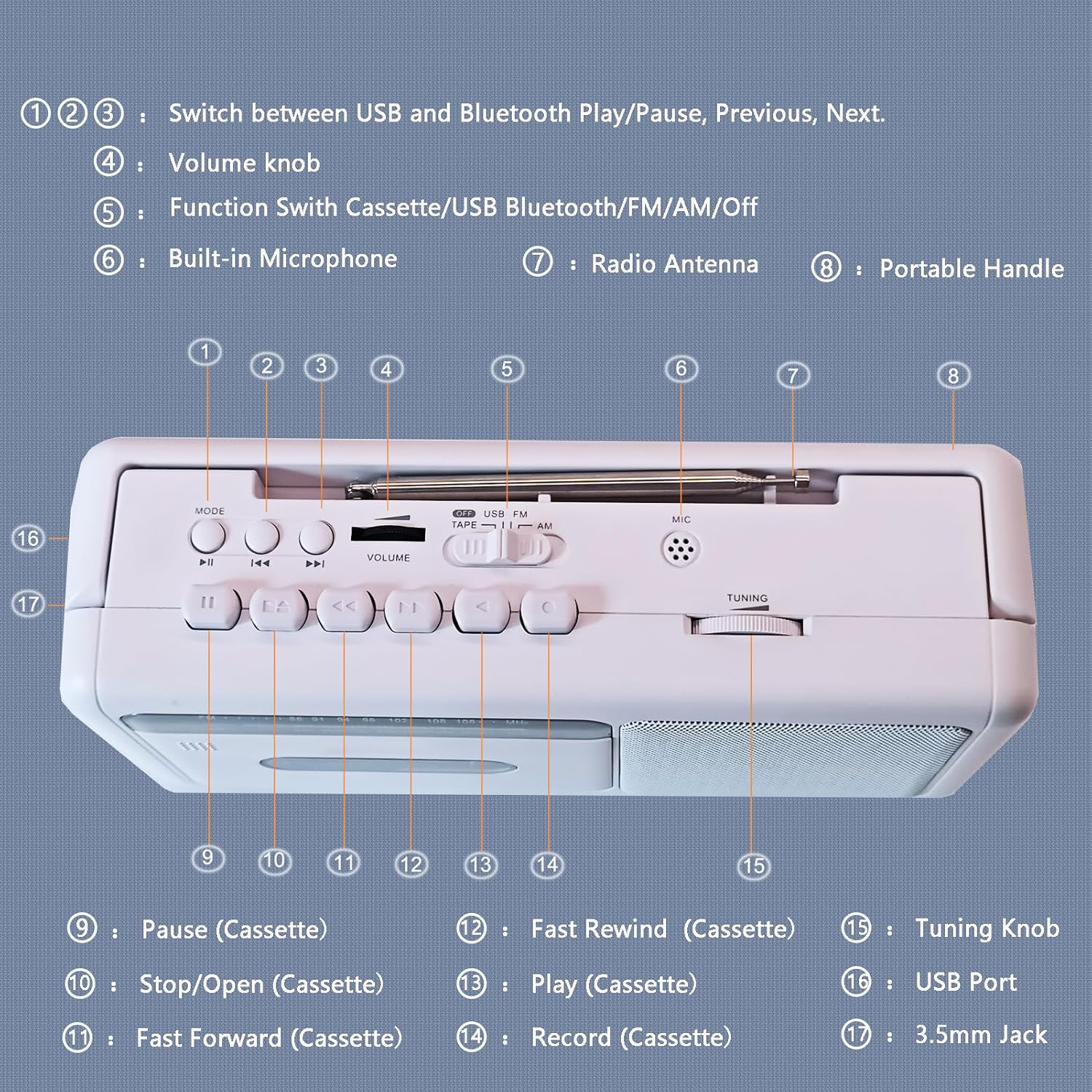
Figure 3: Control Panel Diagram
- 1, 2, 3: Mode/Playback Control Buttons (USB/Bluetooth Play/Pause, Previous, Next)
- 4: Көлөм баскычы
- 5: Function Switch (Cassette/USB/Bluetooth/FM/AM/Off)
- 6: Камтылган микрофон
- 7: Радио антенна
- 8: Портативдик тутка
- 9: Pause (Cassette)
- 10: Stop/Open (Cassette)
- 11: Fast Forward (Cassette)
- 12: Fast Rewind (Cassette)
- 13: Play (Cassette)
- 14: Record (Cassette)
- 15: Тюнинг баскычы
- 16: USB порту
- 17: 3.5mm Jack (Earphone/Aux-in)
Кассета ойноткучтун иштеши
- Set the Function Switch (5) to "TAPE".
- Press the Stop/Open button (10) to open the cassette compartment door.
- Insert a cassette tape with the open edge facing upwards. Close the compartment door firmly.
- Press the Play button (13) to begin playback.
- Adjust the Volume Knob (4) to your desired listening level.
- To pause playback, press the Pause button (9). Press again to resume.
- To fast forward, press the Fast Forward button (11). To fast rewind, press the Fast Rewind button (12). Press Play (13) or Stop/Open (10) to stop winding.
- To stop playback and eject the tape, press the Stop/Open button (10).

Figure 4: Inserting a Cassette Tape
AM/FM радиосу
- Set the Function Switch (5) to "FM" or "AM".
- Extend the telescopic antenna (7) for optimal FM reception. For AM reception, rotate the unit for best signal.
- Rotate the Tuning Knob (15) to select your desired radio station.
- Adjust the Volume Knob (4) to your desired listening level.

Figure 5: Enjoying AM/FM Radio
Bluetooth агымы
- Set the Function Switch (5) to "BT" (Bluetooth). The unit will enter pairing mode, indicated by an audible prompt.
- Bluetooth иштетилген түзмөгүңүздө (мисалы, смартфон, планшет) Bluetooth'ду иштетиңиз жана жеткиликтүү түзмөктөрдү издеңиз.
- Select "WTB-777" from the list of devices to pair. Once paired, you will hear a confirmation sound.
- Begin playing audio on your connected device. The sound will be streamed wirelessly to the WTB-777.
- Use the Volume Knob (4) on the unit or the volume controls on your connected device to adjust the volume.
- Use buttons (1, 2, 3) to control playback (Play/Pause, Previous/Next track) directly from the unit.

6-сүрөт: Bluetooth байланышы
USB ойнотуу
- Set the Function Switch (5) to "USB".
- MP3 аудиосу бар USB флэш-дискти салыңыз files into the USB Port (16).
- The unit will automatically begin playing the audio files USB дискинен.
- Use buttons (1, 2, 3) to control playback (Play/Pause, Previous/Next track).
- Adjust the Volume Knob (4) to your desired listening level.
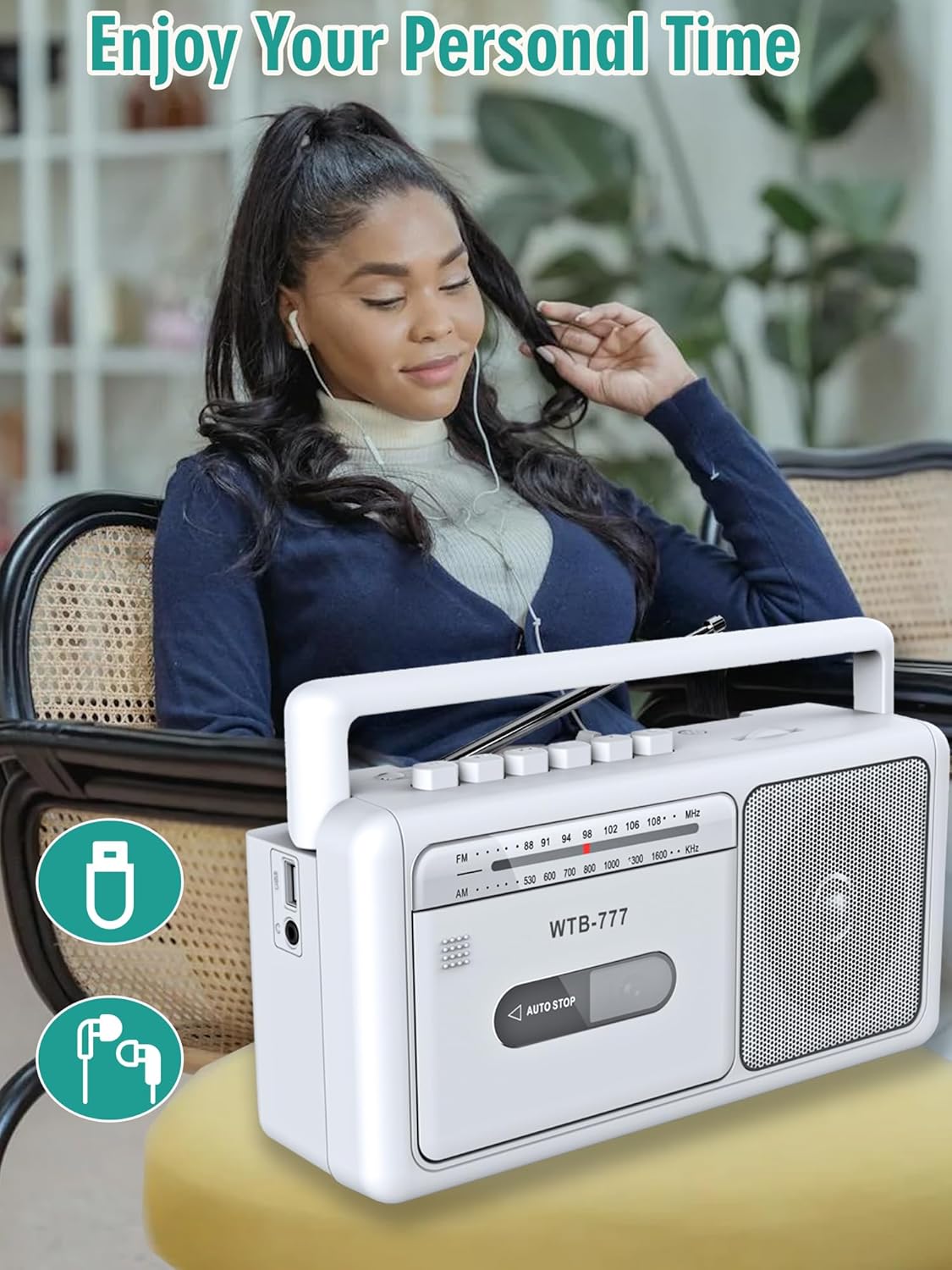
Figure 7: USB Playback and Earphone Jack
Кассетага жаздыруу
The WTB-777 allows you to record audio from the radio onto a blank cassette tape.
- Insert a blank cassette tape into the cassette compartment (refer to Cassette Player Operation).
- Set the Function Switch (5) to "FM" or "AM" and tune to your desired radio station.
- Press the Record button (14) and the Play button (13) simultaneously to begin recording. The unit will automatically start recording the radio broadcast onto the tape.
- To stop recording, press the Stop/Open button (10).
Эскертүү: The built-in microphone (6) can also be used for voice recording directly to tape when the function switch is set to "TAPE" and the Record button (14) is pressed.
Техникалык тейлөө
- Тазалоо: Use a soft, dry cloth to clean the exterior of the unit. Do not use abrasive cleaners or solvents. For the cassette head and pinch roller, use a specialized cassette head cleaner periodically to ensure optimal sound quality and prevent tape damage.
- Сактагыч: Эгерде түзмөк көпкө колдонулбаса, аны салкын, кургак жерде, күндүн түз нурунан жана өтө жогорку температурадан алыс сактаңыз. Узак убакытка сактасаңыз, батареяларды алып салыңыз.
- Тасмага кам көрүү: Кассеталарды чаңдан жана бузулуудан коргоо үчүн аларды кутучаларында сактаңыз. Тасмаларды күчтүү магниттик талаалардын таасирине дуушар кылбаңыз.
Проблемаларды чечүү
If you experience issues with your WIITHINK WTB-777, please consult the following table before seeking professional service.
| Көйгөй | Мүмкүн себеп | Чечим |
|---|---|---|
| Түзмөк күйбөйт. |
|
|
| Динамиктен үн жок. |
|
|
| Кассета ойнотулбайт же үн бурмаланып угулат. |
|
|
| Радио кабыл алуу начар. |
|
|
| Bluetooth түзмөгү жупташтырылбайт. |
|
|
Техникалык шарттар
Detailed technical specifications for the WIITHINK WTB-777.
| Бренд | ОЙЛОЙМ |
| Модел | WTB-777 |
| Продукциянын өлчөмдөрү (L x W x Y) | 9.8 x 3 x 5.1 дюйм (24.9 x 7.6 x 13 см) |
| Элемент Салмагы | 2.75 фунт (1.25 кг) |
| Түс | Ак |
| Байланыш технологиясы | Bluetooth, Built-in Microphone, Earphone Jack, USB |
| Динамик түрү | Portable |
| AM жыштык диапазону | 520 - 1710 кГц |
| FM жыштык диапазону | 87 - 108 МГц |
| Power Source | AC (Power Cord included), 4 x 'C' Batteries (not included) |
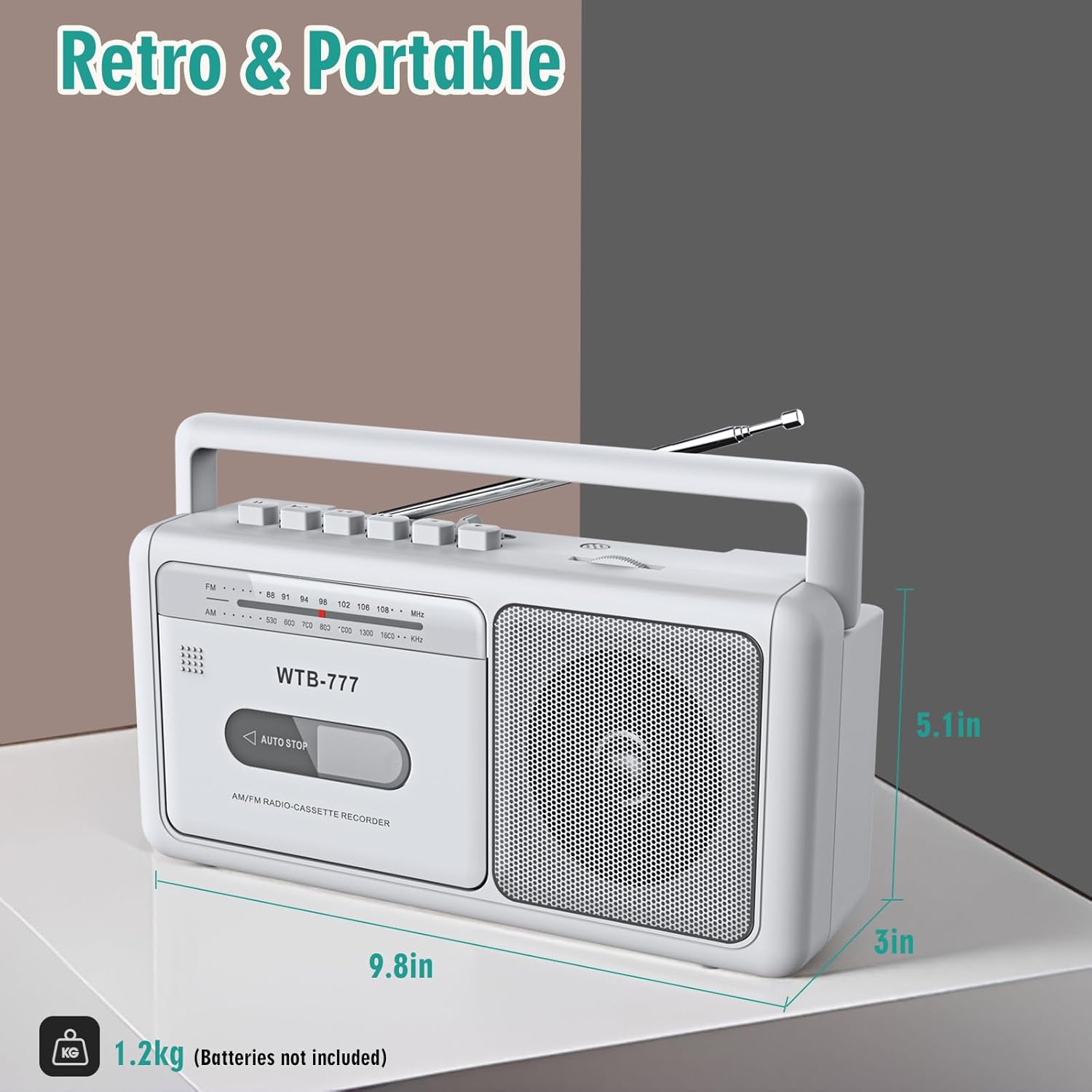
Сүрөт 8: Продукциянын өлчөмдөрү
Кепилдик жана колдоо
Specific warranty information for the WIITHINK WTB-777 is typically provided with the product packaging or on the manufacturer's official website. Please refer to the documentation included with your purchase for detailed warranty terms and conditions.
For technical support, troubleshooting assistance beyond this manual, or inquiries regarding parts and service, please contact WIITHINK customer support through their official channels. Contact information can usually be found on the product packaging, the manufacturer's website, or the retailer's product page.


