Introduction
Сатып алганыңыз үчүн рахматasing the Apera NNS NS-8091BT Music System. This portable device combines a classic FM radio with modern connectivity options, including USB, Micro SD, and Bluetooth 5.0. Its stylish design and versatile features make it an ideal companion for enjoying your favorite audio content anywhere. Please read this manual carefully before use to ensure proper operation and to maximize your listening experience.
Маанилүү коопсуздук маалыматы
- Аппаратты жамгырдын, нымдуулуктун же экстремалдык температуранын таасиринде калтырбаңыз.
- Аппаратты түшүрүүдөн же катуу таасирлерден сактаныңыз.
- Аппаратты өзүңүз ажыратпаңыз же оңдоого аракет кылбаңыз. Бардык тейлөөлөрдү квалификациялуу кызматкерлерге тапшырыңыз.
- Аппаратты түз күн нурунан жана жылуулук булактарынан алыс кармаңыз.
- Аппаратты иштетип жатканда туура желдетүүнү камсыз кылыңыз.
- Use only the provided charging cable or a compatible 5V DC adapter for charging.
- Before first use, fully charge the device for approximately 2 hours.
Пакеттин мазмуну
- NNS NS-8091BT Music System
- USB заряддоо кабели
- User Manual
Продукт бүттүview
Familiarize yourself with the various parts and controls of your NNS NS-8091BT Music System.
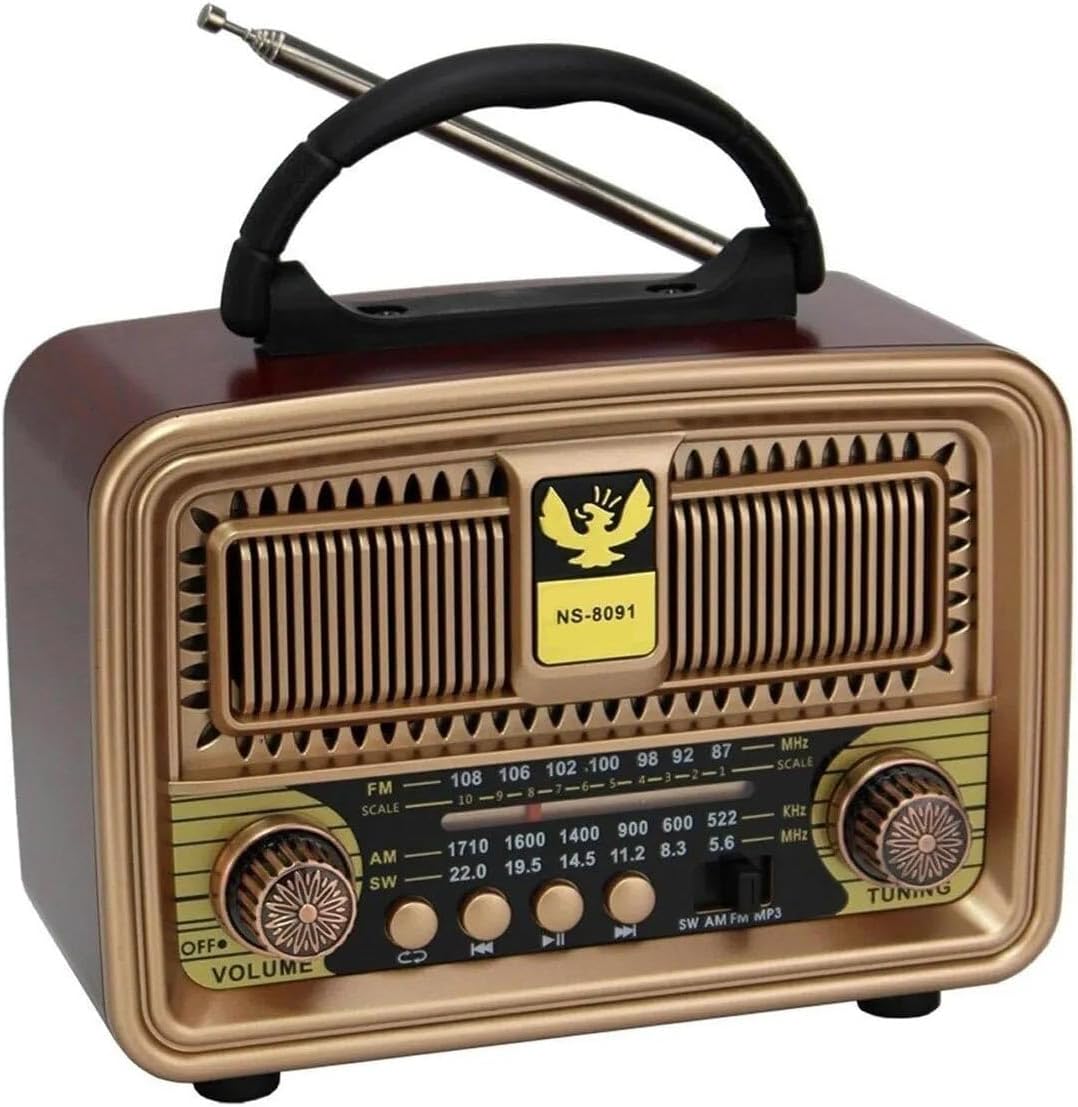
Сүрөт 1: Алдыңкы View of the Music System
This image displays the front of the NNS NS-8091BT Music System, highlighting its vintage-inspired design with a prominent speaker grille, a frequency display, and two rotary knobs for volume/power and tuning. The model number "NS-8091" is visible on the front panel.

2-сүрөт: Каптал View Байланыш порттору менен
This image shows the side panel of the music system, detailing the input ports. From top to bottom, these include a standard USB port, a Micro SD (TF) card slot, and a DC 5V charging port, along with a "CHARGE" indicator.

3-сүрөт: Арткы View Батарея бөлүмү менен
This image illustrates the back of the music system, revealing the battery compartment. It is designed to accommodate one 18650 rechargeable battery (visible in blue) and two UM-1 (D-cell) 1.5V batteries, providing flexible power options.
Башкаруу каражаттары жана көрсөткүчтөр:
- ӨЧҮРҮҮ/ҮЛДӨМНҮН баскычы: Turns the unit on/off and adjusts the volume level.
- TUNING баскычы: Used to tune into radio stations.
- Тасма тандоо которгучу: Selects between FM, AM, and SW radio bands.
- Режим баскычы: Switches between FM Radio, USB/Micro SD, and Bluetooth modes.
- Ойнотуу башкаруу баскычтары: Previous Track, Play/Pause, Next Track (for USB/Micro SD/Bluetooth modes).
- USB порт: MP3 ойнотуу үчүн fileUSB флешкасынан.
- Micro SD (TF) Card Slot: MP3 ойнотуу үчүн files from a Micro SD card.
- DC 5V заряддоо порту: Заряддоо кабелин туташтыруу үчүн.
- ЗАРЯДДАЛУУ индикатору: Lights up when the device is charging.
- Телескопиялык антенна: For improving FM and SW radio reception.
- Батарея бөлүмү: Houses the 18650 rechargeable battery and slots for two D-cell batteries.
Жайгашуу
1. Батареяны заряддоо:
- Locate the DC 5V charging port on the side of the unit.
- Берилген USB заряддоо кабелин портко туташтырыңыз.
- USB кабелинин экинчи учун стандарттуу USB кубат адаптерине (кошулмада жок) же компьютердин USB портуна туташтырыңыз.
- The "CHARGE" indicator light will illuminate, indicating that the device is charging.
- For first use, charge the device for approximately 2 hours to ensure the 1200mAh 18650 rechargeable battery is fully charged.
- Once fully charged, the indicator light may change color or turn off (behavior may vary by unit). Disconnect the charging cable.
Эскертүү: The unit can also be powered by two D-cell (UM-1 1.5V) batteries. Insert them into the battery compartment on the back, ensuring correct polarity.
2. Антеннаны орнотуу:
For optimal radio reception, extend the telescopic antenna fully when using FM or SW radio modes.
Иштөө нускамалары
1. Күйгүзүү/өчүрүү жана үндү башкаруу:
- To turn on the device, rotate the ӨЧҮРҮҮ/ҮЛДӨМ knob clockwise until you hear a click and the unit powers on.
- Үндү катуулатуу үчүн баскычты саат жебеси боюнча айландырыңыз. Үндү азайтуу үчүн саат жебесине каршы айландырыңыз.
- To turn off the device, rotate the ӨЧҮРҮҮ/ҮЛДӨМ knob counter-clockwise until you hear a click and the unit powers off.
2. FM радиосунун иштеши:
- аркылуу аппаратты күйгүзүңүз ӨЧҮРҮҮ/ҮЛДӨМ баскыч.
- Set the Band Selector switch to "FM".
- Жакшыраак кабыл алуу үчүн телескоптук антеннаны узартыңыз.
- айлантыңыз TUNING knob to scan for available FM radio stations. The frequency display will show the current frequency.
- тууралаңыз TUNING knob until you find a clear signal for your desired station.
Эскертүү: The device also supports AM and SW bands. Select the appropriate band using the Band Selector switch and tune as described above.
3. USB / Micro SD MP3 Player Operation:
- Аппаратты күйгүзүңүз.
- USB флеш-дискти USB портуна же Micro SD картаны TF карта уячасына салыңыз. Карта туура салынганын текшериңиз.
- The unit should automatically switch to USB/Micro SD mode and begin playing MP3 fileс. Болбосо, басыңыз Mode button to cycle through modes until you reach USB/Micro SD mode.
- колдонуу Мурунку трек, Ойнотуу/Тыныгуу, жана Кийинки трек ойнотууну башкаруу үчүн баскычтар.
4. Bluetooth функциясы:
- Аппаратты күйгүзүңүз.
- басыңыз Mode button to switch to Bluetooth mode. The unit will emit an audible prompt indicating it's ready for pairing.
- Смартфонуңузда, планшетиңизде же башка Bluetooth иштетилген түзмөгүңүздө Bluetooth'ту иштетип, жеткиликтүү түзмөктөрдү издеңиз.
- Select "NS-8091BT" (or similar name) from the list of found devices to pair.
- Once successfully paired, the unit will emit another audible prompt. You can now play audio from your connected device wirelessly through the music system.
- Use the playback controls on your connected device or the Ойнотуу башкаруу баскычтары on the music system to manage your audio.
Техникалык тейлөө
- Тазалоо: Түзмөктүн сыртын тазалоо үчүн жумшак, кургак чүпүрөктү колдонуңуз. Абразивдүү тазалоочу каражаттарды, момдорду же эриткичтерди колдонбоңуз.
- Сактагыч: Узак мөөнөткө колдонулбаганда, аспапты күн тийбеген, салкын, кургак жерде сактаңыз.
- Батареяга кам көрүү: If using the rechargeable battery, ensure it is charged regularly to maintain its lifespan. If using D-cell batteries, remove them if the unit will not be used for a long time to prevent leakage.
Проблемаларды чечүү
| Көйгөй | Мүмкүн себеп | Чечим |
|---|---|---|
| Күч жок | Батарея түгөнүп калган же туура салынган эмес. | Charge the rechargeable battery or replace the D-cell batteries. Ensure batteries are inserted with correct polarity. |
| Радио кабыл алуу начар | Антенна узартылган эмес; начар сигнал аймак. | Телескопиялык антеннаны толугу менен сунуңуз. Сигнал жакшыраак болушу үчүн түзмөктүн ордун башка жакка буруп көрүңүз. |
| USB/Micro SD ойнотулбай жатат | Туура эмес режим; колдоого алынбайт file format; corrupted media. | Press the Mode button to select USB/Micro SD mode. Ensure files are in MP3 format. Try a different USB drive or Micro SD card. |
| Bluetooth туташпай жатат | Not in Bluetooth mode; device not discoverable; already paired with another device. | Press the Mode button to select Bluetooth mode. Ensure Bluetooth is enabled on your external device and it's in pairing mode. Disconnect from other Bluetooth devices. |
| Төмөн үн же бурмаланган үн | Volume too low; battery low; audio source issue. | Adjust the volume knob. Charge the battery. Check the volume on your connected Bluetooth device or the quality of the MP3 file/radio signal. |
Техникалык шарттар
| Модел | NS-8091BT |
| Бренд | Апера |
| Байланыш | Bluetooth 5.0, USB, Micro SD (TF) |
| Radio Bands | FM, AM, SW (3-band) |
| Динамик чыгаруу күчү | 5 Ватт |
| Power Source | 1200mAh 18650 Rechargeable Battery (included), 2 x UM-1 (D-cell) 1.5V Batteries (not included) |
| Заряддоо киргизүү | DC 5V |
| Продукциянын өлчөмдөрү (L x D x H) | 18 см х 8 см х 13.5 см |
| Материалдын түрү | Oak Wood (finish) |
| Шайкеш түзмөктөр | Smartphones, Tablets, USB Flash Drives, Micro SD Cards |
Кепилдик жана колдоо
For warranty information and technical support, please refer to the warranty card included with your product or contact Apera customer service through their official website or the retailer where you purchased the product. Please have your model number (NS-8091BT) and purchase details ready when contacting support.
Apera Store: Visit Apera Store on Amazon


