1. Киришүү
This manual provides essential information for setting up, operating, and maintaining your MINISFORUM Mini PC AD69. Please read this guide thoroughly before using the device to ensure optimal performance and longevity.
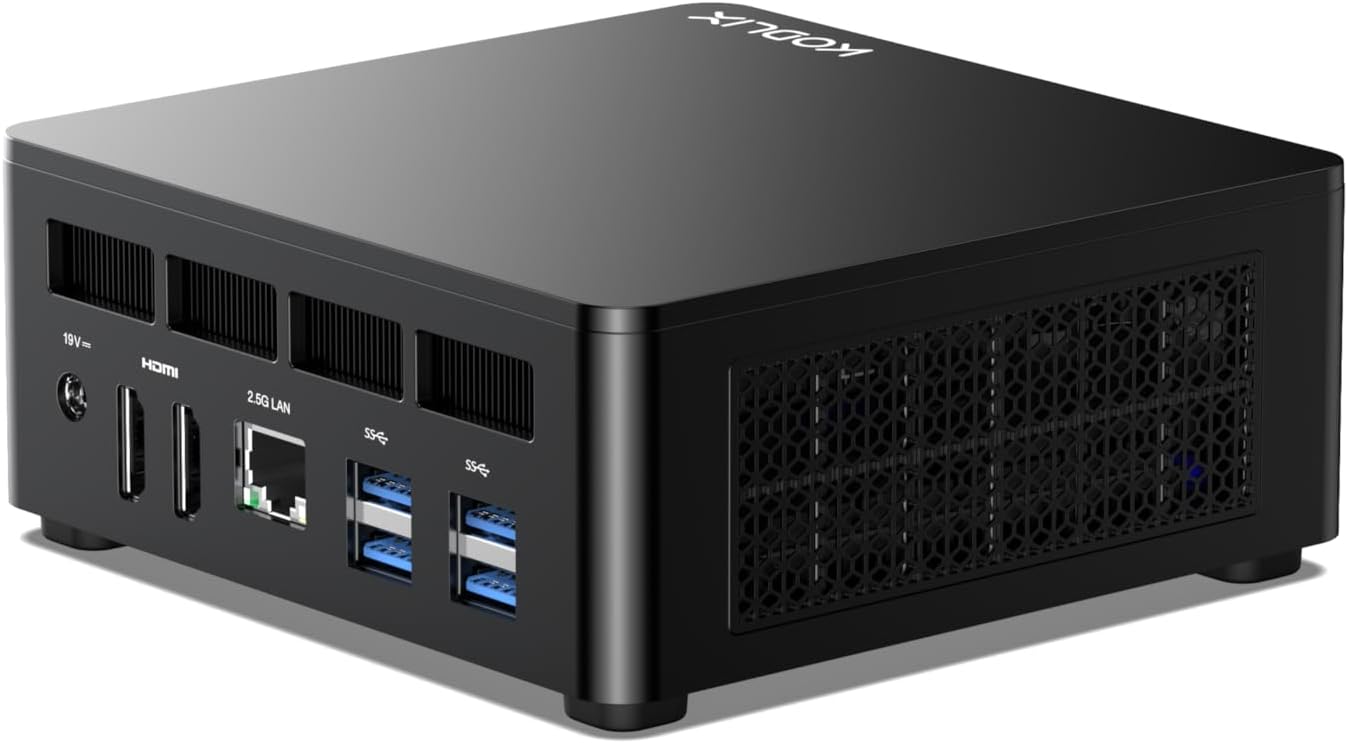
Image 1.1: The MINISFORUM Mini PC AD69, a compact desktop computer.
The MINISFORUM Mini PC AD69 is a high-performance compact desktop computer designed for various applications, including business, education, and gaming. It features an AMD Ryzen 9 6900HX processor, DDR5 memory, and PCIe 4.0 SSD for fast and efficient operation.
2. Орнотуу
2.1 Пакеттин мазмуну
Пакетте бардык буюмдар бар экенин текшериңиз:
- MINISFORUM Mini PC AD69
- Кубаттуу адаптер
- HDMI кабели
- Колдонуучунун Колдонмосу (бул документ)
- Mounting Bracket (optional, for VESA mounting)
2.2 Перифериялык түзүлүштөрдү туташтыруу
Before powering on, connect your peripherals to the Mini PC. Refer to the port diagram below for connection points.

Сүрөт 2.1: Алдыңкы жана арткы view of the Mini PC AD69, highlighting available ports.
- Кубат киргизүү: Connect the DC 19V power adapter to the power input port.
- Дисплей: Connect your monitor(s) using the HDMI 2.1 ports or USB4 ports. The device supports up to four displays simultaneously.
- USB түзмөктөрү: Connect your keyboard, mouse, and other USB devices to the USB 3.2 Gen2 Type-A ports or USB4 ports.
- Тармак: For a wired connection, connect an Ethernet cable to the RJ45 2.5 Gigabit Ethernet Port.
- Аудио: Connect headphones or speakers to the 3.5mm Audio Jack.
2.3 Күйгүзүү
- Ensure all necessary peripherals are connected.
- Кубат адаптерин электр розеткасына туташтырыңыз.
- Press the Power Button located on the front of the Mini PC. The power indicator light will illuminate.
2.4 Монтаждоо параметрлери
The Mini PC AD69 can be mounted behind a monitor or TV using the included VESA mounting bracket (if applicable) to save desk space.

Image 2.2: The Mini PC AD69 shown mounted on the back of a monitor, demonstrating its space-saving design.
3. Иштөө нускамалары
3.1 Initial Boot and Operating System
Upon first boot, the Mini PC will guide you through the operating system setup process. Follow the on-screen instructions to configure your preferences.
3.2 Дисплейдин конфигурациясы
The Mini PC AD69 supports up to four independent displays. Connect your monitors to the available HDMI 2.1 and USB4 ports. The operating system will automatically detect the connected displays. You can configure display settings (resolution, orientation, extended/duplicated desktop) through the operating system's display settings menu.

Image 3.1: The Mini PC AD69 connected to four monitors, demonstrating its quad display capability.
3.3 Тармакка туташуу
- Зымдуу туташуу: Connect an Ethernet cable to the RJ45 2.5 Gigabit Ethernet port for a stable, high-speed wired network connection.
- Зымсыз туташуу: The Mini PC supports Wi-Fi 6E. To connect to a wireless network, navigate to the network settings in your operating system, select your desired Wi-Fi network, and enter the password.
3.4 Bluetooth түзмөктөрү
The Mini PC AD69 includes Bluetooth 5.3 for connecting wireless peripherals such as keyboards, mice, and headphones. To pair a Bluetooth device, go to the Bluetooth settings in your operating system, enable Bluetooth, and follow the pairing instructions for your device.
4. Техникалык тейлөө
4.1 Тазалоо
Regularly clean the exterior of the Mini PC with a soft, dry cloth. Avoid using liquid cleaners or abrasive materials. Ensure the ventilation grilles are free from dust and obstructions to maintain proper airflow.
4.2 Жылуулук диссипациясы
The Mini PC AD69 features an efficient heat dissipation system, including a large heatsink, quiet fan, and liquid metal thermal interface material, to ensure stable performance. To prevent overheating:
- Мини-компьютерди жакшы желдетилген жерге коюңуз.
- Вентиляция тешиктерин жаппаңыз.
- Түзмөктү абанын айлануусуна тоскоол боло турган жумшак беттерге койбоңуз.

Image 4.1: Diagram illustrating the efficient heat dissipation design of the Mini PC AD69, showing airflow and internal cooling components.
4.3 Сактагычты кеңейтүү
The Mini PC AD69 supports storage expansion with additional M.2 2280 PCIe 4.0 SSDs and RAM upgrades up to 64GB DDR5. Refer to the internal component diagram for slot locations. It is recommended to consult a qualified technician for hardware upgrades to avoid damage.

Сүрөт 4.2: Ички view of the Mini PC AD69, showing the dual-channel DDR5 memory slots and dual M.2 PCIe 4.0 SSD slots.
5. Кыйынчылыктарды
If you encounter issues with your Mini PC, refer to the following common problems and solutions:
- Кубат жок:
- Кубат адаптери Мини компьютерге жана иштеген электр розеткасына бекем туташып турганын текшериңиз.
- Башка аспапка сайып, розетка иштеп жатканын текшериңиз.
- Кубат баскычын бекем басыңыз.
- Дисплей жок:
- Check that the HDMI or USB4 cable is securely connected to both the Mini PC and the monitor.
- Монитордун күйгүзүлгөнүн жана туура киргизүү булагына коюлганын текшериңиз.
- Башка дисплей кабелин же бар болсо мониторду колдонуп көрүңүз.
- Интернет байланышы жок (Wi-Fi):
- Verify that Wi-Fi is enabled in the operating system settings.
- Ensure you are connected to the correct network and have entered the password correctly.
- Restart your router and the Mini PC.
- No Internet Connection (Wired):
- Check that the Ethernet cable is securely connected to both the Mini PC and the router/modem.
- Verify that your router/modem is working correctly.
- Башка Ethernet кабелин колдонуп көрүңүз.
- Перифериялык түзмөк аныкталган жок:
- Ensure the peripheral is properly connected to a USB port.
- Перифериялык түзүлүштү башка USB портуна туташтырууга аракет кылыңыз.
- Check if the peripheral requires specific drivers and install them if necessary.
6. Техникалык шарттар
| Өзгөчөлүк | Спецификация |
|---|---|
| Процессор | AMD Ryzen 9 6900HX (8 Cores/16 Threads, up to 4.9 GHz) |
| Графика | AMD Radeon 680M (интеграцияланган) |
| RAM | 32GB DDR5 (Dual Channel, 4800MHz, expandable to 64GB) |
| Сактагыч | 512GB PCIe 4.0 SSD (M.2 2280) |
| Display Output | 2x HDMI 2.1 (up to 7680x4320), 2x USB4 (up to 8K@60Hz) |
| USB порттору | 4x USB 3.2 Gen2 Type-A, 2x USB4 (40Gbps) |
| Network | RJ45 2.5 Gigabit Ethernet, Wi-Fi 6E |
| Bluetooth | Bluetooth 5.3 |
| Аудио | 3.5 мм аудио джек |
| Операция системасы | OS (Pre-installed) |
| Өлчөмдөр | Болжол менен 5 x 5 x 2 дюйм (12.7 x 12.7 x 5.08 см) |
| Салмагы | Болжол менен 3.21 фунт (1.45 кг) |
7. Кепилдик жана колдоо
7.1 Кепилдик маалыматы
MINISFORUM products typically come with a limited warranty. The duration and terms of the warranty may vary by region and product. Please refer to the warranty card included with your product or visit the official MINISFORUM webтолук кепилдик маалымат алуу үчүн сайт.
Сатып алганыңыздын далилин (дүмүрчөк же эсеп-дүмүрчөк) сактаңыз, анткени ал бардык кепилдик дооматтары үчүн талап кылынат.
7.2 Техникалык колдоо
For technical assistance, troubleshooting beyond this manual, or warranty inquiries, please contact MINISFORUM customer support. Support is primarily provided via email.
Байланыш маалыматы:
- Refer to the official MINISFORUM webэң акыркы колдоо байланыш маалыматтары үчүн сайт.
- When contacting support, please provide your product model (AD69), serial number, and a clear description of the issue.


