1. Киришүү
Thank you for choosing the Moukey MPA80 PA System. This manual provides essential information for the safe and efficient operation of your new audio system. Please read it thoroughly before use and retain it for future reference.
Коопсуздук нускамалары
- Аппаратты иштетүүдөн мурун бардык нускамаларды кылдат окуп чыгыңыз.
- Продукцияны суудан, нымдан жана экстремалдык температурадан алыс кармаңыз.
- Агрегатты өз алдынча бөлүүгө же оңдоого аракет кылбаңыз. Бардык тейлөөлөрдү квалификациялуу кызматкерлерге тапшырыңыз.
- Ашыкча ысып кетүүнүн алдын алуу үчүн туура желдетүүнү камсыз кылыңыз.
- Use only the power adapter and accessories specified by the manufacturer.
- Position the speakers and stands on a stable, level surface to prevent tipping.
2. Кутуда эмне бар
Пакетте бардык буюмдар бар экенин текшериңиз:
- 1 x 8-inch Active PA Speaker
- 1 x 8-inch Passive PA Speaker
- 2 x Tripod Stands
- 1 x Зымдуу микрофон
- 1 x Алыстан башкаруу
- 1 x Кубат кабели
- 1 x Speaker Connection Cable (for active to passive speaker)
- 1 х Колдонуучунун колдонмосу (бул документ)

Image 2.1: Moukey MPA80 PA System components including two speakers, two tripod stands, a wired microphone, and a remote control.
3. Продукт бүтүп калдыview
Спикер компоненттери
Each speaker unit features an 8-inch woofer and 1-inch tweeters for balanced audio output.
Control Panel (Active Speaker)
The active speaker houses the main control panel. Refer to the image below for a visual guide to the controls and inputs.
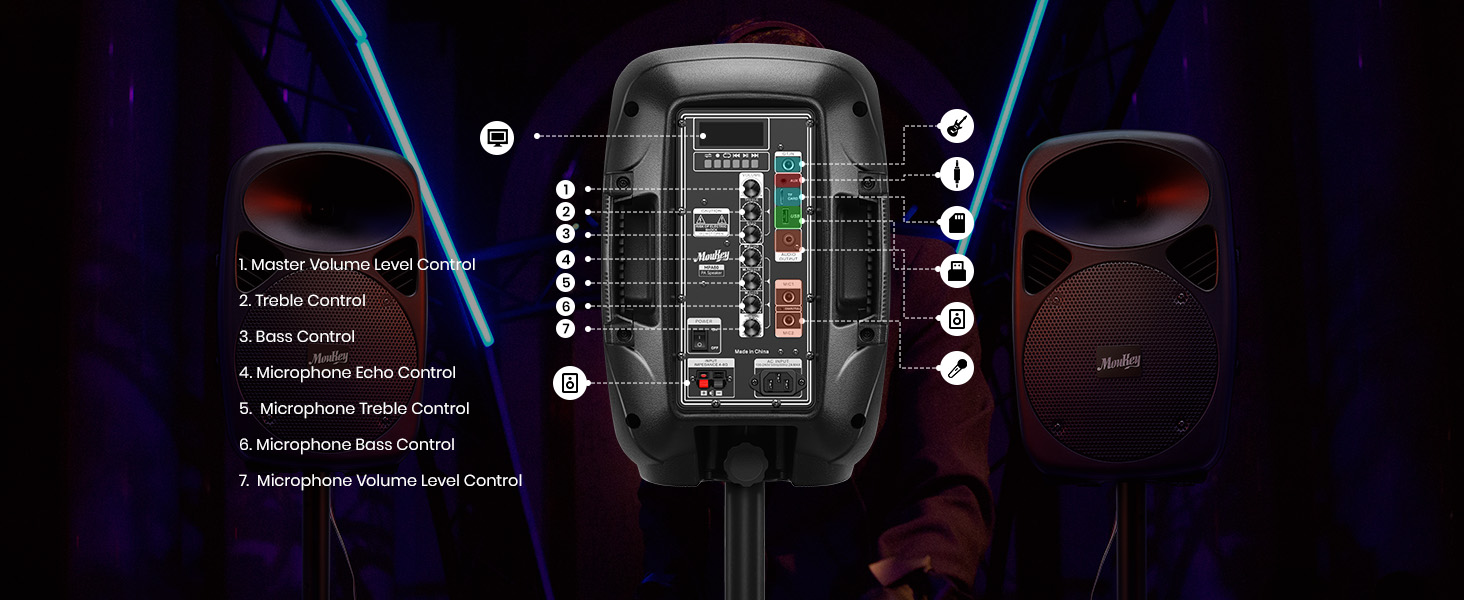
Сүрөт 3.1: Детальдуу view of the Moukey MPA80 PA System's active speaker control panel with numbered labels for each function.
- Master Volume Level Control: Жалпы чыгаруу көлөмүн тууралайт.
- Үч ыргак башкаруу: Жогорку жыштыктагы аудио чыгарууну тууралайт.
- Басс башкаруу: Төмөн жыштыктагы аудио чыгарууну тууралайт.
- Microphone Echo Control: Adjusts the echo effect for microphone inputs.
- Microphone Treble Control: Adjusts the high-frequency audio for microphone inputs.
- Microphone Bass Control: Adjusts the low-frequency audio for microphone inputs.
- Microphone Volume Level Control: Adjusts the volume of microphone inputs.
- USB/TF Card Slot: USB дисктерден же TF карталарынан аудио ойнотуу үчүн.
- Режим баскычы: Switches between input modes (Bluetooth, USB, TF, FM, AUX).
- Ойнотуу/тындыруу баскычы: Controls playback for USB/TF/Bluetooth.
- Мурунку/Кийинки трек баскычтары: Navigates tracks for USB/TF/Bluetooth.
- FM антеннасы: Жакшыртылган FM радио кабыл алуу үчүн.
- AUX киргизүү: Тышкы аудио түзүлүштөрдү туташтыруу үчүн 3.5 мм уяча.
- Микрофон киргизүүлөрү (x2): 1/4-inch jacks for connecting wired microphones.
- Кубат киргизүү: AC кубат кабелин туташтыруу үчүн.
- Кубат которгучу: Агрегатты күйгүзөт же өчүрөт.
- Динамиктин чыгышы: Connects to the passive speaker using the provided cable.
4. Орнотуу
4.1 Assembling the Tripod Stands
The included tripod stands provide stable support for your speakers. Follow these steps for assembly:
- Штативдик стенддин буттары толугу менен жазылып, туруктуу болгонго чейин жазыңыз.
- Adjust the height of the stand using the locking mechanism. Ensure the locking pin is securely engaged.
- Place a speaker onto the top pole of each stand. Ensure the speaker is seated firmly.
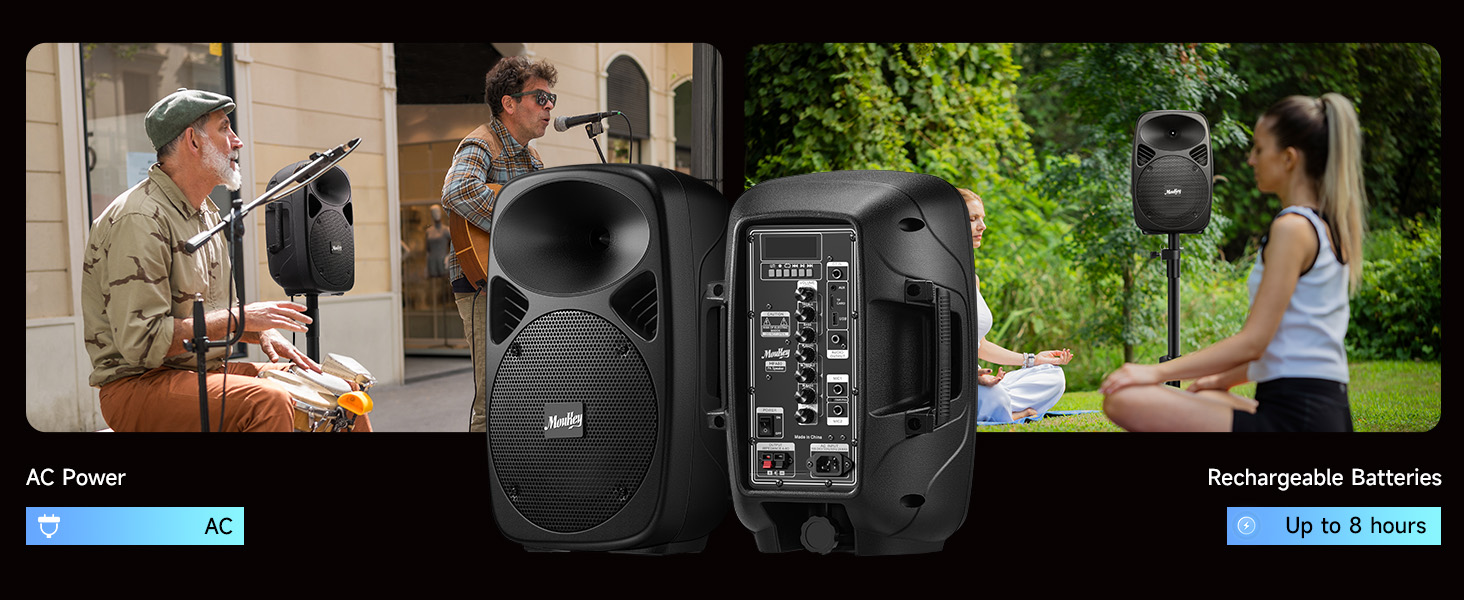
Image 4.1: Diagram showing the steps to assemble the tripod stands and mount the speakers.
4.2 Динамиктерди туташтыруу
The Moukey MPA80 system includes one active speaker and one passive speaker. The passive speaker must be connected to the active speaker using the provided speaker cable.
- Locate the speaker output terminals on the active speaker and the input terminals on the passive speaker.
- Connect one end of the speaker cable to the active speaker's output.
- Connect the other end of the speaker cable to the passive speaker's input. Ensure a secure connection.
Эскертүү: The passive speaker does not have its own power source and relies on the active speaker for audio signal and power.
4.3 Системаны электр менен камсыздоо
The system can be powered via AC power or its internal rechargeable battery.
Image 4.2: Illustration of the Moukey MPA80 PA System showing both AC power connection and battery operation for up to 8 hours.
- AC кубаттуулугу: Connect the provided power cable to the power input on the active speaker and then to a standard electrical outlet.
- Батарея кубаттуулугу: The system has a built-in rechargeable battery. Ensure the battery is charged before outdoor or portable use. A full charge can provide up to 8 hours of playtime at 50% volume.
- Flip the Power Switch to the 'ON' position to turn on the system.
5. Иштөө нускамалары
5.1 Bluetooth байланышы
Connect your device wirelessly via Bluetooth 5.0.
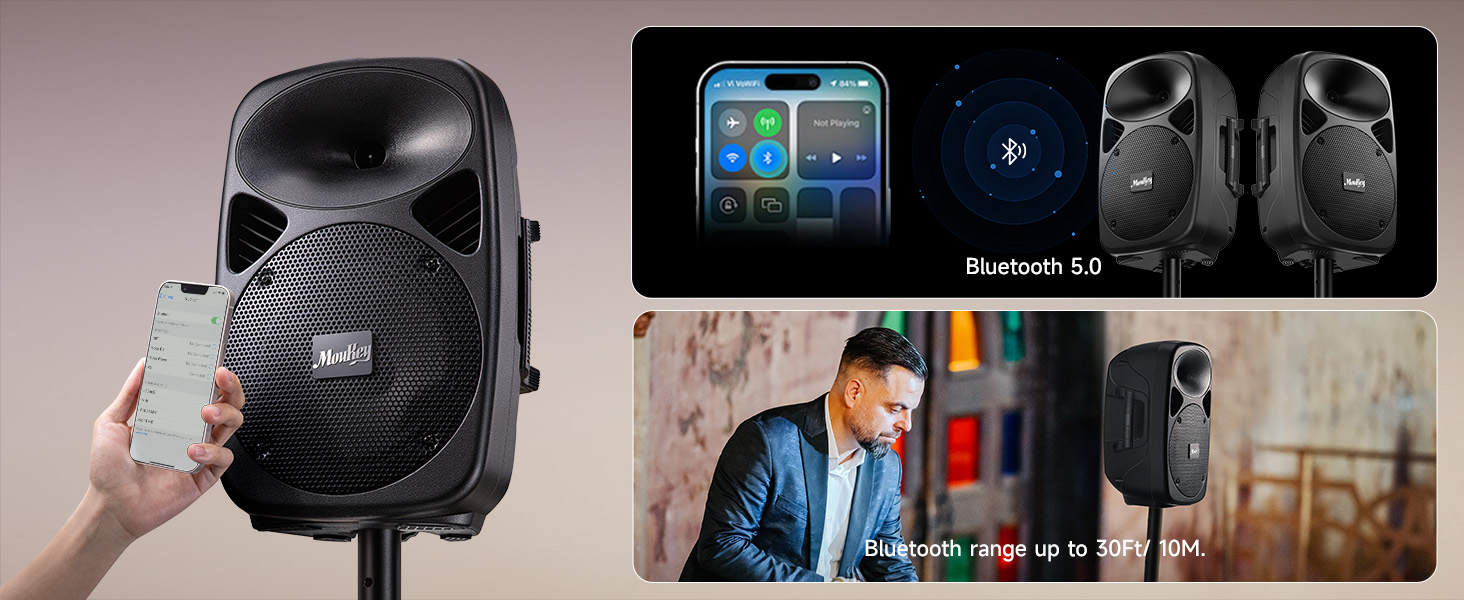
Image 5.1: Image showing a smartphone connecting to the Moukey MPA80 PA System via Bluetooth 5.0, with a Bluetooth range of up to 30 feet.
- PA системасын күйгүзүңүз.
- Press the 'Mode' button on the control panel or remote until 'Bluetooth' mode is selected. The display will show 'BLUE' and a pairing indicator will flash.
- Смартфонуңузда, планшетиңизде же башка Bluetooth иштетилген түзмөгүңүздө жеткиликтүү Bluetooth түзмөктөрүн издеңиз.
- Select 'Moukey MPA80' from the list. Once connected, the pairing indicator will stop flashing.
- You can now play audio from your device through the PA system. The effective Bluetooth range is approximately 30 feet (10 meters).
5.2 USB/TF картасын ойнотуу
Аудио ойнотуу fileтүздөн-түз USB флэш-дискинен же TF (MicroSD) картасынан.
- Insert a USB flash drive or TF card into the respective slot on the control panel.
- The system should automatically switch to USB/TF mode and begin playback. If not, press the 'Mode' button to select the correct input.
- Use the 'Play/Pause', 'Previous', and 'Next' buttons on the control panel or remote to manage playback.
5.3 AUX киргизүү
Connect external audio sources using a 3.5mm AUX cable.
- Connect one end of a 3.5mm audio cable to the AUX input on the active speaker.
- Connect the other end to the headphone jack or audio output of your external device (e.g., laptop, MP3 player).
- Press the 'Mode' button to select 'AUX' input.
- Adjust the volume on both the PA system and your external device.
5.4 Микрофонду колдонуу
Connect the wired microphone for vocal performances or announcements.
- Plug the wired microphone into one of the 1/4-inch 'Mic In' jacks on the active speaker.
- Adjust the 'Mic Volume Level Control' to set the microphone's volume.
- Use the 'Microphone Echo Control', 'Microphone Treble Control', and 'Microphone Bass Control' to fine-tune the microphone's sound.
5.5 FM радиосу
FM радиостанцияларын угуңуз.
- Press the 'Mode' button until 'FM' mode is selected.
- Extend the FM antenna for better reception.
- Use the 'Previous' and 'Next' buttons to scan for radio stations.
5.6 EQ Control
Customize the sound output to your preference.
- Use the 'Treble Control' knob to increase or decrease high frequencies.
- Use the 'Bass Control' knob to increase or decrease low frequencies.
6. Техникалык тейлөө
6.1 Тазалоо
To maintain the appearance and longevity of your PA system:
- Тазалоодон мурун ар дайым кубаттан ажыратыңыз.
- Wipe the surfaces with a soft, dry, or slightly damp кездеме.
- Абразивдүү тазалагычтарды, момдорду же эриткичтерди колдонбоңуз.
- Keep liquids away from openings and controls.
6.2 Батареяга кам көрүү
The internal lithium-ion battery requires proper care for optimal performance and lifespan:
- Заряддоо: Charge the battery fully before first use. Recharge the battery regularly, even if the system is not used frequently, to maintain battery health.
- Сактагыч: If storing the system for an extended period, charge the battery to approximately 50-70% and store in a cool, dry place. Avoid storing with a completely depleted or fully charged battery for long durations.
- Температура: Avoid exposing the battery to extreme heat or cold, as this can degrade performance and lifespan.
6.3 Сактоо
When not in use, store the PA system in a dry, dust-free environment. If possible, use the original packaging or a protective cover to prevent dust accumulation and damage.
7. Кыйынчылыктарды
If you encounter issues with your Moukey MPA80 PA System, refer to the following common problems and solutions:
| Көйгөй | Мүмкүн себеп | Чечим |
|---|---|---|
| Күч жок | Power cable not connected; Battery depleted; Power switch off | Ensure power cable is securely connected; Charge the battery; Turn power switch to 'ON' |
| Үн чыгышы жок | Volume too low; Incorrect input mode; Speaker cable disconnected; External device issue | Increase Master Volume; Select correct input mode (Bluetooth, AUX, USB/TF); Check speaker connection cable; Verify external device audio output |
| Bluetooth туташпай жатат | PA system not in pairing mode; Device too far; Interference; Device already connected to another unit | Ensure PA system is in Bluetooth pairing mode; Move device closer; Reduce interference; Disconnect from other Bluetooth devices |
| Микрофон иштебей жатат | Microphone not plugged in; Mic volume too low; Microphone faulty | Ensure microphone is securely plugged into 'Mic In' jack; Increase 'Mic Volume Level Control'; Test with another microphone if available |
| FM радиосун кабыл алуу начар | Антенна узартылган эмес; Сигнал алсыз | Fully extend the FM antenna; Try repositioning the unit for better signal |
If the problem persists after trying these solutions, please contact Moukey customer support for assistance.
8. Техникалык шарттар
Key technical specifications for the Moukey MPA80 PA System:
| Өзгөчөлүк | Спецификация |
|---|---|
| Эң жогорку кубаттуулук | 800 Вт |
| RMS Power Output | 60 Вт |
| Вуфердин өлчөмү | 8 дюйм |
| Tweeter өлчөмү | 1 дюйм |
| Bluetooth версиясы | 5.0 |
| Байланыш технологиясы | AUX, Bluetooth, USB |
| Аудио киргизүү | USB, TF, 2 Mic-in (1/4"), AUX IN (3.5mm) |
| Power Source | AC Power, Rechargeable Battery |
| Батарея түрү | Литий-ион (2 керек, камтылган) |
| Батарея ойнотуу убактысы | 8 саатка чейин (50% көлөмдө) |
| Frequency Response | 18 KHz |
| Импеданс | 8 Ом |
| Продукциянын өлчөмдөрү (ар бир баяндамачы) | 10.2 x 7.9 x 15.4 дюйм |
| Элемент Салмагы | 26 pounds (total for system) |
| Tripod Stand Height (max) | 37 дюйм |
| Tripod Stand Load Capacity | 132 фунтка чейин |
9. Кепилдик жана колдоо
Moukey products are designed and manufactured to high-quality standards. For information regarding warranty coverage, please refer to the warranty card included with your product or visit the official Moukey webсайт.
For technical support, troubleshooting assistance, or inquiries about replacement parts, please contact Moukey customer service through the contact information provided on the official webсайт же сатып алуу платформаңыз.


