1. Киришүү
This manual provides essential information for the safe and efficient operation of your VISION VP-621 4K Ultra HD Multimedia Projector. Please read this manual thoroughly before using the projector and retain it for future reference.
The VISION VP-621 is a versatile smart projector featuring 4K Ultra HD support, 11000 lumens brightness, 5G WiFi, Bluetooth 5.0, Auto Focus, Wireless Miracast, and an integrated Android 9.0 operating system. It is designed for various applications including home entertainment, business presentations, and educational purposes.
2. Коопсуздук маалыматы
- Вентиляция тешиктерин жаппаңыз. Ашыкча ысып кетүүнүн алдын алуу үчүн проектордун айланасында адекваттуу аба агымын камсыз кылыңыз.
- l болгондо проектордун объективине тике карабаamp күйүк. Жарык жарык көзгө зыян келтириши мүмкүн.
- Проектор кулап калбашы үчүн аны туруктуу, түз жерге коюңуз.
- Проекторду суудан, нымдуулуктан жана өтө жогорку температурадан алыс кармаңыз.
- Проектор менен келген кубат адаптерин гана колдонуңуз.
- Проекторду өз алдынча ачууга же оңдоого аракет кылбаңыз. Бардык тейлөө иштерин квалификациялуу адистерге тапшырыңыз.
- Чагылган бороондордо же көпкө колдонулбаганда проекторду электр розеткасынан ажыратыңыз.
3. Пакеттин мазмуну
Төмөндө тизмеленген нерселердин баары пакетиңизге камтылганын текшериңиз:
- VISION VP-621 Projector
- Электр кабели
- Адаптер
- Алыстан башкаруу
- AV Cable
- Проектор линзасынын капкагы
4. Продукт бүтүп калдыview
Familiarize yourself with the main components and interfaces of your VISION VP-621 projector.

Сүрөт: алдыңкы жана каптал view of the VISION VP-621 projector, showcasing анын компакттуу дизайны жана линзасы.
4.1 Алдыңкы жана үстүнкү панели
- Проекциялык линза: Сүрөттү чыгарат.
- Инфракызыл кабылдагыч: Алыстан башкаруу сигналдары үчүн.
- Башкаруу баскычтары: Power, Navigation (OK, Up, Down, Left, Right), Back.
- Вентиляция торлору: For cooling the internal components.

Сүрөт: Жогорку view of the projector highlighting the integrated control buttons for power and navigation.
4.2 Rear Panel and Connectivity Ports
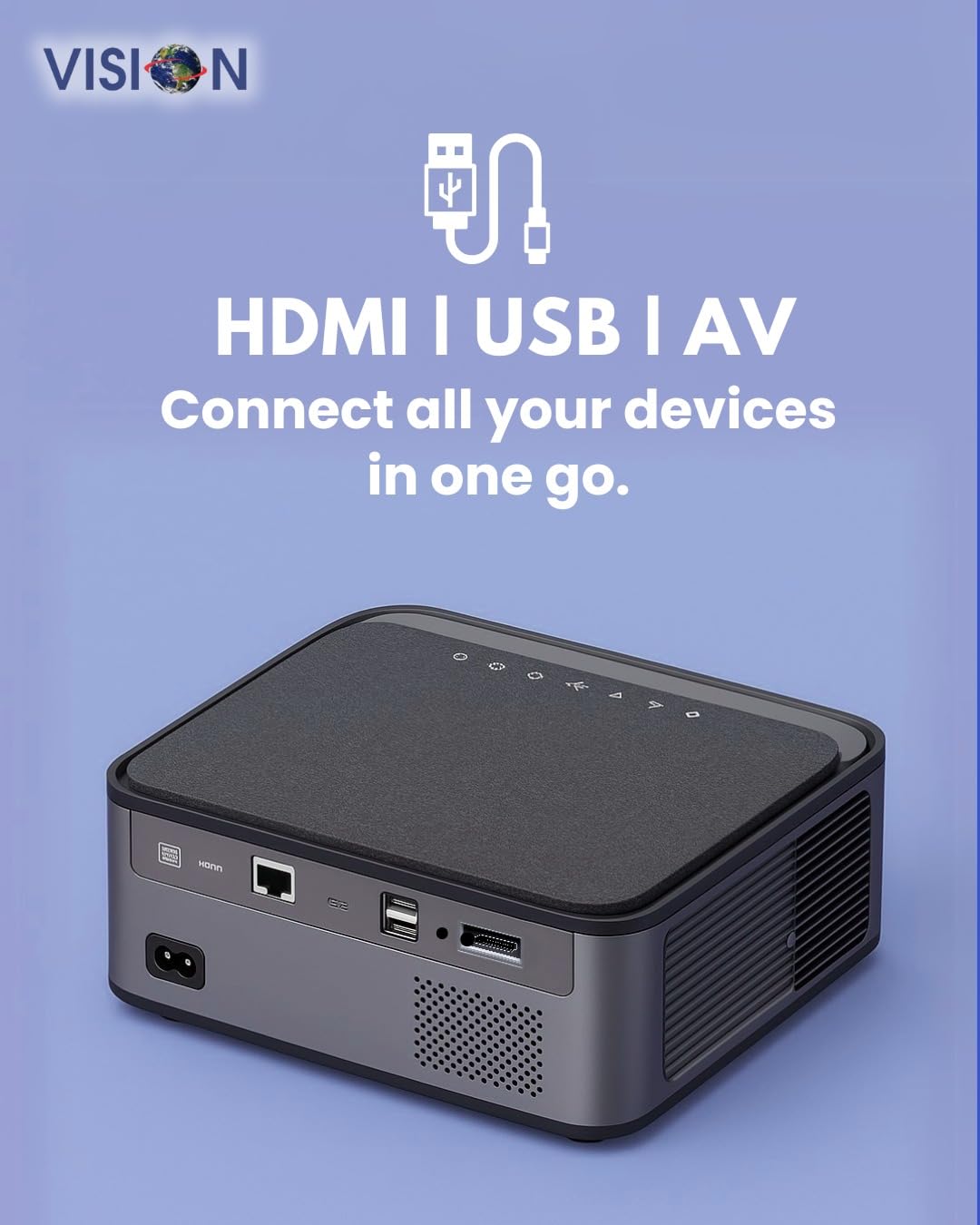
Сүрөт: Арткы view of the projector displaying the various input and output ports, including HDMI, USB, and AV.
- Кубат киргизүү: Кубат адаптерин бул жерге туташтырыңыз.
- HDMI порту: Connect to HDMI-enabled devices (laptops, gaming consoles, streaming sticks).
- USB порттору (x2): Connect USB drives for media playback or external devices.
- AV киргизүү: Connect to older devices using the provided AV cable.
- Аудио чыгышы (3.5 мм): Тышкы динамиктерди же гарнитураны туташтырыңыз.
- LAN порту: For wired internet connection (if available).
5. Орнотуу
5.1 Проекторду жайгаштыруу
Choose a flat, stable surface for the projector. Ensure there are no obstructions in front of the lens and that the ventilation grilles are clear.

Image: A projector positioned on a desk, illustrating a typical setup environment.
5.2 Кубат туташтыруу
- Кубат адаптерин проектордун кубат киргизүү портуна туташтырыңыз.
- Электр шнурунун розеткага сайыңыз.
- Проектордогу кубат индикаторунун жарыгы күйөт.
5.3 Баштапкы күйгүзүү
- Аны күйгүзүү үчүн проектордун же пульттун кубат баскычын басыңыз.
- The projector will boot up and display the Android 9.0 home screen.
5.4 Фокусту жана Keystone жөндөөсүн
The VISION VP-621 features automatic focus and 4D keystone correction for a clear and properly aligned image.

Image: Illustrates the projector's automatic focus and keystone correction capabilities, ensuring a sharp and aligned picture.
- Auto Focus: The projector will automatically adjust the focus for a sharp image upon startup or movement.
- 4D Keystone Correction: The projector automatically corrects image distortion when placed at an angle. Manual adjustments may be available in the settings menu if needed.
6. Иштөө нускамалары
6.1 Android 9.0 Smart OS
The integrated Android 9.0 system allows direct access to streaming services and apps.
- Навигация: Use the remote control's directional buttons and "OK" button to navigate the interface.
- Колдонмо орнотуу: Access the Google Play Store to download and install applications like YouTube, Netflix, and Prime Video.
- Тармак туташуусу: Go to Settings > Network to connect to a 5G WiFi network or a wired LAN connection.
6.2 Тышкы түзмөктөрдү туташтыруу
HDMI туташуусу
- Connect an HDMI cable from your device (laptop, gaming console, Fire TV Stick) to the HDMI port on the projector.
- On the projector's home screen, select the HDMI input source.
USB туташуу
- Insert a USB drive into one of the USB ports on the projector.
- The projector will typically prompt you to open the media player or file browser. If not, navigate to the file manager app on the Android home screen.
AV туташуу
- Connect the provided AV cable to the AV input port on the projector and to your external device.
- Select the AV input source on the projector.
Bluetooth 5.0 Audio Output
- Go to Settings > Bluetooth on the projector.
- Bluetooth'ду иштетиңиз жана жеткиликтүү түзмөктөрдү издеңиз.
- Select your Bluetooth speaker or headphones from the list to pair and connect.
Wireless Miracast (Screen Mirroring)
Miracast allows you to wirelessly mirror the screen of your compatible smartphone, tablet, or laptop.
- On the projector's home screen, select the "Miracast" or "Screen Mirroring" application.
- On your mobile device, enable screen mirroring (often found in quick settings or display settings, named "Cast," "Smart View," "Wireless Display," etc.).
- Туташууну орнотуу үчүн жеткиликтүү түзмөктөрдүн тизмесинен проекторду тандаңыз.
7. Техникалык тейлөө
7.1 Проекторду тазалоо
- Объектив: Оптикалык линзалар үчүн атайын жасалган жумшак, түксүз кездемени колдонуңуз. Абразивдүү тазалагычтарды колдонбоңуз.
- Casing: Проекторду сүртүңүз casinжумшак, кургак чүпүрөк менен сүртүңүз. Өжөр кир үчүн бир азampчүпүрөккө суу куюп, анан кургатып сүртүңүз.
- Вентиляция: Regularly check and clean the ventilation grilles to ensure proper airflow and prevent dust buildup. Use a soft brush or compressed air.
7.2 Лamp Жашоо
The VISION VP-621 utilizes advanced LED technology, providing an estimated lamp life of up to 50,000 hours. This significantly reduces the need for lamp салттуу проекторлор менен салыштырганда алмаштыруу.
8. Кыйынчылыктарды
| Көйгөй | Мүмкүн себеп | Чечим |
|---|---|---|
| Сүрөт көрсөтүлгөн жок |
|
|
| бүдөмүк сүрөт |
|
|
| Үн жок |
|
|
| Wi-Fi'га туташпай жатат |
|
|
9. Техникалык шарттар
| Бренд | VISION |
| Модель аты | VP-621 AN |
| Дисплей технологиясы | LCD |
| Дисплей түрү | LED |
| Жарыктык | 11000 Lumens |
| Сүрөттүн карама-катышы | 18000:1 пиксел |
| Native Resolution | 1920 x 1280 (Full HD) |
| Колдоого алынган резолюция | Up to 4K Ultra HD |
| Аспект катышы | 16:9, 4:3 |
| Операция системасы | Android 9.0 |
| Байланыш технологиясы | Bluetooth 5.0, HDMI, USB, Wi-Fi (5G) |
| Аппараттык интерфейс | Bluetooth 5, HDMI, USB 3.0 |
| Өзгөчөлүктөр | Built-In 3D, Built-In Cooling System, Built-In Speaker, Electric Focus, Wi-Fi Ready, Auto Focus, 4D Keystone Correction, Wireless Miracast |
| Продукциянын өлчөмдөрү | 30 x 18 x 7 см |
| Элемент Салмагы | 8 кг |
| Lamp Жашоо | 50,000 саатка чейин |

Image: Illustrates the projector's Full HD (1920x1080) resolution capability for crisp visuals.

Image: Highlights the projector's 11000 lumens brightness, ensuring clear visuals in various lighting conditions.
10. Кепилдик жана колдоо
Кепилдик маалыматы жана техникалык колдоо алуу үчүн өндүрүүчүгө кайрылыңыз:
- Өндүрүүчү: Scorpio Infosolutions
- Жайгашкан жери: Дели, Индия
- Телефон: +91-7982647130
- Webсайт: visionsheen.in
Please have your product model (VP-621) and purchase details ready when contacting support.


