Introduction
Thank you for choosing the TREBLAB C7-Pro Wireless Bluetooth Headset. This manual provides detailed instructions for setting up, operating, and maintaining your headset to ensure optimal performance and longevity. Designed for clear communication and extended comfort, the C7-Pro is ideal for professional use, home office, calls, and gaming.
Эмне камтылган
- TREBLAB C7-Pro Headphones
- Заряддоо стенди
- USB / Type-C Charging Cable
- User Manual
- Quick Start Guide
- Кепилдик картасы
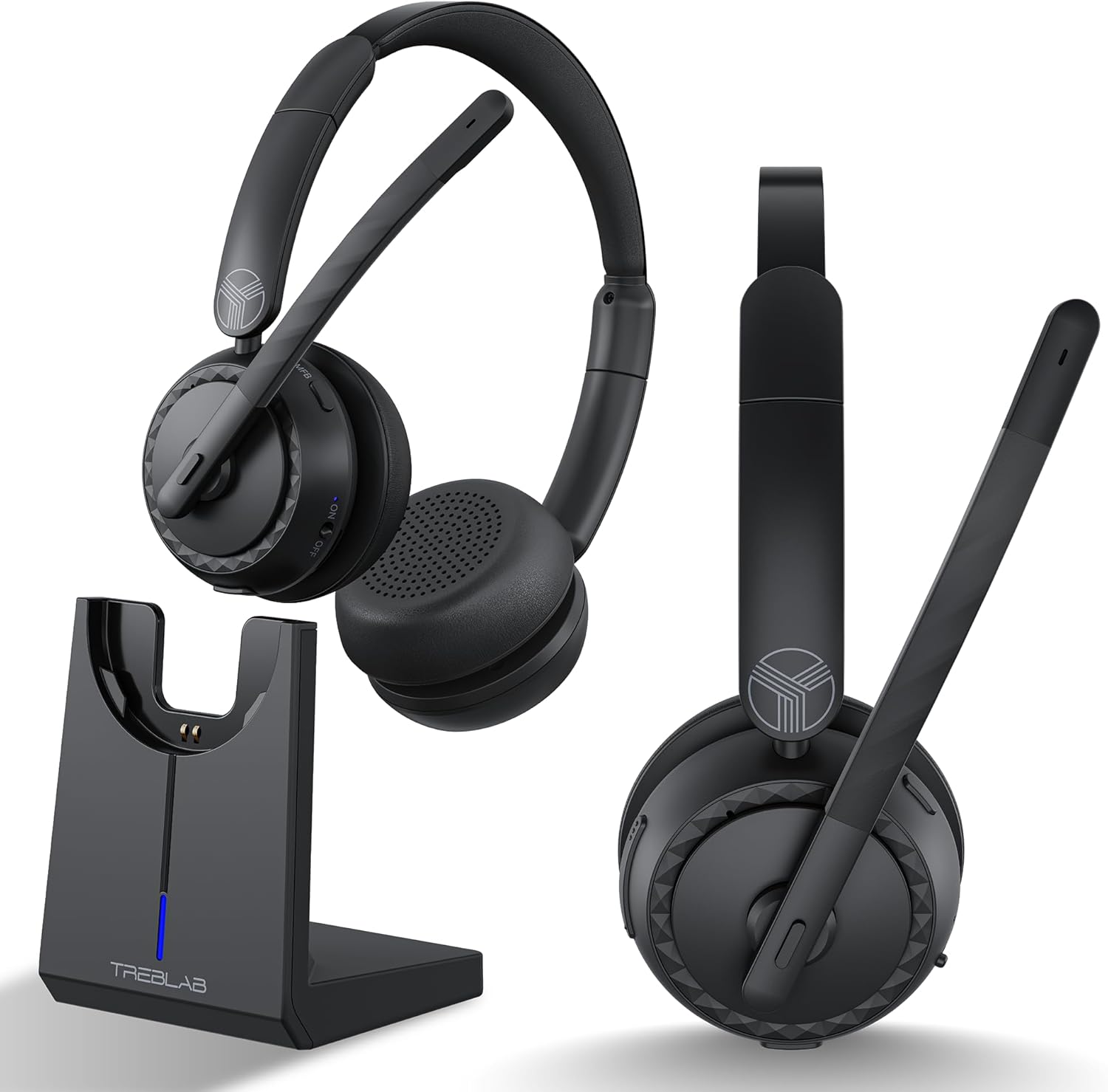
Продукт бүттүview
Headset Components and Features
The TREBLAB C7-Pro headset is designed for comfort and clear audio. It features plush memory foam cushions, an adjustable headband, and a flexible microphone boom with noise-cancelling capabilities.


Жайгашуу
Гарнитураны заряддоо
Before first use, fully charge your TREBLAB C7-Pro headset. The included magnetic charging stand provides a convenient way to charge and store your headset.
- Connect the USB Type-C charging cable to the charging stand and a power source (e.g., computer USB port, wall adapter).
- Place the TREBLAB C7-Pro headset onto the magnetic charging stand. Ensure the charging contacts align.
- The LED indicator on the stand will show charging status. A full charge takes approximately 2.5 hours.

Күйгүзүү/өчүрүү
Күйгүзүү үчүн: Кубат баскычын LED индикатору күйгүчө басып туруңуз.
Өчүрүү үчүн: LED индикатору өчкөнчө Кубат баскычын басып, кармап туруңуз.
Bluetooth Жупташтыруу
The TREBLAB C7-Pro uses Bluetooth 5.3 for stable wireless connectivity.
- Гарнитура өчүрүлгөнүн текшериңиз.
- Күйгүзүү баскычын болжол менен 5 секунд басып, LED индикатору көк жана кызыл түстө күйүп-өчкөнгө чейин, жупташтыруу режимин көрсөткөнгө чейин кармап туруңуз.
- Түзмөгүңүздө (смартфон, ноутбук, компьютер) Bluetooth'ду күйгүзүп, жеткиликтүү түзмөктөрдү издеңиз.
- Select "TREBLAB C7-Pro" from the list of devices.
- Туташкандан кийин гарнитурадагы LED индикатору жай көк түстө күйөт.

Иштөө нускамалары
Чалууларды башкаруу
- Чалууга жооп берүү/аяктоо: Көп функциялуу баскычты (MFB) бир жолу басыңыз.
- Чакырууну четке кагуу: MFBди 2 секунд басып туруңуз.
- Микрофондун үнүн басуу/ачуу: Press the Mute button on the microphone boom.
Музыканы ойнотуу
- Ойнотуу/тындыруу: MFB бир жолу басыңыз.
- Кийинки трек: Үнүн жогорулатуу баскычын басып, кармап туруңуз.
- Мурунку трек: Үндү азайтуу баскычын басып, кармап туруңуз.
Үндү көзөмөлдөө
- Көлөмүн жогорулатуу: Үнүн жогорулатуу баскычын басыңыз.
- Көлөмдү азайтуу: Үндү азайтуу баскычын басыңыз.
Оюн режими
The TREBLAB C7-Pro features a 65ms low-latency Gaming Mode for synchronized audio and visuals. To activate/deactivate Gaming Mode, please refer to the Quick Start Guide for specific button combinations.
Шайкештик
The TREBLAB C7-Pro headset is widely compatible with various platforms and devices, including Zoom, Microsoft Teams, Skype, macOS, Windows, Android, and Apple devices.

Техникалык тейлөө
Тазалоо
Regularly clean your headset to maintain hygiene and performance.
- Use a soft, dry, lint-free cloth to wipe the ear cushions and headband.
- өжөр кир үчүн, бир аз гampчүпүрөктү суу менен. Катуу химиялык заттарды же абразивдүү материалдарды колдонуудан алыс болуңуз.
- Динамиктин торчолоруна же микрофондун тешигине суюктуктун кирбегенин текшериңиз.
Сактагыч
When not in use, store the headset on its charging stand or in a cool, dry place away from direct sunlight and extreme temperatures.
Проблемаларды чечүү
| Көйгөй | Мүмкүн себеп | Чечим |
|---|---|---|
| Гарнитура күйбөйт. | Батарея аз. | Гарнитураны толук заряддаңыз. |
| Түзмөк менен жупташтыруу мүмкүн эмес. | Гарнитура жупташтыруу режиминде эмес; Түзмөктүн Bluetooth функциясы өчүк; Түзмөктөн өтө алыс. | Ensure headset is in pairing mode (flashing blue/red); Turn on Bluetooth on your device; Move headset closer to device (within 35 ft). |
| Үн жок же үн сапаты начар. | Volume too low; Incorrect audio output selected; Interference. | Increase volume on headset and device; Select TREBLAB C7-Pro as audio output; Move away from other wireless devices. |
| Микрофон иштебей жатат. | Microphone muted; Incorrect input device selected. | Unmute microphone; Select TREBLAB C7-Pro as audio input device in your system settings. |
Техникалык шарттар
| Өзгөчөлүк | Деталь |
|---|---|
| Модель аты | C7-Pro |
| Байланыш технологиясы | Зымсыз (Bluetooth 5.3) |
| Bluetooth диапазону | 10 метр (35 бут) |
| Аудио драйверинин өлчөмү | 40 миллиметр |
| Батареянын иштөө мөөнөтү | 45 саатка чейин |
| Заряддоо убактысы | 2.5 саат |
| Аудио кечигүү | 65 миллисекунд (Оюн режими) |
| Микрофондун сезгичтиги | -38 дБ |
| Сууга туруктуулук деңгээли | IPX4 сууга туруктуу |
| Элемент Салмагы | 185 грамм (6.5 унция) |
| Материал | Пластик |
| Шайкеш түзмөктөр | Cellphones, Gaming Consoles, Telephones, Laptops, Desktops |
| Сунушталган Колдонуулар | Office Meetings, Calling, Gaming |
Кепилдик жана колдоо
For warranty information and technical support, please refer to the included Warranty Card or visit the official TREBLAB website. You can also contact TREBLAB customer service for assistance.
Official TREBLAB Store: TREBLAB Amazon Store


