1. Киришүү
This manual provides detailed instructions for the setup, operation, customization, and maintenance of your CHERRY XTRFY M50 Wireless Gaming Mouse. Please read this manual thoroughly to ensure optimal performance and longevity of your device.
1.1. Пакеттин мазмуну
- CHERRY XTRFY M50 зымсыз оюн чычкан
- USB-Cден USB-Aга чейин кубаттоочу кабель
- USB Wireless Receiver (2.4 GHz)
- Quick Start Guide
2. Орнотуу
2.1. Чычканды туташтыруу
The CHERRY XTRFY M50 Wireless Gaming Mouse offers multiple connectivity options: 2.4 GHz wireless via USB receiver, Bluetooth, and wired via USB-C cable.
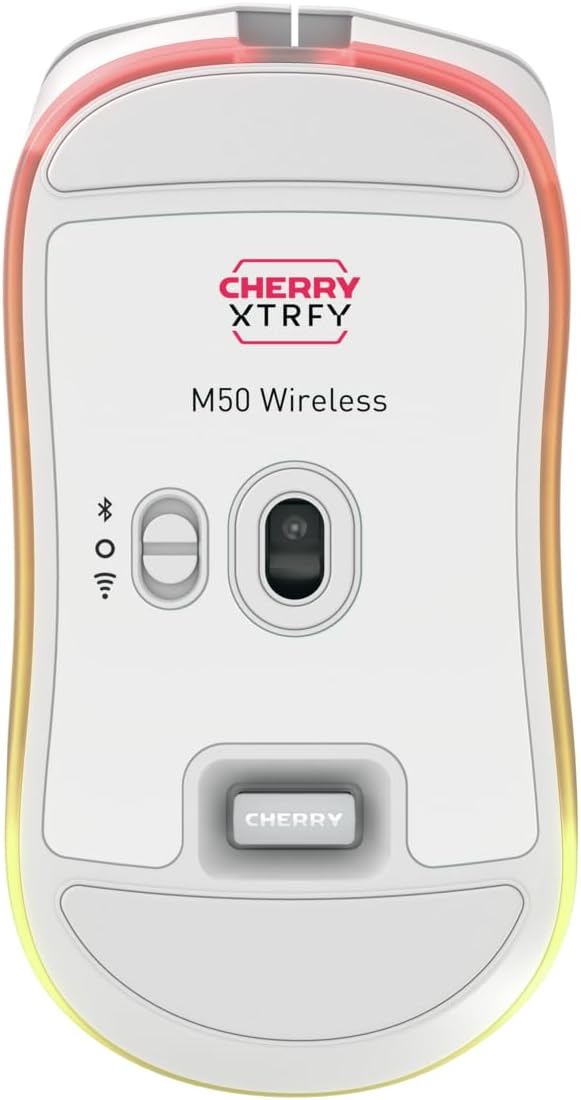
Сүрөт: Төмөнкү view of the M50 Wireless mouse, highlighting the sensor and the connectivity mode switch.
2.1.1. 2.4 ГГц зымсыз байланыш
- Locate the USB wireless receiver. It is typically stored in a compartment on the underside of the mouse.
- Plug the USB wireless receiver into an available USB-A port on your computer.
- On the underside of the mouse, slide the switch to the '2.4 GHz' position (often indicated by a wireless icon).
- Чычкан компьютериңизге автоматтык түрдө туташуу керек.
2.1.2. Bluetooth туташуусу
- On the underside of the mouse, slide the switch to the 'Bluetooth' position (often indicated by a Bluetooth icon).
- On your computer, navigate to Bluetooth settings and enable Bluetooth.
- "Түзмөк кошуу" же "Жаңы түзмөктү жупташтыруу" дегенди тандаңыз.
- The mouse should appear as 'CHERRY XTRFY M50' or similar. Select it to pair.
2.1.3. Зымдуу туташуу
- Connect the USB-C end of the charging cable to the front port of the mouse.
- Connect the USB-A end of the charging cable to an available USB-A port on your computer.
- Чычкан зымдуу режимде иштейт жана бир эле учурда кубатталат.

Сүрөт: The M50 Wireless mouse connected via its USB-C charging cable, illustrating wired mode and charging.
2.2. Чычканды заряддоо
To charge the M50 Wireless mouse, connect the provided USB-C cable to the mouse and the USB-A end to a powered USB port on your computer or a USB wall adapter. The RGB lighting may indicate charging status.
3. Иштөө нускамалары
The CHERRY XTRFY M50 Wireless Gaming Mouse features an ergonomic design for comfortable use and precise control.

Сүрөт: Фронт view of the M50 Wireless mouse, displaying its main buttons and scroll wheel.
3.1. Негизги функциялар
- Сол чыкылдатуу: Негизги аракет баскычы.
- Оң чыкылдатуу: Көбүнчө контексттик менюлар үчүн кошумча аракет баскычы.
- Жылдыруу дөңгөлөгү: Used for vertical scrolling. The 4D tilt wheel also supports horizontal scrolling.
- DPI баскычы: Located behind the scroll wheel, this button cycles through pre-set CPI (Counts Per Inch) levels.
- Каптал баскычтары: Typically used for 'forward' and 'back' navigation in web browsers or customizable in software.
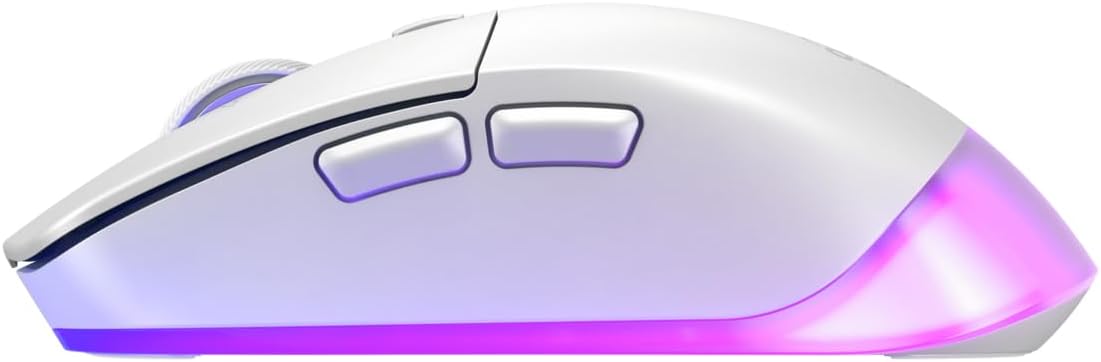
Сүрөт: Side view of the M50 Wireless mouse, showing the ergonomic curve and the two side buttons.
4. Customization (CHERRY UTILITY Software)
The CHERRY XTRFY M50 Wireless Gaming Mouse features 5 customizable on-board profiles. To unlock the full potential of your mouse, download and install the CHERRY UTILITY software from the official CHERRY XTRFY webсайт.
4.1. Программалык камсыздоонун өзгөчөлүктөрү
With the CHERRY UTILITY software, you can:
- Adjust CPI (Counts Per Inch) sensitivity levels.
- Configure Polling Rate.
- Assign macros to buttons.
- Баскычтын функцияларын кайра картага түшүрүү.
- Customize RGB illumination effects and colors.
- Create and manage up to 5 on-board profiles, which are stored directly on the mouse.
5. Техникалык тейлөө
5.1. Тазалоо
Оптималдуу аткарууну жана көрүнүштү сактоо үчүн:
- Ensure the mouse is disconnected from your computer or powered off before cleaning.
- Жумшак, түксүз кездемени жеңил колдонуңуз dampсуу же жумшак тазалоо эритмеси менен.
- Катуу химиялык заттарды, абразивдүү материалдарды же ашыкча нымдуулукту колдонуудан алыс болуңуз.
- Clean the sensor area gently with a cotton swab if tracking issues occur.
5.2. Сактоо
When not in use for extended periods, store the mouse in a dry, cool environment away from direct sunlight and extreme temperatures.
6. Кыйынчылыктарды
6.1. Байланыш маселелери
- Mouse not responding (2.4 GHz): Ensure the USB receiver is securely plugged into a working USB port. Check that the mouse's mode switch is set to 2.4 GHz. Try a different USB port.
- Mouse not responding (Bluetooth): Ensure Bluetooth is enabled on your computer and the mouse's mode switch is set to Bluetooth. Re-pair the device if necessary.
- Үзгүлтүксүз туташуу: Move the mouse closer to the receiver or Bluetooth adapter. Avoid sources of interference (e.g., other wireless devices, large metal objects).
6.2. Tracking Issues
- Чычкан сенсорун пахта таякчасы менен тазалаңыз.
- Чычканды ылайыктуу жерде (мисалы, чычкан аянтчасында) колдонуп жатканыңызды текшериңиз.
- Adjust CPI settings via the DPI button or CHERRY UTILITY software.
6.3. Заряддоо көйгөйлөрү
- Ensure the USB-C cable is properly connected to both the mouse and a powered USB port.
- Башка USB портун же кубаттоо кабелин колдонуп көрүңүз.
7. Техникалык шарттар
| Бренд | CHERRY XTRFY |
| Модель аты | M50 Wireless |
| Модель номери | JW-5000-0 |
| Байланыш технологиясы | 2.4 GHz Wireless, Bluetooth, USB Wired |
| Кыймылды аныктоо технологиясы | Лазер |
| Өзгөчө өзгөчөлүк | Lightweight, Adjustable RGB Illumination, 4D Tilt Wheel |
| Түс | Ак |
| Пакеттин болжолдуу өлчөмдөрү (L x W x Y) | 7.2 x 4.09 x 2.72 дюйм |
8. Кепилдик жана колдоо
For warranty information and technical support, please refer to the official CHERRY XTRFY webсайтка же кардарларды тейлөөгө кайрылыңыз. Кепилдик дооматтар үчүн сатып алганыңыздын далилин сактаңыз.
Webсайт: www.cherryxtrfy.com


