1. Киришүү
The WONLINK AC1200 Outdoor WiFi Extender is designed to provide robust and stable wireless network coverage in outdoor environments. Featuring dual-band technology (2.4GHz and 5GHz) and Power over Ethernet (PoE) support, this device is ideal for extending Wi-Fi to gardens, yards, farms, parks, and other large outdoor areas. Its IP66-rated weather-resistant casing ensures reliable performance in various challenging conditions.
2. Кутуда эмне бар
- 1 * Outdoor Access Point
- 1 * 48V PoE Adapter
- 2 * Stainless Steel Ties
- 2 * Бурама
- 2 * Silicone Gaskets
- 1 * Quick Installation Guide
3. Продукциянын өзгөчөлүктөрү
- Аба ырайына туруктуу дизайн: IP66-rated casing protects the device from harsh outdoor conditions, including extreme cold, heat, and continuous humidity. Key components are sealed with waterproof glue.
- High-Speed Dual-Band Network: Complies with IEEE 802.11ac/a/b/g/n standards, offering maximum dual-band speeds of up to 867Mbps on 5GHz and 300Mbps on 2.4GHz. Ideal for HD streaming and online gaming.
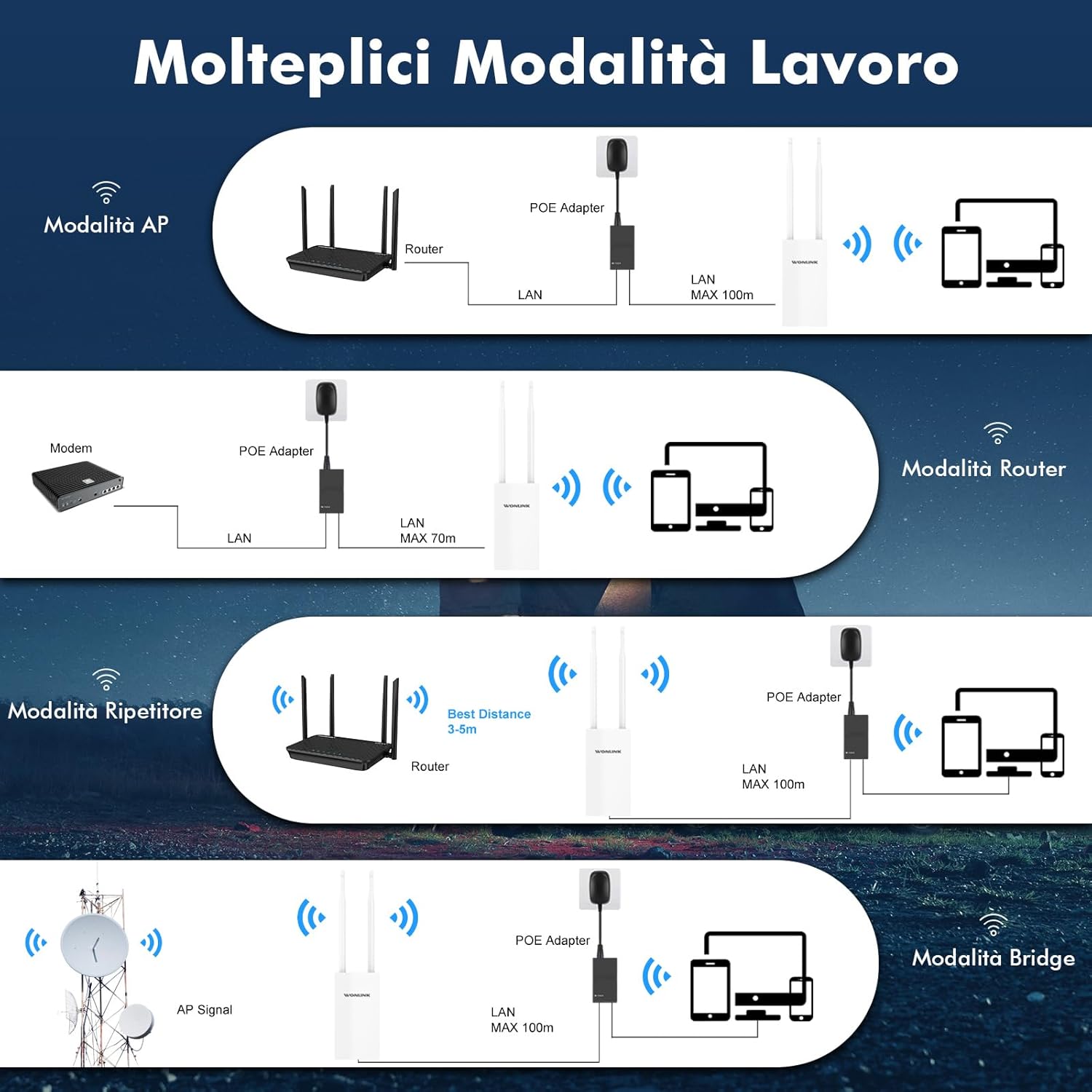
- Бир нече иштөө режимдери: Supports Repeater, AP (Access Point), Router, and Bridge modes to suit various network environments.
- Power Over Ethernet (PoE) & Dual Gigabit Ports: Integrated PoE allows flexible installation in areas without power outlets. Features dual Gigabit Ethernet (1000Mbps) LAN/WAN ports for excellent network speed.
- Stable Long-Range WiFi Coverage: Equipped with 2 high-gain external antennas and high-power PA+LNA amplifiers to extend WiFi signals and eliminate dead zones.


4. Орнотуу колдонмосу
This section provides a step-by-step guide for setting up your WONLINK AC1200 Outdoor WiFi Extender. For a visual walkthrough, please refer to the official setup video below.
4.1. AP Mode Configuration Steps
- Түзмөктү туташтыруу: Ensure correct cable connection and wait for the indicator light to turn on. Connect the device to your computer via Ethernet.
- Connect to WONLINK WiFi: On your computer, connect to the WONLINK device's default WiFi signal (e.g., "WONLINK-XXXX-5G" or "WONLINK-XXXX-2G").
- Мүмкүнчүлүк Web Интерфейс: ачуу а web браузер жана демейки IP дарегин киргизиңиз 192.168.10.1 дарек тилкесинде.
- Кирүү: Enter the default password "admin" to log in.
- AP режимин тандоо: Navigate to "Wizard" and select "AP" mode.
- Configure LAN Settings: In "Lan Settings", enter a new IP address. (Note: The first three groups of numbers of the IP address should be the same as your router's IP, but the last digit must be different.)
- Зымсыз тармак жөндөөлөрүн конфигурациялоо: Set the SSID (network name) for Wireless 2.4G and Wireless 5G. Enter your desired password. (Note: The password should be the same as your router's password. The SSID can be customized as you prefer.)
- Бүтүрүү: Click "Finish" to apply settings. Reconnect to the new WiFi network using the password you set.
4.2. Repeater Mode Configuration Steps
- Түзмөктү туташтыруу: Ensure correct cable connection and wait for the indicator light to turn on. Connect the device to your computer via Ethernet.
- Connect to WONLINK WiFi: On your computer, connect to the WONLINK device's default WiFi signal (e.g., "WONLINK-XXXX-5G" or "WONLINK-XXXX-2G").
- Мүмкүнчүлүк Web Интерфейс: ачуу а web браузер жана демейки IP дарегин киргизиңиз 192.168.10.1 дарек тилкесинде.
- Кирүү: Enter the default password "admin" to log in.
- Кайталоочу режимин тандаңыз: Navigate to "Wizard" and select "Repeater" mode.
- Хост тармагын издөө: Select the 2.4G or 5.8G band, then click "Scan" to find your host router's WiFi signal. Select your network from the scan results.
- Enter Host Password: Enter the WiFi password of your host router. (Note: The password must be identical to your router's password.)
- Бүтүрүү: Click "Finish" to apply settings. Reconnect to the extended WiFi network using the password you set.
5. Иштөө режимдери
The WONLINK AC1200 Outdoor WiFi Extender supports several operating modes to adapt to various networking needs:
- AP (кирүү чекити) режими: Converts a wired internet connection into a wireless signal for expansion. Ideal for creating a new Wi-Fi hotspot.
- Багыттоочу режим: Functions as a standard wireless router, connecting to a modem and providing independent network access.
- Кайталоо режими: Extends the coverage of an existing Wi-Fi network by receiving and re-transmitting the signal.
- Көпүрө режими: Similar to Repeater mode, but can form an independent SSID. Useful for connecting wired devices to a wireless network.
6. Техникалык тейлөө
To ensure the longevity and optimal performance of your WONLINK AC1200 Outdoor WiFi Extender, follow these maintenance guidelines:
- үзгүлтүксүз тазалоо: Periodically wipe the device's exterior with a soft, dry cloth to remove dust and debris. Avoid using harsh chemicals or abrasive materials.
- Байланыштарды текшерүү: Regularly check all cable connections (Ethernet, PoE) to ensure they are secure and free from damage.
- Программалык камсыздоонун жаңыртуулары: Өндүрүүчүнү текшериңиз webжеткиликтүү болгон микропрограмма жаңыртуулары үчүн сайт. Микропрограмманы жаңыртып туруу иштин натыйжалуулугун, туруктуулугун жана коопсуздугун жакшырта алат.
- Экологиялык эске алуулар: Despite its IP66 rating, avoid placing the device in locations where it is constantly submerged in water or exposed to extreme physical impact. Ensure proper ventilation around the device.
7. Кыйынчылыктарды
If you encounter issues with your WONLINK AC1200 Outdoor WiFi Extender, try the following troubleshooting steps:
- Кубат/индикатордун жарыгы өчпөгөн:
- Ensure the PoE adapter is properly connected to a power outlet and the device.
- Check the Ethernet cable connecting the PoE adapter to the device.
- Кирүү мүмкүн эмес Web Интерфейс (192.168.10.1):
- Verify your computer is connected to the WONLINK device's default WiFi network or directly via Ethernet.
- Компьютериңиздин IP жөндөөлөрү IP дарегин автоматтык түрдө алуу (DHCP) үчүн коюлганын текшериңиз.
- Браузериңиздин кэшин тазалап көрүңүз же башка браузерди колдонуп көрүңүз.
- Орнотуудан кийин интернетке кирүү мүмкүн эмес:
- In Repeater mode, ensure you selected the correct host WiFi network and entered its password accurately.
- In AP mode, verify the new IP address set in "Lan Settings" is compatible with your main router's network (same first three octets, different last octet).
- Check the internet connection of your main router.
- Weak or Unstable Signal:
- Adjust the position of the extender to minimize obstacles between it and your main router or client devices.
- Антенналардын бекем орнотулганын жана туура багытталганын текшериңиз.
- Consider interference from other electronic devices or neighboring Wi-Fi networks.
For further assistance, please contact WONLINK customer support.
8. Техникалык шарттар
| Өзгөчөлүк | Деталь |
|---|---|
| Бренд | WONLINK |
| Модел | WL-AP7202 |
| Зымсыз стандарт | 802.11a/b/g/n/ac |
| Маалыматтарды өткөрүү ылдамдыгы | 1200 Megabits per second (Mbps) |
| Жыштык тилкесинин классы | Кош диапазон (2.4 ГГц жана 5 ГГц) |
| Антенналар | 2 x 10dBi жогорку күчөткүчтүү антенналар |
| Ethernet порттору | Dual Gigabit Ethernet (1000Mbps) |
| Электр камсыздоо | 48V PoE Power |
| Аба ырайына каршылык | IP66 рейтинги |
| Шайкеш түзмөктөр | Smartphones, Tablets, Laptops, Computers, Smart TVs, Gaming Consoles, Printers, Security Cameras |
| Өлчөмдөр | 22.5 x 19.5 x 5 см |
| Салмагы | 520 грамм |
9. Кепилдик жана колдоо
WONLINK is committed to providing high-quality products and excellent customer service.
- Продукт колдоо: If you encounter any issues with your product, please contact us. We aim to respond within 24 hours and provide satisfactory solutions.
- Кайтаруу саясаты: Бул продукт сатуучунун кайтарып берүү саясатына ылайык, сатып алынган күндөн тартып 14 күндүн ичинде акчасын кайтарып алууга же алмаштырууга укуктуу.
- Программалык камсыздоо жаңыртуулары: Information regarding guaranteed software updates is currently unknown. Please check the official WONLINK webакыркы маалымат алуу үчүн сайт.
For more information or to contact support, visit the WONLINK Store on Amazon.


