1. Продукт бүтүп калдыview
The amaran Ace 25c is a compact, powerful, and versatile RGB portable video light designed for photography and videography. It features a wide CCT range, high CRI/TLCI, app control, and convenient magnetic mounting, making it an essential tool for creators on the go.

The amaran Ace 25c light shown with its included accessories: a cold shoe adapter, a USB-C charging cable, and a dome diffuser.
2. Кутуда эмне бар
- 1 x amaran Ace 25c light
- 1 x amaran Ace Dome Difuser
- 1 x amaran Ace Lock to Cold Shoe Adapter
- 1 x amaran USB-C Charging Cable (50cm)
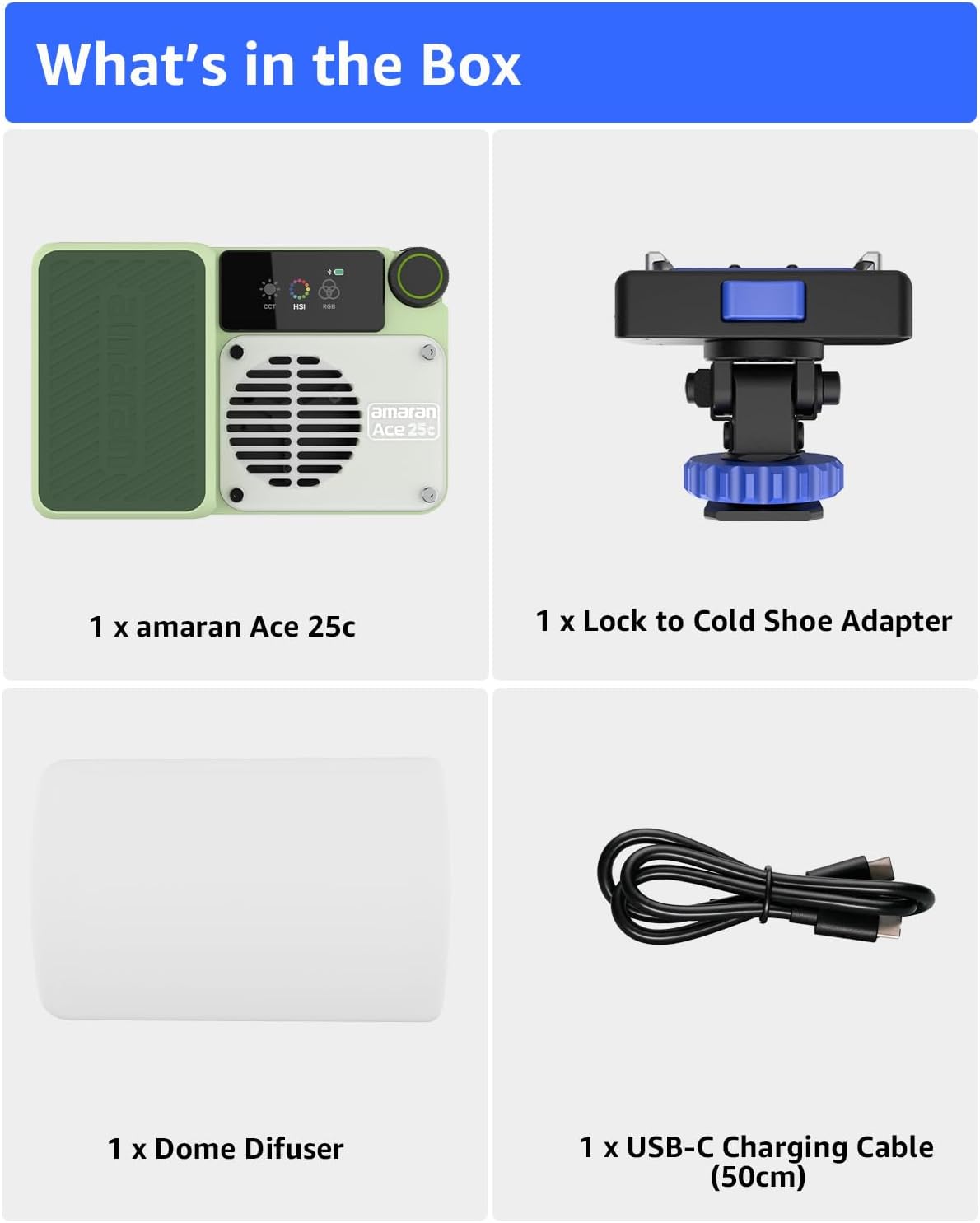
All components included in the amaran Ace 25c package.
3. Негизги өзгөчөлүктөрү
- Компакт өлчөмү: Measuring 11.8 x 7.7 x 3.3cm (4.65 x 3.03 x 1.30in), this mini on-camera light is designed for portability and convenience.
- Powerful Illumination & BOOST Mode: One-click boost from 25W to 32W. Bare Light Illuminance Up to 5,908 lux @ 0.5m (4,300K), with CCT from 2,300K to 10,000K.
- Кош башкаруу ыкмалары: Control via on-board interface or wirelessly using the amaran App / Sidus Link App.
- amaran Ace Lock Quick Mount: Enables one-second installation and removal, compatible with various camera mounts and accessories.
- Батареянын узак иштөө мөөнөтү: Up to 4 hours 40 minutes in Silent Mode and 70 minutes in Standard Mode. Super fast charging (0%-80% in 1 hour, 80%-100% in 30 minutes).
- Магниттик дизайн: Built-in back magnetic silicone pad allows easy attachment to any magnetic surface.

Бүттүview of the compact design and versatile features.

Illustrates palm-sized form factor, magnetic accessories, app control, and knob control.

Demonstrates the wide range of color temperature and HSI control.

The light can also function as a power bank to charge other devices.
4. Орнотуу колдонмосу
4.1 Алгачкы заряддоо
Before first use, fully charge your amaran Ace 25c using the provided USB-C charging cable. Connect the cable to the USB-C port on the light and to a compatible USB power adapter (not included). The display will indicate charging status.
4.2 Жарыкты орнотуу
The amaran Ace 25c offers multiple mounting options:
- Amaran Ace Lock: Use the included Amaran Ace Lock to Cold Shoe Adapter for quick attachment to cameras or light stands with a cold shoe mount. Simply slide the light onto the adapter until it locks into place.
- Магниттик орнотуу: The built-in magnetic silicone pad on the back allows you to attach the light to any ferrous metal surface for versatile placement.
- Standard Screw Mounts: The light also supports standard 1/4-inch screw mounts for compatibility with tripods and other accessories.

The Amaran Ace Lock system allows for rapid attachment and detachment.

The powerful magnetic base provides flexible mounting options.
Official product video demonstrating the features and usage of the amaran Ace 25c video light, including its compact size, magnetic mounting, and app control capabilities.
5. Иштөө нускамалары
5.1 Күйгүзүү/өчүрүү
Locate the power switch on the side of the unit. Slide the switch to the 'ON' position to power on the light. Slide it to 'OFF' to power down.
5.2 On-Board Controls
The amaran Ace 25c features an intuitive display and a multi-function knob for direct control:
- Туткасы: Rotate to adjust brightness, CCT (Correlated Color Temperature), or HSI (Hue, Saturation, Intensity) values. Press to confirm selections or switch between modes.
- Баскычтар: Additional buttons allow for quick access to different lighting modes (CCT, HSI, RGB) and other settings.
5.3 App Control (Sidus Link)
For advanced control and features, download the Sidus Link app from your device's app store. Pair your amaran Ace 25c with the app via Bluetooth to access a full range of adjustments, including precise color selection, effects, and firmware updates.
5.4 Adjusting Color and Brightness
In CCT mode, adjust the color temperature from 2,300K (warm) to 10,000K (cool). In HSI/RGB mode, select from a full spectrum of colors to achieve desired lighting effects. Brightness can be adjusted from 0% to 100% in all modes.
5.5 BOOST Mode
Activate BOOST mode for a temporary increase in light output from 25W to 32W, providing extra intensity when needed for critical shots. Refer to the on-screen display for BOOST mode activation and duration.
6. Техникалык тейлөө
To ensure the longevity and optimal performance of your amaran Ace 25c, follow these maintenance guidelines:
- Аппаратты таза, жумшак, кургак чүпүрөк менен сүртүңүз. Катуу химиялык заттарды же абразивдүү материалдарды колдонуудан алыс болуңуз.
- Жарыкты күн тийбеген жана экстремалдык температурадан алыс салкын, кургак жерде сактаңыз.
- Protect the light panel from scratches and impacts. Use the included dome diffuser when transporting or storing to prevent damage.
- Ensure the USB-C port is free of dust and debris to maintain proper charging and data transfer.
7. Кыйынчылыктарды
| Көйгөй | Мүмкүн себеп | Чечим |
|---|---|---|
| Жарык күйбөйт | Батарея аз; Кубат өчүк | Charge the device; Ensure power switch is in 'ON' position |
| Cannot connect to Sidus Link App | Bluetooth off; App not updated; Device not paired | Ensure Bluetooth is enabled on your phone; Update the app; Follow in-app pairing instructions |
| Жарыктын чыгышы күңүрт | Brightness set too low; Not in BOOST mode | Increase brightness via knob or app; Activate BOOST mode if higher intensity is needed |
| Жарык ысып кетет | Prolonged use at high intensity; Blocked ventilation | Reduce intensity or use Silent Mode; Ensure ventilation grilles are clear |
8. Техникалык шарттар
| Өзгөчөлүк | Деталь |
|---|---|
| Продукциянын өлчөмдөрү | 6.1 x 3.94 x 3.44 дюйм |
| Элемент Салмагы | 1.1 фунт |
| Элемент моделинин номери | Wihte |
| Бренд | Amaran |
| Батареянын иштөө мөөнөтү (Стандарттык режим) | 70 мүнөт |
| Battery Life (Silent Mode) | 4 саат 40 мүнөткө чейин |
| Байланыш технологиясы | Bluetooth |
| Flash режимдери сүрөттөлүшү | Constant illumination, adjustable brightness, adjustable color temperature |
| Өндүрүүчү | Aputure |
| Келип чыккан өлкө | Кытай |
9. Кепилдик жана колдоо
For detailed warranty information and customer support, please refer to the official Amaran website or the user manual PDF available for download. You can find the user manual PDF at: Amaran Ace 25c User Manual (PDF).
For further assistance, please contact Amaran customer service through their official channels.


