Introduction
This manual provides essential information for setting up, operating, maintaining, and troubleshooting your HP Elite Mini 800 G9 Desktop Computer. This compact and powerful mini PC is designed for business environments, offering high performance in a small form factor.
The HP Elite Mini 800 G9 features an Intel Core i5-12500T processor, 16 GB DDR5 RAM, and a 256 GB SSD, running on Windows 11 Pro. Its small size allows for flexible deployment options, including mounting behind a monitor or discreet placement on a desk.
Кутуда эмне бар
Таңгакта бардык буюмдар бар экенин текшериңиз:
- HP Elite Mini 800 G9 рабочий компьютер
- AC адаптер
- Баскычтоп
- Чычкан
Жайгашуу
HP Elite Mini 800 G9 компьютериңизди орнотуу үчүн төмөнкү кадамдарды аткарыңыз:
1. Пакеттен чыгаруу жана жайгаштыруу
Carefully remove the mini PC and all accessories from the packaging. Place the mini PC on a stable, flat surface with adequate ventilation. Ensure no vents are obstructed.
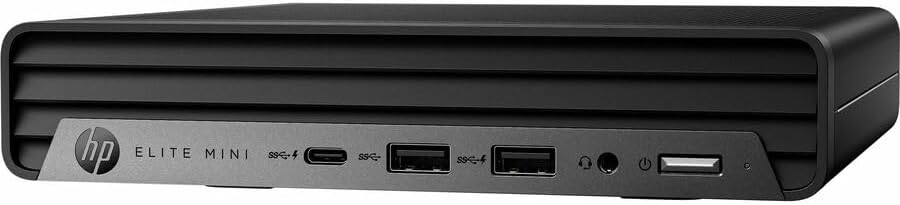
Сүрөт: алдыңкы view of the HP Elite Mini 800 G9 Desktop PC, highlighting the accessible front ports including USB-C, USB-A, and a headphone jack.
2. Перифериялык түзүлүштөрдү туташтыруу
- Мониторду туташтыруу: Connect your monitor to one of the available video output ports (e.g., DisplayPort, HDMI) on the rear of the mini PC.
- Баскычтоп менен чычканды туташтыруу: Plug the included keyboard and mouse into the USB ports on the mini PC.
- Тармакка туташуу (милдеттүү эмес): For a wired internet connection, connect an Ethernet cable from your router or network switch to the Ethernet port on the mini PC. Wireless connectivity (Wi-Fi 6) is also available.
- Туташуу кубаты: AC адаптерин мини-компьютердеги кубат киргизүү портуна туташтырыңыз, андан кийин кубат шнурун розеткага сайыңыз.
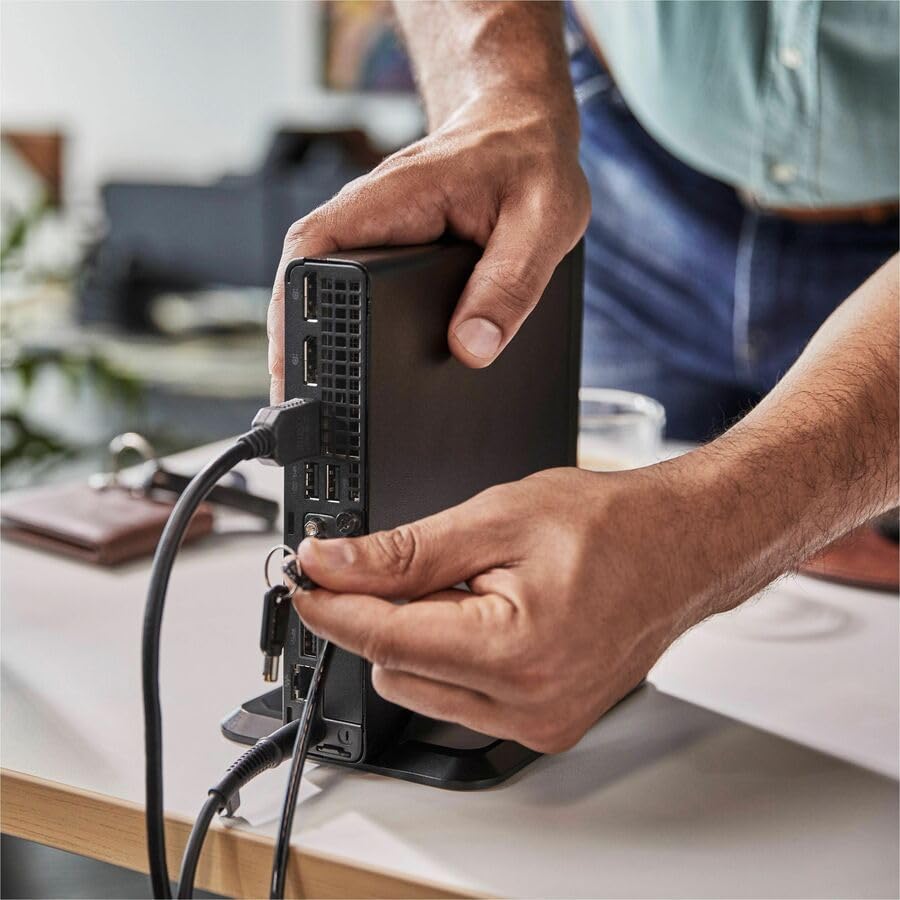
Image: A user connecting various cables, including power and display, to the rear ports of the HP Elite Mini 800 G9. This illustrates the typical connection process for peripherals.
Иштөө нускамалары
Once your HP Elite Mini 800 G9 is set up, follow these steps for basic operation:
1. Күйгүзүү
Press the power button located on the front of the mini PC. The power indicator light will illuminate, and the system will begin to boot up. The operating system (Windows 11 Pro) will load automatically.
2. Баштапкы орнотуу (Биринчи колдонуу)
Upon first boot, you will be guided through the Windows 11 Pro setup process. This includes selecting your region, language, accepting terms, and setting up a user account. Follow the on-screen prompts to complete this process.
3. Өчүрүү
To properly shut down the computer, click the Баштоо Windows'тогу баскычты басып, андан кийин тандаңыз Күч > Өчүрүү. Avoid powering off the system by holding the power button, as this can lead to data loss or system corruption.

Image: A professional working at a desk, demonstrating the compact integration of the HP Elite Mini 800 G9, which is mounted discreetly behind a monitor.
Техникалык тейлөө
Regular maintenance helps ensure the longevity and optimal performance of your HP Elite Mini 800 G9 Desktop Computer.
1. Программалык камсыздоону жаңыртуу
Операциялык тутумуңузду жана драйверлериңизди жаңыртып туруңуз. Windows Update ОС жаңыртууларын автоматтык түрдө иштетет. Драйверлерди жаңыртуу үчүн расмий HP колдоо кызматына кайрылыңыз webсиздин моделиңиз үчүн сайт.
2. Тазалоо
- Сырткы: Бир аз жумшак, түксүз кездемени колдонуңуз dampсырткы беттерин тазалоо үчүн суу же жумшак тазалоочу эритме менен эритип алыңыз.
- Тешиктер: Periodically use compressed air to clear dust from the ventilation grilles to prevent overheating. Ensure the system is powered off before cleaning vents.
3. Маалыматтын резервдик көчүрмөсү
Regularly back up important data to an external drive or cloud storage to prevent data loss in case of hardware failure or other issues.
Проблемаларды чечүү
This section addresses common issues you might encounter with your HP Elite Mini 800 G9.
Күч жок
- Ensure the AC adapter is securely connected to both the mini PC and a working power outlet.
- Башка аспапка сайып, розетка иштеп жатканын текшериңиз.
- Кубат баскычынын бузулганын же тоскоолдуктар бар-жогун текшериңиз.
Монитордо дисплей жок
- Confirm the monitor is powered on and correctly connected to the mini PC's video output port.
- Мониторуңузда туура киргизүү булагы тандалганын текшериңиз.
- Try connecting the mini PC to a different monitor or using a different video cable if available.
Жай аткаруу
- Фондо иштеп жаткан керексиз тиркемелерди жабыңыз.
- Күтүүдөгү Windows жаңыртууларын же драйвер жаңыртууларын текшериңиз жана орнотуңуз.
- Run a disk cleanup and defragmentation (for HDDs, not typically needed for SSDs).
- Scan for malware or viruses using reputable antivirus software.
Техникалык шарттар
Detailed technical specifications for the HP Elite Mini 800 G9 Desktop Computer:
| Өзгөчөлүк | Деталь |
|---|---|
| Модель номери | AS1F8AT#ABA |
| Процессор | Intel Core i5-12500T (12th Gen, Hexa-core, 2 GHz) |
| RAM | 16 ГБ DDR5 RAM |
| Сактагыч | 256 ГБ SSD |
| Графика | Intel UHD Graphics 770 (Интеграцияланган) |
| Операция системасы | Windows 11 Pro |
| Зымсыз байланыш | Wi-Fi 6 (802.11ax), Bluetooth |
| Өлчөмдөрү (LxWxH) | 6.9 x 7 x 1.4 дюйм |
| Салмагы | 3.13 фунт |
| Порттор (Алдыңкы) | USB-C, USB-A, Headphone/Microphone Combo |
| Порттар (арткы) | Multiple USB-A, Video Outputs (e.g., DisplayPort, HDMI), Ethernet, Power Input |
Кепилдик жана колдоо
Your HP Elite Mini 800 G9 Desktop Computer comes with a standard manufacturer's warranty. For specific warranty terms and conditions, please refer to the documentation included with your product or visit the official HP support webсайт.
Техникалык жардам, драйверлерди жүктөп алуу же кошумча колдоо алуу үчүн, HP колдоо кызматына кайрылыңыз webсайт: