1. Киришүү
This manual provides detailed instructions for the installation, operation, and maintenance of your Leadfan Android 12 Car Radio. Please read this manual thoroughly before using the product to ensure proper functionality and safety. This unit is designed to upgrade the stereo system in Toyota Sienna models from 2011 to 2014.
2. Шайкеш келген унаалар
This double DIN stereo is specifically designed for the following vehicle models:
- Toyota Sienna 2011
- Toyota Sienna 2012
- Toyota Sienna 2013
- Toyota Sienna 2014
Эскертүү: This unit does not support factory JBL amplifiers or screen navigation. Please verify your car's model, year, and the shape/size of the center console before installation.

Image: Leadfan Android 12 Car Radio installed in a Toyota Sienna dashboard, illustrating compatible and incompatible console types for proper fitment.
3. Эмнелер камтылган
Your package includes all necessary accessories for installation and operation:
- 1x Car Touch Screen Radio
- 1x GPS антеннасы
- 1x Камдык камера
- 1x CanBus Decoder
- 1x Арткы View Кирүү кабели
- 1x RCA кабелдик топтому
- 2x USB кабели
- 1x Кубат кабели
- 1x Түпнуска USB кабели
- 1x Колдонуучунун колдонмосу (бул документ)
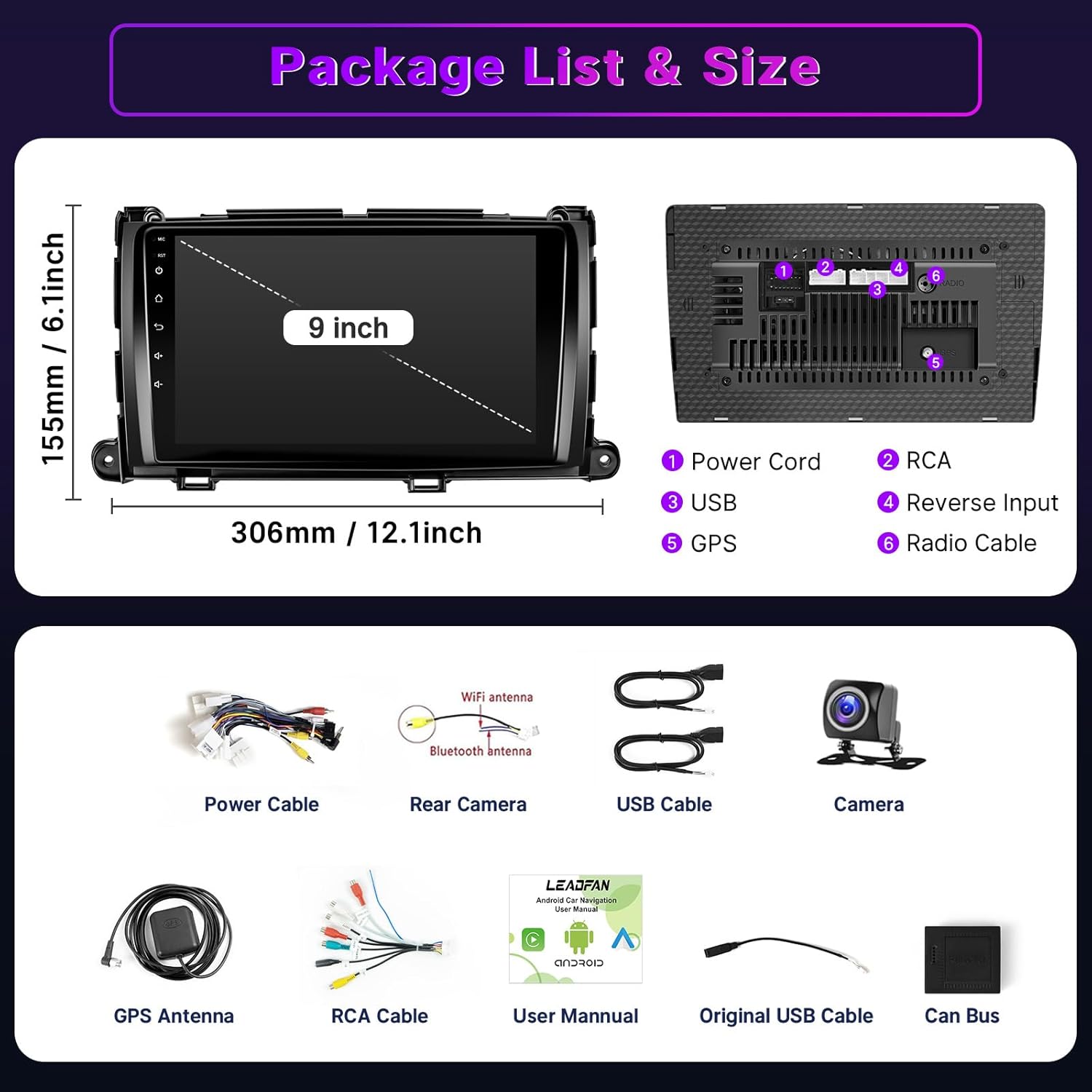
Image: A visual representation of the package contents, showing the main head unit, various cables (power, RCA, USB), GPS antenna, backup camera, and user manual.
4. Негизги өзгөчөлүктөрү
4.1. Зымсыз CarPlay жана Android Auto
The car radio is compatible with wireless Apple CarPlay and Android Auto. Connect your smartphone via Bluetooth and Wi-Fi to access navigation, music, messages, and voice control functions (e.g., "Hey Siri" or "Hey Google").

Image: The car radio display showing both Apple CarPlay and Android Auto interfaces, highlighting voice command capabilities for navigation, calls, and music.
4.2. Mirror Link & HD Touchscreen & Split Screen
Equipped with a 2.5D 9-inch IPS touchscreen, the unit supports mirroring for both iOS (wireless) and Android (wireless/wired) phones. The split-screen function allows two applications to run independently side-by-side, enhancing multitasking.

Image: The 9-inch IPS touchscreen demonstrating split-screen mode, displaying a navigation map on one side and a music player on the other, along with an illustration of phone mirroring.
4.3. GPS Navigation & WIFI
The system includes a GPS navigation system with support for both offline and online maps. Connect to Wi-Fi or mobile hotspots to download apps and receive real-time map updates.

Image: The car radio screen displaying GPS navigation with route information and map views, alongside a Wi-Fi connection screen showing available networks and app download capabilities.
4.4. Bluetooth 5.1 & FM Radio & EQ
Integrated Bluetooth 5.1 allows for hands-free calling and wireless audio streaming. The FM radio provides access to local stations, and the built-in EQ allows for sound customization.


Images: Screenshots of the Bluetooth calling interface, FM radio tuner, and sound equalizer settings on the car radio display.
4.5. Backup Camera & Steering Wheel Control (SWC)
For enhanced safety, the unit supports a rear-view camera with a 170° wide-angle lens, IP68 waterproof rating, and night vision. After correct wiring, the steering wheel control function allows you to manage the radio without taking your hands off the wheel.

Image: A detailed diagram illustrating the wiring connections for the backup camera, along with a simulated view of the rear-view display on the car radio screen, showing parking guidelines.
5. Орнотуу жана орнотуу
The Leadfan Android 12 Car Radio is designed for plug-and-play installation with the provided wiring harness. However, professional installation is recommended. Ensure the vehicle's power is disconnected before starting the installation process.
5.1. Зымдарды туташтыруу
Connect the main power harness, RCA cables, USB cables, GPS antenna, and backup camera input as per the included wiring diagram. The harness is designed to fit specific ports, minimizing incorrect connections.
Video: An installation guide demonstrating the process of connecting the various cables and components of a car stereo system. This video is for a 9.7-inch display, but the general wiring principles apply to your 9-inch unit.
5.2. Башкы блокту орнотуу
Once all connections are made, carefully mount the head unit into the dashboard opening. Secure it using the appropriate screws and reattach any removed trim pieces. Ensure no wires are pinched during reassembly.
Video: A demonstration of customizing the home page layout and selecting different themes on the car radio interface. This helps personalize your user experience.
6. Иштөө нускамалары
6.1. Негизги навигация
The 9-inch touchscreen allows for intuitive control. Swipe left or right to navigate between application pages. Tap icons to launch applications such as Navigation, Radio, Music, Video, and Settings.
6.2. Интерфейсти ыңгайлаштыруу
You can customize the home screen layout and choose from various themes to personalize your experience. Access the 'Theme' or 'Car Settings' application to modify these settings.
6.3. Using CarPlay/Android Auto
Once connected wirelessly, your phone's interface will appear on the car radio. Use the touchscreen or voice commands to control compatible apps. Ensure your phone's Bluetooth and Wi-Fi are enabled for seamless connection.
6.4. GPS and Multimedia
Launch the 'Navigation' app for directions. For music and videos, use the 'Music' or 'Video' apps, or stream directly via Bluetooth. The 'FM Radio' app allows you to tune into radio stations.
7. Техникалык тейлөө
Унаа радиоңуздун узак мөөнөттүү иштешин жана оптималдуу иштешин камсыз кылуу үчүн, төмөнкү техникалык тейлөө көрсөтмөлөрүн аткарыңыз:
- Тазалоо: Экранды жана сыртын тазалоо үчүн жумшак, кургак чүпүрөктү колдонуңуз. Абразивдүү тазалагычтардан же эриткичтерден качыңыз.
- Программалык камсыздоо жаңыртуулары: Periodically check for software updates via the system settings to ensure you have the latest features and bug fixes.
- Температура: Аппаратты өтө ысык жана муздак температурага узак убакыт бою тийгизүүдөн сактаңыз.
- Байланыштары: Бардык кабелдер коопсуз туташтырылганын текшериңиз. Бошоң байланыштар үзгүлтүксүз көйгөйлөргө алып келиши мүмкүн.
8. Кыйынчылыктарды
Эгер кандайдыр бир көйгөйгө туш болсоңуз, төмөнкү жалпы көйгөйлөрдү жана чечимдерди караңыз:
| Көйгөй | Мүмкүн себеп | Чечим |
|---|---|---|
| Түзмөк күйбөйт | Электр туташуусу бошоп калган, сактагыч күйүп кеткен, зымдар туура эмес туташкан. | Check power cable connections. Inspect vehicle fuses. Verify wiring against the diagram. |
| Үн жок | Volume too low, incorrect audio output settings, loose speaker wires. | Increase volume. Check audio settings (e.g., balance/fader). Ensure speaker wires are properly connected. |
| Камдык камера көрсөтүлбөй жатат | Incorrect camera wiring, faulty camera, reverse trigger not connected. | Verify camera connections, especially the reverse trigger wire. Test camera functionality if possible. |
| GPS сигналы алсыз/жоголгон | GPS antenna obstructed or improperly placed, outdated maps. | GPS антеннасынын таза болушун текшериңиз view of the sky. Update maps if necessary. |
| CarPlay/Android Auto туташпай жатат | Bluetooth/Wi-Fi off on phone, incompatible phone software, incorrect connection steps. | Ensure phone's Bluetooth and Wi-Fi are on. Restart phone and car radio. Follow connection instructions carefully. |
9. Техникалык шарттар
| Өзгөчөлүк | Деталь |
|---|---|
| Операция системасы | Android 12 |
| RAM + ROM | 2GB RAM + 32GB ROM (4-core) |
| Дисплей өлчөмү | 9 дюйм |
| Дисплей түрү | 2.5D IPS сенсордук экран |
| Байланыш | Bluetooth 5.1, Wi-Fi, USB |
| Өзгөчөлүктөр | Wireless CarPlay, Android Auto, Mirror Link, GPS Navigation, Steering Wheel Control, Backup Camera Support, FM Radio, EQ |
| Аудио чыгаруу режими | Стерео |
| Элемент Салмагы | 3.27 фунт |
| Пакеттин өлчөмдөрү | 14.61 x 11.06 x 4.45 дюйм |
10. Кепилдик жана колдоо
Your Leadfan Android 12 Car Radio comes with comprehensive support:
- 30 күндүк акысыз кайтаруу: Кандайдыр бир нааразычылык үчүн.
- 12 айлык алмаштыруу: Сапатка байланыштуу маселелер үчүн.
- Өмүр бою техникалык колдоо: Dedicated assistance for the product's lifespan.
- Кесипкөй кардарларды тейлөө: Responsive support for all inquiries.
For technical assistance or warranty claims, please contact Leadfan customer service through the platform of purchase or refer to the contact information provided in your package.


