1. Продукт бүтүп калдыview
The KAWA Dash Cam D5 is a compact 2K 1296P QHD front dash camera designed to record your driving journey. It features hands-free voice control, built-in Wi-Fi for app connectivity, continuous loop recording, G-Sensor for emergency event detection, and enhanced night vision for clear footage in low-light conditions. The discreet design ensures it does not obstruct your view айдап бара жатканда.
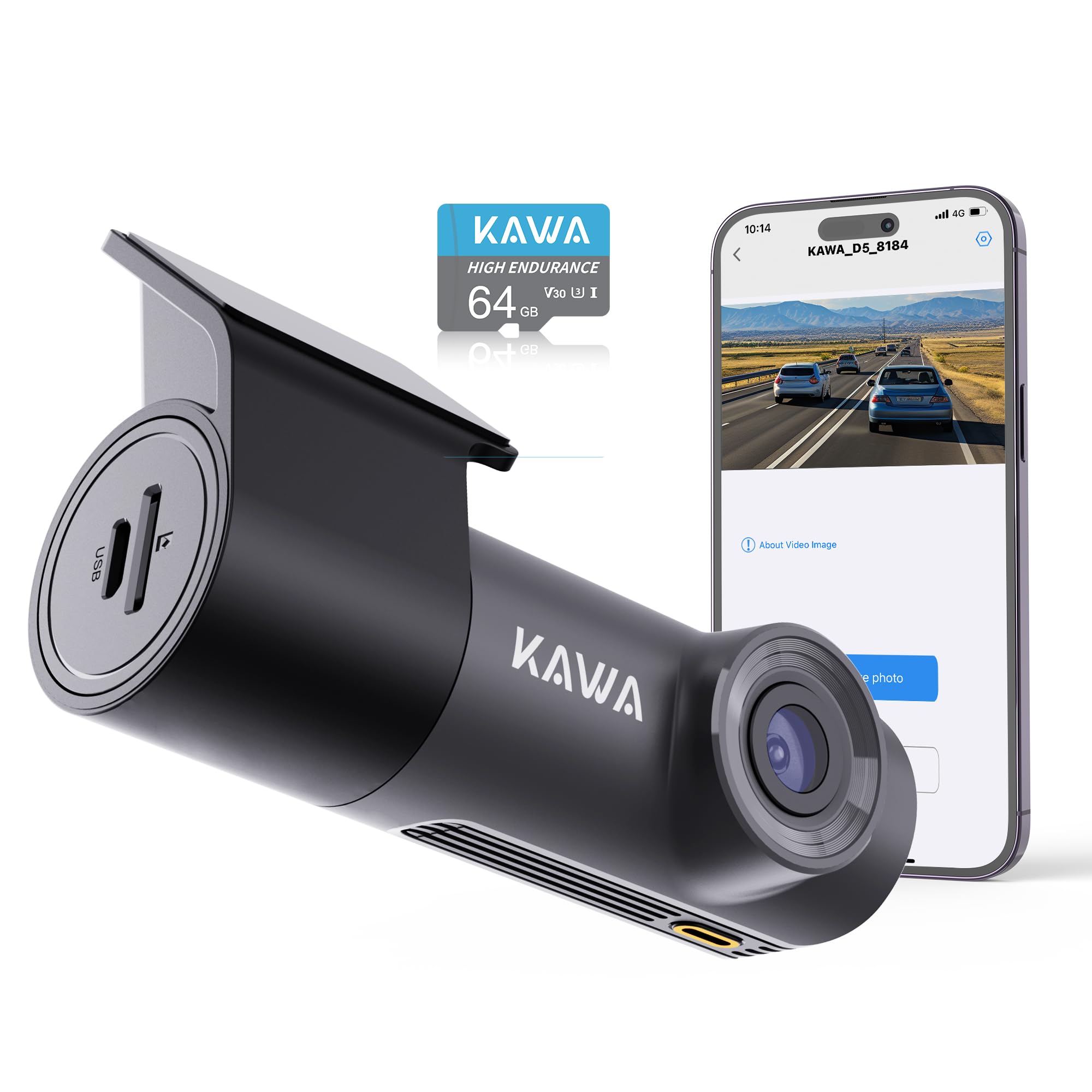
Image: The KAWA Dash Cam D5, showcasing its compact and hidden design when installed in a vehicle, with a visual guide for cable management.

Сүрөт: бүттүview of key features including 2K QHD resolution, voice control, Wi-Fi, 360-degree rotation, 24-hour parking monitor, night vision, emergency recording, and loop recording.
2. Коопсуздук маалыматы
- Айдоо учурунда камераны иштетпеңиз. Орнотууларды унаа коопсуз токтоп турганда гана тууралаңыз.
- Видеорегистратордун айдоочуга тоскоол болбогон жерге орнотулганын текшериңиз view же унаанын коопсуздук функцияларына тоскоол болушу мүмкүн.
- Use only the provided power adapter and cables to prevent damage or fire hazards.
- Аппаратты экстремалдык температурага, түз күн нуруна же нымдуулукка узак убакытка калтырбаңыз.
- Аппаратты балдардан алыс кармаңыз.
3. Пакеттин мазмуну
Пакетте бардык буюмдар бар экенин текшериңиз:
- KAWA Dash Cam D5
- Унаа заряддагыч
- User Manual
- Ысыкка чыдамдуу чаптама кагаз
- Антистатикалык тасма

Image: Visual representation of the items included in the KAWA Dash Cam D5 package.
4. Продукциянын диаграммасы
The KAWA Dash Cam D5 features a compact design. Refer to the image below for approximate dimensions.

Image: Physical dimensions of the KAWA Dash Cam D5, indicating its compact size for discreet installation.
5. Орнотуу жана орнотуу
5.1 Micro SD картаны орнотуу
- Камера өчүрүлгөнүн текшериңиз.
- Камеранын капталындагы Micro SD карта уячасын табыңыз.
- Insert a Class 10 or higher Micro SD card (32GB or above recommended) into the slot until it clicks into place.
- Чыгаруу үчүн картаны сыртка чыкканга чейин акырын түртүңүз.
Эскертүү: A Micro SD card is not included and must be purchased separately. Using a reputable brand's high-speed Class 10 card is essential to avoid system crashes or video frame drops. For optimal compatibility, consider the official KAWA Micro SD card (ASIN: B0BNPKSJMX).

Image: Guidance on selecting and installing a Micro SD card for the dash cam.
5.2 Камераны орнотуу
- Багыттоочу камера орнотула турган алдыңкы айнектин бетин тазалаңыз.
- Apply the anti-static film to the desired location on the windshield. Ensure it is smooth and free of air bubbles.
- Press the 3M adhesive of the dash cam mount firmly onto the dotted line in the center of the electrostatic sticker. This ensures a stable and secure attachment.
- Adjust the dash cam's angle for optimal view. The mount allows for multi-angle 360° rotation adjustment.

Image: The dash cam's mini hidden design and suggested cable routing for a clean installation.

Image: Instructions for securing the dash cam mount and its 360-degree rotation capability.
5.3 Кубат туташтыруу
- Унаа кубаттагычты камеранын электр киргизүү портуна туташтырыңыз.
- Унаа кубаттагычты унааңыздын тамеки от алгыч розеткасына сайыңыз.
- Электр кабелин алдыңызга тоскоол болбош үчүн алдыңкы айнектин жана инструменттердин панелинин жанынан тыкан өткөрүңүз view же айдоого тоскоолдук кылуу.
6. Иштөө нускамалары
6.1 Күйгүзүү/өчүрүү
- Унааңыздын от алдыруу функциясы күйгүзүлгөндө (жана тамеки күйгүзгүчтүн розеткасына кубат берилгенде), видеорегистратор автоматтык түрдө күйүп, жаздыра баштайт.
- Ал от алдыруу системасы өчүрүлгөндө автоматтык түрдө өчөт.
6.2 Цикл жаздыруу
The dash cam records video in continuous loops (1, 2, or 3-minute segments). When the Micro SD card is full, the oldest video files will be overwritten by new recordings, ensuring continuous operation.

Image: Explanation of the loop recording feature, which ensures continuous recording by overwriting the oldest files.

Image: Details on endless loop recording and how storage capacity affects recording duration.
6.3 Шашылыш жазуу (G-сенсор)
The built-in G-Sensor detects sudden impacts or collisions. When triggered, it automatically initiates emergency recording and locks the video file, анын циклдик жазуу менен кайра жазылышына жол бербейт. Булар fileс өзүнчө папкада сакталат.

Image: Visual explanation of how emergency recording functions during impacts or collisions.
6.4 Hands-Free Үн башкаруу
Control your dash cam using simple voice commands for safer operation while driving. Available commands include:
- "Видеону кулпулоо"
- "Сүрөткө тартуу"
- "Аудио күйгүзүү" / "Аудио өчүрүү"
- "WiFi'ды күйгүзүү" / "WiFi'ды өчүрүү"
- "Turn on hotspot" / "Turn off hotspot"

Image: Demonstrates the various voice commands available for hands-free operation of the dash cam.

Image: Further illustration of the voice control feature, emphasizing its convenience and safety benefits.
6.5 Wi-Fi жана колдонмону башкаруу
The KAWA Dash Cam D5 features built-in Wi-Fi, allowing you to connect to the KAWA AUTO app on your iOS or Android mobile device. Through the app, you can:
- View жандуу видео канал.
- Жазылган видеолорду телефонуңузга жүктөп алыңыз.
- Видеорегистратордун жөндөөлөрүн тууралаңыз.
- OTA (Over-The-Air) микропрограммалык камсыздоосун жаңыртууну аткарыңыз.
"KAWA AUTO" тиркемесин App Store'дон (iOS) же Google Play Store'дон (Android) жүктөп алыңыз.

Image: Demonstrates Wi-Fi connectivity and app control for viewing, downloading, and sharing videos.

Image: Details on the built-in Wi-Fi functionality and the KAWA AUTO app for managing the dash cam.
6.6 күнү-түнү иштеген унаа токтотуучу жай монитору
With the optional parking monitoring cable (not included, ASIN: B0BKPKV72H), the dash cam can provide 24-hour surveillance for your parked vehicle. It supports G-Sensor emergency recording and time-lapse mode to capture incidents or save storage space.
- G-sensor өзгөчө кырдаалдарда жаздыруу: Automatically records and locks video upon detecting impacts while parked.
- Убактылуу режим: Shrinks real-time footage (e.g., 30 minutes to 1 minute) to save storage space while maintaining continuous surveillance.

Image: Illustrates the 24/7 parking monitor feature, including G-Sensor and time-lapse capabilities.

Image: Further explanation of 24/7 parking surveillance and its features.
6.7 Night Vision and Wide Dynamic Range (WDR)
The dash cam is equipped with advanced features for clear nighttime footage and balanced exposure:
- Crystal-Clear Nighttime Footage: Captures license plates, road signs, and critical details with high clarity in low-light conditions.
- Кең динамикалык диапазон (WDR): Automatically adjusts exposure to balance bright and dark areas, preventing overexposure in strong light and underexposure in shadows, ensuring clear images in various lighting conditions.

Image: Demonstrates the dash cam's capability to record clear footagтүндө э.

Image: Further illustration of the dash cam's night vision performance.

Image: Visual comparison demonstrating the effectiveness of Wide Dynamic Range (WDR) in balancing exposure.
6.8 Видеону ойнотуу
Videos are recorded in MP4 format. For playback on your computer, we recommend using Potplayer or VLC Media Player for optimal experience.

Image: Recommended software for playing back dash cam video fileкомпьютерде.
7. Техникалык тейлөө
7.1 Линзаны тазалоо
Regularly clean the dash cam lens with a soft, lint-free cloth to ensure clear video quality. Avoid using abrasive cleaners or solvents.
7.2 Micro SD картаны башкаруу
- Форматтоо: It is recommended to format the Micro SD card periodically (e.g., once a month) through the dash cam's app settings to maintain optimal performance and prevent data corruption. Formatting will erase all data on the card, so back up important fileс биринчи.
- Алмаштыруу: Micro SD cards have a limited lifespan. If you experience frequent recording errors or data corruption, consider replacing the card.
7.3 Микропрограмма жаңыртуулары
Firmware updates may be released to improve performance, add features, or fix bugs. Check for and install updates via the KAWA AUTO mobile app to ensure your dash cam has the latest software.
8. Кыйынчылыктарды
| Көйгөй | Мүмкүн себеп | Чечим |
|---|---|---|
| Dash камерасы күйбөйт. | Электр менен камсыздоо жок; унаанын кубаттагычы бузук; байланышы бош. | Check car charger connection; ensure vehicle's cigarette lighter socket is functional; try a different power source if available. |
| Жаздыруу токтойт же катып калат. | Micro SD card issue (full, corrupted, slow speed); firmware issue. | Format the Micro SD card; replace with a high-speed Class 10 card; check for firmware updates. |
| Wi-Fi байланышы туруксуз же иштебей жатат. | Interference; distance from phone; app issue. | Ensure phone is close to the dash cam (within 1.5 meters); restart dash cam and phone; reinstall the KAWA AUTO app. |
| Үн менен башкаруу жооп бербей жатат. | Loud environment; incorrect commands; microphone obstruction. | Speak clearly and directly towards the dash cam; reduce background noise; ensure microphone is not blocked. |
| Түнкүсүн видеонун сапаты начар. | Кир линза; өтө аз жарык шарттарында. | Clean the lens; ensure no obstructions on the windshield. |
9. Техникалык шарттар
| Өзгөчөлүк | Спецификация |
|---|---|
| Модель аты | D5 |
| Видео тартуунун резолюциясы | 1296p (2K QHD) |
| Байланыш технологиясы | Wi-Fi |
| Өзгөчөлүктөр | App Control, Voice Control, Loop Recording, G-Sensor, Night Vision, 24/7 Parking Monitor (requires separate cable) |
| Монтаж түрү | Алдынкы айнек тоосу |
| Продукциянын өлчөмдөрү | 7 x 14 x 11 inches (approx. 3.7"L x 2.36"H x 1.18"D for camera unit) |
| Элемент Салмагы | 8.8 унция |
| Power Source | Super Capacitor (no lithium-ion battery) |
| Иштөө температурасы | -4°F (-20°C) ~ 149°F (65°C) |
| Сактоо температурасы | -22°F (-30°C) ~ 176°F (80°C) |

Image: Information about the dash cam's Super Capacitor, which provides enhanced durability and temperature resistance compared to traditional batteries.
10. Кепилдик жана колдоо
For warranty information, technical support, or service inquiries, please refer to the official KAWA website or contact KAWA customer support directly. Keep your purchase receipt as proof of purchase for warranty claims.
Акыркы маалымат жана колдоо ресурстары үчүн төмөнкү дарекке кириңиз: Amazon'догу KAWA дүкөнү


