1. Киришүү
Thank you for choosing the CHEREEKI Wireless Gamepad for PS-4. This manual provides detailed instructions on how to set up, operate, and maintain your new controller. Please read this manual carefully before use to ensure optimal performance and longevity of your device. This controller is designed to enhance your gaming experience with its advanced features and ergonomic design.
2. Продукт бүтүп калдыview
2.1 Негизги өзгөчөлүктөрү
- Шайкештик: Compatible with PS-4, PS-4 Slim, and PS-4 Pro consoles, providing a stable signal up to 8 meters without delay.
- Эргономикалык дизайн: Manually mounted with highly sensitive buttons and classic analog stick design for precise and comfortable gaming.
- 6-Axis Sensor & Dual Motors: Equipped with a built-in 6-axis sensor (gyroscope and accelerometer) and dual vibration motors for immersive gaming feedback.
- Touchpad & Light Bar: Features a multi-touch touchpad and an integrated light bar for new gaming possibilities.
- Батареянын узак иштөө мөөнөтү: 600mAh battery provides up to 7 hours of playtime on a 2-3 hour charge.
- Бөлүшүү функциясы: Includes a dedicated SHARE button for easy sharing of video clips and screenshots.
- Stereo Headphone Socket: A 3.5mm audio jack allows connection of headphones for immersive audio.
2.2 Пакеттин мазмуну
- CHEREEKI Wireless Gamepad
- USB заряддоо кабели
- User Manual
2.3 Controller Layout

2.3.1-сүрөт: Алдыңкы жана арткы view of the CHEREEKI Wireless Gamepad, highlighting key components such as the R1/R2/L1/L2 buttons, Light Bar, Micro USB Port, SHARE button, OPTIONS button, Directional Buttons, Left Stick, Home Button, Right Stick, Extension Port, and Stereo Headset Jack.
Familiarize yourself with the various buttons and ports on your controller:
- Directional Buttons (D-Pad): Так багыт киргизүү үчүн.
- Сол/оң аналогдук таякчалар: 360 градустук кыймыл жана камераны башкаруу үчүн.
- Аракет баскычтары (Үч бурчтук, Тегерек, Крест, Төрт бурчтук): Оюндагы аракеттер үчүн.
- БӨЛҮШҮҮ баскычы: Оюн учурундагы көз ирмемдер менен бөлүшүү үчүн.
- ПАРАМЕТРЛЕР баскычы: To access in-game menus and options.
- PS баскычы (Башкы бет баскычы): To turn on/off the controller, access the PS-4 home screen.
- Сенсордук такта: Multi-touch surface for interactive gameplay.
- L1/R1 баскычтары: Ийин баскычтары.
- L2/R2 триггерлери: Так киргизүү үчүн аналогдук триггерлер.
- Light Bar: Indicates player number, health, and other game information.
- Микро USB порту: Заряддоо жана зымдуу туташуу үчүн.
- Stereo Headset Jack: 3.5mm port for connecting headphones or headsets.
- Кеңейтүү порту: For connecting compatible accessories.
3. Орнотуу
3.1 Initial Connection & Pairing
For the first-time connection, the controller must be paired with your PS-4 console using a USB cable.
- Ensure your PS-4 console is powered on.
- Connect one end of the provided USB charging cable to the Micro USB port on the controller and the other end to a USB port on your PS-4 console.
- Press the PS button (Home button) on the controller. The light bar will flash and then glow solid, indicating successful pairing.
- Жупташтырылгандан кийин, контроллерди зымсыз колдонуу үчүн USB кабелин ажыратсаңыз болот.
3.2 Reconnecting Wirelessly
After initial pairing, the controller will automatically attempt to reconnect wirelessly to the last paired PS-4 console when you press the PS button.
3.3 Контроллерди заряддоо

3.3.1-сүрөт: Illustration of the CHEREEKI Wireless Gamepad's battery life, indicating a charging time of 2 hours for 7 hours of play time.
The controller is equipped with a 600mAh rechargeable Lithium-Ion battery.
- Connect the controller to your PS-4 console or a standard USB charger (5V/1A) using the provided USB cable.
- The light bar will slowly flash orange while charging.
- Once fully charged (approximately 2-3 hours), the light bar will turn off.
- Толук заряддоо 7 саатка чейин үзгүлтүксүз оюн ойноону камсыз кылат.
4. Иштөө нускамалары
4.1 Күйгүзүү/өчүрүү
- Күйгүзүү үчүн: Press the PS button. The controller will attempt to connect to the PS-4 console.
- Өчүрүү үчүн: If connected to the PS-4, hold the PS button for about 10 seconds until the light bar turns off. The controller will also power off automatically after a period of inactivity.
4.2 Шайкештик

4.2.1-сүрөт: The CHEREEKI Wireless Gamepad demonstrating wide compatibility with PS4, PS4 Slim, and PS4 Pro consoles.
This controller is fully compatible with PlayStation 4, PlayStation 4 Slim, and PlayStation 4 Pro consoles. It provides a stable and responsive connection for all compatible PS-4 titles.
4.3 Motion Sensor (Gyro) Control
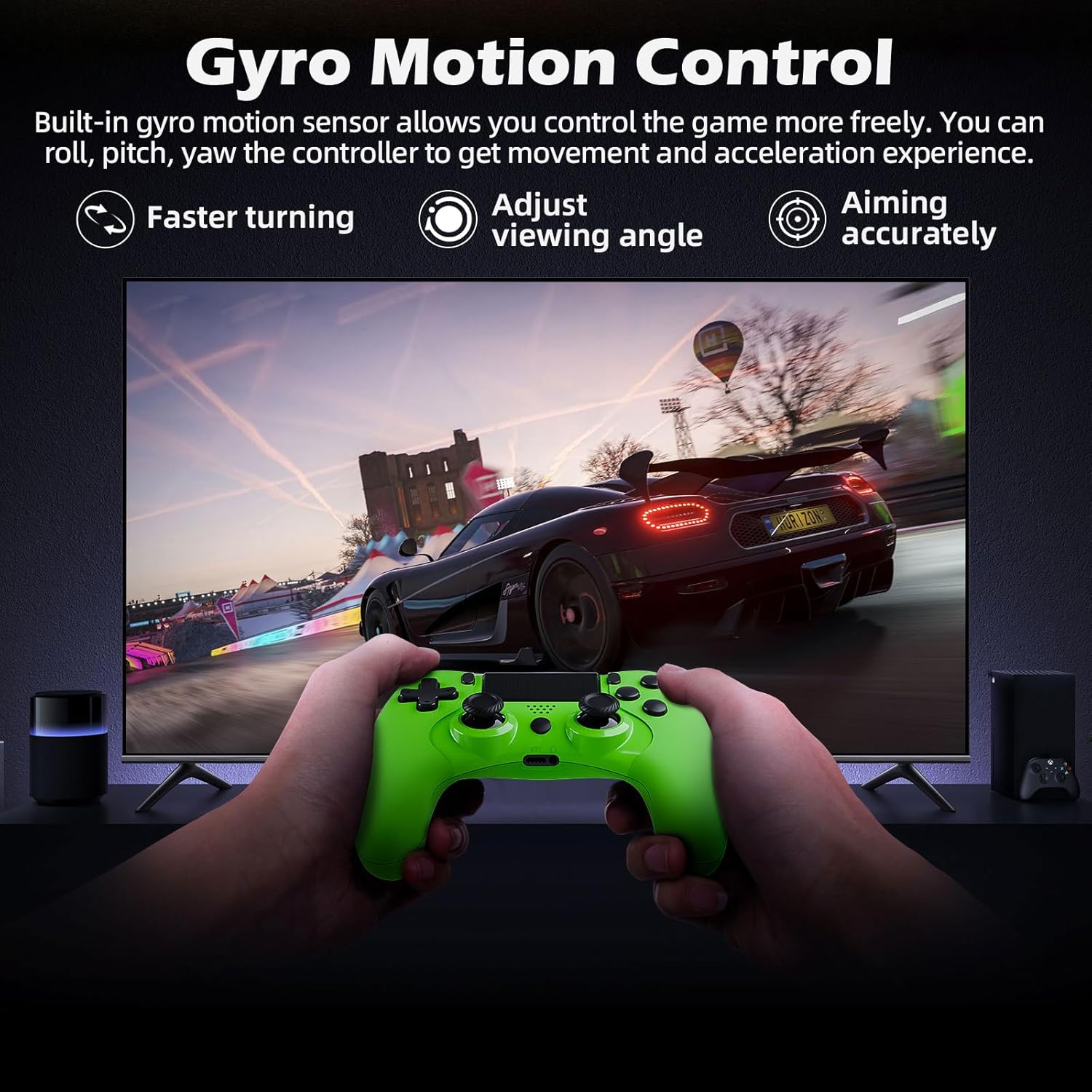
4.3.1-сүрөт: A user playing a racing game with the CHEREEKI Wireless Gamepad, demonstrating the built-in gyro motion sensor for controlling movement and acceleration, allowing for faster turning, adjusting viewing angle, and accurate aiming.
The built-in 6-axis motion sensor allows for intuitive control in games that support motion sensing. You can roll, pitch, and yaw the controller to control in-game actions, providing a more immersive and dynamic gaming experience, especially for racing or aiming.
4.4 Кош мотордун титирөөсү

4.4.1-сүрөт: The CHEREEKI Wireless Gamepad illustrating its dual motor vibration feature, designed to provide an immersive tactile feedback experience during gameplay.
The integrated dual vibration motors provide realistic feedback for in-game events such as crashes, explosions, or impacts, making your gaming experience more immersive and engaging.
4.5 Сенсордук панелди колдонуу
The multi-touch touchpad on the front of the controller can be used for navigation, gestures, and specific in-game interactions, depending on the game's design.
4.6 Аудио туташуу
Plug any standard 3.5mm stereo headset or headphones into the audio jack at the bottom of the controller for in-game audio and voice chat (if supported by the headset).
4.7 Sharing Gameplay
Press the SHARE button to access the sharing menu. From here, you can easily upload screenshots, video clips, or start live broadcasts of your gameplay.
5. Техникалык тейлөө
5.1 Тазалоо
- Контроллердин бетин сүртүү үчүн жумшак, кургак чүпүрөктү колдонуңуз.
- өжөр кир үчүн, бир аз гampчүпүрөктү суу же жумшак тазалоо эритмеси менен жууп салыңыз.
- Do not use strong chemicals, abrasive cleaners, or allow water to enter the controller's ports.
5.2 Сактоо
- Контроллерди түз күн нурунан жана экстремалдык температурадан алыс салкын, кургак жерде сактаңыз.
- Контроллерди түшүрүүдөн же катуу таасирлерге дуушар кылуудан качыңыз.
- Эгер батарейканы узак убакытка сактасаңыз, анын иштөө мөөнөтүн сактоо үчүн аны мезгил-мезгили менен (мисалы, ар бир 3-6 ай сайын) кубаттап туруңуз.
6. Кыйынчылыктарды
6.1 Controller Not Connecting/Responding
- USB туташуусун текшерүү: Ensure the USB cable is securely connected to both the controller and the PS-4 console.
- Контроллерди кайра жупташтыруу: Connect the controller to the PS-4 with a USB cable and press the PS button to re-pair.
- Контроллерди баштапкы абалга келтирүү: Locate the small reset button on the back of the controller (often near the L2 button, inside a tiny hole). Use a paperclip to press and hold the button for 3-5 seconds. Then, reconnect via USB and press the PS button.
- Батареяны заряддоо: Контроллердин батареясы жетиштүү заряддалганын текшериңиз.
- Интерференция: Move closer to the PS-4 console or ensure there are no strong wireless interference sources nearby.
6.2 Input Lag or Disconnection
- Аралык: Ensure you are within the effective wireless range (up to 8m).
- Батарея деңгээли: Low battery can affect wireless performance. Charge the controller.
- Интерференция: Other wireless devices (Wi-Fi routers, Bluetooth devices) can cause interference. Try to minimize these or move the console/controller.
- Контроллерди баштапкы абалга келтирүү: Perform a hard reset as described above.
6.3 Заряддоо маселелери
- Кабелди текшерүү: Кабелдин бузулушуна жол бербөө үчүн башка USB кабелин колдонуп көрүңүз.
- Заряддоо портун текшерүү: Ensure the Micro USB port on the controller is clean and free of debris.
- Кубат булагы: Try charging from a different USB port on the PS-4 or a different USB wall adapter.
7. Техникалык шарттар
| Өзгөчөлүк | Спецификация |
|---|---|
| Модель номери | STK-4006L |
| Байланыш | Зымсыз (Bluetooth), Зымдуу (USB) |
| Шайкештик | PS-4, PS-4 Slim, PS-4 Pro |
| Батарея түрү | Литий ион |
| Батарея сыйымдуулугу | 600 мАч |
| Заряддоо убактысы | Болжол менен 2-3 саат |
| Ойнотуу убактысы | 7 саатка чейин |
| Зымсыз диапазон | 8 метрге чейин |
| Өлчөмдөр | 17.4 x 12.1 x 7.3 см |
| Салмагы | 210 г |
| Сенсорлор | 6-axis motion sensing system (gyroscope, accelerometer) |
| Вибрация | Кош титирөө моторлору |
| Аудио порт | 3.5 мм стерео гарнитура уясы |
8. Кепилдик жана колдоо
8.1 Кепилдик маалыматы
This CHEREEKI product is covered by a standard manufacturer's warranty against defects in materials and workmanship. Please refer to your purchase documentation for specific warranty terms and duration. The warranty does not cover damage caused by misuse, accidents, unauthorized modifications, or normal wear and tear.
8.2 Кардарларды колдоо
For technical support, troubleshooting assistance, or warranty claims, please contact CHEREEKI customer service. You can typically find contact information on the product packaging, the retailer's website, or the official CHEREEKI brand store on Amazon.
When contacting support, please have your product model number (STK-4006L) and purchase details ready.


