Introduction
Thank you for choosing the CHEREEKI Wireless Gamepad for PS-4. This controller is designed to enhance your gaming experience on PS-4, PS4 Slim, and PS4 Pro consoles, offering precise control, immersive feedback, and comfortable design. This manual provides detailed instructions on setting up, operating, maintaining, and troubleshooting your new gamepad.

Image: The CHEREEKI Wireless Gamepad in white, showcasing анын эргономикалык дизайны.
Продукт бүттүview
Familiarize yourself with the various components and buttons of your CHEREEKI Wireless Gamepad.
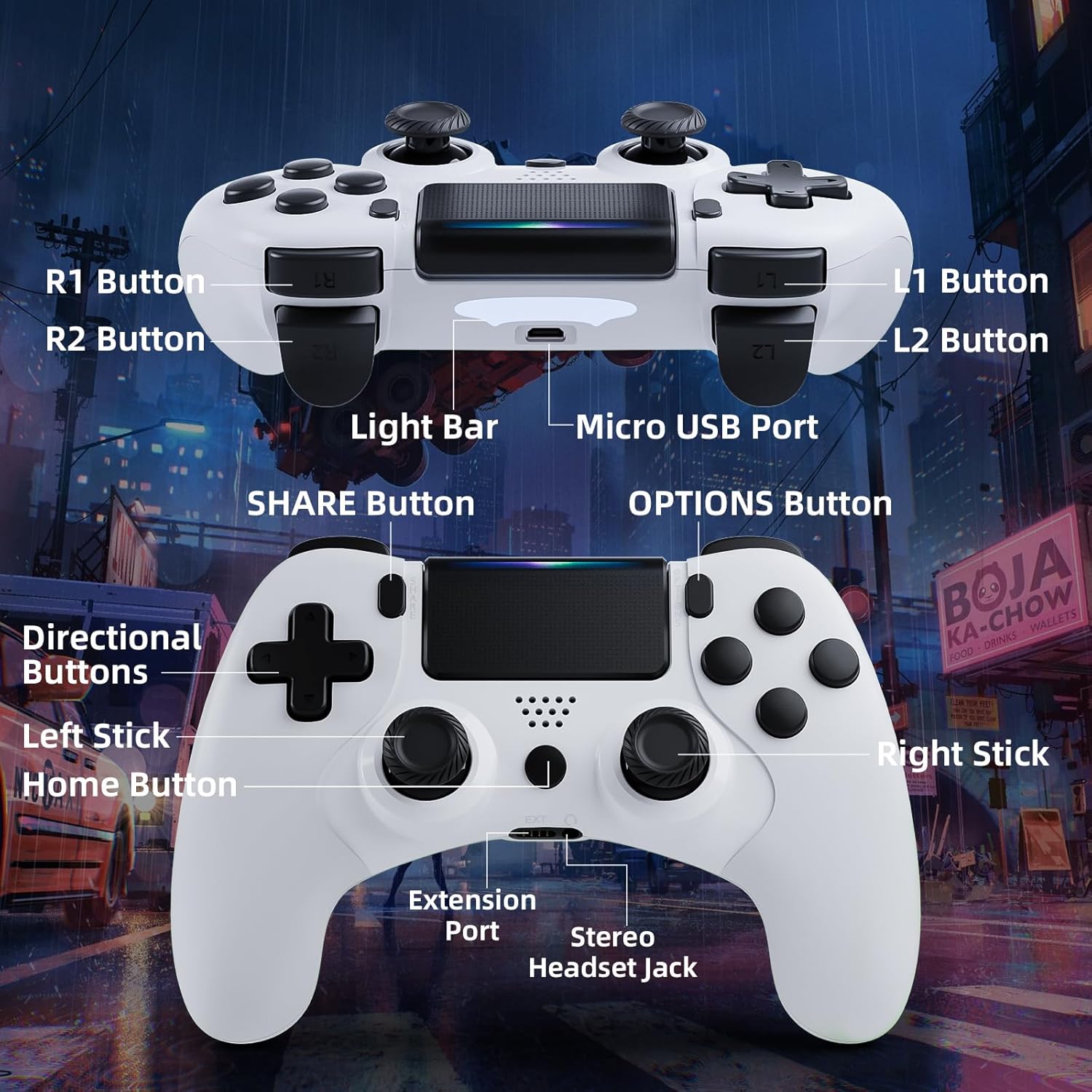
Image: Detailed diagram of the CHEREEKI Wireless Gamepad, highlighting its various buttons and ports for easy identification.
Контроллердин компоненттери:
- R1 баскычы: Right shoulder button.
- R2 баскычы: Right trigger button.
- L1 баскычы: Left shoulder button.
- L2 баскычы: Left trigger button.
- Light Bar: Indicates controller status and player number.
- Микро USB порту: For charging and initial wired connection.
- БӨЛҮШҮҮ баскычы: For sharing gameplay videos and screenshots.
- ПАРАМЕТРЛЕР баскычы: Оюн ичиндеги менюларга жана опцияларга кирүү.
- Directional Buttons (D-Pad): Багыттуу киргизүү үчүн.
- Сол таякча: Analog stick for movement.
- Үй баскычы: PS button, for turning on/off the console and accessing the PS menu.
- Оң таякча: Analog stick for camera control or aiming.
- Кеңейтүү порту: For compatible accessories.
- Stereo Headset Jack: Гарнитураны туташтыруу үчүн.
Жайгашуу
1. Initial Connection and Pairing
The controller must be connected via USB cable for the first time to pair with your PS-4 console. This establishes the connection for future wireless use.
- Ensure your PS-4 console is powered on.
- Connect the Micro USB cable to the controller's Micro USB Port and the other end to a USB port on your PS-4 console.
- басыңыз Башкы бет баскычы (PS button) on the controller. The light bar will flash and then glow steadily, indicating successful pairing.
- Жупташтырылгандан кийин, контроллерди зымсыз колдонуу үчүн USB кабелин ажыратсаңыз болот.
2. Геймпадды заряддоо
The CHEREEKI Wireless Gamepad features a built-in 600 mAh rechargeable battery.
- Connect the controller to your PS-4 console or a standard USB charger using the Micro USB cable.
- The light bar will slowly pulse orange while charging.
- Адатта, толук заряддоо үчүн 2-3 саат талап кылынат.
- Once fully charged, the light bar will turn off.
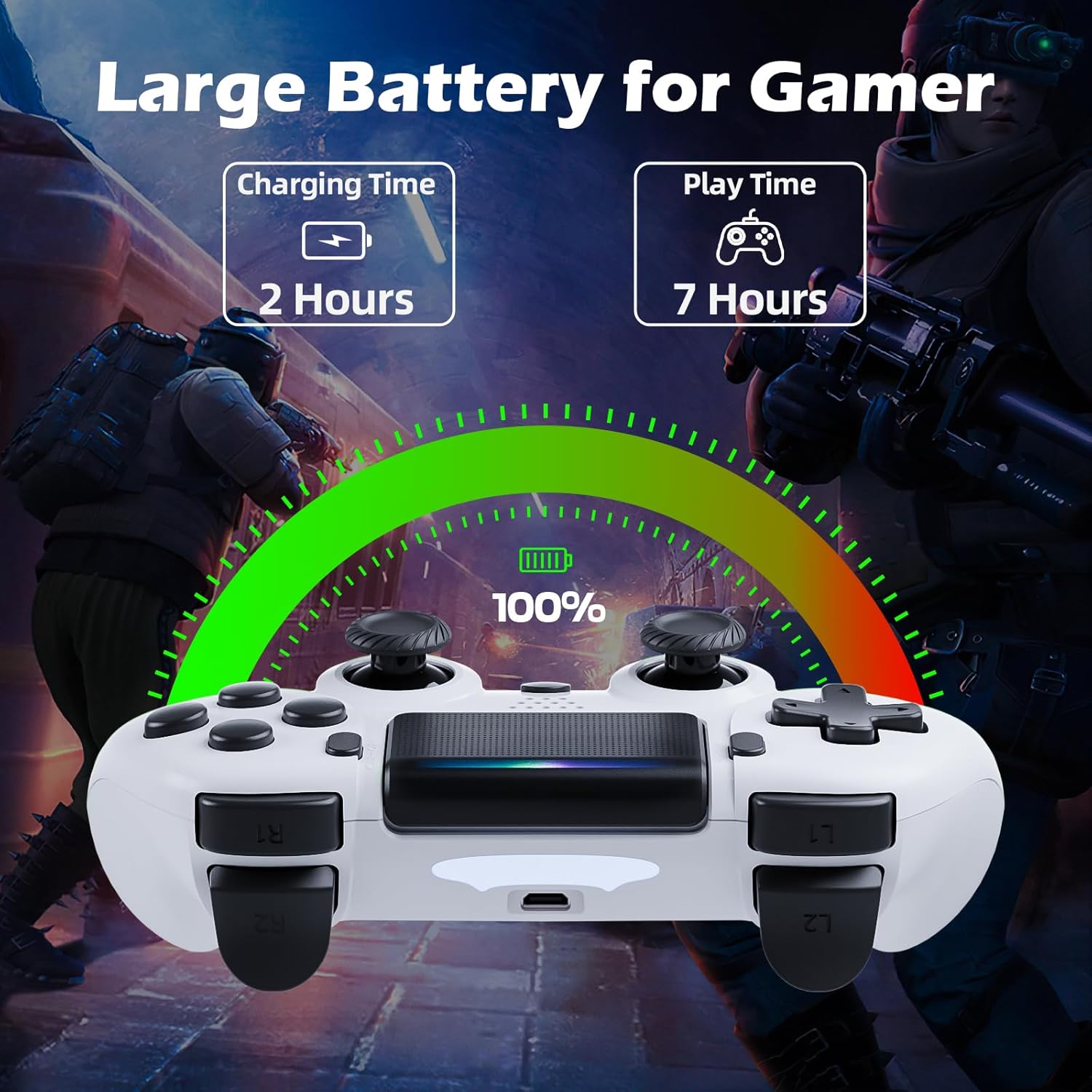
Image: Illustration showing the controller's charging time of 2 hours and play time of 7 hours on a full charge.
3. Шайкештик
This controller is compatible with PS-4, PS4 Slim, and PS4 Pro consoles.

Image: Visual representation of the controller's wide compatibility with PS4, PS4 Slim, and PS4 Pro consoles.
Иштөө нускамалары
1. Негизги башкаруу элементтери
The gamepad features standard PS-4 button layouts for intuitive gameplay.
- Аналогдук таякчалар: Use the Left Stick for character movement and the Right Stick for camera control or aiming.
- Directional Buttons (D-Pad): For precise directional input in menus or specific game actions.
- Аракет баскычтары (Үч бурчтук, Тегерек, Крест, Төрт бурчтук): Perform in-game actions as defined by the game.
- Shoulder and Trigger Buttons (L1, L2, R1, R2): Used for various actions like shooting, aiming, or interacting.
2. Motion Sensor (Gyro) Control
The built-in 6-axis motion sensor allows for intuitive control by tilting and rotating the controller.
- In supported games, you can use motion control for actions like steering, aiming, or adjusting viewбурчтар.
- Experiment with tilting the controller to achieve faster turns, adjust viewing angles, or aim more accurately.

Image: Illustration demonstrating the Gyro Motion Control feature, allowing for faster turning, viewing angle adjustment, and accurate aiming.
3. Double Vibration Feedback
Experience immersive gameplay with the dual motor vibration feature, providing tactile feedback for in-game events.
- The controller will vibrate to simulate impacts, explosions, and other in-game sensations.
- Vibration intensity may vary based on game design.

Image: Illustration of the Double Motor Vibration feature, showing the internal motors that provide immersive haptic feedback during gameplay.
4. Touchpad Functionality
The integrated touchpad allows for new ways to interact with games and navigate menus.
- Tap, swipe, or click the touchpad as required by specific games or system functions.
5. SHARE баскычы
The SHARE button allows you to easily share your gameplay moments.
- басыңыз БӨЛҮШҮҮ баскычы to access the Share menu, where you can upload screenshots or video clips to social media, or start a broadcast.
6. Stereo Headset Jack
Connect your compatible 3.5mm headset to the Stereo Headset Jack for in-game audio and voice chat.
- Plug your headset into the port located at the bottom of the controller.
- Adjust audio settings via the PS-4 system menu.
7. Эргономикалык дизайн
The controller is designed for comfort during extended gaming sessions.

Image: Depiction of the controller's ergonomic design, showing how it comfortably fits the shape of the hand for prolonged use.
Техникалык тейлөө
Proper care will extend the life of your CHEREEKI Wireless Gamepad.
- Тазалоо: Башкаргычты жумшак, кургак чүпүрөк менен сүртүңүз. Өтө кир болсо, бир аз сүртүңүзampчүпүрөктү суу менен. Катуу химиялык заттардан же абразивдүү тазалагычтардан алыс болуңуз.
- Сактагыч: Контроллерди түз күн нурунан жана экстремалдык температурадан алыс салкын, кургак жерде сактаңыз.
- Батареяга кам көрүү: To maintain battery health, avoid fully discharging the controller frequently. If storing for a long period, charge the battery to about 50% every few months.
- Колдонуу: Avoid dropping the controller or exposing it to excessive force, which can damage internal components.
Проблемаларды чечүү
Эгерде сиз геймпадыңыз менен көйгөйлөргө туш болсоңуз, төмөнкү кеңири таралган көйгөйлөрдү жана чечимдерди караңыз.
| Көйгөй | Мүмкүн себеп | Чечим |
|---|---|---|
| Controller does not connect wirelessly or connection is unstable. | Not properly paired; too far from console; interference. |
|
| Controller does not charge or holds charge for a short time. | Faulty cable; power source issue; battery degradation. |
|
| Баскычтар жооп бербей же жабышчаак. | Debris under buttons; physical damage. |
|
| Вибрациялык кайтарым байланыш жок. | Vibration disabled in game/system settings; game does not support vibration. |
|
Техникалык шарттар
| Өзгөчөлүк | Деталь |
|---|---|
| Модель номери | STK-4006L |
| Шайкештик | PS-4, PS4 Slim, PS4 Pro |
| Байланыш | Wireless (Bluetooth), Wired (Micro USB) |
| Зымсыз диапазон | 8 метрге чейин |
| Батарея түрү | Built-in Lithium-ion |
| Батарея сыйымдуулугу | 600 мАч |
| Заряддоо убактысы | Болжол менен 2-3 саат |
| Ойнотуу убактысы | 7 саатка чейин |
| Өлчөмдөрү (L x W x Y) | 17.4 x 13 x 7.6 см (болжол менен 6.85 x 5.12 x 2.99 дюйм) |
| Салмагы | 210 грамм (болжол менен 0.46 фунт) |
| Сенсорлор | 6-axis motion sensor (gyroscope, accelerometer) |
| Вибрация | Кош моторлуу титирөө |
| Киргизүү/Чыгуу | Touchpad, Stereo Headset Jack, Extension Port |
Кепилдик жана колдоо
For warranty information, please refer to the documentation included with your purchase or visit the official CHEREEKI webсайт. Кепилдиктин шарттары аймакка жана сатуучуга жараша өзгөрүшү мүмкүн.
If you require technical support or have questions not covered in this manual, please contact the seller or CHEREEKI customer service through their official channels. Provide your model number (STK-4006L) and a detailed description of your issue for faster assistance.


