Introduction
This manual provides detailed instructions for the QCOQ T60 Smart Watch. It covers setup, operation, maintenance, and troubleshooting to ensure optimal use of your device. The QCOQ T60 Smart Watch features a 1.91-inch display, Bluetooth call functionality, heart rate monitoring, and IP68 water resistance.
Пакеттин мазмуну
Сураныч, пакетте төмөнкү нерселерди текшериңиз:
- QCOQ T60 Smart Watch (1 unit)
- Заряддоо кабели
- User Manual
Жайгашуу
1. Аппаратты заряддоо
Before first use, fully charge the smart watch. Connect the magnetic charging cable to the charging contacts on the back of the watch and plug the USB end into a standard USB power adapter (not included).

Image: The QCOQ T60 Smart Watch connected to its magnetic charging cable, illustrating the charging process. The watch display shows an 80% battery level, indicating partial charge.
- Заряддоо убактысы: толук кубаттоо үчүн болжол менен 2 саат.
- Battery Life: Up to 7 days of typical usage on a full charge.
2. Колдонмону орнотуу жана жупташтыруу
To utilize all features of your QCOQ T60 Smart Watch, download and install the companion application on your smartphone.
- Scan the QR code provided in the quick start guide or search for the app name (usually indicated in the watch's initial setup screen or manual) in your smartphone's app store (App Store for iOS, Google Play Store for Android).
- Смартфонуңузда Bluetooth иштетилгенин текшериңиз.
- Орнотулган колдонмону ачып, каттоо эсебин түзүү же кирүү үчүн экрандагы нускамаларды аткарыңыз.
- Within the app, navigate to the device pairing section and select your QCOQ T60 Smart Watch from the list of available devices.
- Смартфонуңузда жана акылдуу саатыңызда жупташтыруу өтүнүчүн ырастаңыз.
Иштөө нускамалары
1. Негизги навигация
The QCOQ T60 Smart Watch features a touchscreen display and a side button for navigation.
- Өйдө/ылдый сүрүү: Менюларды жана эскертмелерди сыдырыңыз.
- Солго/Оңго сүрүү: Access quick functions or different widgets.
- таптаңыз: Бир нерсени тандаңыз же аракетти ырастаңыз.
- Каптал баскычы: Башкы экранга кайтуу же түзмөктү ойготуу үчүн басыңыз. Кубат параметрлери үчүн көпкө басыңыз.
2. Bluetooth чалуу функциясы
Once paired with your smartphone, the QCOQ T60 Smart Watch allows you to make and answer calls directly from your wrist.
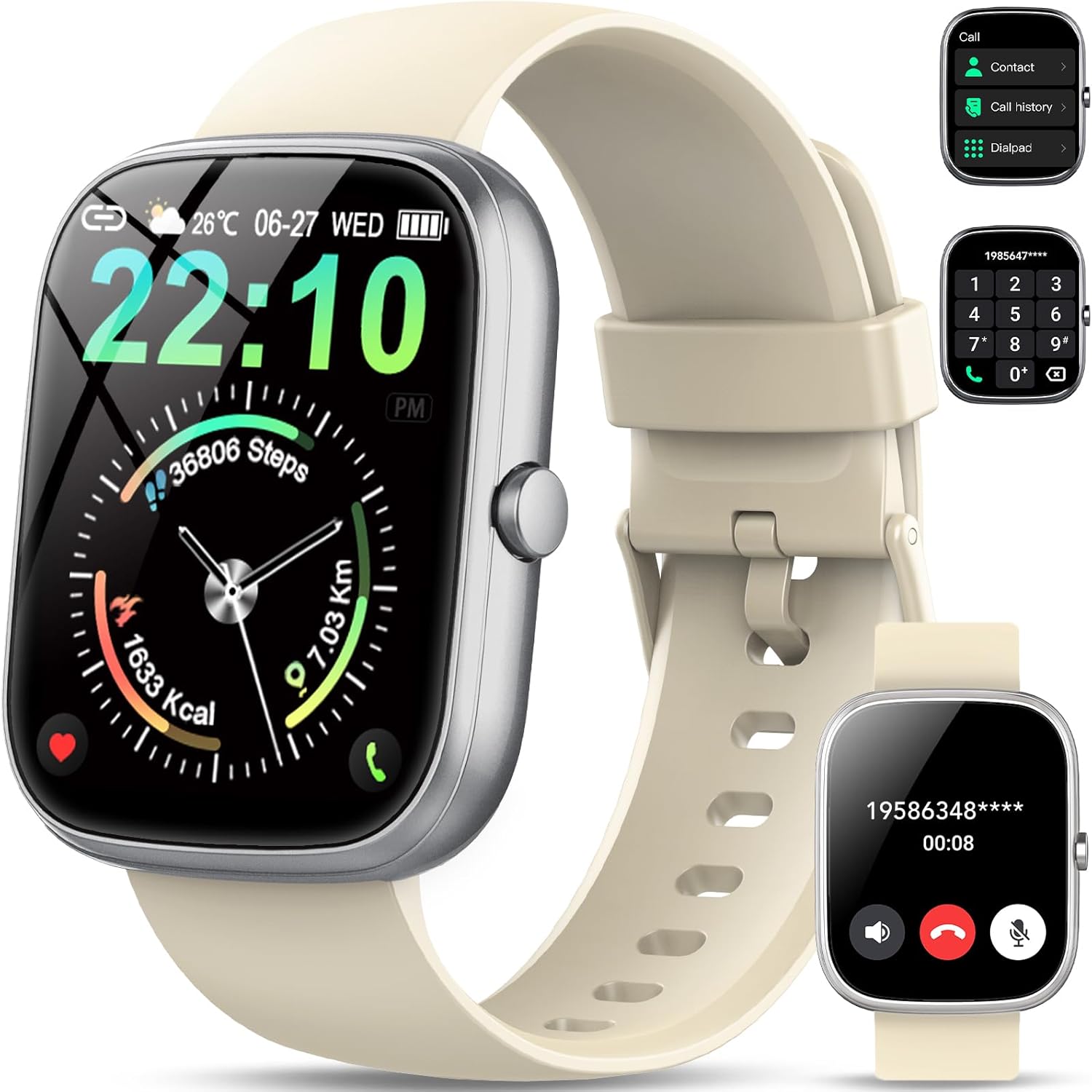
Image: The QCOQ T60 Smart Watch screen showing the call interface, including options to access contacts, view call history, and use a dialpad. A separate inset shows an incoming call notification.
- Чалууларга жооп берүү: Кирүүчү чалуу кабыл алынганда, саат экранындагы жашыл жооп сөлөкөтүн таптаңыз.
- Чалууларды жасоо: Access the 'Call' menu on the watch, then select from contacts, call history, or use the dialpad to enter a number.
3. Эскертмелер
Эскертмелерди түз эле смартфонуңуздан саатыңызга алыңыз.

Image: The QCOQ T60 Smart Watch screen showing notifications from various social media and messaging applications. Adjacent to it, a smartphone displays an incoming call, demonstrating the watch's Bluetooth call feature.
- Ensure notification permissions are enabled for the companion app on your smartphone.
- Сааттын бетинин үстүнөн ылдый сүрүңүз view акыркы эскертмелер.
4. Фитнеске көз салуу
The QCOQ T60 Smart Watch monitors various fitness metrics.

Image: A visual representation of the QCOQ T60 Smart Watch's fitness capabilities, highlighting over 110 sport modes, step counting, calorie expenditure tracking, IP68 water resistance, and comprehensive daily activity data.
- Жүрөктүн кагышын көзөмөлдөө: The watch provides real-time heart rate data. Access the heart rate function on the watch or through the app.
- Step Count & Calories: Tracks your daily steps, distance, and estimated calories burned.
- Спорт режимдери: Select from over 110 sport modes to track specific activities.
5. Уйкунун мониторинги
The watch automatically monitors your sleep patterns.

Image: The QCOQ T60 Smart Watch screen showing detailed sleep monitoring data, including deep, light, and awake sleep stages. Another section displays a 7-day weather forecast.
- Wear the watch while sleeping for accurate data.
- View detailed sleep analysis in the companion app, including deep sleep, light sleep, and awake times.
6. Башка өзгөчөлүктөр
- Аба ырайы: View учурдагы аба ырайы жана 7 күндүк болжолдоо.
- Музыкалык башкаруу: Смартфонуңузда музыканы ойнотууну көзөмөлдөңүз (ойнотуу, тындыруу, тректерди өткөрүп жиберүү).
- Камераны алыстан башкаруу: Саатты смартфонуңуздун камерасы үчүн алыстан башкаруучу жапкыч катары колдонуңуз.
- Үн жардамчысы: Смартфонуңуздун үн жардамчысына кириңиз.
- Отуруучу эстеткич: Иштебей турган мезгилдерден кийин жылуу үчүн эскертмелерди алыңыз.
- Ойготкуч: Ойготкучтарды түздөн-түз сааттан орнотуңуз.
- Кандагы кычкылтектин мониторинги: Каныңыздын кычкылтек деңгээлин өлчөңүз.
- Аялдардын ден соолугу: Track menstrual cycles and related data.
- Калькулятор: Негизги калькулятор функциясы.
7. Сааттын жүзүн ыңгайлаштыруу
Саатыңызды ар кандай саат беттери менен жекелештириңиз.

Image: A collage of various watch faces available for the QCOQ T60 Smart Watch, demonstrating the range of styles and information displays, including options for personalized backgrounds.
- Long press on the current watch face to enter the watch face selection menu.
- Swipe left or right to browse available watch faces. Tap to select.
- More watch faces and customization options (including custom backgrounds) are available through the companion app.
Техникалык тейлөө
1. Тазалоо
- Сааттын экранын жана корпусун жумшак, түксүз чүпүрөк менен сүртүңүз.
- For the strap, use a mild soap and water solution if necessary, then rinse thoroughly and dry completely before wearing.
- Катуу химиялык заттарды же абразивдүү материалдарды колдонуудан алыс болуңуз.
2. Сууга туруктуулук (IP68)
The QCOQ T60 Smart Watch is IP68 rated, meaning it is resistant to dust and can withstand immersion in water up to 1.5 meters for up to 30 minutes. It is suitable for daily use, such as hand washing or light rain.
- Do not use the watch for diving, hot showers, saunas, or in environments with high-pressure water.
- Суу өткөрбөөчүлүк туруктуу шарт эмес жана убакыттын өтүшү менен кадимки эскирүү жана айрылуу менен төмөндөшү мүмкүн.
3. Батареяга кам көрүү
- Батареянын иштешин начарлатышы мүмкүн болгон өтө жогорку температуралардан алыс болуңуз.
- Charge the watch regularly; avoid letting the battery completely drain for extended periods.
Проблемаларды чечүү
- Күйгүзүлбөй жаткан саат: Саат толук заряддалганын текшериңиз. Аны заряддагычка кеминде 10 мүнөт туташтырыңыз.
- Смартфон менен жупташуу мүмкүн эмес:
- Телефонуңузда жана саатыңызда Bluetooth иштетилгенин текшериңиз.
- Саат телефонуңуздун диапазонунда экенин текшериңиз.
- Саатты да, телефонуңузду да өчүрүп күйгүзүңүз.
- Check if the companion app has necessary permissions.
- Билдирмелер алынган жок:
- Verify that notifications are enabled in the watch's settings and the companion app.
- Саат Bluetooth аркылуу туура туташып турганын текшериңиз.
- Колдонмо үчүн телефонуңуздун эскертме жөндөөлөрүн текшериңиз.
- Inaccurate heart rate/activity data: Ensure the watch is worn snugly on your wrist, not too tight or too loose. Clean the sensor regularly.
Техникалык шарттар
| Өзгөчөлүк | Спецификация |
|---|---|
| Бренд | QCOQ |
| Модел | T60 |
| Дисплей өлчөмү | 1.91 дюйм |
| Дисплей технологиясы | LCD |
| Резолюция | 240 x 240 |
| Байланыш | Bluetooth |
| Шайкеш түзмөктөр | Смартфон |
| Суу каршылык | IP68 |
| Өзгөчөлүктөр | Heart Rate Monitor, Notifications, Camera Remote, Voice Assistant |
| Адам интерфейсинин киргизүү | Сенсордук экран |
| GPS | GPS жок |
| Батарея түрү | Литий-ион (1 керек) |
| Өлчөмдөрү (посылка) | 17.4 x 9.4 x 1.8 см |
| Салмагы (посылка) | 38.19 г |
| Түс | Creamy White |
Коопсуздук маалыматы
- Consult your doctor before starting any new exercise regimen or if you have pre-existing health conditions.
- Саатты ажыратууга же өзгөртүүгө аракет кылбаңыз.
- Аппаратты катуу ысыктан же сууктан алыс кармаңыз.
- Түзмөктү жана анын батарейкасын жергиликтүү эрежелерге ылайык жок кылыңыз.
Кепилдик жана колдоо
For warranty information and customer support, please refer to the documentation included with your purchase or visit the official QCOQ website. Ensure you have your purchase receipt and product model number (T60) available when contacting support.


