Продукт бүттүview
The ARPHA Keyless Entry Door Lock with 2 Handle Set (Model D180H) offers advanced security and convenient access to your home. This smart lock can be unlocked via multiple methods including a mobile application, keypad password, electronic key (EKey), and a traditional mechanical key. It supports up to 100 unique access codes, including 97 user codes and 3 administrator passcodes, providing flexible access management for various users.
Key features include an auto-lock function with adjustable timing (10 seconds to 30 minutes), a one-touch lock feature for quick securing, and an anti-peeping password method that allows for the entry of random digits before or after the actual code to enhance privacy. The lock is designed for easy installation on most US standard left and right-hand doors without the need for drilling. It operates on 4 AA batteries (not included) with an approximate battery life of 180 days.
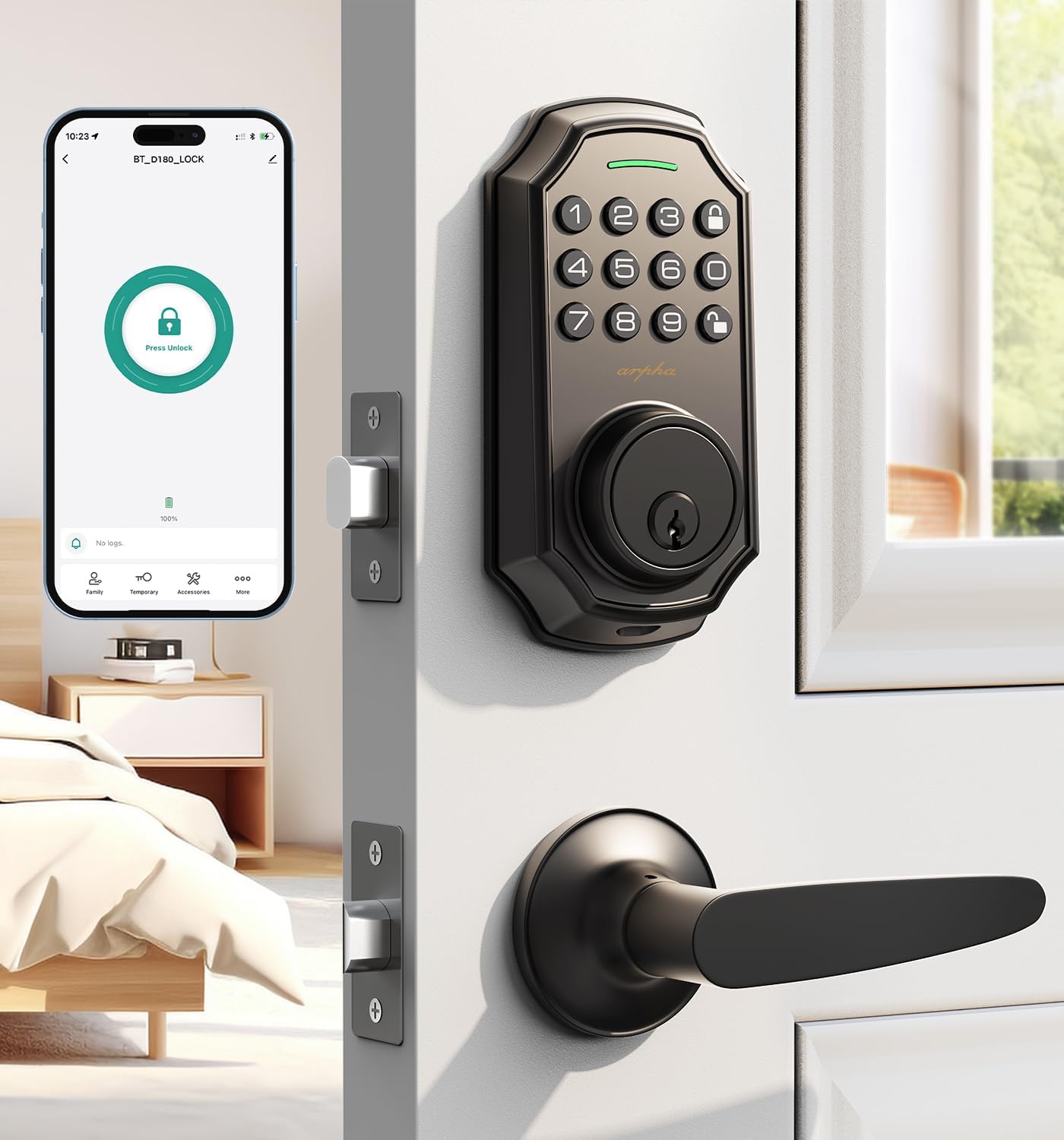
Image: ARPHA Keyless Entry Door Lock with 2 Handle Set, showcasing the keypad and handle.
Камтылган компоненттер
Орнотууну баштоодон мурун, бардык компоненттер бар экенин текшериңиз:
- Keypad Deadbolt Unit
- Ички чогултуу бөлүмү
- Door Handle Set (2 handles)
- Кулпу цилиндри
- Монтаждоо плитасы
- Strike Plate
- Бурамалар жана бекиткичтер
- Механикалык ачкычтар
- Орнотуу шаблону (эгер бар болсо)
Орнотуу жана орнотуу
The ARPHA D180H lock is designed for straightforward installation. Follow these steps carefully. For visual guidance, refer to the installation videos provided.
Эшиктин шайкештиги
This lock set is compatible with most US standard left and right-hand doors. Ensure your door meets the following dimensions:
- Door Thickness: 1.31" to 2.16" (35mm to 55mm)
- Backset: 2-3/8" or 2-3/4" (60mm or 70mm)
- Cross Bore Diameter: 2-1/8" (54mm)

Image: Diagram illustrating compatible door dimensions and types for the ARPHA D180H lock.
Кадам-кадам орнотуу
- Install the Lock Cylinder: Insert the lock cylinder into the door edge. Secure it with the provided screws.
- Install the Front Lock: Pass the connecting wire through the bottom of the cylinder. Ensure the cylinder is vertical.
- Secure with Metal Plate: Secure the front lock with the metal plate and appropriate screws.
- Install the Rear Lock: Insert the wire into the slot on the rear lock. Hide any extra connecting wires in the doorway. Place the rear lock on the plate and secure it with screws.
- Батареяларды салыңыз: Open the battery compartment on the interior unit and insert 4 AA batteries. Ensure correct polarity.
- Сыноо операциясы: After installation, test the lock's functionality using the mechanical key and keypad.
Video: H300 handle installation video, demonstrating the process of installing the lock cylinder and handle components.
Video: D180H installation video, providing a detailed guide for installing the smart lock components.
Video: Easy-to-install keypad lock, very practical, demonstrating the overall installation process and ease of use.
Иштөө нускамалары
Кулпуну ачуу ыкмалары
- Колдонмону башкаруу: Unlock the door remotely using the dedicated mobile application.
- Купуя сөз: Enter your programmed password on the keypad.
- EKey: Use a registered electronic key for quick access.
- Механикалык ачкыч: Физикалык ачкычты камдык көчүрмө катары колдонуңуз.

Image: Illustration of the 4-in-1 unlocking methods: Keypad Password, Mechanical Key, One Touch Unlock, and App Remote Control.
Колдонмону башкаруу жана функциялары
The ARPHA smart lock can be fully managed through its mobile application. Ensure Bluetooth is enabled on your device for initial connection. Remote unlocking requires an optional gateway (ASIN: B09YHFG933).
- Generate and Share Codes: Create one-time, permanent, scheduled, and recurring access codes for family, guests, or service providers.
- Колдонуучуну башкаруу: Add or remove users and assign specific access permissions.
- Кирүү жазуулары: View real-time unlocking records and activity logs within the app.
Video: D180H-App Connection Door Lock Tutorial, guiding users through connecting the lock to the mobile application.
Video: D180H-App Function Operation, demonstrating various functions and settings available in the app.

Image: Visual representation of the lock's capacity for up to 100 user codes, including admin and regular users.
Auto-Lock and One-Touch Locking
The electronic door lock features a smart one-touch switch for easy control. You can enable the auto-lock feature and set the timer from 10 seconds to 30 minutes, ensuring the door is automatically secured after a set period.

Image: Depiction of the auto-lock and one-touch locking features, showing the adjustable timer.
Anti-Peeping Password
The security lock supports a 16-digit virtual password unlocking method. Users can enter 10 to 8 digits before or after setting a 6 to 8 digit password. This allows you to add random numbers before or after your correct passcode to protect it from prying eyes, ensuring your security stays private even in crowded spaces.

Image: Explanation of the anti-peeping password feature, showing how random digits can be added to protect the real passcode.
Техникалык тейлөө
To ensure optimal performance and longevity of your ARPHA Keyless Entry Door Lock, regular maintenance is recommended:
- Батареяны алмаштыруу: Replace the 4 AA batteries when the low battery alert is triggered. Avoid mixing old and new batteries.
- Тазалоо: Wipe the keypad and exterior surfaces with a soft, dry cloth. Avoid abrasive cleaners or solvents that could damage the finish.
- Байланыштарды текшерүү: Бардык бурамалар жана туташтыргычтар бекем экенин мезгил-мезгили менен текшерип туруңуз.
- Майлоо: If the mechanical parts feel stiff, apply a small amount of graphite lubricant to the lock cylinder.
Проблемаларды чечүү
If you encounter issues with your ARPHA Keyless Entry Door Lock, refer to the following common troubleshooting tips:
- Кулпу жооп бербейт: Check battery levels and replace if necessary. Ensure the battery compartment is securely closed.
- Клавиатура күйбөйт: This usually indicates low battery. Replace batteries.
- Туура эмес сырсөз киргизилди: Ensure you are entering the correct 6-8 digit passcode. Remember the anti-peeping feature allows extra digits, but the core code must be accurate.
- Авто кулпу иштебейт: Verify the auto-lock feature is enabled in the app and the delay time is set correctly.
- Колдонмого туташуу маселелери: Ensure Bluetooth is enabled on your phone and you are within range. For remote access, confirm your optional gateway is properly set up and connected.
- Механикалык ачкыч иштебейт: Ачкычтын толук салынганын жана туура бурулганын текшериңиз. Ачкыч тешигинде кандайдыр бир тоскоолдуктар бар-жогун текшериңиз.
For further assistance, please contact ARPHA customer support.
Техникалык шарттар
| Бренд | АРФА |
| Модель аты | D180H |
| Кулпу түрү | Keypad Deadbolt Handle Set, Smart Deadbolt Lock for Front Door, Bluetooth Door Lock |
| Материал | Цинк |
| Түс | Кара |
| Элементтин өлчөмдөрү L x W x H | 5.9 x 3 x 2.4 дюйм |
| Элемент Салмагы | 3.6 фунт |
| Башкаруу ыкмасы | Колдонмо |
| Connectivity Protocol | Ble |
| Power Source | 4 АА батарейкалар (киргизилген эмес) |
| Сунушталган Колдонуулар | Residential front doors |
Кепилдик жана колдоо
ARPHA is committed to providing exceptional support for its products:
- Кепилдик: ARPHA offers a 30-day money-back guarantee and an 18-month assurance period.
- Техникалык колдоо: Өмүр бою техникалык колдоо бар.
- Кардарларды тейлөө: A dedicated support team is available via 24/7 after-sales email service to assist with any inquiries or issues.


