1. Киришүү
Thank you for choosing the KESIEME Intelligent Touch Screen Open Ear Earbuds. These wireless headphones are designed for comfort and awareness, featuring an open-ear design, Bluetooth 5.4 connectivity, and a touch-screen charging case for intuitive control. This manual provides detailed instructions to help you get the most out of your device.

Image 1.1: KESIEME Open Ear Earbuds and their intelligent touch screen charging case.
2. Пакеттин мазмуну
Сураныч, төмөнкү нерселер үчүн кутучаны белгилеңиз:
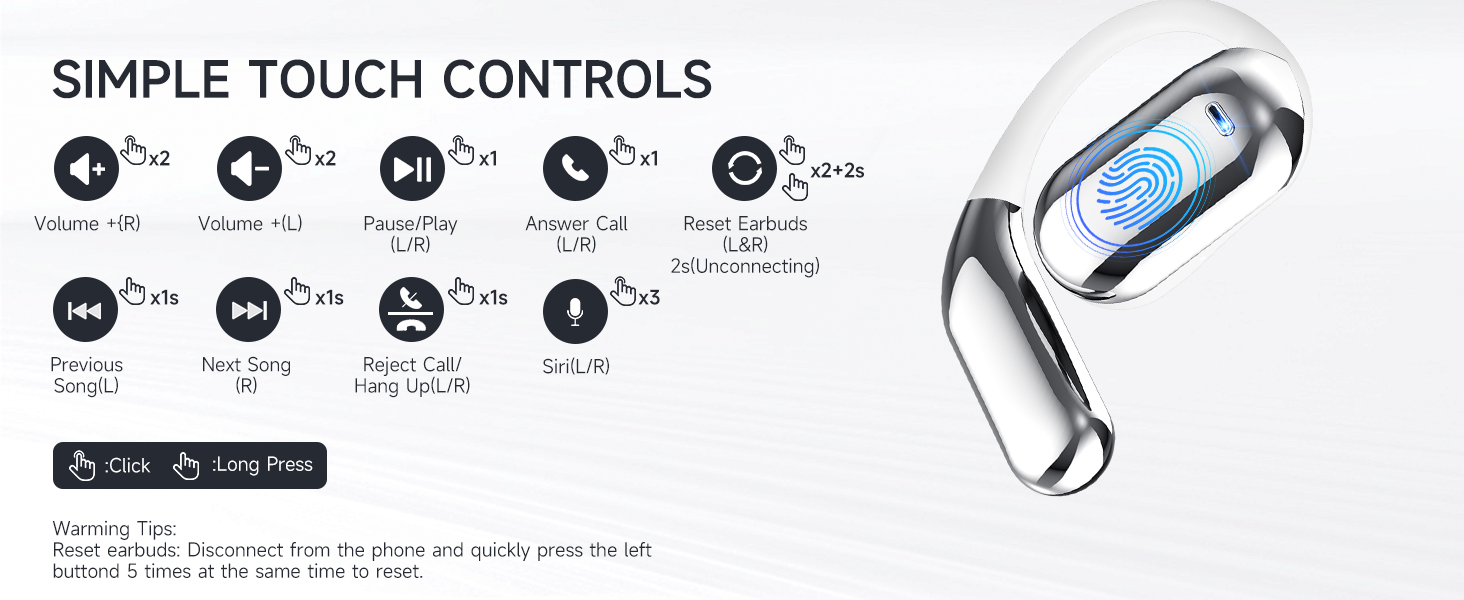
Image 2.1: Illustration of items included in the product package.
- Open Air Conduction Earphones (2 units)
- Заряддоо кутусу (1 бирдик)
- Колдонуучунун колдонмосу (1 бирдик)
- Type-C заряддоо кабели (1 бирдик)
3. Продукт бүтүп калдыview жана өзгөчөлүктөрү
3.1 Open Ear Design
The KESIEME earbuds feature an open-ear design that rests gently on the ear, providing comfort for extended wear and allowing you to remain aware of your surroundings. This design minimizes pressure in the ear canal and reduces the risk of hearing damage compared to in-ear headphones.

Image 3.1: Comparison of open-ear design comfort versus traditional in-ear designs.
3.2 Premium Sound Quality
Equipped with dual 14.2mm air conduction dynamic drivers, these headphones deliver clear sound, powerful volume, and stereo audio. The design addresses sound leakage, ensuring a private listening experience.

Сүрөт 3.2: Детальдуу view of the 14.2mm dynamic drivers for enhanced audio.
3.3 Bluetooth 5.4 Technology
The earbuds utilize Bluetooth 5.4 for a stable, fast, and low-latency wireless connection. This advanced technology ensures an uninterrupted audio experience with a connection range of up to 33 feet (10 meters).

Image 3.3: Benefits of upgraded Bluetooth 5.4 technology.
3.4 Comfort and Fit
Designed with ergonomic ear hooks and skin-friendly materials, the earbuds are lightweight and provide a secure, comfortable fit for various activities.

Image 3.4: Features contributing to the ultimate comfort and fit of the earbuds.
4. Орнотуу жана заряддоо
4.1 Алгачкы заряддоо
Before first use, fully charge the earbuds and the charging case. Connect the provided Type-C charging cable to the charging case and a power source. The smart LED power display on the case will indicate the charging status and battery levels.
A single full charge provides up to 20 hours of earbud playtime. The charging case can recharge the earbuds multiple times, extending total playtime to approximately 48 hours.
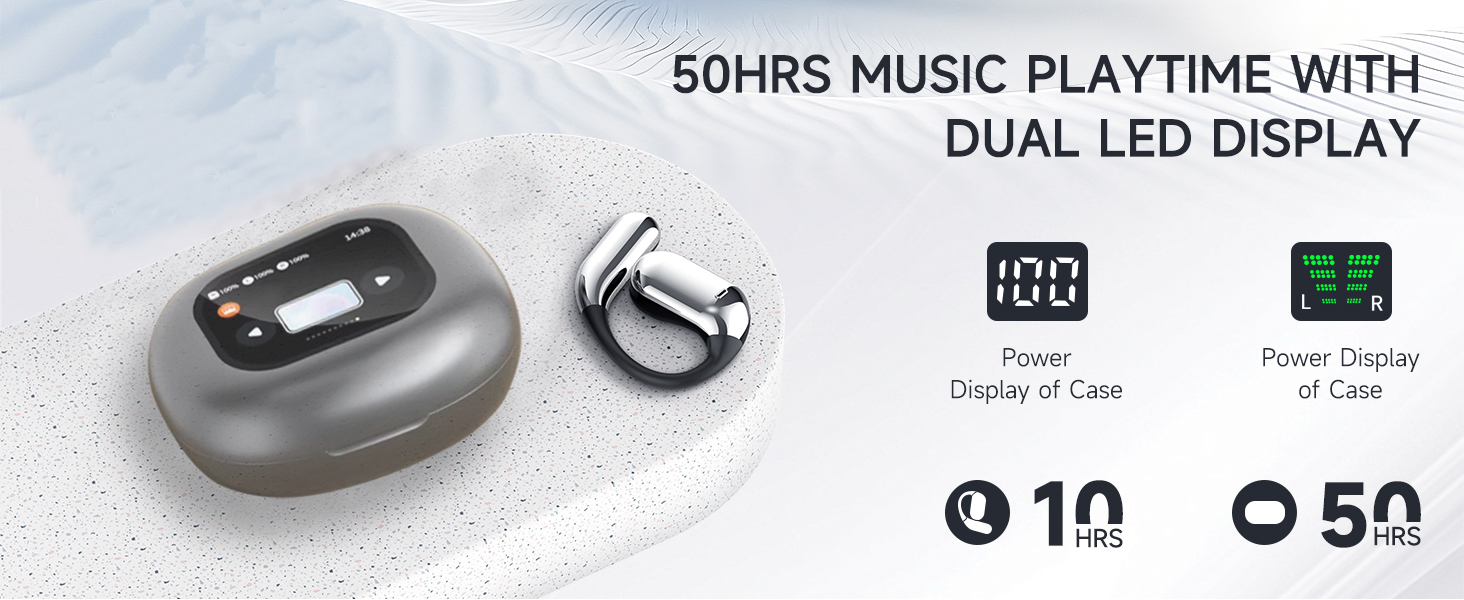
Image 4.1: Charging case with LED display showing battery status and total playtime.
4.2 Түзмөк менен жупташтыруу
- Кулакчындардын кубатталганын текшериңиз.
- Заряддоо кутучасын ачыңыз. Кулакчындар автоматтык түрдө күйүп, жупташтыруу режимине өтөт.
- Түзмөгүңүздө (смартфон, планшет, компьютер) Bluetooth иштетип, жеткиликтүү түзмөктөрдү издеңиз.
- Select "KESIEME YYK" (or similar model name) from the list to connect.
- Туташкандан кийин, сиз ырастоо үнүн угасыз жана кулакчындар колдонууга даяр болот.
Эскертүү: Эгерде аппаратта Bluetooth иштетилген болсо, кулакчындар кутудан чыгарылганда акыркы жупташтырылган түзмөккө автоматтык түрдө кайра туташат.
5. Иштөө нускамалары
5.1 Кулакчындарды тагынуу
Follow these steps for a secure and comfortable fit:
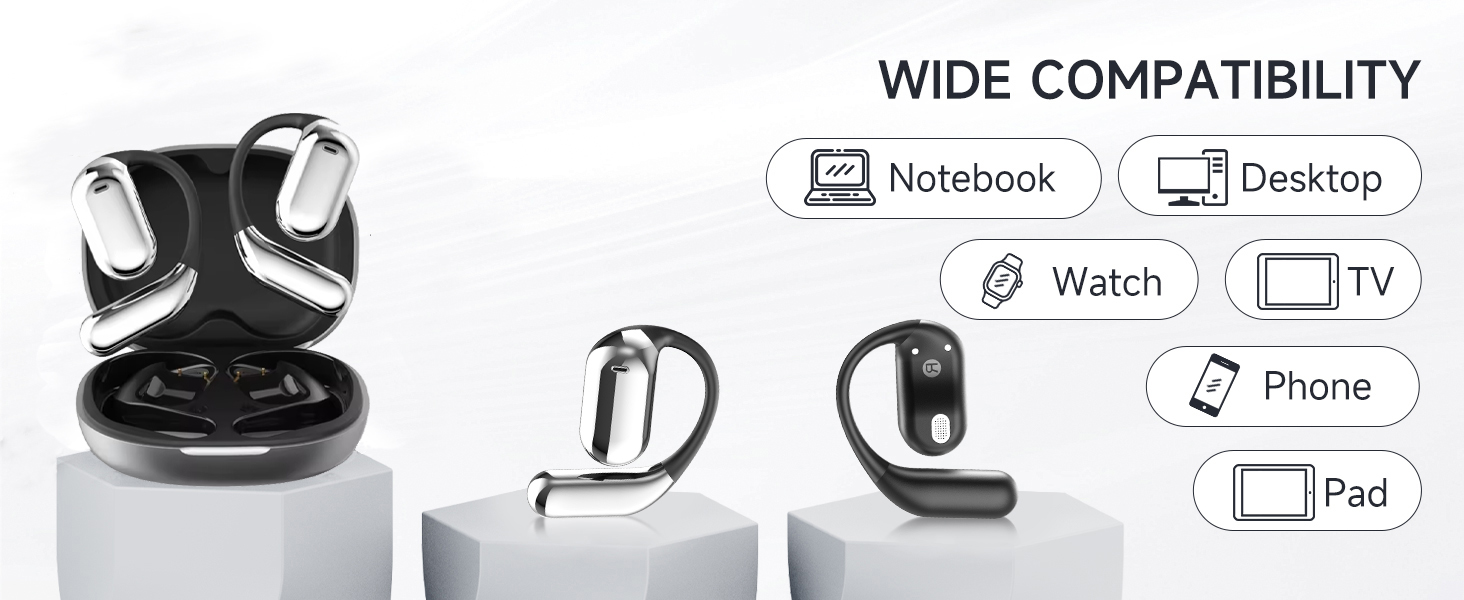
Image 5.1: Step-by-step instructions for correctly wearing the earbuds.
- Заряддагычтан кулакчындарды алып салыңыз.
- Hang the end of the earphones on the ear bone.
- Turn the earphones and slide them behind the ear.
- Adjust the ear hook, wear, and pull down the ear hook for a secure fit.
5.2 Сенсордук башкаруу
The earbuds feature intuitive touch controls for managing audio playback, calls, and voice assistant functions. The charging case also has a touch screen for additional controls.
Сүрөт 5.2: Бүттүview кулакчындын сенсордук башкаруу элементтеринин.
| Акция | Функция |
|---|---|
| Double Click (L/R) | Volume + (Right Earbud), Volume - (Left Earbud) |
| Single Click (L/R) | Музыканы ойнотуу/тындыруу, чалууга жооп берүү |
| Узак басуу 1сек (сол/оң) | Previous Song (Left Earbud), Next Song (Right Earbud) |
| Узак басуу 2сек (сол/оң) | Reject Call / Hang Up Call |
| Triple Click (L/R) | Үн жардамчысын иштетүү (Siri/Google Жардамчы) |
| Double Click + Long Press 2s (L/R) | Reset Earbuds (Disconnect from phone, then quickly press left button 5 times to reset) |
5.3 Кубаттоочу кутучанын сенсордук экран функциялары
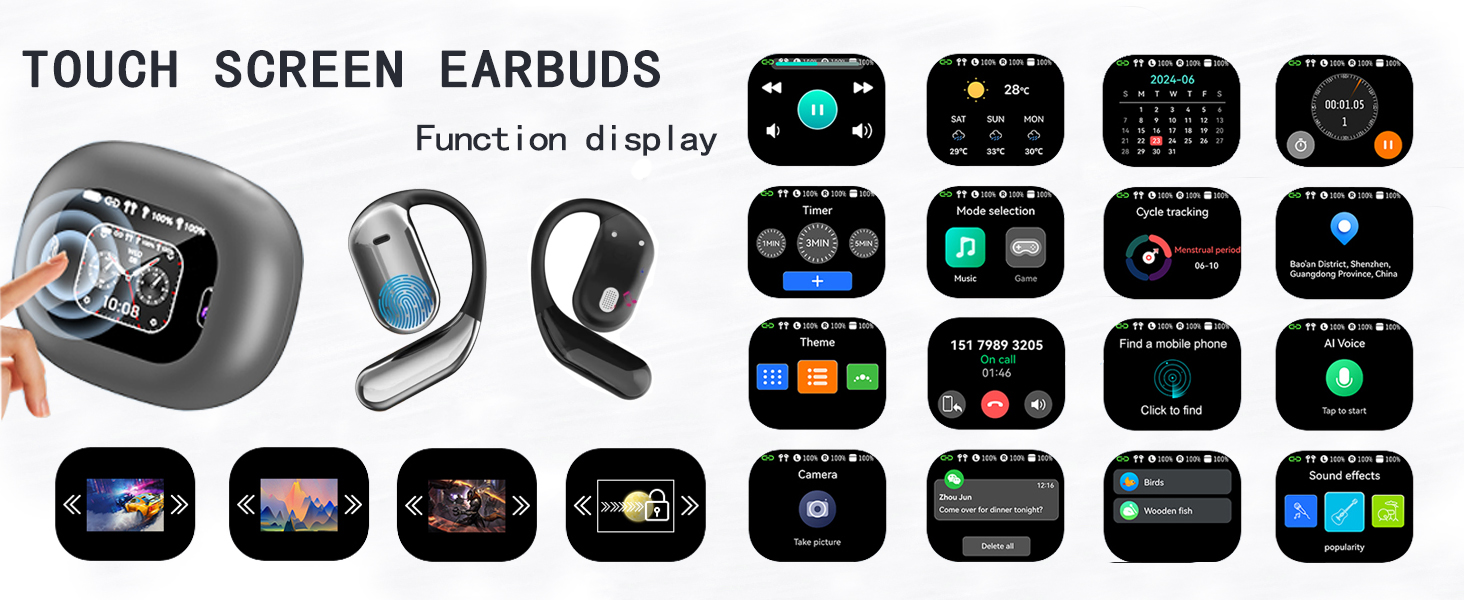
The charging case features an LCD full-color touch screen, providing access to various functions directly from the case.
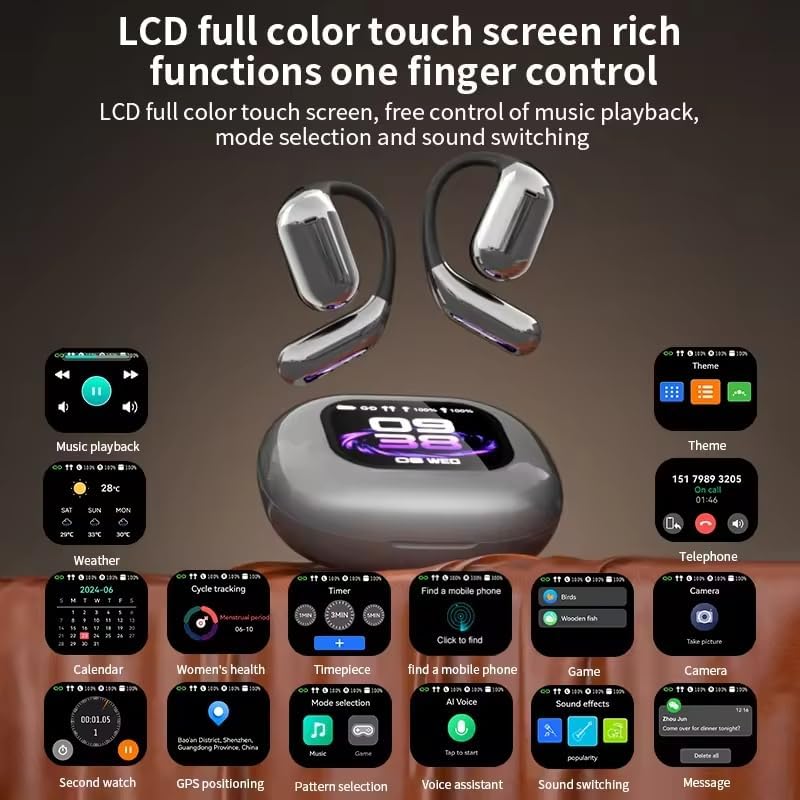
Сүрөт 5.3: Бүттүview of the charging case's touch screen interface and available functions.
- Музыка ойнотуу: Control tracks and volume.
- Аба ырайы: View учурдагы аба ырайы маалыматы.
- Календар: Access date and time.
- Таймер: Set countdowns.
- Режим тандоо: Switch between different audio modes (e.g., Music, Game).
- Циклге көз салуу: (Potentially for fitness, details not specified).
- Мобилдик телефон табуу: Жупташкан смартфонуңузду табыңыз.
- Темалар: Дисплей темасын ыңгайлаштырыңыз.
- Телефон: View call history or dial.
- Камера: Remote control for your phone's camera.
- AI үнү: Үн жардамчысын иштетүү.
- Үн эффекттери: Adjust audio equalization.
- Кабарлар: View эскертмелер.
6. Техникалык тейлөө
To ensure the longevity and optimal performance of your KESIEME earbuds, follow these maintenance guidelines:
- Тазалоо: Кулакчындарды жана кубаттоочу кутучаны дайыма жумшак, кургак, түксүз чүпүрөк менен сүртүп туруңуз. Абразивдүү материалдарды, спиртти же химиялык тазалоочу каражаттарды колдонуудан алыс болуңуз.
- Сактагыч: When not in use, store the earbuds in their charging case to protect them from dust and damage. Keep the case closed.
- Заряддоо: Use only the provided Type-C cable for charging. Avoid exposing the charging port to moisture.
- Суу каршылык: Кулакчындар суу өткөрбөйт, бирок суу өткөрбөйт. Аларды сууга чөмүлтпөңүз же катуу жамгырда калтырбаңыз. Эгер суу болуп калса, жакшылап кургатыңыз.
- Температура: Do not expose the earbuds or charging case to extreme temperatures (hot or cold) or direct sunlight for prolonged periods.
7. Кыйынчылыктарды
Эгер кулакчыныңызда кандайдыр бир көйгөйгө туш болсоңуз, төмөнкү жалпы чечимдерди караңыз:
| Көйгөй | Чечим |
|---|---|
| Кулакчындар жупташтырылбай жатат/туташтырылбай жатат |
|
| Үн жок же үнү төмөн |
|
| Заряддоо куту заряддалбай жатат |
|
| Тийүү башкаруулары жооп бербейт |
|
8. Техникалык шарттар
| Өзгөчөлүк | Деталь |
|---|---|
| Бренд | KESIEME |
| Модель аты | Open Ear Earbuds (YYK) |
| Байланыш технологиясы | Зымсыз (Bluetooth) |
| Зымсыз байланыш технологиясы | Bluetooth 5.4 |
| Bluetooth диапазону | 33 Фут (10 метр) |
| Кулак жайгаштыруу | Ачык кулак |
| Форма фактору | АЧЫК КУЛАК |
| Аудио драйвер түрү | Динамикалык драйвер |
| Аудио драйверинин өлчөмү | 14.2 миллиметр |
| Жыштык диапазону | 20 Гц - 20 000 Гц |
| Импеданс | 32 Ом |
| Батареянын иштөө мөөнөтү (наушник) | 20 саатка чейин (бир кубаттоо) |
| Жалпы ойноо убактысы (капка менен) | 48 саатка чейин |
| Башкаруу түрү | тийүү |
| Сууга туруктуулук деңгээли | Сууга чыдамдуу |
| Элемент Салмагы | 6.7 унция (0.19 килограмм) |
| Продукциянын өлчөмдөрү | 6 x 4.2 x 1.5 дюйм |
| Шайкеш түзмөктөр | Desktops, Laptops, Tablets, Mobile Phones |
9. Кепилдик жана колдоо
KESIEME products are designed for reliability and performance. For warranty information, please refer to the documentation included with your purchase or contact KESIEME customer support.
If you require further assistance or have questions not covered in this manual, please contact KESIEME customer support through their official website or the retailer where you purchased the product. Please have your model number (YYK) and purchase details ready.


