Introduction
Thank you for choosing the Mesqool CR1025 Digital Alarm Clock Radio. This device combines multiple functions including a digital alarm clock, Bluetooth 5.0 speaker, FM radio, night light, and dual USB charging ports. This manual provides detailed instructions to help you set up and operate your new device effectively.
Пакеттин мазмуну
- Mesqool CR1025 Digital Alarm Clock Radio
- Кубаттуу адаптер
- User Manual
- C Battery (for backup)
Продукт бүттүview
Familiarize yourself with the components and controls of your Mesqool CR1025 Digital Alarm Clock Radio.
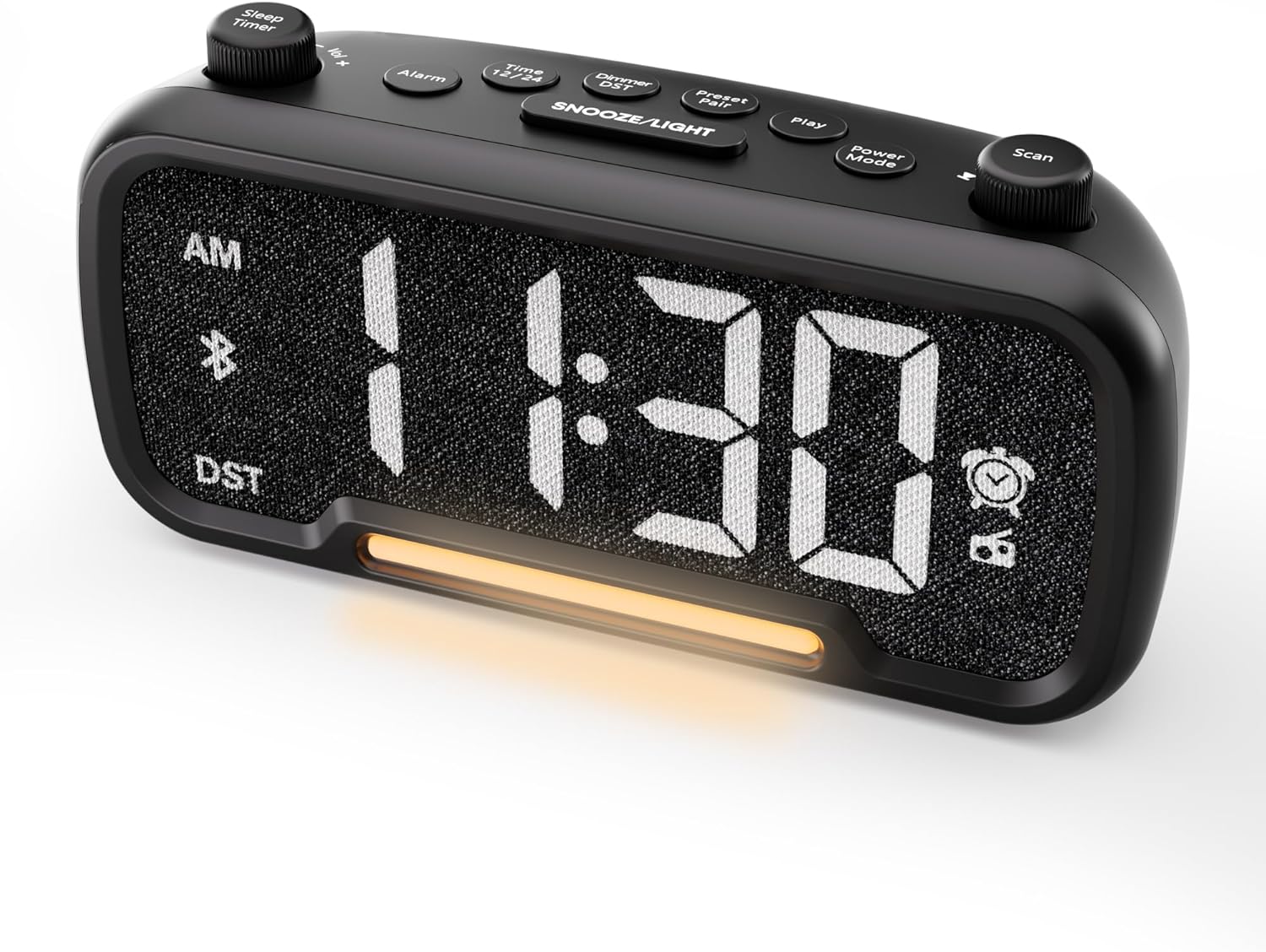

Control Buttons and Knobs:
- Sleep Timer / Vol +/- Knob (Left): Adjusts volume, sets sleep timer duration.
- Ойготкуч баскычы: Sets and activates/deactivates alarms.
- Time 12/24 Button: Switches between 12-hour and 24-hour time formats.
- Dimmer / DST Button: Adjusts display brightness, activates/deactivates Daylight Saving Time (DST).
- Preset / Pair Button: Saves FM radio presets, initiates Bluetooth pairing.
- Ойнотуу баскычы: Plays/pauses media in Bluetooth mode.
- Кубат режиминин баскычы: Cycles through operating modes (FM, Bluetooth, AUX).
- Scan / TU +/- Knob (Right): Scans FM radio stations, manually tunes FM frequency.
- SNOOZE/LIGHT Button: Activates snooze function, turns night light on/off.

Жайгашуу
1. Баштапкы кубаттуулук
Connect the provided power adapter to the DC 5V IN port on the back of the alarm clock and plug it into a standard wall outlet. The display will light up. Ensure the C battery is installed for backup in case of power outage.

2. Убакытты белгилөө
- басып, кармап туруңуз Убакыт 12/24 button for 2 seconds. The hour digits will begin to flash.
- айлантыңыз Көлөм +/- knob (left knob) to adjust the hour.
- басыңыз Убакыт 12/24 баскычын кайра басыңыз. Мүнөт сандары күйүп-өчө баштайт.
- айлантыңыз Көлөм +/- мүнөттү тууралоо үчүн баскыч.
- басыңыз Убакыт 12/24 button once more to confirm the time setting.
Video demonstrating how to set the time on the Mesqool Digital Alarm Clock Radio.
3. 12/24 сааттык убакыт форматы
To switch between 12-hour and 24-hour time formats, short press the Убакыт 12/24 button. The display will change accordingly.
4. Daylight Saving Time (DST) Adjustment
To activate or deactivate DST, press and hold the Dimmer / DST button for 2 seconds. The time will adjust by one hour forward or backward, and the DST indicator will appear or disappear on the display.
Иштөө нускамалары
1. Ойготкуч коюу
- басып, кармап туруңуз Ойготкуч button for 2 seconds. The hour digits will flash.
- айлантыңыз Көлөм +/- knob to adjust the desired alarm hour.
- басыңыз Ойготкуч баскычын кайра басыңыз. Мүнөттөрдүн сандары күйүп-өчүп турат.
- айлантыңыз Көлөм +/- knob to adjust the desired alarm minute.
- басыңыз Ойготкуч button again. The alarm sound selection will flash (bell icon for buzzer, radio icon for FM radio). Rotate the Көлөм +/- knob to choose between buzzer or FM radio as the alarm sound.
- If FM radio is selected, press the Ойготкуч button again. The volume level will flash (L01-L16). Rotate the Көлөм +/- knob to set the desired alarm volume.
- басыңыз Ойготкуч button once more to confirm and activate the alarm. The alarm icon will appear on the display.
To deactivate the alarm, short press the Ойготкуч button. The alarm icon will disappear from the display.

Чырым Function:
Ойготкуч басылганда, басыңыз SNOOZE / LIGHT button to activate the snooze function for 9 minutes. The alarm will sound again after 9 minutes. To turn off the alarm completely, press any other button except SNOOZE / LIGHT.

2. FM радиосунун иштеши
- басыңыз Кубат режими button repeatedly until the radio icon lights up on the display, indicating FM radio mode.
- Auto-Scan and Save Presets: басыңыз Scan / TU +/- knob (right knob) to automatically search for available FM stations and save them as presets (up to 20 stations). The display will show "P01", "P02", etc., as stations are saved.
- Кол менен жөндөө: айлантыңыз Scan / TU +/- knob to manually browse frequencies.
- Алдын ала орнотууларды кайра чакырыңыз: баскычын кыска басыңыз Алдын ала орнотуу / Жупташтыруу Сакталган алдын ала коюлган станцияларды карап чыгуу үчүн баскычын басыңыз.
- Үндү тууралоо: айлантыңыз Көлөм +/- knob (left knob) to adjust the radio volume (L01-L16).

Video demonstrating how to set the FM radio alarm on the Mesqool Digital Alarm Clock Radio.
3. Bluetooth колонкасынын иштеши
- басыңыз Кубат режими button repeatedly until the Bluetooth icon (bt) starts flashing on the display, indicating pairing mode.
- On your mobile device, enable Bluetooth and search for "CR1025" in the list of available devices.
- Select "CR1025" to pair. Once connected, the Bluetooth icon will stop flashing and remain solid.
- Эми сиз түзмөгүңүздөгү аудиону ойготкуч сааттын динамиги аркылуу ойнотсоңуз болот.
- колдонуу Көлөм +/- knob on the alarm clock or your mobile device to adjust the volume.
- басыңыз Play аудиону ойнотуу же тындыруу үчүн баскыч.

Video demonstrating how to set up Bluetooth on the Mesqool Digital Alarm Clock Radio.
4. Night Light Operation
The alarm clock features a gentle night light. To turn the night light on or off, short press the SNOOZE / LIGHT баскычы.

5. Dimmer Setting
The display brightness can be adjusted to 5 levels. Short press the Dimmer / DST button to cycle through the brightness levels (L01-L05). Select the level that best suits your environment.

6. Sleep Timer Setting
The sleep timer allows you to set a duration for the FM radio or Bluetooth speaker to play before automatically turning off. This is useful for falling asleep to music or podcasts.
- While in FM radio or Bluetooth mode, press the Уйку таймери button. The display will show the current sleep timer duration (e.g., "30" for 30 minutes).
- айлантыңыз Sleep Timer / Vol +/- knob to select the desired duration: 15, 30, 60, 90, or 120 minutes. You can also select "OFF" to disable the sleep timer.
- The timer will start counting down, and the device will automatically turn off after the selected duration.
7. USB заряддоо порттору
The alarm clock is equipped with two USB charging ports (Type-C and USB-A) on the back, each providing 5V/1A output. These ports can be used to conveniently charge your smartphone, tablet, or other USB-powered devices.

Проблемаларды чечүү
| Көйгөй | Мүмкүн чечим |
|---|---|
| Сааттын дисплейи бош. | Ensure the power adapter is securely connected to both the clock and a working power outlet. Check if the power outlet is functional. |
| Ойготкуч угулбайт. | Verify that the alarm is set and activated (alarm icon visible on display). Check the alarm volume level. Ensure the correct alarm sound (buzzer or FM radio) is selected. |
| FM радиосун кабыл алуу начар. | Extend the FM antenna fully. Try repositioning the antenna or the clock for better signal. Perform an auto-scan again to find stronger stations. |
| Bluetooth түзмөгүн жупташтыруу мүмкүн эмес. | Ensure the clock is in Bluetooth pairing mode (flashing 'bt' icon). Make sure Bluetooth is enabled on your mobile device and it is within range. Forget "CR1025" from your device's Bluetooth list and try pairing again. |
| USB заряддоо порттору иштебей жатат. | Confirm the alarm clock is powered on. Ensure the charging cables are properly connected to both the clock and your device. Try a different USB cable or device to rule out cable/device issues. |
Техникалык шарттар
| Өзгөчөлүк | Деталь |
|---|---|
| Бренд | Meskool |
| Модель номери | CR1025 |
| Түс | Кара |
| Дисплей түрү | Digital LED |
| Продукциянын өлчөмдөрү | 6.61"L x 3.31"W x 2.32"H |
| Power Source | Зымдуу электр (AC адаптери камтылган) |
| Батареянын камдык көчүрмөсү | 1 C батарейка (кошулган) |
| Bluetooth версиясы | V5.0 |
| FM радиосунун жыштыгы | 87.5-108 МГц |
| FM алдын ала орнотуулар | 20 станцияга чейин |
| Диммерди көрсөтүү | 5 деңгээл |
| Сигнал үндөрү | Buzzer, FM радиосу |
| Тындыруунун узактыгы | 9 мүнөт |
| USB заряддоо чыгышы | Type-C & USB-A, 5V/1A each |
| Материал | Пластик |
| Элемент Салмагы | 0.48 фунт (болжол менен 7.7 унция) |
Техникалык тейлөө
- Clean the device with a soft, dry cloth. Do not use liquid cleaners or abrasive materials.
- Keep the device away from direct sunlight, extreme temperatures, and high humidity.
- Ашыкча ысып кетүүнүн алдын алуу үчүн аппараттын айланасында туура желдетүүнү камсыз кылыңыз.
- If the device will not be used for an extended period, remove the backup battery.
Коопсуздук маалыматы
- Аппаратты сууга же нымга тийгизбеңиз.
- Аппаратты өз алдынча бөлүүгө же оңдоого аракет кылбаңыз. Квалификациялуу тейлөө кызматкерлерине кайрылыңыз.
- Аппаратты балдар жетпеген жерде сактаңыз.
- Берилген кубат адаптерин гана колдонуңуз. Уруксат берилбеген адаптерлерди колдонуу түзмөккө зыян келтирип, кепилдикти жокко чыгарышы мүмкүн.
- Avoid placing the device near heat sources or open flames.
Кепилдик жана колдоо
Specific warranty details are not provided in the product information. For warranty claims, technical support, or further assistance, please contact Mesqool customer service through their official webпродукт сатылып алынган сайт же сатуучу. Кепилдикке байланыштуу суроолор үчүн сатып алганыңыздын далилин сактап коюңуз.
Visit the Mesqool Store for more information: Mesqool Official Store


