1. Киришүү
The KPAW MAX 6 is an innovative 2-in-1 automatic card shuffler and dealer designed to enhance your card game experience. It streamlines the process of shuffling and dealing, ensuring fair and efficient gameplay for a variety of card games, including Poker, UNO, Phase 10, Skip-Bo, Rummy, and more. This manual provides detailed instructions for setting up, operating, maintaining, and troubleshooting your device.
2. Кутуда эмне бар
Кутудан чыгаргандан кийин, төмөнкү компоненттердин бардыгы камтылганын текшериңиз:
- 1 × MAX 6 автоматтык карта аралаштыруу жана дилер
- 4 × Wireless Drawing Remotes
- 1 × USB-C заряддоо кабели
- 1 × Колдонуучунун колдонмосу
- 1 × таңгак кутусу
3. Негизги өзгөчөлүктөрү
3.1. 2-in-1 Shuffling & Dealing
The KPAW MAX 6 innovatively combines card shuffling and dealing into a single unit. This eliminates the need for manual shuffling, ensuring a smooth and error-free game setup.

Image: The KPAW MAX 6 device demonstrating its dual function of shuffling and dealing cards.
3.2. Supports Up to 12 Players
This device is designed to accommodate up to 12 players, making it suitable for large gatherings and various card games like Blackjack, Texas Hold'em, Rummy, and Bridge. Custom settings allow for adjustment of card count and player numbers.

Image: The KPAW MAX 6 dealing cards in a circular pattern, illustrating its support for up to 12 players with 360-degree rotation.
3.3. Custom Dealing Options
Tailor your game with adjustable card count, dealing direction (180° or 360°), and dealing distance (Far/Mid/Close). This flexibility ensures compatibility with diverse game rules worldwide.

Image: The KPAW MAX 6 dealing cards in a semi-circular, back-and-forth pattern, suitable for up to 8 players.
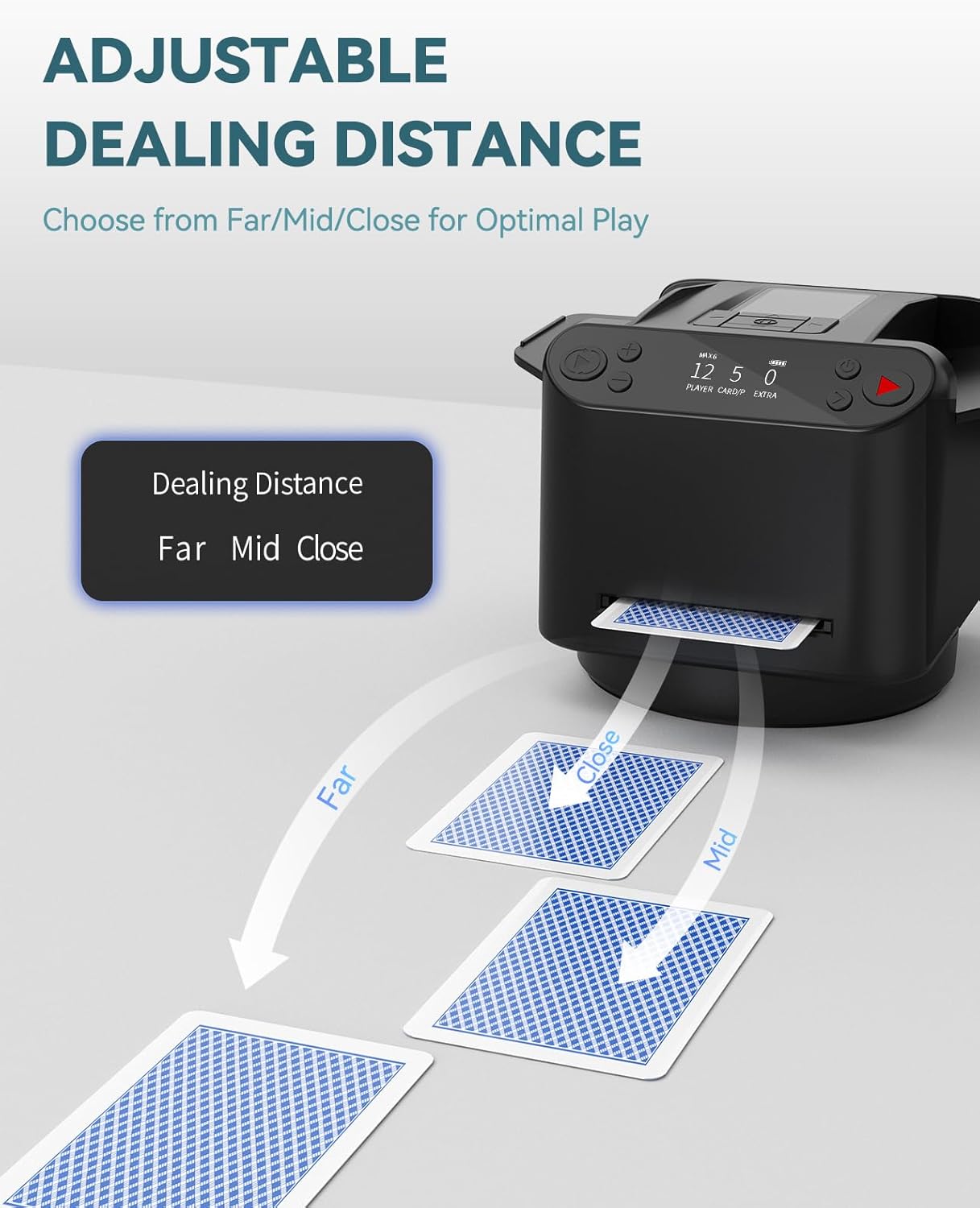
Image: The KPAW MAX 6 illustrating different card dealing distances: far, mid, and close, for optimal play.
3.4. Wireless Drawing Remotes
Four wireless drawing remotes are included, allowing players to draw cards remotely with a simple press. This feature is particularly useful for games like UNO, Rummy, and Phase 10, simplifying card management during gameplay.

Image: The KPAW MAX 6 surrounded by four wireless drawing remotes, with UNO cards being dealt, highlighting the remote drawing feature.
3.5. Adapts to Multiple Card Sizes
Equipped with a retractable card baffle and open-sided trays, the device accommodates various card sizes, from standard poker decks to specialty game cards like Canasta or UNO, ensuring smooth operation.

Image: The KPAW MAX 6 illustrating its adaptability to different card sizes, including standard, bridge, UNO, Phase 10, and Five Crowns cards.
3.6. Тынч иштөө
The KPAW MAX 6 operates with minimal noise, maintaining a calm atmosphere ideal for extended game sessions, social gatherings, or family nights.
3.7. Кайра заряддалуучу батарея
A long-lasting rechargeable battery allows the device to handle up to 150 decks on a single full charge, eliminating the need for disposable batteries.

Сүрөт: ички view of the KPAW MAX 6, emphasizing its powerful 5,200mAh rechargeable battery for extended playtime.
3.8. Preset Gameplay Settings
The device comes with ready-to-play settings for popular games like Texas Hold'em and Bridge, simplifying game setup.

Image: The KPAW MAX 6's control panel displaying options for preset gameplay settings, specifically for Texas Hold'em and Bridge.
Demonstration Video: UNO and Texas Hold'em Mode
Video: This video demonstrates the KPAW MAX 6 in action, showcasing its functionality for both UNO and Texas Hold'em game modes, including card dealing and remote drawing.
4. Орнотуу колдонмосу
- Кутудан чыгаруу: Carefully remove all components from the packaging box. Retain the packaging for future storage or transport.
- Аппаратты заряддоо: Connect the provided USB-C charging cable to the device's charging port and a compatible USB power adapter (not included). The battery indicator on the display will show charging status. A full charge can take a few hours. Ensure the device is fully charged before first use for optimal performance.
- Карталарды киргизүү: Place up to two standard decks of cards into the card input trays. Ensure cards are neatly stacked and aligned. The retractable card baffle can be adjusted to fit different card sizes.
- Күйгүзүү: Press and hold the power button (usually located on the control panel) until the display illuminates.
5. Иштөө нускамалары
- Selecting Game Mode: Use the navigation buttons on the control panel to browse through available game modes (e.g., Texas Hold'em, Bridge, UNO, Custom). Select your desired game mode.
- Adjusting Settings (Custom Mode): If using Custom mode, you can adjust parameters such as number of players (up to 12), number of cards per player, dealing direction (180° or 360° rotation), and dealing distance (Far, Mid, Close). Refer to the on-screen prompts for specific adjustments.
- Shuffling Cards: Once the game mode and settings are confirmed, press the 'Shuffle' button. The device will automatically shuffle the cards placed in the input trays.
- Dealing Cards: After shuffling, press the 'Deal' button. The device will begin dealing cards according to the selected game mode and settings. For games like Texas Hold'em, it will deal hole cards, then community cards (Flop, Turn, River) upon subsequent presses of the 'Deal' button.
- Using Wireless Drawing Remotes: For games requiring players to draw cards (e.g., UNO, Rummy), distribute the wireless remotes to each player. When a player needs to draw a card, they simply press the button on their remote. The machine will automatically deal a card to the corresponding player's position. Ensure a clear line of sight between the remote and the device for optimal performance.
- Өчүрүү: To turn off the device, press and hold the power button until the display shuts down.
6. Техникалык тейлөө
- Тазалоо: Regularly wipe the exterior of the device with a soft, dry cloth. For internal cleaning, ensure the device is powered off and unplugged. Use a soft brush or compressed air to remove any dust or card residue from the card pathways and sensors. Do not use abrasive cleaners or immerse the device in water.
- Батареяга кам көрүү: To prolong battery life, avoid fully discharging the battery frequently. Charge the device regularly, even if not in use for extended periods (e.g., once every 3 months). Store the device in a cool, dry place.
- Картанын абалы: Use clean, undamaged cards for optimal performance. Bent, sticky, or excessively worn cards can lead to jams or misfeeds.
7. Кыйынчылыктарды
| Көйгөй | Мүмкүн себеп | Чечим |
|---|---|---|
| Cards not shuffling/dealing smoothly or stopping early. | Cards are bent, worn, or dirty; card baffle not adjusted correctly; low battery. | Use new or clean cards. Adjust the retractable card baffle to fit the card size. Ensure the device is fully charged. Clean card pathways. |
| Device not dealing cards after shuffling. | Internal mechanism jam; software glitch. | Power off the device, remove all cards, and inspect the card path for obstructions. Power on again. If the issue persists, contact customer support. |
| Wireless remotes not responding. | Remotes not paired; battery in remote is low; obstruction between remote and device. | Ensure remotes are paired according to the operating instructions. Replace remote batteries if necessary. Ensure a clear line of sight to the device. |
| Түзмөк күйбөй жатат. | Battery is completely drained; power button not held long enough. | Connect the device to the charger and allow it to charge for at least 30 minutes before attempting to power on again. Press and hold the power button for 3-5 seconds. |
8. Техникалык шарттар
| Атрибут | Деталь |
|---|---|
| Продукциянын өлчөмдөрү | 6.38 x 5 x 4.57 дюйм |
| Элемент Салмагы | 2.25 фунт |
| Келип чыккан өлкө | Кытай |
| ASIN | B0DF7KXF87 |
| Элемент моделинин номери | МАКС 6 |
| Батареялар | Rechargeable (5,200mAh built-in) |
| Өндүрүүчү | KPAW |
9. Кепилдик жана колдоо
For warranty information and customer support, please refer to the documentation provided with your purchase or contact KPAW Gaming Tech. directly through their official channels. Keep your proof of purchase for any warranty claims.
Байланыш маалыматы: Please visit the KPAW official website or your point of purchase for the most up-to-date contact details for support and service inquiries.


