1. Киришүү
This manual provides essential information for the safe and efficient installation, operation, and maintenance of your TCP Economy LED UFO High Bay Luminaire. Please read this manual thoroughly before installation and retain it for future reference.
The TCP Economy LED UFO High Bay Luminaire is designed for commercial and industrial applications, offering high efficacy and a long operational lifespan. It features a robust design suitable for various environments, including warehouses, retail spaces, and gymnasiums.

Сүрөт 1: Алдыңкы view of the TCP Economy LED UFO High Bay Luminaire, showing the LED array and clear lens.
2. Коопсуздук маалыматы
- Электр коопсуздугу: Installation must be performed by a qualified electrician in accordance with all national and local electrical codes. Always disconnect power at the circuit breaker before installing, servicing, or cleaning the fixture.
- Негиздөө: Ensure the fixture is properly grounded to prevent electrical shock.
- Колдонуу: Do not handle the fixture with wet hands. Avoid touching the LED array directly.
- Иштөө чөйрөсү: This luminaire is rated IP65 for outdoor use and protection against dust and water jets. Do not submerge the fixture in water. Ensure the operating temperature is within the specified range.
- Монтаждоо: The mounting structure must be capable of supporting the weight of the fixture.
- Өзгөртүүлөр: Do not attempt to modify or disassemble the fixture. This will void the warranty and may create safety hazards.
3. Пакеттин мазмуну
Таңгактан чыгарганда, бардык компоненттердин бар экенин жана бузулбаганын текшериңиз. Таңгактын ичинде төмөнкүлөр болушу керек:
- 1 x TCP Economy LED UFO High Bay Luminaire
- 1 x Eyebolt for suspended mounting
Note: Additional mounting hardware (e.g., chains, hooks) may be required and is sold separately.
4. Техникалык шарттар
| Өзгөчөлүк | Спецификация |
|---|---|
| Модель номери | 762148336747 |
| Бренд | TCP |
| Ватtage Параметрлер | 115 Вт / 160 Вт / 200 Вт |
| Натыйжалуулук | 145 LPW чейин |
| Түс температурасы (CCT) | 4000K / 5000K |
| Караңгылык | 0-10V караңгылатуу |
| IP рейтинги | IP65 (чаң өткөрбөйт, суу агымдарынан корголгон) |
| Өмүр | 50,000 саат |
| Киргизүү көлөмүtage | 120-277V AC (Typical, verify product label) |
| Жарык булагы түрү | LED |
| Орнотуу түрү | Suspended (Eyebolt included) |
| Фикстура формасы | Шыбы |
| Ички/тышкы колдонуу | Сыртта |
| Көлөкө материалы | Акрил |
| Элемент Салмагы | 6.44 фунт |
| Пакеттин өлчөмдөрү | 12.48 x 12.44 x 5.87 дюйм |
| Fixture Dimensions (approx.) | 11" Diameter x 5.9" Height (with eyebolt) |
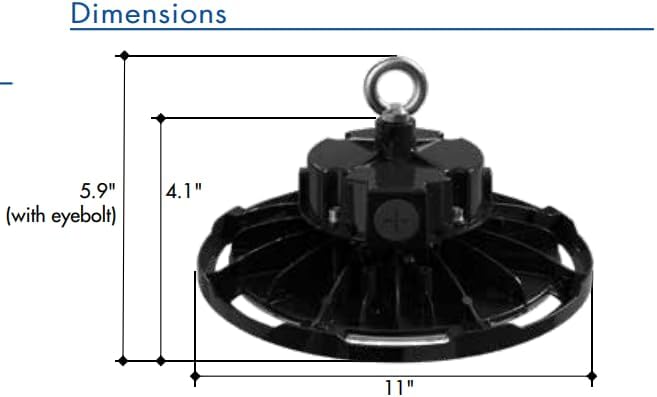
Figure 2: Approximate dimensions of the luminaire, including height with eyebolt and diameter.
5. Орнотуу нускамалары (Орнотуу)
This luminaire is designed for suspended mounting. Follow these steps for proper installation:
- Биринчи коопсуздук: Ensure power to the installation area is turned OFF at the circuit breaker before beginning any work.
- Түзмөктү текшерүү: Carefully remove the luminaire from its packaging and inspect for any damage. Do not install if damaged.
- Prepare Mounting Point: Identify a suitable structural mounting point capable of safely supporting the luminaire's weight (6.44 lbs). Install appropriate mounting hardware (e.g., chain, hook) if not already present.
- Attach Eyebolt: Securely thread the provided eyebolt into the top of the luminaire housing.
- Suspend Fixture: Carefully lift the luminaire and attach the eyebolt to your chosen mounting hardware. Ensure the fixture is stable and level.
- Зымдар:
- Open the wiring compartment on the top of the fixture.
- Connect the AC input wires (Line, Neutral, Ground) from your power supply to the corresponding wires on the luminaire. Refer to local electrical codes for proper wiring practices.
- For 0-10V dimming functionality, connect the purple (DIM+) and gray (DIM-) wires from your 0-10V dimmer to the corresponding dimming wires on the luminaire. If dimming is not desired, cap these wires individually.
- Бардык байланыштар коопсуз жана изоляцияланганын текшериңиз.
- Жабуу бөлүм: Securely close the wiring compartment cover.
- Күчтү калыбына келтирүү: Орнотуу аяктагандан жана бардык туташуулар текшерилгенден кийин, автоматтык өчүргүчтөгү кубаттуулукту калыбына келтириңиз.
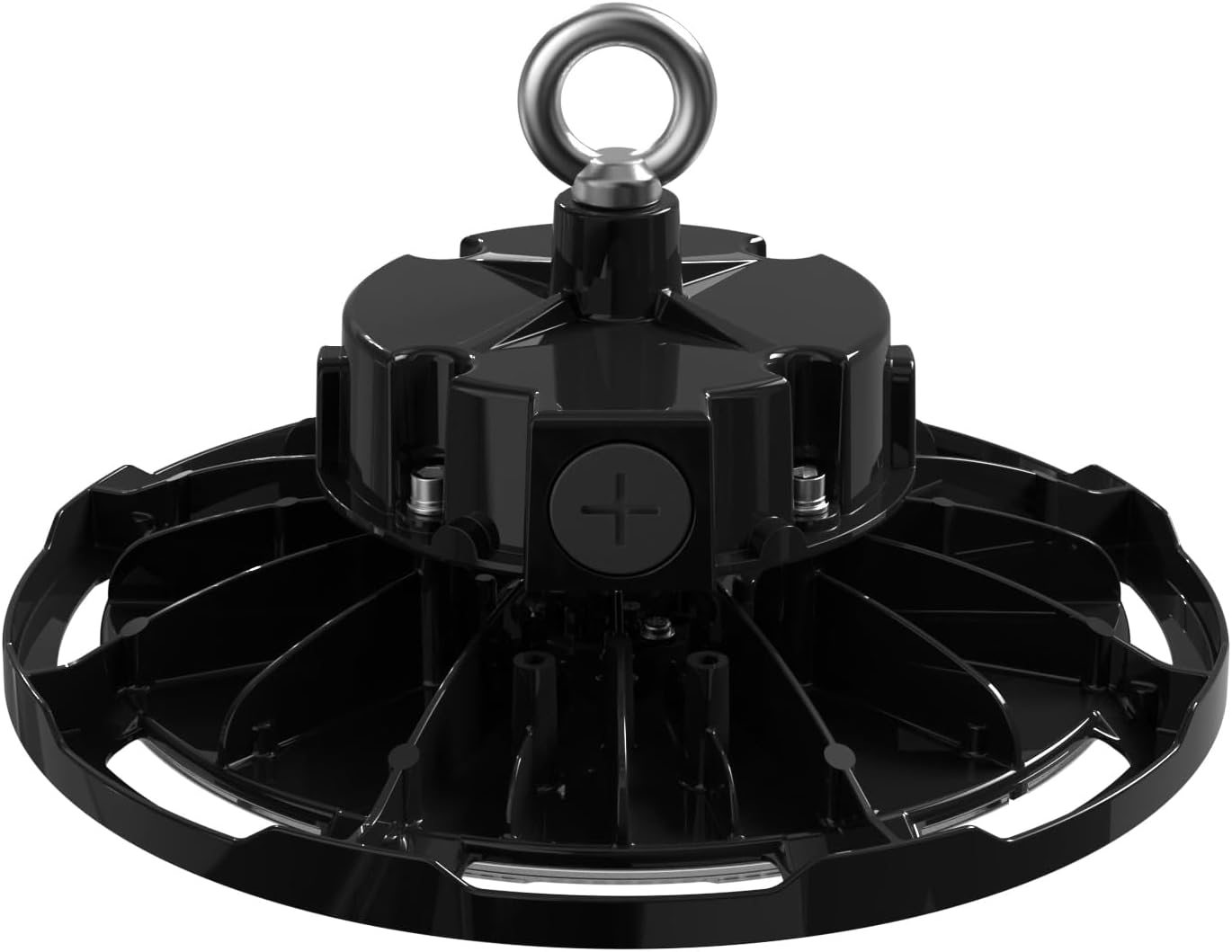
3-сүрөт: Жогорку view of the luminaire, illustrating the eyebolt for suspension and the location of the wiring compartment.
6. Операция
The TCP Economy LED UFO High Bay Luminaire operates immediately upon receiving power.
- Күйгүзүү/өчүрүү: Control the luminaire's power supply via the connected wall switch or circuit breaker.
- алсыздатуу: If connected to a compatible 0-10V dimmer, adjust the light output by manipulating the dimmer control. The luminaire will respond to the 0-10V signal to vary its brightness.
7. Техникалык тейлөө
The TCP Economy LED UFO High Bay Luminaire requires minimal maintenance.
- Тазалоо: Ensure power is disconnected before cleaning. Use a soft, damp cloth to wipe the exterior of the fixture. Do not use abrasive cleaners or solvents, as these may damage the finish or optical components.
- Текшерүү: Periodically inspect the fixture and its mounting hardware for any signs of damage, loose connections, or wear. Address any issues promptly.
- Колдонуучу тейлей турган бөлүктөр жок: There are no user-serviceable parts inside the luminaire. Do not attempt to open or repair the unit.
8. Кыйынчылыктарды
If the luminaire is not functioning as expected, perform the following basic checks:
- Жарык жок:
- Verify that the power supply to the fixture is active at the circuit breaker and wall switch.
- Check all wiring connections for proper contact and insulation.
- Караңгылык иштебейт:
- Ensure the 0-10V dimmer is compatible and correctly wired to the luminaire's dimming leads (purple and gray).
- Verify the dimmer is functioning correctly.
- Жылтылдап:
- Бошогон зым байланыштарын текшериңиз.
- Киргизүү көлөмүн камсыз кылыңызtage туруктуу жана белгиленген диапазондо.
If these steps do not resolve the issue, contact customer support for assistance. Do not attempt further repairs yourself.
9. Кепилдик жана колдоо
This TCP Economy LED UFO High Bay Luminaire is covered by a Беш жылдык Чектелген Кепилдик against defects in manufacturing. Please retain your proof of purchase for warranty claims.

Figure 4: Warranty statement and product listings (UL and cUL listed, IP65 Rated).
For technical support, warranty inquiries, or replacement parts, please contact TCP customer service:
- Webсайт: www.tcpi.com
- Телефон: Refer to TCP's official webучурдагы байланыш номерлери үчүн сайт.


