1. Продукт бүтүп калдыview
The RadioShack USB Type-C Headset is designed for clear audio communication and comfortable listening on computers and laptops. It features 40mm drivers for quality sound and an omnidirectional microphone for effective voice capture. The headset connects via a USB Type-C port, offering a stable and reliable connection.
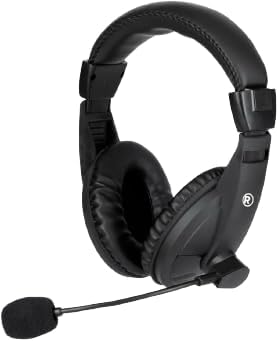
Сүрөт 1.1: Фронт view of the RadioShack USB Type-C Headset, showcasing its over-ear design and integrated microphone.

Сүрөт 1.2: Side view of the headset, highlighting the adjustable headband and the flexible microphone arm.
2. Орнотуу нускамалары
- Гарнитураны туташтыруу: Locate an available USB Type-C port on your computer or laptop. Insert the USB Type-C connector of the headset firmly into the port.
- Драйверди орнотуу: The headset is plug-and-play. Your operating system (Windows, macOS, Linux) should automatically detect and install the necessary drivers. This process typically takes a few seconds.
- Аудио жөндөөлөрүн текшерүү: After connecting, open your computer's sound settings. Ensure the RadioShack USB Headset is selected as the default playback and recording device.

Сүрөт 2.1: Жакын план view of the USB Type-C connector, which plugs into your device.
3. Гарнитураны иштетүү
3.1 Кийүү жана тууралоо
- Баш боосун тууралоо: Башыңызга ыңгайлуу отуруу үчүн, эки жагынан тең боонун жылдырмаларын сунуңуз же артка тартыңыз.
- Positioning the Ear Pads: Ensure the soft, cushioned ear pads fully cover your ears for optimal sound isolation and comfort.

Сүрөт 3.1: A person wearing the headset, demonstrating the ergonomic design and comfortable fit for extended use.
3.2 Микрофонду колдонуу
- Микрофондун жайгашуусу: Gently bend the flexible microphone arm to position the omnidirectional microphone approximately 1-2 inches (2.5-5 cm) from your mouth for clear voice pickup.
- Үнсүз/Ачуу: If your headset features an in-line remote control, use the designated button to mute or unmute the microphone as needed.
3.3 Үндү башкаруу
- Алыстан башкаруу: Utilize the remote control integrated into the cable to adjust the volume up or down.
- Системанын көлөмү: Alternatively, adjust the volume directly through your computer's operating system sound settings.
4. Техникалык тейлөө
- Тазалоо: Use a soft, dry cloth to wipe down the headset, ear pads, and microphone. Avoid using harsh chemicals or abrasive materials.
- Сактагыч: Гарнитураны таза, кургак жерде, өтө жогорку температурадан жана түз күн нурунан алыс сактаңыз. Кабелди чаташтырып албаңыз.
- Кабельге кам көрүү: The 110cm (3.5 feet) cable provides ample length. Avoid sharp bends or excessive pulling on the cable to prevent damage.

Сүрөт 4.1: The headset displaying its 110cm (3.5 feet) cable, offering broad length for comfortable movement.
5. Кыйынчылыктарды
- Гарнитурадан үн жок:
- Ensure the USB Type-C connector is fully inserted into the port.
- Check your computer's sound settings to confirm the RadioShack USB Headset is selected as the default playback device.
- Increase the volume using the in-line remote control or your computer's system volume.
- Try connecting the headset to a different USB Type-C port or another computer to rule out port or device issues.
- Микрофон иштебейт:
- Verify the microphone is not muted via the in-line remote or your computer's sound settings.
- Confirm the RadioShack USB Headset is selected as the default recording device in your computer's sound settings.
- Adjust the microphone's physical position closer to your mouth.
- Check privacy settings on your operating system that might restrict microphone access for certain applications.
- Бурмаланган аудио:
- Lower the volume to see if distortion reduces.
- Ensure the audio source is not the cause of the distortion.
- Update your computer's audio drivers if available.
6. Техникалык шарттар
| Өзгөчөлүк | Деталь |
|---|---|
| Модель номери | 2604800 |
| Байланыш технологиясы | USB Type-C |
| Аудио драйвер түрү | Динамикалык драйвер (40 мм) |
| Микрофон түрү | Көп багыттуу |
| Наушник формасы | Кулак үстүндө |
| Кабелдин узундугу | 110 см (3.5 фут) |
| Башкаруу ыкмасы | Алыстан башкаруу (линияда) |
| Шайкеш түзмөктөр | Computers, Laptops |
| Материал | Акрилонитрил бутадиен стирол (ABS) |
| Элемент Салмагы | 10.6 унция (0.66 фунт) |
| Түс | Кара |
7. Кепилдик жана колдоо
For warranty information and customer support, please refer to the official RadioShack webсайтка же түздөн-түз кардарларды тейлөөгө кайрылыңыз. Сатып алуу квитанциясын кепилдик дооматтары үчүн сатып алуунун далили катары сактаңыз.
Онлайн колдоо: Visit www.radioshack.com Көп берилүүчү суроолор, продуктуну каттоо жана байланыш параметрлери үчүн.


