1. Киришүү
This manual provides comprehensive instructions for the installation, operation, and maintenance of your Antec CX700 ATX Mid Tower Gaming Case. Designed for PC enthusiasts, this case features a sleek, modern design with a tempered glass side panel and pre-installed ARGB fans to enhance visual appeal and ensure optimal airflow. Please read this manual thoroughly before beginning assembly to ensure proper setup and safe operation.
2. Техникалык шарттар
| Өзгөчөлүк | Деталь |
|---|---|
| Бренд | Antec |
| Модель номери | CX700 |
| Иштин түрү | Ара Tower |
| Motherboard шайкештиги | ATX |
| Түс | Кара |
| Материал | Эритмеленген болот, пластмасса |
| Элемент Салмагы | 5.5 килограмм (12.1 фунт) |
| Муздатуу ыкмасы | Аба |
| Pre-installed ARGB Fans | 3 (Front-mounted) |
| Fan Support (Max) | Front: 3x120mm, Top: 3x120mm, Rear: 1x120mm, Bottom: 3x120mm |
| USB 3.0 порттору | 2 |
| USB Type-C порттору | 1 |
| Аудио порттор | Headphone, Microphone |
| GPU Clearance (Max) | 410мм (16.14 дюйм) |
| HDD колдоосу | 3.5 дюйм |
| SSD Support | 2.5 дюйм |
| PSU Length (Max) | 225мм |
3. Пакеттин мазмуну
- Antec CX700 ATX Mid Tower Gaming Case
- Pre-installed ARGB Fans (3 fans, typically front-mounted as per product title)
- Accessory Box (Screws, cable ties, user manual)
- Температуралуу айнек каптал панели
4. Орнотуу нускамалары
4.1 Таңгактан чыгаруу жана текшерүү
Carefully remove the case from its packaging. Inspect for any signs of damage during transit. The tempered glass panel is fragile; handle with care.
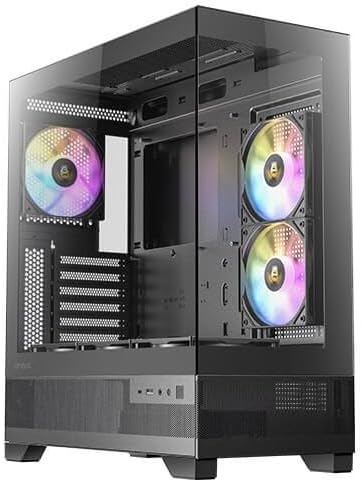
1-сүрөт: алдыңкы жана каптал view of the Antec CX700 case, showcasing the tempered glass panel and pre-installed fans.
4.2 Каптал панелдерди алып салуу
To access the interior for component installation, remove the tempered glass side panel and the solid rear side panel.
- Locate the thumbscrews on the rear of the case securing the tempered glass panel.
- Carefully unscrew these thumbscrews.
- Gently pull the tempered glass panel away from the chassis. Lay it flat on a soft, clean surface to prevent scratches or damage.
- Repeat the process for the solid rear side panel if necessary for cable management access.

2-сүрөт: Арткы view of the Antec CX700 case, showing the rear fan and expansion slots. The side panel is removed for internal access.
4.3 Motherboard орнотуу
Install your ATX motherboard into the designated area. Ensure all standoffs are correctly aligned and secured.
4.4 Компонентти орнотуу
Install your CPU, RAM, GPU (up to 410mm length), storage drives (3.5" HDD, 2.5" SSD), and power supply unit (PSU, up to 225mm length) according to their respective manuals and the case's layout.

3-сүрөт: Жогорку view of the Antec CX700 case, highlighting the pre-installed fans and internal layout for component placement.
4.5 Кабелди башкаруу
Кабелдерди эффективдүү башкаруу үчүн энелик плата лотогунун артындагы кабелдик маршруттук кескичтерди жана байланыш чекиттерин колдонуңуз. Бул аба агымын жана эстетиканы жакшыртат.
4.6 Front Panel I/O Connections
Connect the front panel I/O cables (USB 3.0, USB Type-C, HD Audio, Power, Reset, LED) to the corresponding headers on your motherboard.
- Кубат баскычы: Initiates system power.
- Калыбына келтирүү баскычы: Системаны кайра иштетет.
- USB 3.0 порттору (x2): жогорку ылдамдыктагы маалыматтарды берүү үчүн.
- USB Type-C Port (x1): For modern device connectivity.
- Гарнитура уячасы: Аудио чыгаруу.
- Микрофон Джек: Аудио киргизүү.
5. Иштөө нускамалары
Once all components are installed and connected, replace the side panels. Connect your peripherals, monitor, and power cable. Press the power button on the top panel to start your system. The pre-installed ARGB fans will illuminate, providing customizable lighting effects.
6. Техникалык тейлөө
Regular maintenance ensures optimal performance and longevity of your PC case and components.
- Чаң чыпкалары: The case includes magnetic dust filters (e.g., on the top panel) that can be easily removed and cleaned with water or a soft brush. Clean these regularly to maintain airflow and prevent dust buildup inside the case.
- Ички тазалоо: Periodically open the side panels and use compressed air to remove dust from internal components and fans. Ensure the system is powered off and unplugged before cleaning.
- Жылууланган айнек: Clean the tempered glass panel with a microfiber cloth and a non-abrasive glass cleaner. Avoid harsh chemicals.
7. Кыйынчылыктарды
Көйгөйгө туш болсоңуз, төмөнкү жалпы көйгөйлөрдү чечүү кадамдарын караңыз:
- Система күйбөй жатат:
- Электр кубаты розеткага туура туташтырылганын жана PSU которгучу 'ON' абалында экенин текшериңиз.
- Бардык кубат кабелдеринин (24-пиндүү ATX, 8-пиндүү CPU, GPU үчүн PCIe) энелик платага жана компоненттерге бекем туташкандыгын текшериңиз.
- Check that the front panel power button cable is correctly connected to the motherboard's front panel header.
- Күйөрмандар айланбайт / ARGB күйбөйт:
- Confirm that the fan power cables and ARGB cables are correctly connected to the motherboard or a dedicated ARGB controller.
- Refer to your motherboard manual for proper ARGB header connections and software control.
- Дисплей чыгышы жок:
- Ensure your monitor cable is connected to the graphics card (GPU) output, not the motherboard's integrated graphics ports (unless using integrated graphics).
- Графикалык картаны PCIe слотуна кайра орнотуңуз.
8. Кепилдик жана колдоо
The Antec CX700 ATX Mid Tower Gaming Case comes with a standard manufacturer's warranty. For specific warranty terms, duration, and to register your product, please visit the official Antec webсайтка же кардарларды тейлөөгө кайрылыңыз. Кепилдик дооматтар үчүн сатып алганыңыздын далилин сактаңыз.
For further technical assistance or support, please refer to the Antec support resources available online.


