1. Киришүү
This manual provides essential information for the safe and efficient operation of your THOMSON 43FG2S14 43-inch Full HD Google Smart TV. Please read it thoroughly before using the television and retain it for future reference.

Сүрөт 1.1: Алдыңкы view of the THOMSON 43FG2S14 TV.
Негизги өзгөчөлүктөрү:
- Full HD токтому: Experience clear and detailed images.
- Google TV: Personalized Smart TV experience with recommendations and multiple user profiles. Access content from various streaming services.
- Google Cast: Wirelessly stream movies, music, and videos from compatible devices.
- Backlit Premium Remote Control: Easy navigation even in low light, with a customizable favorite button.
- Triple Tuner (DVB-T, DVB-S, DVB-C): Receive TV signals via terrestrial antenna, satellite, or cable without additional equipment.
- Dolby Audio: Enjoy a dynamic sound experience with clear dialogue and immersive surround sound.
- Байланыш: Multiple HDMI and USB ports, Bluetooth 5.1, Wi-Fi.
2. Орнотуу
2.1 Пакеттен чыгаруу жана жайгаштыруу
Carefully remove the TV from its packaging. It is recommended to have two people for this process. Place the TV on a stable, flat surface or mount it on a wall using a compatible VESA mount (not included). Ensure adequate ventilation around the TV.

Figure 2.1: TV dimensions for placement planning.
2.2 Түзмөктөрдү туташтыруу
Connect your external devices such as set-top boxes, gaming consoles, or Blu-ray players to the TV's input ports. Refer to the diagram below for port locations.

2.2-сүрөт: Арткы view with connection ports.
- HDMI порттору (x3): For high-definition audio and video devices. One port supports ARC (Audio Return Channel).
- USB порттору (x2): USB сактагыч түзмөктөрүн медиа ойнотуу же программалык камсыздоону жаңыртуу үчүн туташтыруу үчүн.
- LAN порту: Зымдуу интернет байланышы үчүн.
- Антенна киргизүү: Connect your terrestrial antenna for DVB-T reception.
- Спутник киргизүү: Connect your satellite dish for DVB-S reception.
- CI+ Slot: For inserting a Conditional Access Module (CAM) and smart card for encrypted channels.
- Аудио чыгуу (оптикалык): Тышкы аудио системаларына туташуу үчүн.
- AV IN: Композиттик видео жана стерео аудио кабелдерин колдонуу менен эски түзмөктөрдү туташтыруу үчүн.
2.3 Алгачкы күйгүзүү жана биринчи жолу орнотуу
After connecting all necessary cables, plug the power cord into an electrical outlet. Press the power button on the remote control or the TV. The TV will guide you through the initial setup process, including language selection, network connection (Wi-Fi or LAN), Google account login, and channel scanning.
3. Иштөө нускамалары
3.1 Google TV интерфейси
Your THOMSON TV features the Google TV operating system, which organizes content from your various streaming services and apps into a personalized interface. You can create multiple user profileылайыкташтырылган сунуштар үчүн.
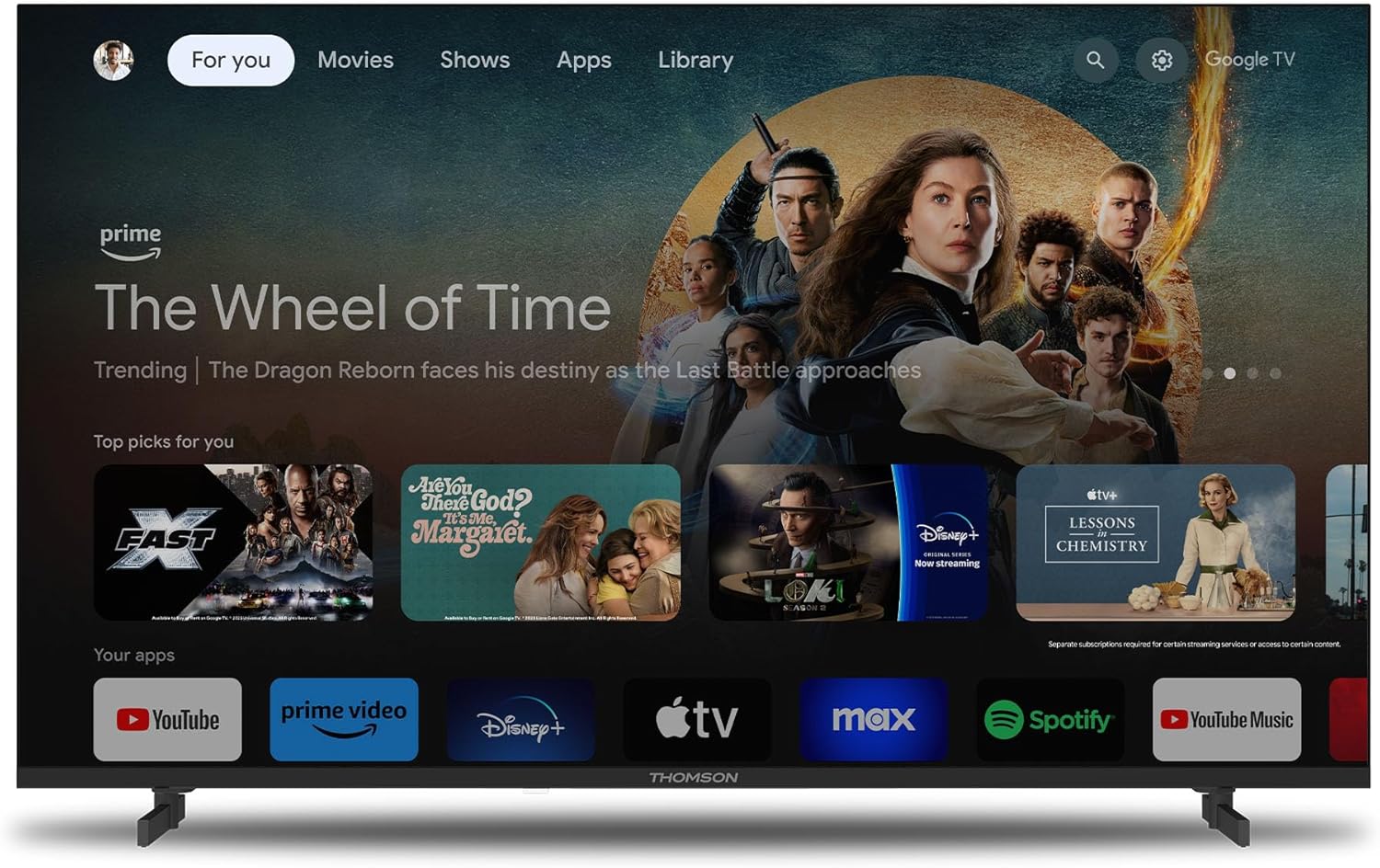
Figure 3.1: Google TV home screen.
3.2 Алыстан башкарууну колдонуу
The included remote control is backlit for easy use in dim lighting. It features dedicated buttons for popular streaming services and a customizable 'Favorite' button (star icon) to quickly access your preferred application.
3.3 Google Cast Functionality
Utilize Google Cast to wirelessly stream content from your compatible smartphone, tablet, or computer directly to your TV screen. Ensure both devices are connected to the same Wi-Fi network.

Figure 3.2: Google Cast in action.
3.4 Dolby Audio Experience
The TV integrates Dolby Audio technology to provide a rich and dynamic sound experience. This enhances dialogue clarity and creates an immersive audio environment for movies, music, and games.

Figure 3.3: Enhanced audio with Dolby Audio.
4. Техникалык тейлөө
4.1 Телевизорду тазалоо
Тазалоодон мурун телевизорду розеткадан сууруп алыңыз. Экранды жана шкафты сүртүү үчүн жумшак, кургак чүпүрөктү колдонуңуз. өжөр белгилери үчүн, жеңил гampкездемени суу же жумшак, абразивдүү эмес экран тазалагыч менен сүртүңүз. Эч качан суюктукту экранга же корпуска түз чачпаңыз.
4.2 Программалык камсыздоо жаңыртуулары
Your TV may receive software updates periodically to improve performance and add new features. Ensure your TV is connected to the internet to receive these updates automatically or check for them manually through the TV's settings menu.
5. Кыйынчылыктарды
Эгерде сиз телевизоруңузда көйгөйлөргө туш болсоңуз, колдоо кызматына кайрылуудан мурун төмөнкү кеңири таралган көйгөйлөрдү жана чечимдерди карап чыгыңыз.
| Көйгөй | Мүмкүн себеп | Чечим |
|---|---|---|
| сыналгы күйбөйт. | Кубат жок, пульттун батареялары аз. | Check power cord connection. Ensure outlet has power. Replace remote control batteries. |
| Сүрөт жок, бирок үн бар. | Incorrect input source, loose HDMI cable. | Press the 'Source' button on the remote to select the correct input. Check HDMI cable connections. |
| Үн жок, бирок сүрөт бар. | Volume muted, external audio system issue. | Unmute the TV or increase volume. Check connections to external audio systems. |
| Wi-Fi'га туташпай жатат. | Туура эмес сырсөз, роутердеги көйгөй, телевизор роутерден өтө алыс. | Wi-Fi сырсөзүн текшериңиз. Роутерди өчүрүп-күйгүзүңүз. Сыналгыны роутерге жакыныраак жылдырыңыз же зымдуу туташууну колдонуңуз. |
| Алыстан башкаруу жооп бербей жатат. | Batteries low, obstruction, pairing issue. | Replace batteries. Remove any obstructions between remote and TV. Re-pair the remote if it's a Bluetooth remote. |
6. Техникалык шарттар
Detailed technical specifications for the THOMSON 43FG2S14 TV:
- Бренд: Томсон
- Модель номери: 43FG2S14
- Экрандын өлчөмү: 43 дюйм (109 см)
- Дисплей технологиясы: LED
- Чечим: 1080p Full HD (1920 x 1080)
- Жаңыртуу ылдамдыгы: 60 Гц
- Контраст катышы: 1000:1
- Операция системасы: Google TV
- Аудио технологиясы: Dolby Audio, 5.1 Surround Configuration
- Түнерлер: DVB-T (Terrestrial), DVB-S (Satellite), DVB-C (Cable)
- Байланыш:
- 3 x HDMI ports (HDMI 1.4, one with ARC)
- 2 x USB порттору
- Bluetooth 5.1
- Wi-Fi
- LAN (Ethernet) порту
- Оптикалык аудио чыгуу
- AV In
- CI+ Slot
- Аспект катышы: 16:9
- Монтаж түрү: Дубалга орнотулат (VESA менен шайкеш келет)
- Продукциянын өлчөмдөрү (L x W x Y): 95.5 x 8.5 x 55.5 см
- Салмагы: 6 кг
- Камтылган компоненттер: Алыстан башкаруу
7. Кепилдик жана колдоо
7.1 Продукциянын кепилдиги
Your THOMSON 43FG2S14 TV comes with a 3 жылдык кепилдик, ensuring the quality and reliability of the product. Please retain your proof of purchase for warranty claims.
7.2 Кардарларды колдоо
For further assistance, technical support, or warranty inquiries, please refer to the contact information provided with your product packaging or visit the official Thomson support website. When contacting support, please have your model number (43FG2S14) and purchase details ready.


