1. Киришүү
This manual provides essential information for the installation, operation, and maintenance of your XFX Speedster SWFT319 AMD Radeon RX 6800 Gaming Graphics Card. Please read this manual thoroughly before installation to ensure proper setup and optimal performance.
The XFX Speedster SWFT319 AMD Radeon RX 6800 is a high-performance gaming graphics card featuring the AMD RDNA 2 architecture. It is designed to deliver exceptional gaming experiences with its 16GB GDDR6 memory and advanced cooling solution.
2. Коопсуздук маалыматы
- Компоненттерди орнотуудан же алып салуудан мурун ар дайым компьютериңизден электр кубатын ажыратыңыз.
- Wear an anti-static wrist strap or frequently touch a grounded metal object (like your computer case) to discharge static electricity before handling the graphics card. Static discharge can damage electronic components.
- Handle the graphics card by its edges. Avoid touching the gold PCI Express connector or the components on the circuit board.
- Компьютериңиздин корпусунун ысып кетишине жол бербөө үчүн жетиштүү аба айланышын камсыз кылыңыз.
- Графикалык картаны нымдуулукка же экстремалдык температурага дуушар кылбаңыз.
- Балдар жетпеген жерде сактаңыз.
3. Пакеттин мазмуну
Пакетиңизде төмөнкү заттар бар экенин текшериңиз:
- XFX Speedster SWFT319 AMD Radeon RX 6800 Gaming Graphics Card
- Көрсөтмө (бул документ)
Note: Additional accessories such as power adapters or display cables may vary by region or retailer.
4. Продукт бүтүп калдыview
The XFX Speedster SWFT319 AMD Radeon RX 6800 is engineered for high-performance gaming. It features a robust cooling system and ample memory to handle demanding applications and games.

4.1-сүрөт: XFX Speedster SWFT319 AMD Radeon RX 6800 Gaming Graphics Card and Retail Packaging. This image displays the graphics card alongside its product box, highlighting the branding and model information.
Негизги өзгөчөлүктөрү:
- Чипсет: AMD Radeon RX 6800
- Эстутум: 16 ГБ GDDR6
- Муздатуу: XFX Triple Fan Cooling Solution
- Саатты жогорулатуу: 2190 МГц чейин
- Архитектура: AMD RDNA 2

4.2-сүрөт: Бурчтуу view of the graphics card. This image provides a perspective view of the XFX Speedster SWFT319, showcasing its three large cooling fans and part of the heatsink assembly.
Компоненттин идентификациясы:
- PCI Express туташтыргычы: Connects the card to the motherboard's PCIe slot.
- Чыгууларды көрсөтүү: Multiple DisplayPort and HDMI ports for connecting monitors.
- Кубат туташтыргычтары: Requires external power from the power supply unit (PSU).
- Муздатуу желдеткичтери: Three fans for efficient heat dissipation.
- Арткы такта: Provides structural rigidity and additional cooling.

4.3-сүрөт: Жогорку view of the graphics card. This image highlights the top edge of the card, clearly showing the two 8-pin power connectors required for operation.
5. Системалык талаптар
Видеокартаңызды орнотуудан мурун, системаңыз төмөнкү минималдуу талаптарга жооп берерин текшериңиз:
- Motherboard: Бир x16 графикалык уячасы бар PCI Express стандартына шайкеш келген энелик плата.
- Электр камсыздоо: Minimum 650-700 Watt power supply with two 8-pin PCIe power connectors. Higher wattage is recommended for overclocking or systems with multiple power-hungry components.
- Системалык эстутум: 8GB system memory (RAM) minimum, 16GB recommended.
- Операция системасы: Windows 10 64-bit or Windows 11 64-bit. Linux distributions with appropriate driver support are also compatible.
- Процессор: AMD Ryzen 3rd generation or newer, or Intel Core i5 10th generation or newer equivalent.
- Дисплей: DisplayPort же HDMI киргизүүсү бар монитор.
6. Орнотуу боюнча колдонмо
6.1. Орнотууга чейинки кадамдар
- Өчүрүү: Компьютериңизди толугу менен өчүрүп, электр кабелин розеткадан ажыратыңыз.
- Ачык иш: Эне платага кирүү үчүн компьютериңиздин каптал панелин алып салыңыз.
- Статикалык разряд: Ground yourself by touching an unpainted metal surface on your computer chassis to discharge any static electricity. Consider wearing an anti-static wrist strap.
- Эски графикалык картаны алып салуу (эгер бар болсо): If you are replacing an existing graphics card, carefully disconnect any power cables and display cables. Unscrew the retention screw(s) holding the card in place and press the PCIe slot release clip. Gently pull the old card straight out of the slot.
6.2. Физикалык орнотуу
- PCIe уячасын табыңыз: Энелик платаңыздагы PCI Express x16 уячасын аныктаңыз. Бул, адатта, эң узун уяча болот.
- Slot капкактарын алып салуу: Remove the metal slot covers from the back of your computer case that correspond to the PCIe slot(s) the graphics card will occupy. The XFX Speedster SWFT319 is a triple-slot card.
- Графикалык картаны салыңыз: Align the graphics card with the PCIe x16 slot. Press down firmly and evenly until the card is fully seated in the slot and the retention clip clicks into place.
- Коопсуз карта: Secure the graphics card to the computer case with the appropriate screw(s).
- Туташуу кубаты: Connect two 8-pin PCIe power cables from your power supply to the corresponding power connectors on the top edge of the graphics card. Ensure they are fully seated.

6.1-сүрөт: Backplate of the graphics card. This image shows the robust backplate design, which aids in structural integrity and heat dissipation, crucial for proper installation and long-term use.
6.3. Драйверди орнотуу
- Close Case & Reconnect Power: Replace the computer case side panel and reconnect the power cable to the wall outlet.
- Дисплейди туташтыруу: Connect your monitor to one of the display outputs (DisplayPort or HDMI) on the graphics card.
- Жүктөө системасы: Компьютериңизди күйгүзүңүз.
- Драйверлерди жүктөп алыңыз: Расмий AMD веб-сайтына өтүңүз webсайт (www.amd.com/en/support) and download the latest drivers for your AMD Radeon RX 6800 graphics card.
- Драйверлерди орнотуу: Follow the on-screen instructions to install the AMD Software Adrenalin Edition. It is recommended to perform a clean installation to avoid conflicts with previous drivers.
- Кайра баштоо: Драйверди орнотуу аяктагандан кийин компьютериңизди өчүрүп күйгүзүңүз.
7. Графикалык картаңызды иштетүү
7.1. Дисплейлерди туташтыруу
Your XFX Speedster SWFT319 graphics card supports multiple display outputs. Connect your monitor(s) using DisplayPort or HDMI cables. For optimal performance, use high-quality cables.
7.2. AMD Software Adrenalin Edition
The AMD Software Adrenalin Edition provides a comprehensive suite of tools for managing your graphics card. This software allows you to:
- GPU иштешин жана температурасын көзөмөлдөңүз.
- Adjust game settings for optimal performance and visual quality.
- Графикалык драйверлерди жаңыртыңыз.
- Utilize features like AMD FreeSync, Radeon Anti-Lag, and Radeon Boost.
Refer to the AMD Software Adrenalin Edition documentation for detailed instructions on using these features.
8. Техникалык тейлөө
Үзгүлтүксүз техникалык тейлөө графикалык картаңыздын узак мөөнөттүү жана оптималдуу иштешин камсыз кылууга жардам берет.
8.1. Тазалоо
- Чаңды тазалоо: Periodically clean dust from the graphics card's fans and heatsink fins using compressed air. Ensure the computer is powered off and unplugged before cleaning. Hold the fan blades gently to prevent them from spinning rapidly during cleaning, which can damage the bearings.
- Иштин аба агымы: Ensure your computer case has good airflow to prevent dust buildup and maintain optimal operating temperatures.
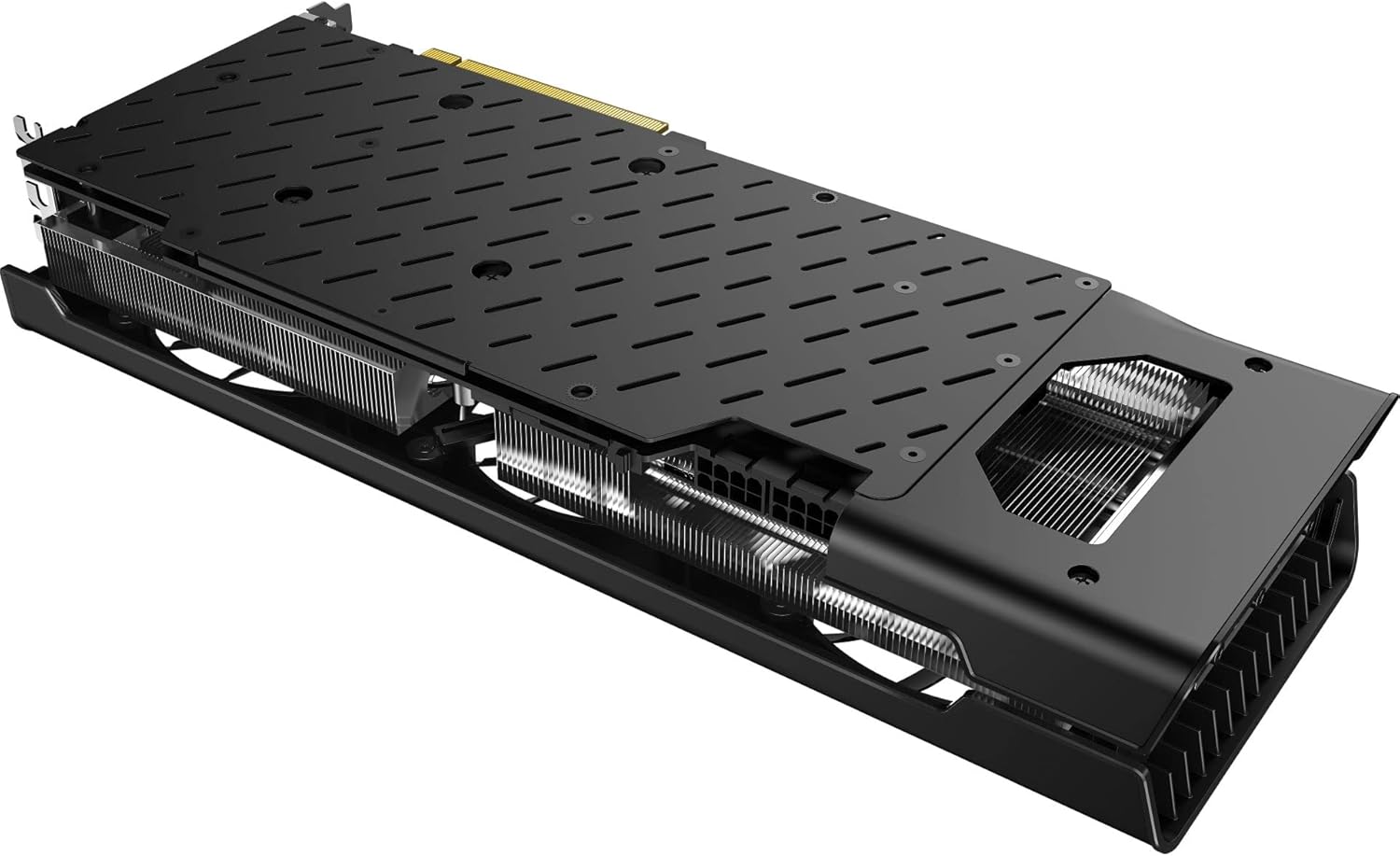
8.1-сүрөт: Төмөнкү view of the graphics card. This image reveals the extensive heatsink fins, which are critical for dissipating heat and should be kept clear of dust for efficient cooling.
9. Кыйынчылыктарды
Эгер графикалык картаңыз менен көйгөйлөргө туш болсоңуз, төмөнкү жалпы көйгөйлөрдү жана чечимдерди караңыз:
9.1. Дисплейдин чыгышы жок
- Кабелдерди текшерүү: Ensure all display cables (DisplayPort/HDMI) are securely connected to both the graphics card and the monitor.
- Күчтү текшерүү: Verify that the two 8-pin PCIe power connectors are firmly seated in the graphics card and connected to the PSU.
- Reseat Card: Power off your PC, unplug it, and reseat the graphics card in its PCIe slot.
- Монитор киргизүү: Мониторуңуз туура киргизүү булагына коюлганын текшериңиз.
9.2. Driver Issues or Instability
- Драйверлерди кайра орнотуу: Perform a clean installation of the latest drivers from the official AMD website. Use a utility like Display Driver Uninstaller (DDU) in Safe Mode to completely remove old drivers before installing new ones.
- Check OS Updates: Иштетүү системаңыз толугу менен жаңыртылганын текшериңиз.
9.3. Poor Performance or Overheating
- Температураны көзөмөлдөө: Use AMD Software Adrenalin Edition or third-party tools to monitor GPU temperatures during operation.
- Аба агымын жакшыртуу: Ensure adequate airflow within your PC case. Clean dust from fans and heatsinks.
- Электр камсыздоо: Электр кубатыңыздын сунушталган кубаттуулукка жооп берерин текшериңизtage for the graphics card and other system components.
- Оюн орнотуулары: Reduce in-game graphics settings if performance is consistently low.
10. Техникалык шарттар
Detailed technical specifications for the XFX Speedster SWFT319 AMD Radeon RX 6800 Gaming Graphics Card:
| Өзгөчөлүк | Спецификация |
|---|---|
| Модель номери | RX-68XLAQBD9 |
| Графикалык сопроцессор | AMD Radeon RX 6800 |
| Chipset маркасы | AMD |
| Графикалык картанын RAM өлчөмү | 16 ГБ GDDR6 |
| Memory Speed | 16 ГГц |
| Max Screen Resolution | 3840x2160 |
| Видео чыгаруу интерфейси | DisplayPort, HDMI |
| Муздатуу чечими | XFX Triple Fan |
| Элемент Салмагы | 3.76 фунт |
| Пакеттин өлчөмдөрү | 17.76 x 8.94 x 4.88 дюйм |
| Өндүрүүчү | XFX |
| ASIN | B0DFMMF59C |
| Дата биринчи жеткиликтүү | 29-август, 2024-жыл |
11. Кепилдик жана колдоо
XFX products are manufactured to the highest quality standards. For information regarding your product's warranty, please refer to the warranty card included with your product or visit the official XFX webсайт.
11.1. Техникалык колдоо
For technical assistance, driver downloads, or further product information, please visit the official XFX support webсайт:
When contacting support, please have your product model number (RX-68XLAQBD9) and serial number ready.


