1. Киришүү
This manual provides essential information for the installation, operation, and maintenance of your ZOTAC GAMING GeForce RTX 4070 Ti SUPER SOLID OC 16GB graphics card. Please read this manual thoroughly before installation to ensure proper functionality and to prevent damage.

Image 1.1: ZOTAC GAMING GeForce RTX 4070 Ti SUPER SOLID OC 16GB Graphics Card and its retail packaging.
2. Пакеттин мазмуну
Пакетте бардык буюмдар бар экенин текшериңиз:
- ZOTAC GAMING GeForce RTX 4070 Ti SUPER SOLID OC 16GB Graphics Card
- GPU колдоо стенди
- Колдонуучунун колдонмосу (бул документ)
- Power Adapter Cable (if applicable, check your specific model)
3. Системалык талаптар
- Бир кош туурасы x16 графикалык уячасы бар PCI Express менен шайкеш келген эне плата
- Minimum 750W power supply with three available 8-pin PCIe power connectors (or equivalent 12VHPWR connector)
- Minimum 16GB system memory
- Microsoft Windows 10/11 64-бит же Linux 64-бит операциялык системасы
- Драйверди орнотуу үчүн интернет байланышы
4. Орнотуу боюнча колдонмо
4.1. Даярдоо
- Компьютериңизди өчүрүп, электр кабелин ажыратыңыз.
- Компьютериңиздин корпусун ачыңыз.
- Статикалык электр энергиясын чыгаруу үчүн өзүңүздү жерлеңиз.
4.2. Installing the Graphics Card
- Сиздин энелик платадан жеткиликтүү PCI Express x16 уячасын табыңыз.
- Компьютериңиздин корпусунан керектүү кеңейтүү уячасынын капкактарын алып салыңыз.
- Carefully insert the graphics card into the PCIe x16 slot until it is fully seated. Ensure the retention clip locks into place.
- Графикалык картаны бурамалар менен корпуска бекитиңиз.
- Connect the required power cables from your power supply to the graphics card. This model typically requires three 8-pin PCIe power connectors or a single 12VHPWR connector. Ensure all connections are secure.
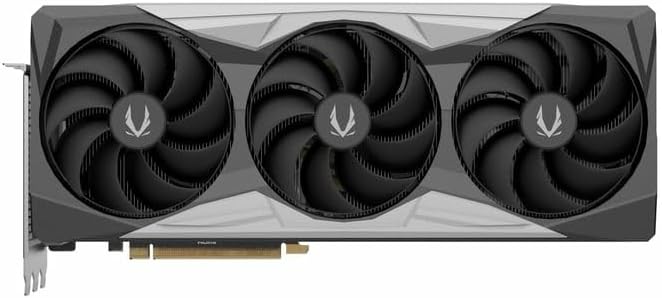
Сүрөт 4.1: Алдыңкы view графикалык картанын үч эселенген желдеткич дизайнын көрсөтөт.
4.3. Installing the GPU Support Stand
The included GPU support stand helps prevent sag and provides additional stability for the graphics card. Follow the instructions provided with the stand for proper installation within your PC case.
4.4. Closing the Case and Connecting Peripherals
- Компьютериңиздин корпусун жабыңыз.
- Connect your monitor(s) to the display outputs on the graphics card (DisplayPort or HDMI).
- Reconnect the power cable and other peripherals to your computer.

Сүрөт 4.2: Арткы view of the graphics card, showing three DisplayPort outputs and one HDMI output.
5. Иштөө нускамалары
5.1. Драйверди орнотуу
- Компьютериңизди күйгүзүңүз.
- Once the operating system loads, download the latest graphics drivers from the official NVIDIA webсайт (www.nvidia.com/drivers) or the ZOTAC webсайт (www.zotac.com/support).
- Драйверди орнотууну аяктоо үчүн экрандагы нускамаларды аткарыңыз. Системаны кайра иштетүү талап кылынышы мүмкүн.
5.2. Программалык камсыздоонун утилиталары
ZOTAC provides utilities such as FireStorm for monitoring and adjusting graphics card settings, including fan speed control (Active Fan Control, FREEZE Fan Stop) and performance profiles. These can be downloaded from the ZOTAC webсайт.
6. Техникалык тейлөө
- Чаңды тазалоо: Видеокарта желдеткичтеринен жана радиатордон чыккан чаңды мезгил-мезгили менен кысылган аба менен тазалап туруңуз. Тазалоодон мурун компьютердин өчүрүлүп, розеткадан суурулуп турганын текшериңиз.
- Драйвер жаңыртуулары: Keep your graphics drivers updated to ensure optimal performance and compatibility.
- Температура мониторинги: Use monitoring software to keep track of the graphics card's temperature during operation. Excessive temperatures can indicate poor airflow or dust buildup.

Сүрөт 6.1: Бурчтуу view of the graphics card, highlighting its robust cooling solution.
7. Кыйынчылыктарды
- Дисплей чыгышы жок:
- Монитордун кабели графикалык картага жана мониторго бекем туташтырылганын текшериңиз.
- Графикалык карта PCIe уячасына толугу менен орнотулганын текшериңиз.
- Check that all power cables are properly connected to the graphics card.
- Мүмкүн болсо, башка монитор же кабель менен сынап көрүңүз.
- Системанын туруксуздугу же бузулушу:
- Ensure graphics drivers are correctly installed and up to date.
- Check for adequate power supply capacity.
- Ашыкча ысып кетүүнүн алдын алуу үчүн температураны көзөмөлдөңүз.
- Системалык эс тутумдун (RAM) туруктуулугун текшериңиз.
- Fan Noise or Malfunction:
- Вентиляторлордон жана радиаторлордон чаңды тазалаңыз.
- Ensure no cables are obstructing fan rotation.
- Use ZOTAC FireStorm utility to check fan speed settings.
8. Техникалык шарттар
| Өзгөчөлүк | Деталь |
|---|---|
| Модель номери | ZT-D40730R-10P |
| Графикалык процессор | NVIDIA GeForce RTX 4070 Ti SUPER |
| Video Memory | 16 ГБ GDDR6X |
| Memory Interface | 256-бит |
| Memory Clock | 21000 МГц (натыйжалуу) |
| Engine Саат | Көбөйтүү: 2640 MHz |
| Display Outputs | 3 x DisplayPort 1.4a, 1 x HDMI 2.1a |
| HDCP колдоо | Ооба |
| Максималдуу санариптик чечилиш | Up to 4K (7680x4320 @60Hz) |
| PCI Express | PCI Express 4.0 x16 |
| Сунушталган электр булагы | 750 Вт |
| Power Connectors | 1 x 12VHPWR (or 3 x 8-pin PCIe via adapter) |
| Өлчөмдөрү (LxWxH) | 16.73 x 11.54 x 3.94 дюйм (болжол менен) |
| Салмагы | 2.2 фунт (болжол менен) |
| Муздатуу системасы | IceStorm 2.0 Advanced Cooling, Triple 100mm Fans, FREEZE Fan Stop, Active Fan Control |
| Өзгөчөлүктөрү | NVIDIA DLSS 3.5, Ray Tracing, Metal Backplate, GPU Support Stand |
9. Кепилдик жана колдоо
For detailed warranty information, please refer to the warranty card included with your product or visit the official ZOTAC website's support section. ZOTAC provides technical support and resources for their products.
- ZOTAC Support Webсайт: www.zotac.com/support
- Продукцияны каттоо: Register your product on the ZOTAC website to activate your warranty and receive product updates.


