1. Продукт бүтүп калдыview
The MageGee LIGHT87 is a versatile 87-key wireless mechanical keyboard designed for gaming and productivity. It features a gasket-mounted structure for a creamy typing sound, hot-swappable switches, vibrant RGB backlighting, and multiple connectivity options including 2.4GHz wireless, Bluetooth 5.0, and USB-C wired mode. It is equipped with an 8000mAh battery and durable side-printed PBT keycaps.

1-сүрөт: жогорудан ылдыйга view of the MageGee LIGHT87 Wireless Mechanical Keyboard, showcasing анын 87 баскычтуу жайгашуусу жана RGB жарыктандыруусу.

Figure 2: ашыкview of the MageGee LIGHT87's key features, including 8000mAh battery, PBT keycaps, Win/Mac dual system support, gasket mount, 5 layers of silencing foams, 16.8 million RGB backlight, triple mode connection, custom hot-swappable switches, and 87-key anti-ghosting.
2. Пакеттин мазмуну
Баштоодон мурун, пакетте бардык элементтер бар экенин текшериңиз:
- MageGee LIGHT87 Wireless Mechanical Keyboard
- USB-C - USB-A кабели
- 2.4GHz USB кабылдагычы
- Баскыч капкагын тарткыч
- Switch Puller
- Колдонуучунун Колдонмосу (бул документ)

Figure 3: Contents of the MageGee LIGHT87 keyboard package, including the keyboard, USB cable, keycap puller, switch puller, and user manual.
3. Орнотуу жана туташуу
The MageGee LIGHT87 keyboard offers three connection modes: USB-C wired, 2.4GHz wireless, and Bluetooth 5.0.
3.1 Баскычтопту заряддоо
Before first use, it is recommended to fully charge the keyboard. Connect the provided USB-C cable to the keyboard's USB-C port and the other end to a USB power source (e.g., computer USB port, wall adapter). The keyboard features an 8000mAh large-capacity battery.

Figure 4: Illustration of the 8000mAh battery capacity, providing approximately 53 hours with RGB backlight on and 400 hours with RGB backlight off.

Figure 5: Detailed battery life estimates: 53 hours with backlight on, 400 hours with backlight off, and 450 hours of sleep standby time.
3.2 Туташуу режимдери
The keyboard supports seamless switching between wired, 2.4GHz, and Bluetooth modes.
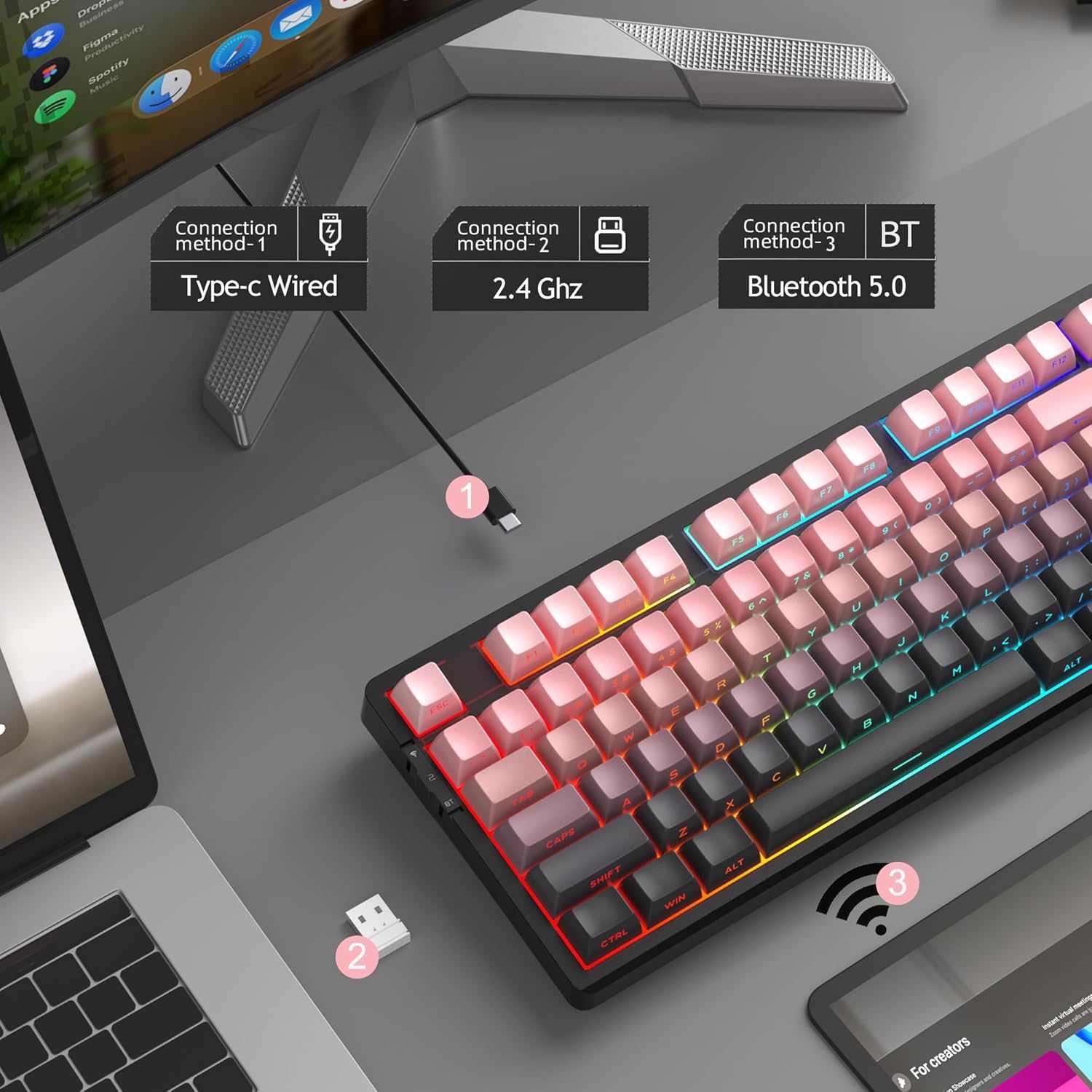
Figure 6: Visual representation of the three connection methods: Type-C Wired, 2.4 GHz Wireless, and Bluetooth 5.0.

Figure 7: Detailed instructions for switching between 2.4GHz, Bluetooth 5.0, and Type-C wired modes using the toggle switch and Fn key combinations.
3.2.1 USB-C Wired Mode
- Connect the USB-C cable to the keyboard and your computer's USB port.
- Toggle the switch on the keyboard to the "2" position (wired mode).
- Баскычтоп системаңыз тарабынан автоматтык түрдө таанылат.
3.2.2 2.4 ГГц зымсыз режим
- 2.4 ГГц USB кабыл алгычын табыңыз (адатта клавиатурадагы бөлүмдө сакталат).
- USB ресиверди компьютериңиздеги жеткиликтүү USB портуна сайыңыз.
- Toggle the switch on the keyboard to the "wifi" icon position (2.4G wireless mode).
- Басыңыз fn+4 to activate 2.4GHz mode. The keyboard should connect automatically.
3.2.3 Bluetooth 5.0 режими
The keyboard can connect to up to three Bluetooth devices.
- Toggle the switch on the keyboard to the "BT" position (Bluetooth mode).
- Басып кармап туруңуз fn+1, fn+2, же fn+3 for 3-5 seconds to enter pairing mode for the desired channel. The indicator light will flash rapidly.
- On your device (PC, laptop, tablet, smartphone), enable Bluetooth and search for "MageGee LIGHT87".
- Жупташтыруу үчүн баскычтопту тандаңыз. Туташтырылгандан кийин, индикатор жарыгы күйүп-өчүп токтойт.
- Жупташтырылган Bluetooth түзмөктөрүнүн ортосунда которулуу үчүн, жөн гана басыңыз fn+1, fn+2, же fn+3.
4. Иштөө нускамалары
4.1 RGB арткы жарыкты башкаруу
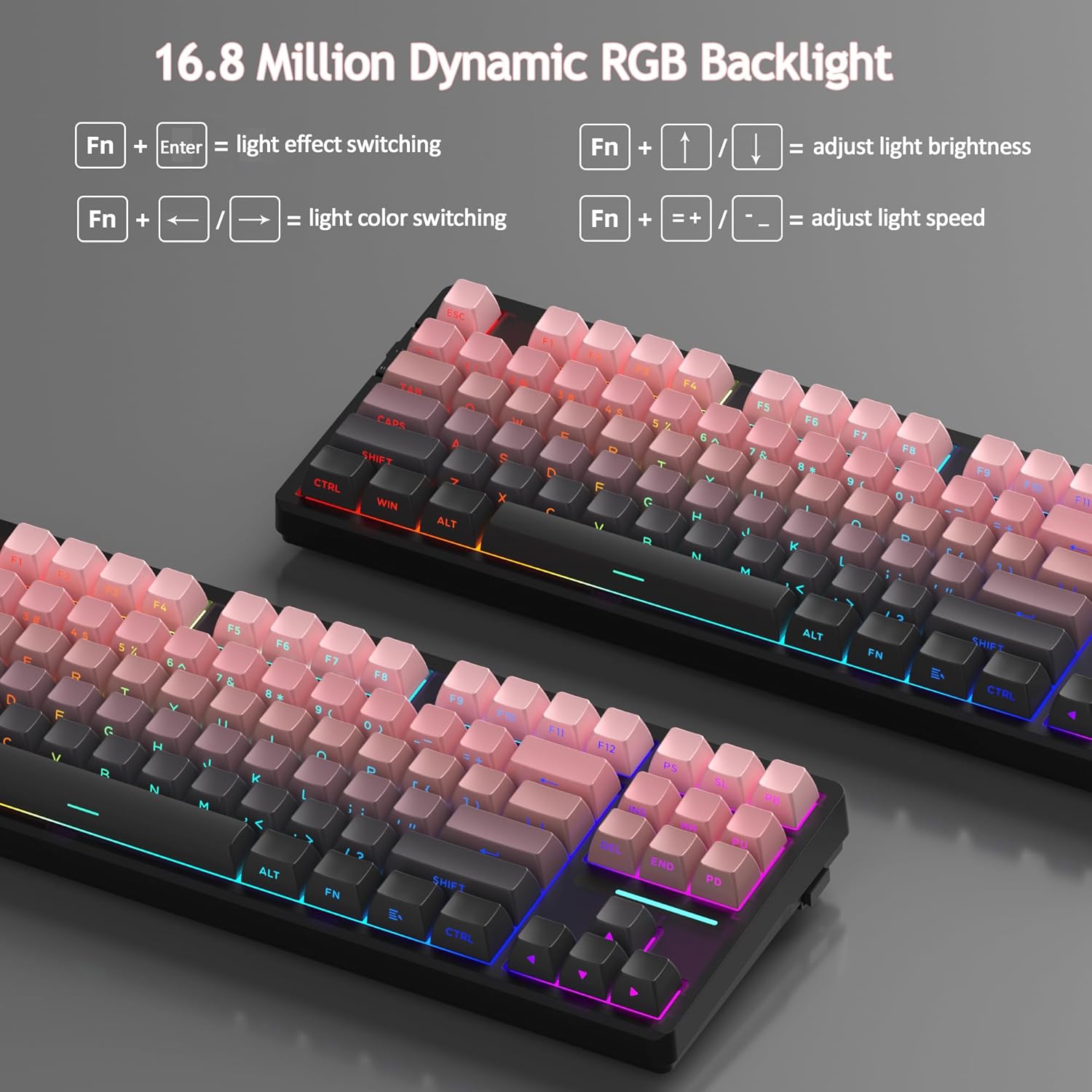
The MageGee LIGHT87 features 16.8 million cool RGB backlight options with various effects.
- Fn + Enter: Toggle between approximately 20 different backlight modes/effects.
- Fn + ←: Adjust light direction (for certain effects).
- Fn + →: Adjust light color (for static modes or color cycling).
- Fn + ↑: Арткы жарыктын жарыктыгын жогорулатуу.
- Fn + ↓: Арткы жарыктын жарыктыгын азайтыңыз.
- Fn + =+: Increase backlight speed (for dynamic effects).
- Fn + -_: Decrease backlight speed (for dynamic effects).
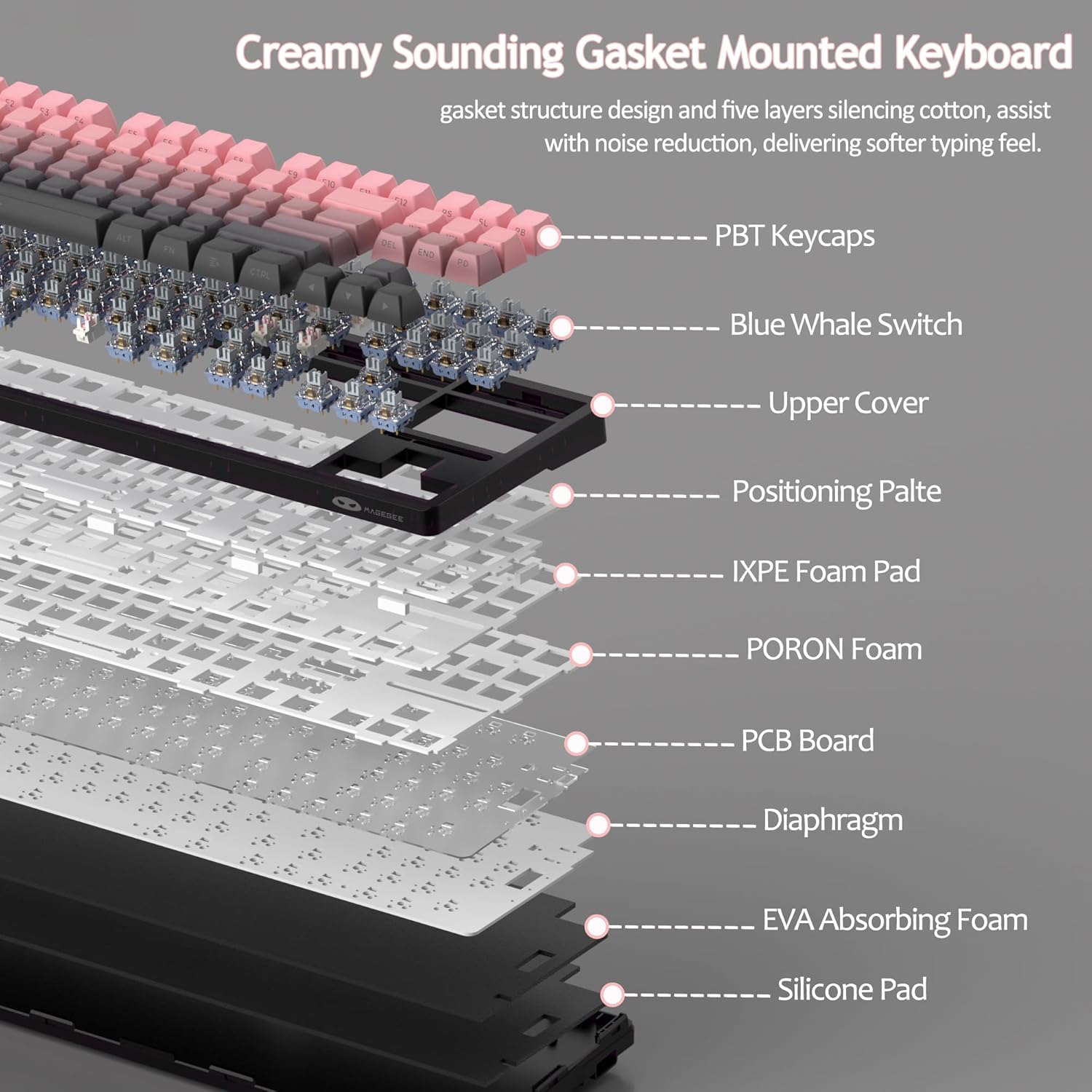
Figure 8: Visual guide to RGB backlight control key combinations.

Figure 9: Table summarizing RGB backlight functions and their corresponding Fn key combinations.
4.2 Ыкчам алмаштыруучу которгучтар
The LIGHT87 keyboard features hot-swappable sockets, allowing you to change switches without soldering. It supports both 3-pin and 5-pin mechanical switches. The keyboard comes pre-installed with quiet linear Blue Whale switches.

Figure 10: Diagram illustrating the hot-swappable switch mechanism, showing compatibility with 3-pin and 5-pin switches and the pre-lubed Blue Whale switch.

Figure 11: Specifications of the Blue Whale Switch, including linear type, conduction stroke, total travel, operating force, material, and lifespan.
To Replace Switches:
- Берилген баскычтоп капкагын тартуучу каражатты колдонуп, баскычтоптун капкагын этияттык менен алып салыңыз.
- Use the switch puller to gently grip the top and bottom clips of the switch.
- Аны PCBден алып салуу үчүн өчүргүчтү түз өйдө тартыңыз.
- Жаңы которгучтун төөнөгүчтөрүн ПХБдагы тешиктерге тууралаңыз.
- Press the new switch firmly into place until it clicks. Ensure it is seated properly and not bent.
- Баскыч капкагын алмаштырыңыз.
4.3 Gasket Structure and Sound Dampэning
The LIGHT87 utilizes a gasket-mounted design, which provides a softer, more flexible typing feel and contributes to a "creamy thock" sound profile. Additionally, it incorporates five layers of sound-absorbing foams to effectively reduce noise and improve typing comfort.

12-сүрөт: жарылган view of the keyboard's internal components, highlighting the gasket structure and various foam layers (IXPE Foam Pad, PORON Foam, EVA Absorbing Foam, Silicone Pad) for sound dampэning.
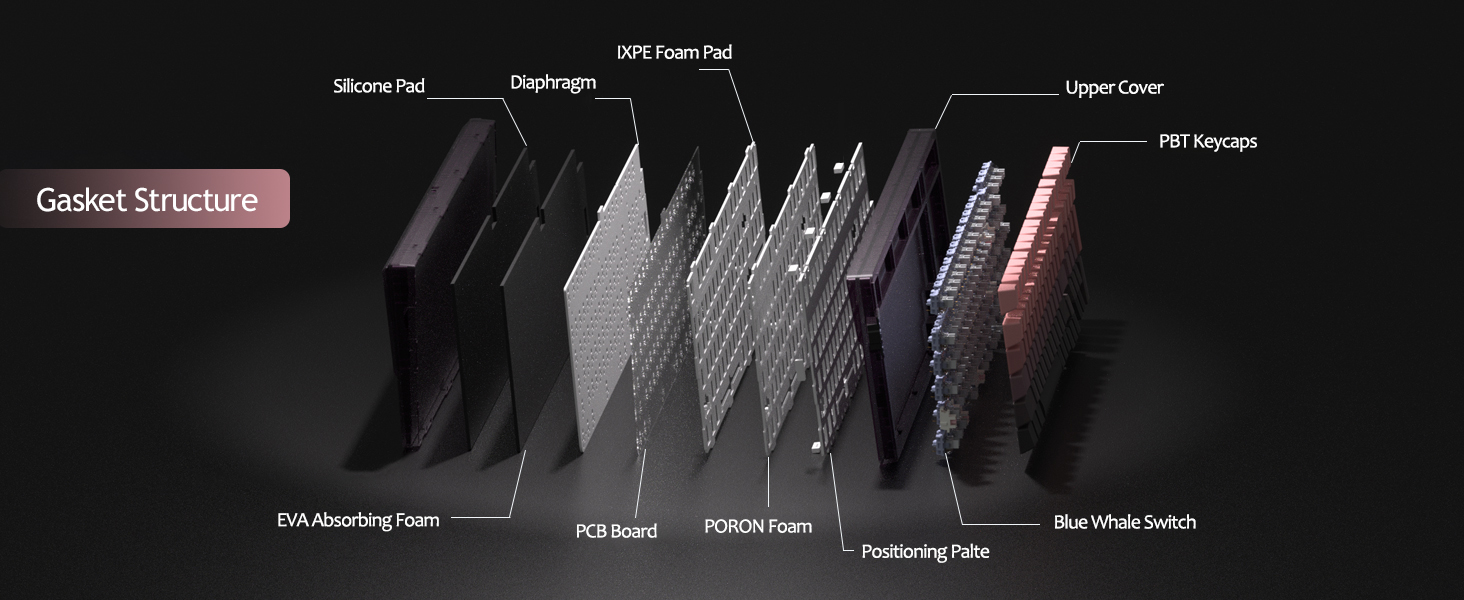
Figure 13: Detailed diagram of the gasket structure, showing how the plate is isolated from the case by gaskets, along with the various foam layers.
4.4 PBT баскычтоптору
The keyboard is equipped with durable PBT keycaps, known for their resistance to shine and wear over time. The legends are side-printed for a clean top surface aesthetic.
Сүрөт 14: Жакын пландан view of the keyboard's side-printed PBT keycaps.
4.5 Layout and Compatibility
The LIGHT87 features a compact 80% (TKL) layout with 87 keys, saving desktop space while retaining essential function and arrow keys. It supports both Windows and Mac operating systems, and all 87 keys feature 100% anti-ghosting for accurate input during intense gaming or typing sessions.
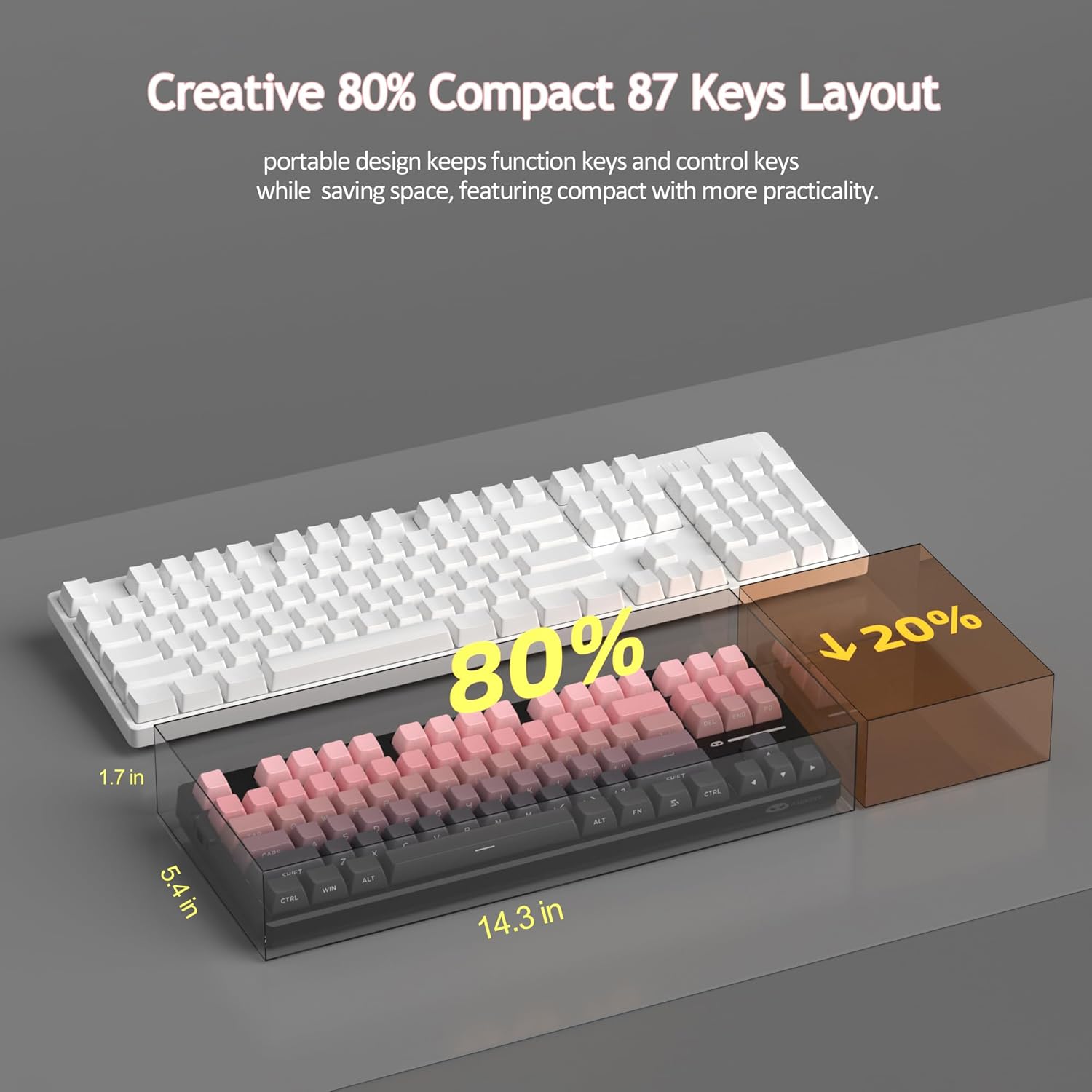
Figure 15: Comparison illustrating the compact 80% layout of the LIGHT87 keyboard compared to a full-size keyboard, highlighting space savings.

Figure 16: The MageGee LIGHT87 keyboard integrated into a desktop setup, demonstrating its use with a computer and monitor.
5. Техникалык тейлөө
5.1 Баскычтопту тазалоо
To maintain the performance and appearance of your keyboard, regular cleaning is recommended.
- Тазалоодон мурун клавиатураны компьютерден ажыратыңыз.
- Баскыч капкактарынын ортосундагы чаңды жана калдыктарды тазалоо үчүн жумшак щетка же кысылган абаны колдонуңуз.
- For stubborn dirt, you can carefully remove keycaps using the provided keycap puller and clean the surface underneath with a slightly damp, lint-free cloth. Ensure the cloth is not dripping wet.
- Wipe the keycaps and keyboard surface with a dry, soft cloth.
- Клавиатураны катуу химиялык заттарды, абразивдүү тазалоочу каражаттарды колдонбоңуз же суюктукка салбаңыз.

Figure 17: Image showing keycaps being removed from the keyboard, useful for cleaning or switch replacement.
5.2 Баскычтоптун бурчун жөндөө
The keyboard features adjustable feet to customize your typing angle for ergonomic comfort.

Figure 18: Image demonstrating the adjustable feet on the underside of the keyboard for tilt customization.

19-сүрөт: Side profile of the keyboard illustrating its ergonomic keycap profile ыңгайлуу терүү үчүн.
6. Кыйынчылыктарды
| Көйгөй | Мүмкүн себеп | Чечим |
|---|---|---|
| Keyboard not responding in wired mode. | Кабелдин туташуусу бошоп калган, туура эмес режим тандалган, USB порту бузук. | Ensure USB-C cable is securely connected. Check if the keyboard switch is set to "2" (wired mode). Try a different USB port on your computer. |
| 2.4GHz wireless not connecting. | USB receiver not plugged in, incorrect mode, low battery. | Ensure the 2.4GHz USB receiver is plugged in. Set the keyboard switch to "wifi" icon and press fn+4Баскычтопту кубаттаңыз. |
| Bluetooth pairing failed or connection unstable. | Incorrect pairing procedure, interference, device Bluetooth issues, low battery. | Ensure keyboard switch is set to "BT". Press and hold Fn + 1/2/3 to re-enter pairing mode. Forget the device on your computer/device and re-pair. Move closer to the device. Charge the keyboard. Restart your device's Bluetooth. |
| Арткы жарык иштебей жатат же тыгылып калган. | Арткы жарык өчүрүлгөн, батарея аз, программалык камсыздоодо мүчүлүштүк бар. | Басыңыз Fn + ↑ to increase brightness. Charge the keyboard. Try cycling through backlight modes with Fn + Enter. |
| Certain keys not responding. | Бош же бузук баскычтоп, ачкыч капкагынын астындагы таштандылар. | Remove the keycap and check for debris. If hot-swappable, try reseating the switch or replacing it with a known working switch. |
7. Техникалык шарттар
| Өзгөчөлүк | Деталь |
|---|---|
| Модел | ЖАРЫК87 |
| Бренд | MageGee |
| Байланыш | 2.4 ГГц зымсыз, Bluetooth 5.0, USB-C зымдуу |
| Макет | 87-key (80% TKL) |
| Которгучтар | Hot-swappable (3-pin/5-pin compatible), Blue Whale Linear Switches |
| Баскыч капкактары | Side-printed PBT |
| Арткы жарык | 16.8 миллион RGB |
| Батарея сыйымдуулугу | 8000mAh |
| Батареянын иштөө мөөнөтү (RGB күйүк) | Болжол менен 53 саат |
| Батареянын иштөө мөөнөтү (RGB ӨЧҮК) | Болжол менен 400 саат |
| Шайкеш түзмөктөр | PC, Laptop, Tablet, Smartphone, Gaming Console |
| Операциялык системаны колдоо | Windows, macOS |
| Anti-Ghosting | Бардык 87 баскыч |
| Өлчөмдөрү (пакет) | 15.91 x 7.17 x 2.6 дюйм |
| Элемент Салмагы | 2.72 фунт |
8. Кепилдик жана колдоо
MageGee products are designed for reliability and performance. For warranty information and customer support, please refer to the official MageGee webсайтка же сатуучуга түздөн-түз сатып алуу платформаңыз аркылуу кайрылыңыз.
You can visit the official MageGee store on Amazon for more information and product updates: MageGee Amazon Store


