1. Киришүү
The ROCAM CR1009UItra is a versatile emergency radio designed for reliability in various situations. It integrates multiple essential functions into a compact and durable device, making it suitable for outdoor activities, emergencies, and daily use. This manual provides detailed instructions for its setup, operation, and maintenance.
Негизги өзгөчөлүктөр төмөнкүлөрдү камтыйт:
- AM/FM/SW Radio Reception
- 12000mAh Power Bank for Mobile Devices
- Integrated Flashlight with Two Modes
- LED окуу Лamp
- SOS Сигнализация Функциясы
- Multiple Charging Methods: Hand Crank, Solar Panel, USB-C
- Наушник уясы
- Built-in Clock
Dimensions: 17.2 x 9.4 x 6.3 cm; Weight: 522 g.

Image: The ROCAM CR1009UItra emergency radio showcasing its various functions including power bank, flashlight, reading lamp, SOS alert, and radio bands.
2. Пакеттин мазмуну
Колдонуудан мурун, таңгактагы бардык буюмдардын бар экендигин текшериңиз:
- ROCAM CR1009UItra Emergency Radio
- USB-C заряддоо кабели
- Карабин клип
- Колдонуучунун Колдонмосу (бул документ)
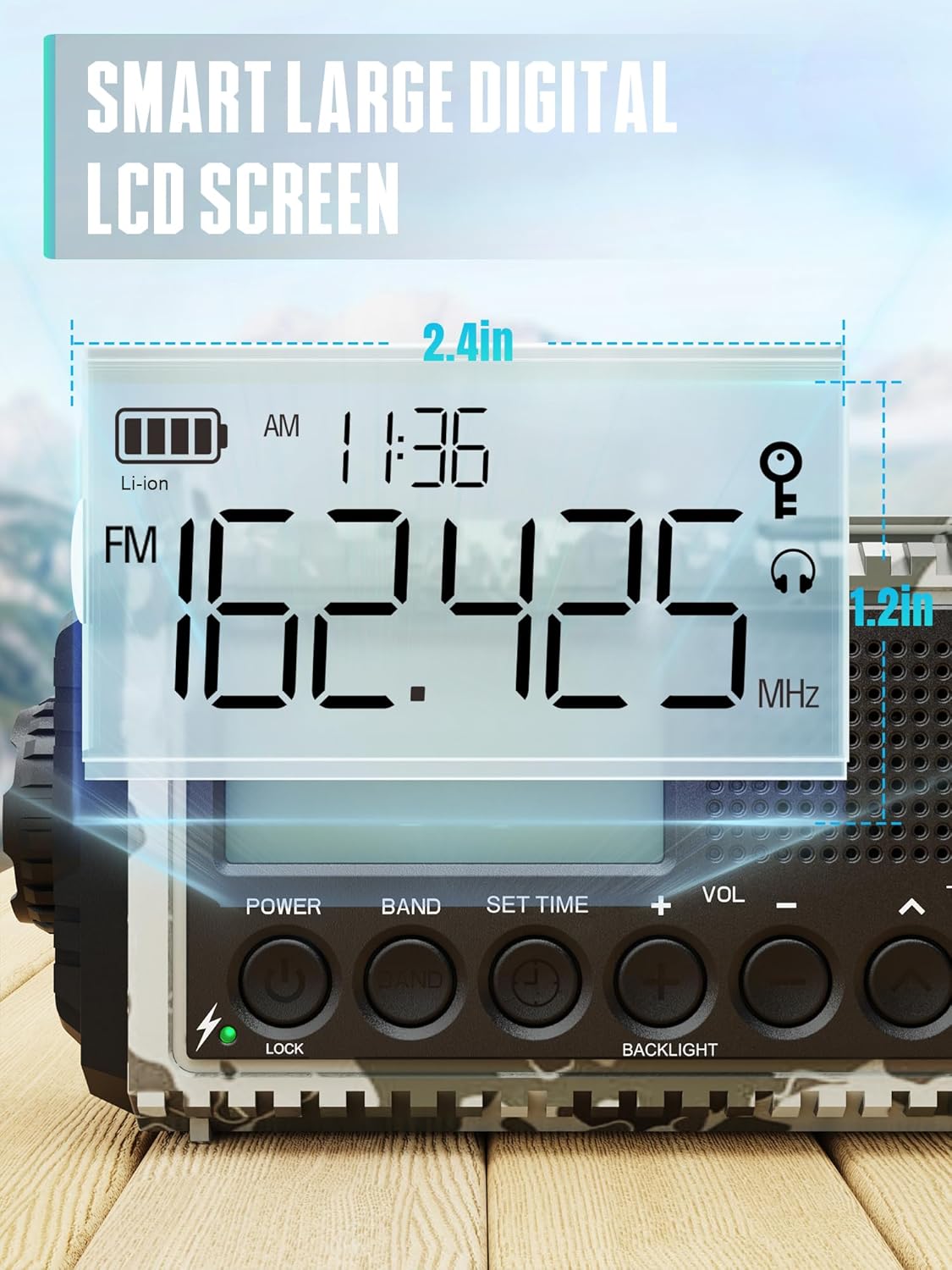
Image: The ROCAM CR1009UItra radio, a USB-C cable, a carabiner, and the user manual, laid out on a wooden table.
3. Орнотуу жана заряддоо
3.1 Баштапкы төлөм
It is recommended to fully charge the radio before first use to ensure optimal battery performance.
3.2 Заряддоо ыкмалары
The ROCAM CR1009UItra offers multiple ways to charge its internal 12000mAh battery:
- USB-C заряддоо: Connect the provided USB-C cable to the radio's USB-C input port and a standard USB power adapter (not included). This is the fastest charging method.
- Күн кубаты: Place the radio with its solar panel facing direct sunlight. The solar panel charges the internal battery, ideal for maintaining charge or slow charging in outdoor environments.
- Кол бурчу: Rotate the hand crank clockwise or counter-clockwise to generate power. Cranking for a few minutes can provide enough power for a short period of radio use or a quick phone charge.
- AAA Batteries (Reserve): The radio can also be powered by 3 AAA batteries (not included) as a reserve power source. These are typically used for the reading lamp or to supplement power in emergencies.

Image: An illustration showing the five charging methods for the ROCAM emergency radio: hand crank, solar panel, Type-C input, AAA battery compartment, and the internal 12000mAh rechargeable battery.

Сүрөт: жакын план view of the solar panel on the top of the radio, indicating its function for solar charging.
Video: Demonstration of the ROCAM 12000mAh hand-cranked radio, showing its features and charging methods.
Видео: Бүттүview of a solar FM/AM crank radio, demonstrating its solar charging capability and radio functions.
4. Иштөө нускамалары
4.1 Radio Function (AM/FM/SW)
- Күйгүзүү/өчүрүү: Locate the 'POWER' button or switch on the device. Press or slide to turn the radio on.
- Тандоо тобу: Use the 'BAND' button to cycle through AM, FM, and SW (Shortwave) bands.
- Жөндөө станциясы: Extend the telescopic antenna for better reception. Use the 'TUNE' knob or buttons (▲ / ▼) to scan for stations. The LCD screen will display the frequency.
- Үндү тууралоо: Use the 'VOL' knob or buttons (+ / -) to adjust the audio volume.
- Наушник колдонуу: For private listening, plug 3.5mm headphones into the headphone jack.

Image: The main product image displaying the digital LCD screen, power, band, set time, volume, and tuning controls.

Сүрөт: деталдуу view of the radio's smart large digital LCD screen, showing time, battery level, and radio frequency.
4.2 Фонар
The radio features a powerful flashlight for illumination in dark conditions.
- Жандандыруу: Locate the flashlight button, typically on the side or front. Press once for low beam, press again for high beam.
- Өчүрүү: Press the button a third time to turn off the flashlight.
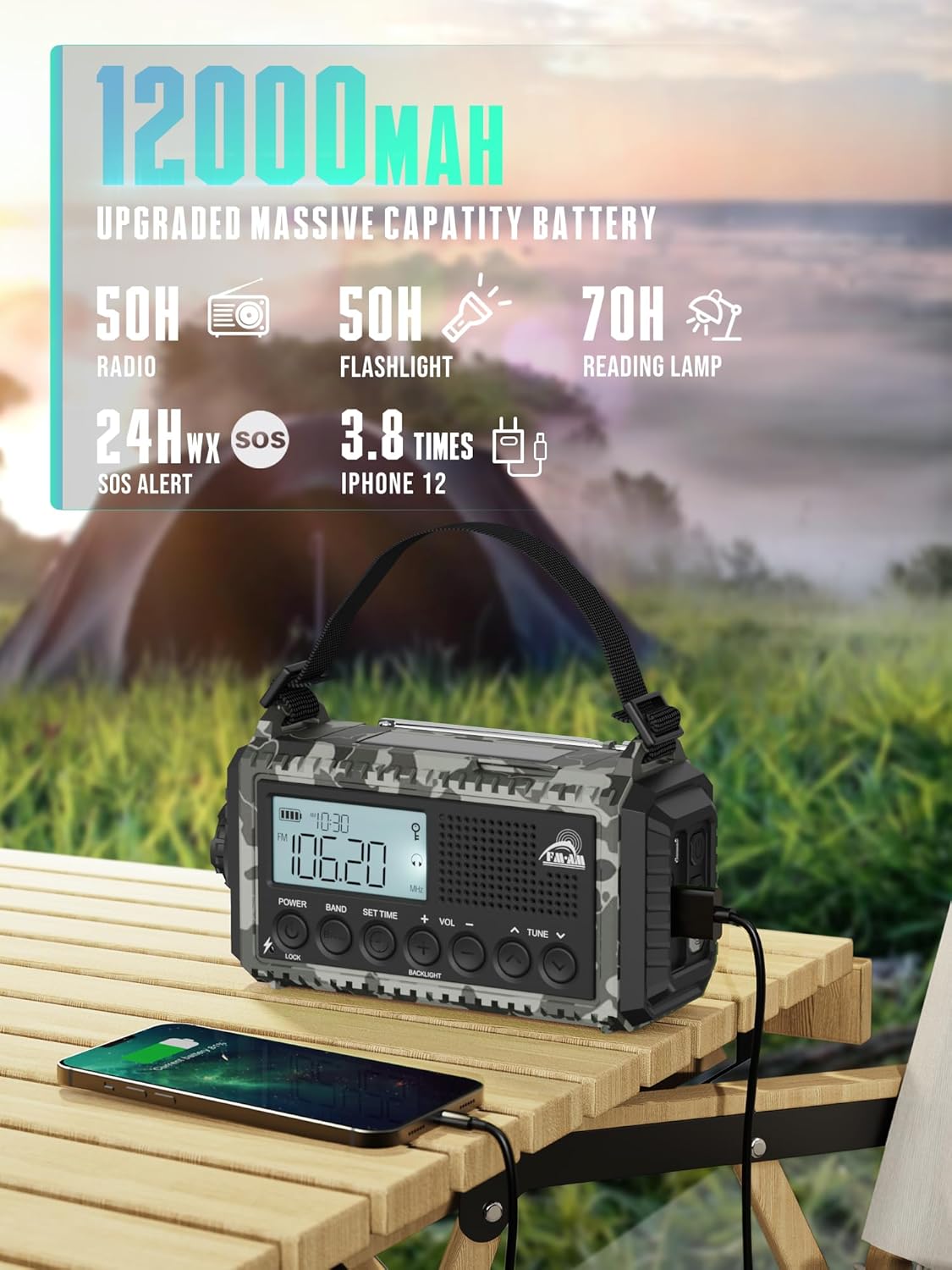
Image: The emergency radio demonstrating its long-range focused flashlight and its two-level reading lamp.
4.3 LED Reading Lamp
The integrated LED reading lamp provides soft, wide illumination for reading or general ambient light.
- Жандандыруу: Open the panel on the top of the radio to reveal the LED reading lamp. There may be a dedicated switch or button to turn it on.
- Жарыктыкты жөндөө: Some models may offer multiple brightness levels.
- Өчүрүү: Close the panel or press the dedicated switch/button to turn off the lamp.
Image: The emergency radio demonstrating its long-range focused flashlight and its two-level reading lamp.
4.4 SOS сигнализациясы
The SOS alarm emits a loud siren (116dB) and a flashing red light to attract attention in emergency situations.
- Жандандыруу: Press and hold the 'SOS' button, usually located near the flashlight.
- Өчүрүү: Release the 'SOS' button to stop the alarm.

Image: The emergency radio with its SOS alarm activated, featuring a red flashing light and a visual representation of a loud siren, indicating its use for attracting attention in emergencies.
4.5 Power Bank функциясы
The built-in 12000mAh battery can be used to charge external devices like smartphones via its USB and Type-C output ports.
- Түзмөктү туташтыруу: Use a compatible USB or USB-C cable to connect your device to the radio's output port.
- Заряддоо: The radio will automatically begin charging your device. Monitor your device's battery indicator.

Image: The ROCAM emergency radio connected to a smartphone via a USB cable, demonstrating its 12000mAh power bank capability.
5. Техникалык тейлөө
- Тазалоо: Радиону жумшак, кургак чүпүрөк менен сүртүңүз. Катуу химиялык заттарды же абразивдүү тазалоочу каражаттарды колдонуудан алыс болуңуз.
- Сактагыч: Радиону салкын, кургак жерде, түз күндүн нурунан жана экстремалдык температурадан алыс сактаңыз.
- Батареяга кам көрүү: For optimal battery life, fully charge the radio at least once every three months if not in regular use.
- Суу каршылык: The radio has an IPX6 rating, meaning it is protected against powerful water jets. It is not designed for submersion. Ensure all port covers are securely closed to maintain water resistance.
6. Кыйынчылыктарды
- Радио күйбөй жатат: Ensure the battery is charged. Try charging via USB-C or hand-cranking for a few minutes. Check if AAA batteries are inserted correctly if using them.
- Радио кабыл алуу начар: Extend the telescopic antenna fully. Try repositioning the radio. Ensure you are in an area with adequate signal strength for the selected band.
- Flashlight/Reading lamp иштебей жатат: Check if the battery is charged. Ensure the correct button/switch is activated.
- Түзмөк кубат банкынан кубатталбай жатат: Ensure the radio's battery has sufficient charge. Verify the charging cable is functional and correctly connected to both the radio's output port and your device.
- SOS сигнализациясы иштебей жатат: Ensure the 'SOS' button is pressed and held for the required duration.
7. Техникалык шарттар
| Бренд | ROCAM |
| Модел | CR1009UItra |
| Tuner Technology | AM/FM |
| Шайкеш түзмөктөр | Наушник |
| Өзгөчөлүктөр | Built-in AM-antenna, Built-in clock, Lightweight, SOS-alarm, Dustproof |
| Камтылган компоненттер | User Manual |
| Дисплей технологиясы | LCD |
| Спикердин максималдуу күчү | 1.5 Ватт |
| Тtage | 3.7 вольт |
| Батареялар камтылган | Yes (internal Lithium-ion) |
| Batteries Required (for reserve) | AAA batteries required (not included for main power, but mentioned as included for some functions) |
| Батареянын курамы | Литий-ион |
| Жыштык | 108 MHz (FM max) |
| Туташтыргыч түрү | USB, USB Type-C |
| Радио топтору колдоого алынат | AM (520 ~ 1710 KHz), FM (87.5 ~ 108 MHz), SW (2.3 ~ 23 MHz) |
| Материалдын түрү | Пластик |
| Продукциянын өлчөмдөрү | 17.2 x 9.4 x 6.3 см |
| Продукт Салмагы | 522 г |
8. Кепилдик жана колдоо
ROCAM offers a 365-day service period for all products under the ROCAM brand. If you encounter any quality issues or require assistance, please contact ROCAM customer support. Your feedback is valued for continuous product improvement.
For further support, please refer to the contact information provided with your purchase or visit the official ROCAM webсайт.


