Introduction
This manual provides detailed instructions for the operation and maintenance of your Timex Ironman Triathlon Flix 100 Lap Watch. Please read this manual thoroughly to ensure proper use and to maximize the features of your watch.
The Timex Ironman Triathlon Flix 100 Lap Watch is designed for athletes and active individuals, featuring a 100-lap memory chronograph, timer, alarm, and Indiglo backlight. It is water-resistant up to 100 meters.
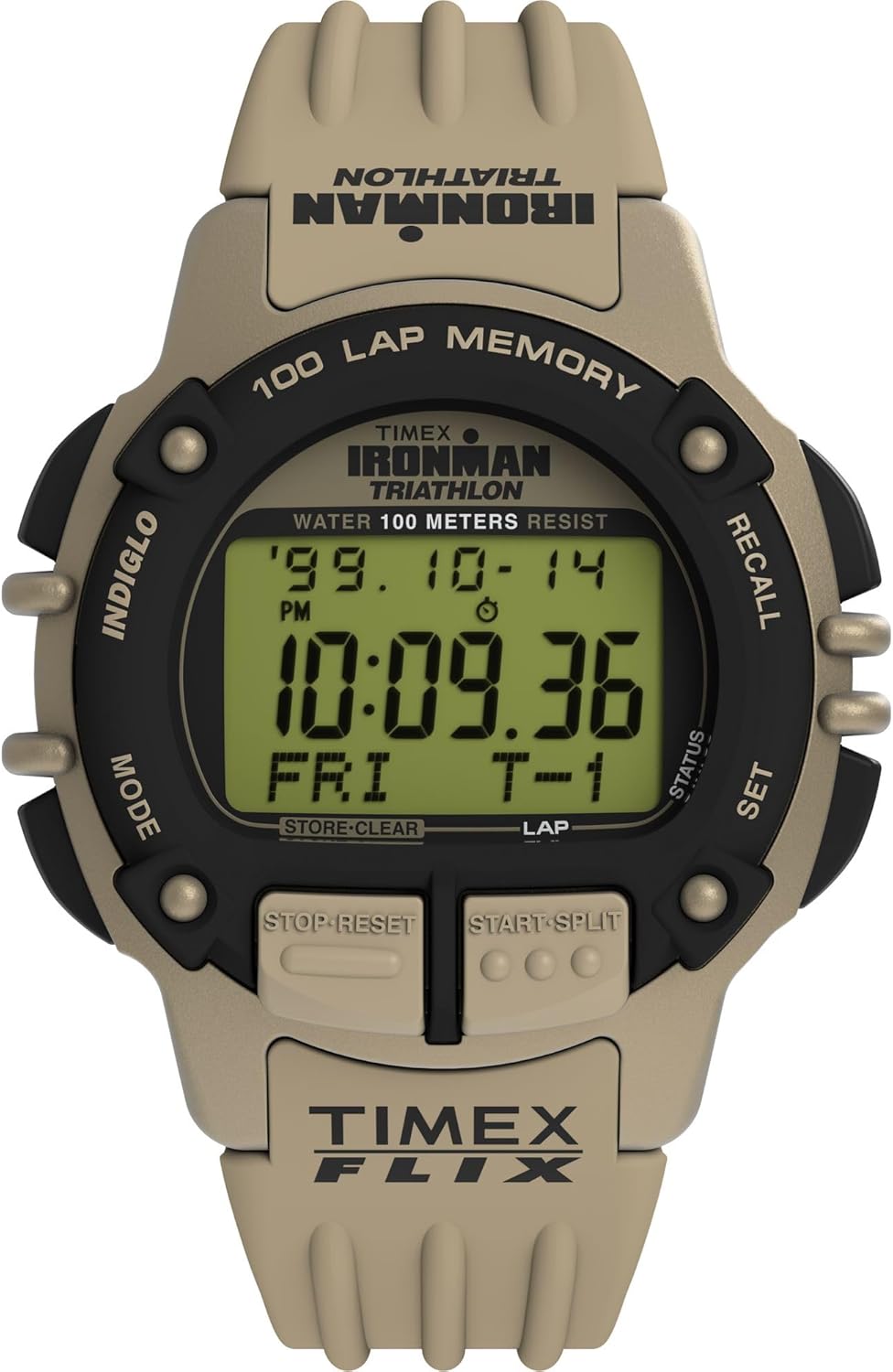
1-сүрөт: Фронт view of the Timex Ironman Triathlon Flix 100 Lap Watch. This image displays the watch face, showing the digital negative display, the 'IRONMAN TRIATHLON' branding, '100 LAP MEMORY', and the various function buttons labeled 'INDIGLO', 'MODE', 'RECALL', 'SET', 'STOP RESET', and 'START SPLIT'. The watch features a green case and strap.
Жайгашуу
1. Баштапкы активдештирүү
Upon first use, remove any plastic film from the watch face. If the display is blank, press any button to activate it. If the watch remains unresponsive, the battery may need replacement (refer to the Maintenance section).
2. Убакыт жана дата орнотуу
- басыңыз РЕЖИМ button repeatedly until the time display is shown.
- басып, кармап туруңуз SET баскычын убакыттын цифралары жаркылдай баштаганга чейин басыңыз.
- колдонуу БАШТОО/БӨЛҮҮ Жарк эткен цифраны же чоңойтуу үчүн баскыч ТОКТОТ/КАЛЫПТАҢЫР азайтуу үчүн баскыч.
- басыңыз РЕЖИМ button to move to the next setting (e.g., minutes, hour, 12/24-hour format, year, month, day).
- Repeat step 3 and 4 until all desired settings are adjusted.
- басыңыз SET орнотуу режиминен чыгуу үчүн баскыч.
Иштөө нускамалары
1. Навигация режимдери
басыңыз РЕЖИМ button to cycle through the following functions: Time, Chronograph, Timer, Alarm, and Recall.
2. Хронограф (Секундомер)
The chronograph measures elapsed time and can store up to 100 lap times.
- аркылуу Хронограф режимине өтүңүз РЕЖИМ баскычы.
- Басыңыз БАШТОО/БӨЛҮҮ убакытты баштоо үчүн.
- Басыңыз БАШТОО/БӨЛҮҮ again to record a lap time. The display will show the lap time and then resume total elapsed time.
- Басыңыз ТОКТОТ/КАЛЫПТАҢЫР Хронографты тындыруу үчүн басыңыз. БАШТОО/БӨЛҮҮ кайра баштоо.
- While paused, press and hold ТОКТОТ/КАЛЫПТАҢЫР to clear the chronograph and reset it to zero.
3. Таймер
The timer can be set for a countdown from a specified duration.
- Navigate to the Timer mode using the РЕЖИМ баскычы.
- басып, кармап туруңуз SET таймердин сандары күйүп-өчкөнгө чейин баскычын басыңыз.
- Колдонуу БАШТОО/БӨЛҮҮ to adjust the flashing digit.
- Басыңыз РЕЖИМ to move to the next digit (hours, minutes, seconds).
- Басыңыз SET таймер орнотууну ырастоо үчүн.
- Басыңыз БАШТОО/БӨЛҮҮ саноону баштоо үчүн.
- Басыңыз ТОКТОТ/КАЛЫПТАҢЫР to pause the timer. Press БАШТОО/БӨЛҮҮ кайра баштоо.
- When the timer reaches zero, an audible alert will sound. Press any button to stop the alert.
4. Ойготкуч
Белгилүү бир убакта үн чыгаруу үчүн ойготкучту коюңуз.
- Navigate to the Alarm mode using the РЕЖИМ баскычы.
- басып, кармап туруңуз SET ойготкучтун убакытынын сандары күйүп-өчкөнгө чейин баскычын басыңыз.
- Колдонуу БАШТОО/БӨЛҮҮ to adjust the flashing digit.
- Басыңыз РЕЖИМ to move to the next digit (hours, minutes, AM/PM).
- Басыңыз SET ойготкучтун жөндөөсүн ырастоо үчүн.
- Басыңыз БАШТОО/БӨЛҮҮ to toggle the alarm ON or OFF. An alarm icon will appear on the display when activated.
- Сигнал чыкканда, аны өчүрүү үчүн каалаган баскычты басыңыз.
5. Indiglo түнкү жарыгы
The Indiglo feature illuminates the watch display for visibility in low-light conditions.
- басыңыз ИНДИГЛО button (top left) to activate the backlight. It will remain lit for a few seconds.

2-сүрөт: The Timex Ironman Triathlon Flix 100 Lap Watch worn on a wrist. This image provides a close-up view of the watch face and strap as it appears during wear, highlighting its size and fit.
Техникалык тейлөө
1. Батареяны алмаштыруу
The watch uses one Lithium Metal battery. When the display dims or functions become erratic, the battery may need replacement. It is recommended to have the battery replaced by a qualified jeweler or watch service center to ensure proper sealing and water resistance.
2. Сууга туруктуулук
This watch is water-resistant up to 100 meters (330 feet). This means it is suitable for showering, swimming, and snorkeling. However, it is not recommended for scuba diving. Do not press any buttons while the watch is submerged, as this can compromise the water seal.
3. Тазалоо
Саатыңызды жумшак, d менен тазалаңызamp cloth. Avoid using harsh chemicals or abrasive materials, which can damage the case or strap.

3-сүрөт: Артка view of the Timex Ironman Triathlon Flix 100 Lap Watch. This image focuses on the stainless steel caseback, displaying engravings such as 'TIMEX', 'IRONMAN TRIATHLON', 'WATER RESISTANT TO 100 METERS', 'STAINLESS STEEL CASEBACK', and 'U.S. PATENT NO. D411,957'.
Проблемаларды чечүү
- Дисплей бош же күңүрт: The battery may be low or depleted. Replace the battery (refer to Maintenance).
- Баскычтар жооп бербейт: Ensure the watch is not in a locked mode (if applicable, though this model does not feature a specific lock). If the issue persists, a battery replacement might resolve it.
- Time or date is incorrect: Re-enter the time and date settings as described in the Setup section.
- Alarm is not sounding: Check if the alarm is activated (alarm icon visible on display). Ensure the volume is not set to silent (if applicable, though this model has a fixed alarm volume).
- Сааттын ичиндеги суу: Immediately take the watch to a qualified service center. Do not attempt to open it yourself, as this will void the warranty and may cause further damage.
Техникалык шарттар
| Өзгөчөлүк | Деталь |
|---|---|
| Модель номери | TW5M63100VQ |
| Case Size | 42мм |
| Боонун узундугу | 8 дюйм |
| Дисплей түрү | Санариптик терс дисплей |
| Линзанын материалы | Акрил |
| Суу каршылык | 100 метр (330 фут) |
| Хронограф | 100-Lap Memory |
| Арткы жарык | Indiglo түнкү жарыгы |
| Батарея түрү | 1 литий металл батарейка (кошулган) |
Кепилдик жана колдоо
Кепилдик маалымат
Your Timex watch is covered by a limited warranty against manufacturing defects. The warranty period typically begins from the date of purchase. Please retain your proof of purchase for warranty claims. The warranty does not cover normal wear and tear, battery life, accidental damage, or damage resulting from improper use or unauthorized repairs.
Кардарларды колдоо
For further assistance, service, or warranty inquiries, please visit the official Timex website or contact Timex customer service. Contact details can usually be found on the Timex website or on the warranty card included with your purchase.


