Продукт бүттүview
The MageGee LIGHT100 is a versatile mechanical keyboard designed for various computing environments, offering multiple connectivity options and customizable features. It features a compact 96% layout, durable PBT keycaps, and a gasket-mounted structure for enhanced typing comfort and sound dampэning.
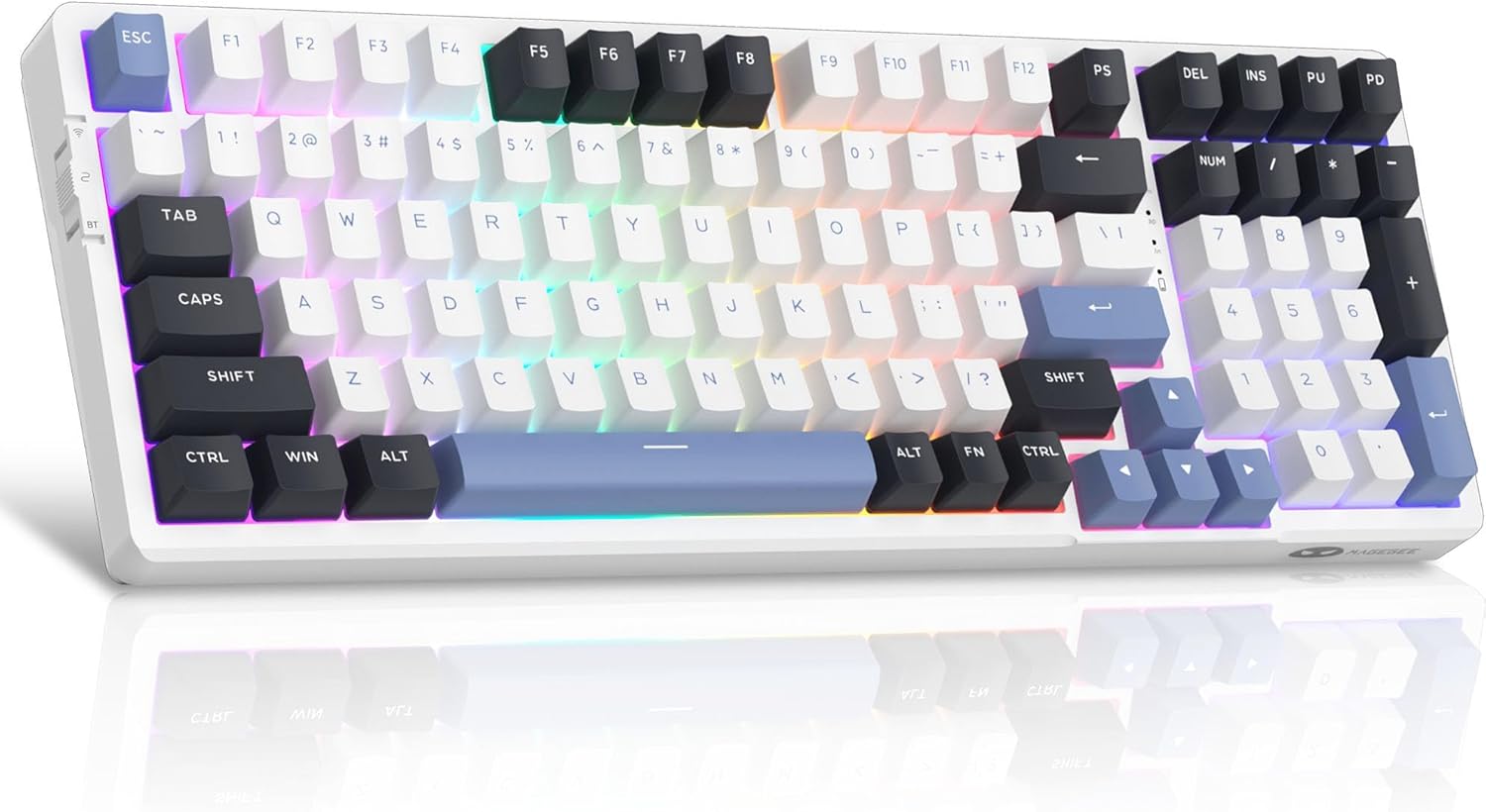
Figure 1: MageGee LIGHT100 Wireless Mechanical Keyboard with RGB backlighting.
Негизги өзгөчөлүктөрү:
- Tri-Mode туташуу: Supports Bluetooth 5.0, 2.4GHz wireless, and USB-C wired connections for broad compatibility across devices.
- Прокладкага орнотулган түзүлүш: Incorporates a gasket design with five layers of sound-absorbing foam to reduce noise and provide a softer, more comfortable typing experience.
- Ыкчам алмаштыруучу которгучтар: Equipped with quiet linear ivory white switches that are hot-swappable, allowing for easy replacement of 3-pin or 5-pin switches without soldering.
- Динамикалык RGB арткы жарык: Features 16.8 million customizable RGB colors with various static and dynamic lighting effects.
- Узак мөөнөттүү батарея: Built-in 8000mAh battery provides extended usage, supporting both RGB-on and RGB-off modes.
- Бышык PBT баскыч капкактары: Comes with high-quality PBT keycaps for enhanced durability and a premium feel.
- 96% компакттуу жайгашуусу: Offers a space-saving design while retaining essential function and arrow keys.
Орнотуу колдонмосу
Пакеттин мазмуну:
Орнотуудан мурун, бардык компоненттердин бар экендигин текшериңиз:
- MageGee LIGHT100 Wireless Mechanical Keyboard
- USB-C Cable
- Баскыч капкагын тарткыч
- Switch Puller
- Spare Switches (Ivory White Linear)
- Колдонуучунун колдонмосу (бул колдонмо)

Figure 2: Included components with the MageGee LIGHT100 keyboard.
Connecting Your Keyboard:
The LIGHT100 keyboard offers three connection methods:
- USB-C зымдуу режими:
Connect the provided USB-C cable to the keyboard's port and the other end to your computer's USB port. The keyboard will automatically be recognized and ready for use. This mode also charges the keyboard's internal battery.

Figure 3: Keyboard connected via USB-C cable, illustrating wired connection.
- 2.4 ГГц зымсыз режими:
Locate the 2.4GHz USB receiver (dongle) usually stored in a compartment on the keyboard. Plug the receiver into an available USB port on your computer. On the keyboard, toggle the switch to the "2.4G" position (often indicated by a wireless icon). The keyboard should connect automatically. If not, press fn+4 жупташууну баштоо.
- Bluetooth 5.0 режими:
The keyboard can connect to up to three different Bluetooth devices. Toggle the switch on the keyboard to the "BT" position. To pair with a device, press fn+1, fn+2, же fn+3 to select a Bluetooth channel. The indicator light for the selected channel will blink, indicating pairing mode. On your device (PC, laptop, tablet, smartphone), search for Bluetooth devices and select "MageGee LIGHT100" to connect. Once connected, the indicator light will become solid. Repeat for other channels to pair additional devices.
Video 1: Official product video demonstrating the MageGee LIGHT100 Wireless Gasket Creamy Keyboard features, including tri-mode connectivity and RGB lighting.
Иштөө нускамалары
RGB жарыкты башкаруу:
The LIGHT100 keyboard features extensive RGB customization:
- Toggle Backlight Modes: Басыңыз Fn + Enter to cycle through approximately 20 different backlight modes (static and dynamic).
- Adjust Backlight Colors: Басыңыз Fn + ← or Fn + → to change the backlight colors within certain modes.
- Арткы жарыктын жарыктыгын жөндөө: Басыңыз Fn + ↑ жарыктыгын жогорулатуу жана Fn + ↓ жарыктыгын азайтуу үчүн.
- Арткы жарык ылдамдыгын тууралоо: Басыңыз Fn + =+ to increase animation speed and Fn + _- to decrease animation speed.

Figure 4: RGB backlight control functions on the keyboard.
Клавиатураны жана которгучту алмаштыруу:
The LIGHT100 keyboard supports hot-swappable switches, allowing for easy customization:
- Баскыч капкактарын алып салуу: Берилген баскычтоптун капкагын тартуучу каражатты колдонуп, баскычтоптун капкактарын акырын түз өйдө тартыңыз.
- Которгучтарды алып салуу: Use the provided switch puller to carefully grip the switch and pull it straight up. Ensure the switch is aligned correctly when re-inserting.
- Которгучтарды орнотуу: Align the pins of the new 3-pin or 5-pin switch with the holes on the PCB and press down firmly until it clicks into place. Do not force the switch if it doesn't align easily to avoid bending pins.

Figure 5: Hot-swappable switch mechanism for easy customization.
Техникалык тейлөө
- Тазалоо: Use a soft, dry cloth to wipe the keyboard surface. For deeper cleaning, remove keycaps and use compressed air to clear debris from between switches.
- Батареяга кам көрүү: To prolong battery life, avoid fully discharging the keyboard frequently. Charge it regularly using the provided USB-C cable.
- Сактагыч: Клавиатураны күн нурунан жана экстремалдык температурадан алыс, салкын, кургак жерде сактаңыз.
- Суюктук таасири: Avoid exposing the keyboard to liquids. In case of spills, immediately disconnect the keyboard and allow it to dry completely before re-use.
Проблемаларды чечүү
| Көйгөй | Чечим |
|---|---|
| Баскычтоп зымсыз режимде жооп бербейт. | Ensure the keyboard is switched to the correct wireless mode (2.4GHz or BT). For 2.4GHz, check if the USB receiver is properly plugged in. For Bluetooth, ensure the correct channel (Fn+1/2/3) is selected and the device's Bluetooth is enabled and paired. Try re-pairing if necessary. |
| Арткы жарык иштебей жатат же тыгылып калган. | Press Fn + Enter to cycle through backlight modes. Check brightness settings using Fn + ↑/↓. Ensure the keyboard battery has sufficient charge. |
| Баскычтар катталбай жатат же эки жолу терилип жатат. | This might indicate a loose or faulty switch. Use the switch puller to remove the affected switch and re-insert it firmly. If the issue persists, replace the switch with a spare one. |
| Bluetooth байланышы туруксуз. | Ensure the keyboard is within range of the device. Minimize interference from other wireless devices. Try forgetting the keyboard on your device and re-pairing. |
| Клавиатура заряддалбай жатат. | Verify the USB-C cable is securely connected to both the keyboard and a power source/computer. Try a different USB port or cable. |
Техникалык шарттар
| Өзгөчөлүк | Деталь |
|---|---|
| Модел | ЖАРЫК100 |
| Бренд | MageGee |
| Байланыш | Bluetooth 5.0, 2.4 ГГц зымсыз, USB-C зымдуу |
| Макет | 96% (99 ачкыч) |
| Баскыч капкактары | PBT |
| Которгучтар | Hot-Swappable Linear Ivory White |
| Арткы жарык | 16.8 миллион RGB |
| Батарея сыйымдуулугу | 8000mAh |
| Шайкеш OS | Windows, macOS, PC, Laptops, Tablets, Smartphones |
| Элемент Салмагы | 2.97 фунт (болжол менен 1.35 кг) |
| Өлчөмдөр | 17.76 x 7.68 x 2.52 дюйм |
Кепилдик жана колдоо
For warranty information, technical support, or further assistance, please refer to the official MageGee webсайтка же түздөн-түз кардарларды тейлөөгө кайрылыңыз. Кепилдик дооматтар үчүн сатып алуу дүмүрчөгүңүздү сактаңыз.
кире аласыз Amazon'догу MageGee дүкөнү көбүрөөк продукт маалымат жана колдоо ресурстар үчүн.


