1. Киришүү
This manual provides essential instructions for the safe and effective use of your DALY Smart Battery Management System (BMS) with Bluetooth Module. This device is designed to protect Li-ion battery packs, specifically the 20S 72V 500A configuration, by monitoring and managing various battery parameters. Please read this manual thoroughly before installation and operation.
2. Коопсуздук маалыматы
Эскертүү: Improper installation or use of the BMS can lead to battery damage, fire, or personal injury. Always follow safety guidelines.
- Электр кубатын колдонуудан мурун, бардык туташуулардын туура жана коопсуз экенин текшериңиз.
- Always disconnect the battery pack before performing any maintenance or wiring changes.
- Wear appropriate personal protective equipment (PPE) when working with batteries.
- Кыска туташуулардан качыңыз.
- Do not expose the BMS to extreme temperatures or moisture beyond its specified operating conditions.
- Seek professional assistance if you are unsure about any installation or operation steps.
3. Пакеттин мазмуну
Пакетте бардык буюмдар бар экенин текшериңиз:
- DALY Smart BMS Unit
- Чыгуу зымдары
- NTC температура сенсору
- Instruction Manual
- Bluetooth модулу
- Balance Cables
- Пакет куту

4. Продукт бүтүп калдыview жана өзгөчөлүктөрү
The DALY Smart BMS is designed to provide comprehensive protection and management for your Li-ion battery pack. It integrates several protective functions and smart features for enhanced battery performance and longevity.

Негизги өзгөчөлүктөрү:
- Комплекстүү коргоо: Includes overcharge, overdischarge, overcurrent, short circuit, and temperature protection.
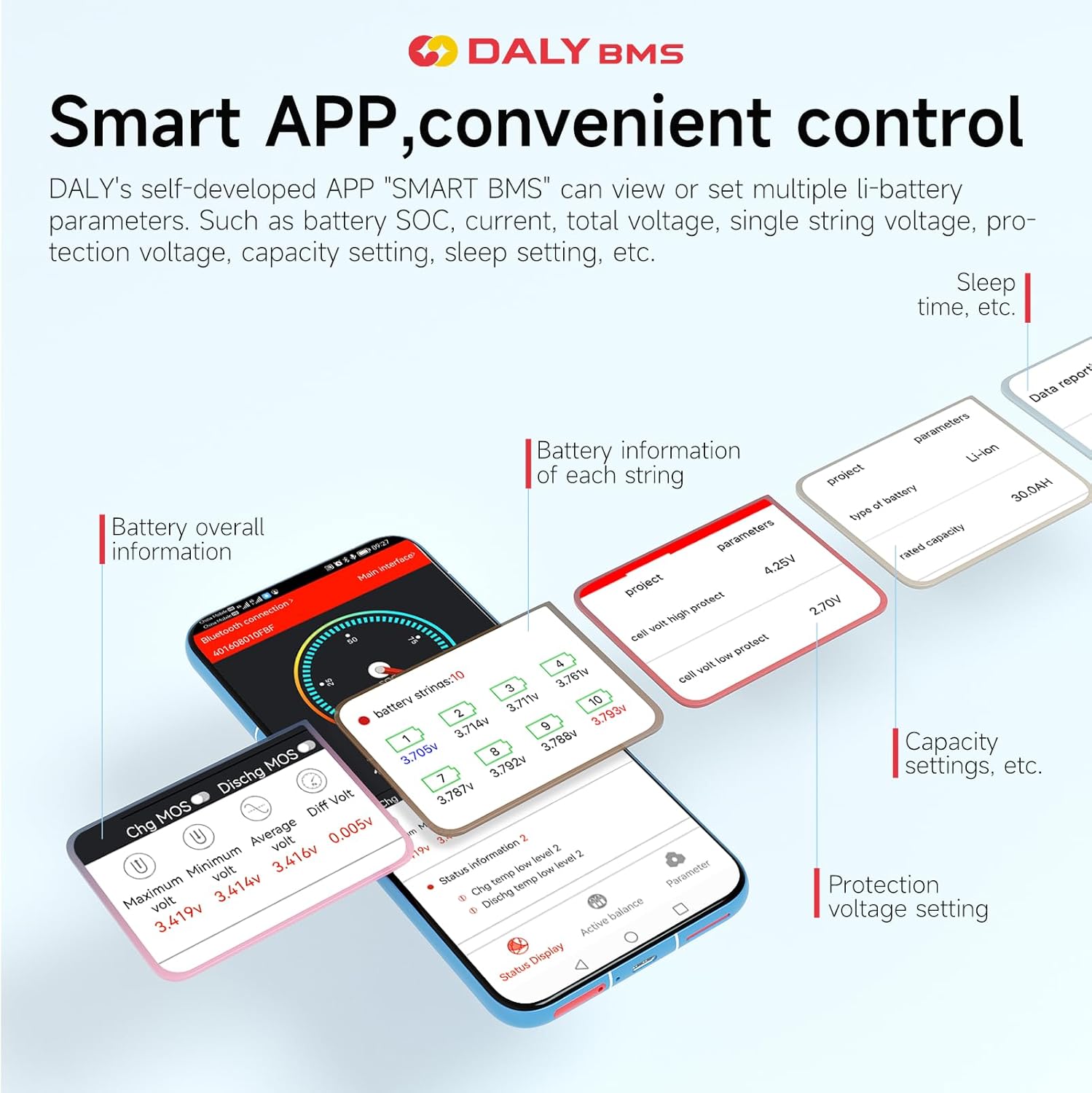
- Bluetooth модулу: Enables wireless monitoring and parameter adjustment via a smartphone application.
- Parallel Connection Support: Features an integrated parallel module to manage current impacts when multiple battery packs are connected in parallel.
- High-Power Pre-charging: Prevents false protection triggers during high current startup.
- Passive Balancing: 100mA passive balancing helps extend the lifespan of lithium batteries.
- Waterproof and Shockproof Design: Enhanced durability through a patented glue injection process.

5. Техникалык шарттар
Detailed technical specifications for the DALY Smart BMS Li-ion 20S 72V 500A model:
| Параметр | Нарк |
|---|---|
| Продукт түрү | Li-ion 20S 500A common port with balance |
| Разряд агымы | 500A |
| Overdischarge Current | 750 ± 15А |
| Заряддоо агымы | 500A |
| Overcharge Current | 750 ± 15А |
| Overcharge Voltage | 4.25V ± 0.05V (Can be set) |
| Overdischarge Voltage | 2.7V ± 0.05V (Can be set) |
| Заряддоо Voltage | 84V |
| Модел | R24S (11~24S) |
| Өлчөмдөрү (L x W x Y) | 183 x 108 x 26 мм (7.2 x 4.25 x 1.02 дюйм) |
| Output Wire | 1AWG * 2 / 200mm |
| Кабель | 24AWG / 450mm |
| Салмагы | 600~700g (1.5 pounds) |
| ASIN | B0DFXX5ZLJ |
| UPC | 753252847038 |


6. Орнотуу боюнча колдонмо (орнотуу)
Proper installation is crucial for the safe and optimal performance of your DALY Smart BMS. It is highly recommended that installation be performed by a qualified professional.
Жалпы кадамдар:
- Prepare the Battery Pack: Ensure your Li-ion battery pack is correctly assembled for a 20S configuration (72V nominal).
- Connect Balance Wires: Carefully connect the balance wires from the BMS to each cell group of your battery pack, starting from B- (negative) and proceeding sequentially to the highest cell voltage. Double-check the order to prevent damage.
- Connect Main Power Wires: Connect the main negative terminal of the battery pack to the B- terminal on the BMS. Connect the main positive terminal of the battery pack to the P+ terminal (if applicable, or directly to the load/charger if using a common port BMS). Connect the load/charger negative to the C- terminal (for charging) and P- terminal (for discharging) on the BMS.
- Connect NTC Temperature Sensor: Attach the NTC sensor to a central location on your battery pack to monitor temperature.
- Connect Bluetooth Module: Plug the Bluetooth module into the designated port on the BMS.
- Байланыштарды текшерүү: Before applying power, meticulously inspect all connections for correctness, polarity, and security. Incorrect wiring can cause severe damage.
- Баштапкы кубаттоо: Apply power to the system. Observe for any unusual behavior.
Эскертүү: Refer to the detailed wiring diagram provided in the physical manual for specific connection points and sequences.
7. Operating Instructions (Bluetooth App)
The DALY Smart BMS features a Bluetooth module for convenient monitoring and control via a dedicated smartphone application.
Using the Smart APP:
- Колдонмону жүктөп алыңыз: Издөө the "SMART BMS" application on your smartphone's app store (iOS or Android).
- Bluetooth иштетүү: Смартфонуңузда Bluetooth иштетилгенин текшериңиз.
- Connect to BMS: Open the SMART BMS app. The app should detect your DALY BMS via the Bluetooth module. Select your BMS from the list of available devices to connect.
- Монитор параметрлери: Once connected, the app will display real-time battery information, including:
- Батареянын заряддын абалы (SOC)
- Ток (заряддоо/разряддоо)
- Total Voltage
- Individual Cell Voltages
- Температура
- Коргоо абалы
- Орнотууларды тууралоо: Колдонмо сизге мүмкүнчүлүк берет view and modify various parameters such as protection voltage settings, capacity settings, and sleep time. Exercise caution when changing settings, as incorrect values can affect battery safety and performance.
8. Техникалык тейлөө
Regular maintenance helps ensure the longevity and reliability of your DALY Smart BMS and battery pack.
- Үзгүлтүксүз текшерүү: Мезгил-мезгили менен бардык зымдарды туташтыруунун бекемдигин жана коррозия же бузулуу белгилерин текшерип туруңуз.
- Тазалык: Keep the BMS unit clean and free from dust and debris. Use a dry, soft cloth for cleaning.
- Температура мониторинги: Ensure the BMS and battery pack operate within their specified temperature ranges. Excessive heat can degrade performance and lifespan.
- Программалык камсыздоонун жаңыртуулары: Check for available firmware updates for the BMS or app to ensure optimal performance and access to new features.
9. Кыйынчылыктарды
If you encounter issues with your DALY Smart BMS, refer to the following common troubleshooting steps:
| Көйгөй | Мүмкүн себеп | Чечим |
|---|---|---|
| BMS not powering on / No output | Incorrect wiring, loose connections, BMS in protection mode, severely over-discharged battery. | Check all wiring according to the manual. Ensure balance wires are correctly connected. Verify battery voltage. If in protection, try to reset (refer to specific BMS model instructions). |
| Bluetooth module not connecting | Bluetooth not enabled on phone, app not installed, module not properly connected to BMS, interference. | Ensure phone Bluetooth is on. Reinstall app. Reconnect Bluetooth module. Move closer to the BMS. |
| Battery not balancing | Balance wires incorrectly connected, significant cell voltage difference, balancing function disabled in app. | Verify balance wire connections. Check cell voltages. Enable balancing in the SMART BMS app settings. |
| Overcharge/Overdischarge protection triggers frequently | Incorrect protection voltage settings, unbalanced cells, faulty charger/load. | Check and adjust protection voltage settings in the app. Balance cells. Inspect charger/load for proper operation. |
| BMS overheating | Excessive current, poor ventilation, high ambient temperature. | Reduce load current. Ensure adequate airflow around the BMS. Operate within specified temperature limits. |
If the problem persists after attempting these solutions, please contact DALY customer support.
10. Колдонуу сценарийлери
The DALY Smart BMS is suitable for a wide range of applications requiring robust battery management for Li-ion packs.

11. Кепилдик жана колдоо
DALY is committed to providing quality products and customer satisfaction.
- Сапатты камсыздоо: This product is manufactured by Dongguan Daly Electronics Co., Ltd. and is ISO, FCC, RoHS, PSE, and CE approved, ensuring adherence to international quality and safety standards.
- Кардарларды тейлөө: We provide 24-hour one-on-one customer service and technical support. If you have any questions or require assistance, please feel free to contact us.


